
I Said Goodbye to Pocket for Omnivore. Here’s How To Use this Read-Later App.
Keep your cash for coffee because this read-later app won’t cost you a dime.
Most of the time, or just every time, a crispy read shouts, ‘Read me now.’
But alas, life gets in the way — work meetings, family obligations, or just plain old exhaustion — and you need to throw it off your ever-growing to-read list.
So, it’s true that I cannot live a day without a read-later app. Some cool ones include Instapaper, Pocket, and Matter, but I’m not tied down to any.
I’d boldly admit that I may not be a loyal customer. I don’t mind switching to a better alternative that cares more about me and my needs.
I used ‘Pocket’ to preserve my later read treasure in one place a few days back. But I came across Omnivore.
Why not take it a snap?
And now you won’t see me hanging out on any other read-later app besides Omnivore. There are pretty good reasons that made me seize on it.
It’s easy and clean to use without having anything to do with my bank balance.
Why did I prefer Omnivore over Pocket?
Who wants to splash cash on stuff you can get for free?
From the read-later library to its text-to-speech features, Omnivore doesn’t cost anything, and it’s free.
Isn’t that a rare find when everything comes with a price tag?
Besides, a lucid layout and intuitive functionality sometimes beat flashy aesthetics.
The app's minimalist interface fits well with its real purpose, which is to offer a distraction-free experience to readers and let them stay focused on what they are reading.
And above all, in this digital era, I am most concerned about the privacy risk. What keeps me so relaxed about Omnivore is its privacy-focused structure.
It’s an open-source app that anyone can access. It means your data is yours and yours alone. The app will not track your activity or sell your data to advertisers.
How do you use Omnivore?
Omnivore is super easy to use. Install it on your browser, and you’re good to go.
Need to revisit an article?
Save the site with a click on the “Save to Omnivore” option in your browser’s toolbar, or you can get the option upon right-clicking on any hyperlink.
Quickly add links to the library by copying and pasting them into the user menu. Using extensions that are there for you on Firefox and Safari beyond Chrome is another intuitive way to add your favorite articles.
Easy peasy!
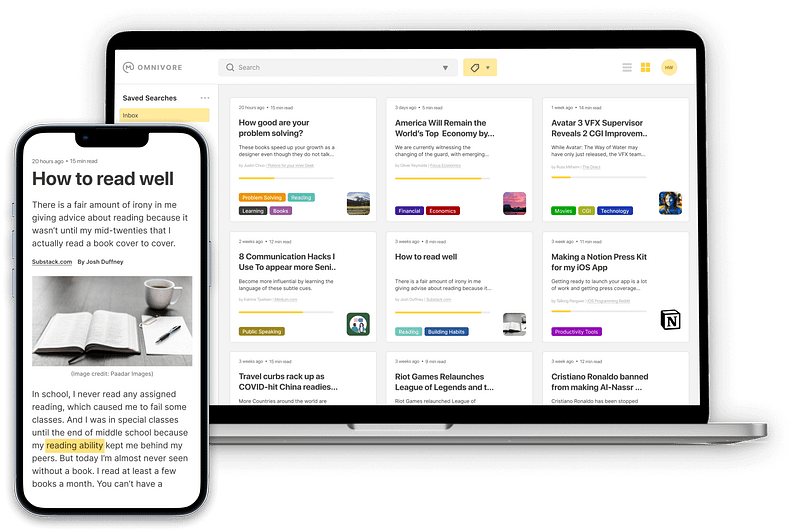
Your saved links are neatly stashed in Omnivore’s library, ready for quick access whenever you want. It’s on your iPhone, Android, and the web — everywhere you need it.
Want to keep your read-laters organized?
Add labels to group articles and links and make it look like a well-organized library of your taste. I prefer the grid layout as it appeals more to me.
That’s not all. It also integrates with RSS feeds and email newsletters to save content directly from wherever you like.
While reading, it’s no problem for Omnivore to jot down notes and highlights on your saved articles.
You can connect it to Mozilla’s Pocket, Logseq, Readwise, and Obsidian. Omnivore can also be synced across devices.
Here’s the end thing.
If you’re on the go, traveling, or lost in a desert, Omnivore allows you to save the articles so you don’t get bored without an internet connection.
And yeah, in the end, don’t forget to save one on “How to survive in the desert without internet?” I hope it will help;)
Bonus: Check out this video on Omnivore.
Follow me for more exciting content.
Medium Email Signup I YouTube Channel I Nextgen Digital (website) I X (Twitter) I Substack Newsletter


