
Want to Have Custom Finance Alerts? Make a Sassy Bot!
How to make a simple alert service using Python and Discord

Who doesn’t love a robot who has a sense of humour? I know I do! Even better, who doesn’t love a robot who can give you alerts for money making opportunities?
If you take trade signals as a suggestion rather than an absolute (because only a Sith deals in absolutes), then your strategy is not fully algorithmic and you cannot rely API calls to your broker. With the right Python knowhow, it’s actually fairly simple to throw together a discord bot to help you beat the markets.
Through this article I will describe:
- How to make a private discord server, and add a bot to it.
- How to program the Discord bot to checks for trading signals and send out alerts.
I have personally deployed this on my Raspberry Pi 3B, which can accessed via remote desktop if anything goes pear-shaped (but you can also run this code from a laptop/desktop).
Step 1: Adding a Discord Bot to a Server
If you don’t wish to read on you can also follow this guide (which will likely explain it much better than I do), but in doing so you may hurt my feelings!
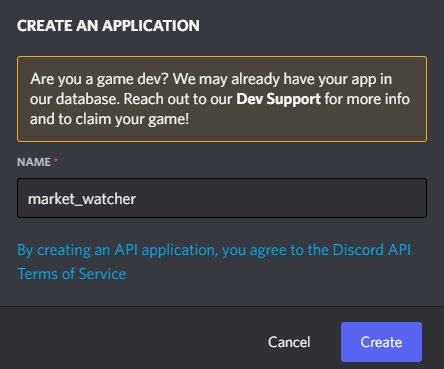
Firstly, you must be logged into discord on your chosen browser, then follow this link to the discord developer page and create a new application, you’ll see this:
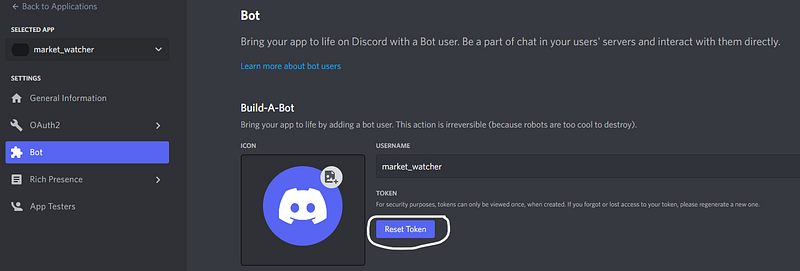
Then cycle to the “Bot” tab on the left hand side, and add the bot. This next step is important! Reset your token, copy it and save it somewhere safe; we’ll need this later to run the bot in Python.
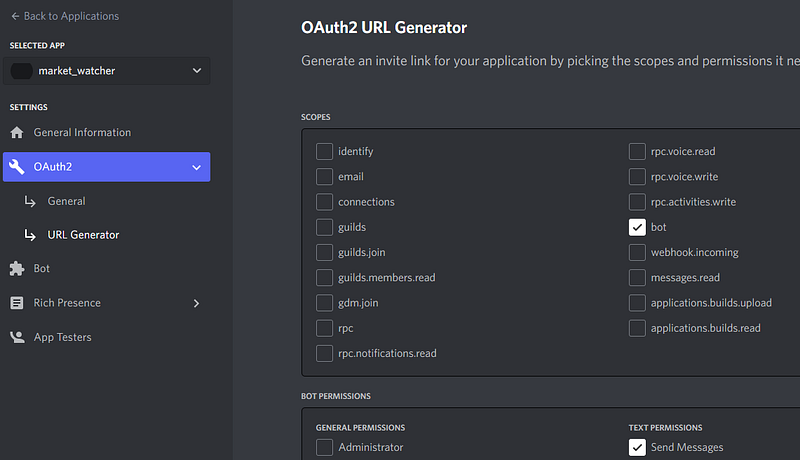
Next, go to the OAuth2 page and click on the URL Generator tab, select the bot from “scopes” and give the bot some permissions. I’m only allowing mine to send messages for now.
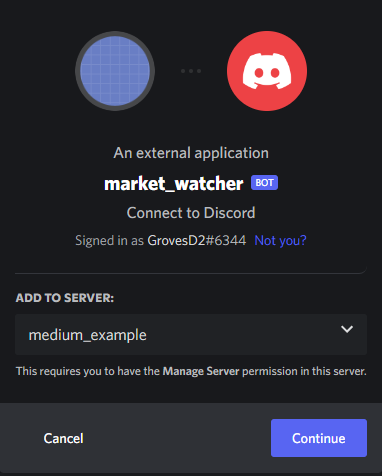
Once this is done, you’ll have a link at the bottom of the page that you can copy/paste into the search bar; you’ll end up with something like the following:
Step 2a: Using discord.py to Create a Bot
Time to put together some code! It’s worth noting that I’ll describe the basics here, but the full code can be viewed on my Git repo.
To start off, we first need to install the discord.py package using pip install -U discord.py, after this we can open up our favourite IDE and introduce the following code:
Let’s break down the above:
bot = commands.Bot(command_prefix='>')says that our bot will respond to any defined commands if we type it in with > first. For example, say we have a command called “hello_there”, then we call it in the discord channel with>hello_there(the response is “General Kenobi”, obviously).- The
on_ready()function is what happens as soon as the bot starts up, I personally like to get the bot to send in a message to let me know that it’s alive and well! - The final commands in the
on_ready()function send the message into the discord channel given byCHANNEL_IDthat can be found by right-clicking the channel we want to send the messages to:
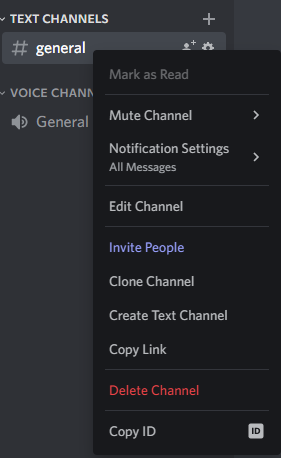
BOT_IDis what we copied and saved earlier when creating our bot and adding it to the server (see Step 1).
Running the above should produce

Awesome, how about putting in an actual command? Let’s define one that prints out a watchlist we have created. This watchlist contains the following columns:
- ticker: the stock identifier (e.g. TSLA, or MSFT).
- price: the price at which we want the bot to alert us at.
- volume: the average volume for the stock over the last two weeks, this is used to indicate whether the stock breaks through our buy price on high trading volume or not.
- date: the date at which the entry was added to the watchlist, this is used for cleaning purposes if we correct a ticker’s information (such as an updated buy price).
The followingprint_watchlist() function implements just that:
Quite simply, to create a command all we need to do is wrap any function with the @bot.command() decorator. The message is sent back to the discord channel with ctx.send(message) for a string called message.
⚠️You can use multiple inputs to any command, but any additional inputs will come in as a string.⚠️
As an example, I added two fictional buy prices + average volumes for GOOG and APPL to the watchlist.csv file; the function call and return in the discord channel will look like:
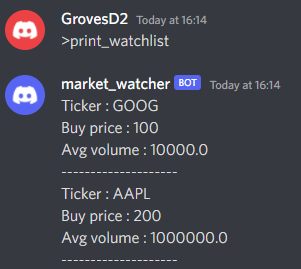
Clearly, this watchlist does not contain price and volume data I am considering, they are merely examples!
Step 2b (or not 2b): How to Scan the Market
Say we have a fully populated watchlist, the next step is to introduce some code which can check whether the buy price has been met over the set of tickers; here is the core logic (the full code can be found at my Github)
Essentially, the key idea is that the watch_market_task() function has been wrapped in the @tasks.loop decorator, which allows this function to be run indefinitely as a background task which repeats every 5 minutes. This background task is kicked off by calling the >watch_market command; a similar command can tell the bot to stop the background task.
A few notes about some of the more confusing logic:
- A status has been introduced so that we are not alerted every time the stock is above the watch price. That could get annoying. Instead, we are alerted if the stock is above the watch price, and/or when it hits 0.5x, 1x, 1.5x or 2x the average daily volume.
- A
price_gapis defined to indicate if our breakout “gaps-up”. This means that the stock could open much higher than the previous day’s close and gives more clarity on the type of breakout we have.
I always like including a message for any task so I can see the bot did its job, but who says the message has to be boring?

Wrapping Up
The discord bot coded here has potential to be extended further, or even repurposed to consider different trading strategies, the sky is the limit!
Personally, I use this to alert me if a stock on my watch list breaches a buy price (deduced with support trend lines). The stocks that reach my watch list are filtered through a custom made scanner that I have, which uses dynamic time warping (see the linked article below):
The alerts will come through to my phone and then I can use this signal to make a trade. Of course, there are plenty of alert services out there, but as a data-scientist, I like the flexibility of knowing I could code in my own custom logic!
Thank you for reading, I hope you enjoyed the article! Please feel free to connect with me on LinkedIn — I’d love to hear from you! Also feel free to follow/DM me on twitter.
If you are thinking getting a medium account, then please consider supporting me and thousands of other writers by signing up for a membership. For full disclosure, signing up through this link grants me a portion of your membership fee, at no additional cost to you (a win-win for sure!).
Or if you’d like another way to support my content creation, then you could

Because I work a full-time job, go to the gym, trade, and write on Medium, I use a lot of coffee!


