avatarAndrew Zuo

Free AI web copilot to create summaries, insights and extended knowledge, download it at here

3738

Abstract

ow your algorithm works?</p><p id="1caa">So I abandoned trying to figure out how Latex works and instead tried to come up with an algorithm myself.</p><h2 id="10f4">Dynamic Programming</h2><p id="15fc">So I heard that the Latex algorithm used dynamic programming. I talked about dynamic programming here.</p><div id="defd" class="link-block"> <a href="https://readmedium.com/3-steps-to-solve-any-algorithm-interview-problem-965d42bf0ed5"> <div> <div> <h2>3 Steps To Solve Any Algorithm Interview Problem</h2> <div><h3>So I published an article about how I thought that most interview questions are actually pretty useful as they test the…</h3></div> <div><p>medium.com</p></div> </div> <div> <div style="background-image: url(https://miro.readmedium.com/v2/resize:fit:320/0*bPZA3n6F95-fgaRv)"></div> </div> </div> </a> </div><p id="9a25">Basically dynamic programming means you solve a series of problems (usually in increasing difficulty), with solutions to previous problems being used in future problems.</p><p id="b4fa">So how could we use a dynamic programming algorithm to solve the text layout problem?</p><p id="0c25">I should probably mention now that my version of the text layout problem is much simpler than Latex’s version. In Latex there’s something called a ‘glue’. The paper says that ‘glue’ is not the best word for it and it should be called a ‘spring’ but then still uses the word ‘glue’.</p><p id="aea7">Anyways these are things like spaces which have a minimum width and a maximum width. I did not plan on having any variable width tokens though so I did not have to deal with this.</p><p id="13a5">I brainstormed a few ways to do this and the idea I came up with is similar to the famous knapsack problem. That is, we find the optimal arrangement with a width of 0, then 1, then 2… And then when we pick the size with the best arrangement.</p><p id="2da0">The problem with this is it’s not really dynamic programming because the previous solutions don’t contribute to later solutions at all. So it’s just brute forcing the problem instead of using dynamic programming.</p><p id="19c9">And then I thought, “Hey, we can simplify this algorithm even further. Because we don’t have any glue. That means the entire layout is deterministic.” So that’s just what I did.</p><h2 id="6c1c">The Algorithm</h2><p id="ead1">And if you think about it some more, Flutter makes this algorithm incredibly easy to do. First we have the <code>SizedBox</code> widget which allows us to determine the maximum width of the lines pretty easily. Then we have a <code>LayoutBuilder</code> which gives us the maximum available width. And then we have a way to get the text width easily as well. We just do:</p><div id="ae45"><pre><span class="hljs-keyword">final</span> TextPainter textPainter = <span class="hljs-title function_ invoke__">TextPainter</span>(<span class="hljs-attr">text</span>: <span class="hljs-title function_ invoke__">TextSpan</span>(<span class="hljs-attr">text</span>: text, <span class="hljs-attr">style</span>: style), <span class="hljs-attr">textScaleFactor</span>: scaleFactor, <span class="hljs-attr">maxLines</span>: <span class="hljs-number">1</span>, <span class="hljs-attr">textDirection</span>: direction)..<span class="hljs-title function_ invoke__">layout</span>(); <span class="hljs-keyword">return</span> textPainter.size.width;</pre></div><p id="aa67">And there we have it. The code is as follows:</p> <figure id="4f01"> <div> <div>

            <iframe class="gist-iframe" src

Options

="/gist/impure/8d41810409a9bde790b1af0c6e7ef902.js" allowfullscreen="" frameborder="0" height="undefined" width="undefined"> </div> </div> </figure></iframe></div></div></figure><p id="5649">So the code is pretty straightforward. There are a few things to note. First of all, I decided to only check in 1 unit increments. The units are resolution independent pixels. I talked about them here.</p><div id="c158" class="link-block"> <a href="https://andrewzuo.com/how-flutter-fixes-resolutions-6fa6a830fe7a"> <div> <div> <h2>How Flutter Fixes Resolutions</h2> <div><h3>The Resolution Independent Pixel</h3></div> <div><p>andrewzuo.com</p></div> </div> <div> <div style="background-image: url(https://miro.readmedium.com/v2/resize:fit:320/0*WqkKPOjzFoGyuNuM)"></div> </div> </div> </a> </div><p id="d2fd">Then I added some logic that tells us we’re only interested in text with the same number of lines as the maximum. Otherwise the algorithm will do something stupid like set all the line lengths to 0 causing every single line to overflow.</p><p id="a143">And that’s it. A relatively simple algorithm go get the next looking pretty good.</p><h2 id="334b">Conclusion</h2><p id="c2b7">This algorithm works pretty good.</p><figure id="d193"><img src="https://cdn-images-1.readmedium.com/v2/resize:fit:800/1*F-Ox0vsbFdHRehRKs3hzXA.png"><figcaption></figcaption></figure><p id="aa5b">But it’s not perfect. The most obvious problem is if the word is longer than the available width. This is a bit rare, much more rare than the previous problem, but when it happens it is very ugly.</p><p id="e96e">And it just so happens that some languages really like to have really long compound words. And when that happens this happens:</p><figure id="28e5"><img src="https://cdn-images-1.readmedium.com/v2/resize:fit:800/1*PLPUB3F9dT6QncD03RSpUA.jpeg"><figcaption>In all fairness, it’s not <b>just</b> German</figcaption></figure><p id="e1c7">You know a part of the Latex paper talks about this. It says we shouldn’t split the word anywhere we want, we should only split it at the end of a syllable. So what, am I going to have a look-up table for all the long words and know where to split them? Sounds like a lot of work.</p><p id="6342">Or I could just have an algorithm that tells us if the word is a perfect compound word (meaning it is literally 2+ words glued together without adding or subtracting letters) we can split it where the words come together.</p><p id="e3d1">Like I just added the word ‘nichtregierungsorganisationen’: nicht regierungs (government) organisationen. We can split it at the end of ‘nicht’ or at the end of ‘regierungs’. The problem is a lot of words aren’t actually perfect compound words. They tend to add an ‘s’ or something.</p><p id="3858">Oh well, I’ll figure it out eventually.</p><p id="cd11">Wait. Before you go why not give this article a clap or two.</p><div id="5b5d" class="link-block"> <a href="https://andrewzuo.com/membership"> <div> <div> <h2>Join Medium with my referral link - Andrew Zuo</h2> <div><h3>As a Medium member, a portion of your membership fee goes to writers you read, and you get full access to every story…</h3></div> <div><p>andrewzuo.com</p></div> </div> <div> <div style="background-image: url(https://miro.readmedium.com/v2/resize:fit:320/0*9yZOIHcI8EPddqV5)"></div> </div> </div> </a> </div></article></body>

Photo by Florian Klauer on Unsplash

I Made A Text Layout Algorithm For My Flutter App

So I make a language learning app called Litany. And in it I have a feature where you can tap on words to have them spoken out loud. So this is pretty simple to do. The app is written in Flutter so I just have a RichText widget which holds a bunch of child Widgets. Yeah, you can put any sort of widget in RichText, not just Text although you do have to wrap them in WidgetSpan.

And this works pretty well… except the text layout algorithm is completely and utterly broken. The most obvious example of this is you can have punctuation overflowing to the next line. The punctuation, not a word, just punctuation. So obviously this looks completely awful.
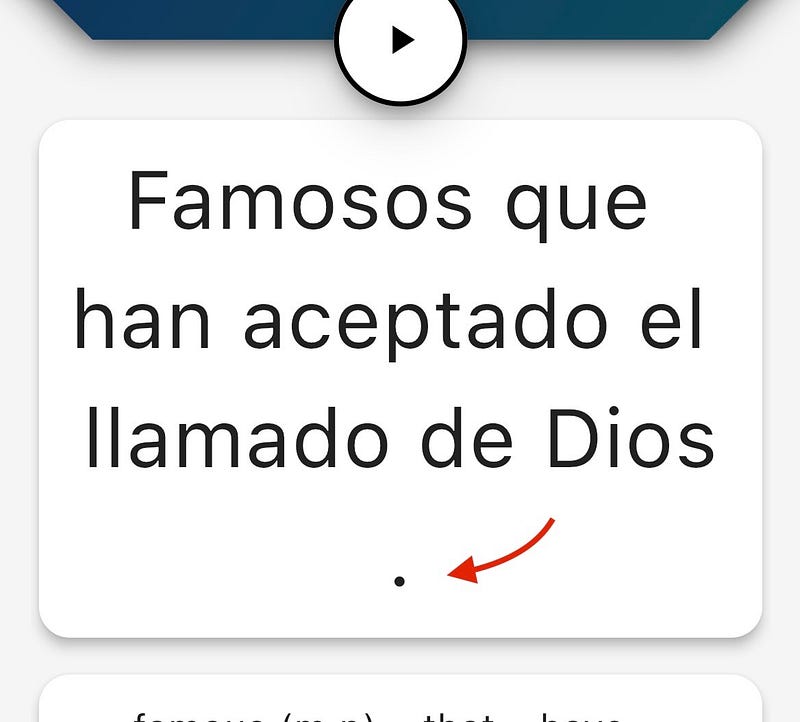
I mean it’s an aesthetic thing but it is really annoying. So I finally decided to fix it.

The Thinking

So how would I fix this? Well, obviously I needed an algorithm to layout the text in a visually pleasing way. So how would I do this?

Well, time to look up the granddaddy of all text layout algorithms: Latex’s text layout algorithm. So you can actually read it here:

And I did try to read it. Really, I did. And I got a good ways through it. It was interesting, it was talking about glue and words and penalties and there were examples.

But then the paper suddenly changed and then… look, just read it.

We shall assume that a list of desired lengths l_1, l_2, l_3,… is given; normally these are all the same, but in general we might want lines of different lengths, as when fitting text around an illustration. The actual length L_j of the jth line, after breakpoints have been chosen as above, is computed in the following obvious way: We add together the widths w_i of all the box and glue items in the range a_j <= i < b_j, and we add w_b, to this total if x_b, is a penalty item. The jth line also has a total stretchability Y_j and total shrinkability Z_j, obtained by summing all of the y_i and z_i for glue items in the range a_j <= i < b_j. Now we can compare the actual length L_j to the desired length l_j, by seeing if there is enough stretchability or shrinkability to change L_j into l_; we define the adjustment ratio r_j of the jth line as follows:

Am I supposed to have a reference spreadsheet to keep track of all of these letters? Why not just say what you mean. It’s giving me flashbacks of University. Just in University the professor would usually start talking about the algorithm in a reasonable amount of time. Here… how is it possible to say this much stuff without ever mentioning how your algorithm works?

So I abandoned trying to figure out how Latex works and instead tried to come up with an algorithm myself.

Dynamic Programming

So I heard that the Latex algorithm used dynamic programming. I talked about dynamic programming here.

Basically dynamic programming means you solve a series of problems (usually in increasing difficulty), with solutions to previous problems being used in future problems.

So how could we use a dynamic programming algorithm to solve the text layout problem?

I should probably mention now that my version of the text layout problem is much simpler than Latex’s version. In Latex there’s something called a ‘glue’. The paper says that ‘glue’ is not the best word for it and it should be called a ‘spring’ but then still uses the word ‘glue’.

Anyways these are things like spaces which have a minimum width and a maximum width. I did not plan on having any variable width tokens though so I did not have to deal with this.

I brainstormed a few ways to do this and the idea I came up with is similar to the famous knapsack problem. That is, we find the optimal arrangement with a width of 0, then 1, then 2… And then when we pick the size with the best arrangement.

The problem with this is it’s not really dynamic programming because the previous solutions don’t contribute to later solutions at all. So it’s just brute forcing the problem instead of using dynamic programming.

And then I thought, “Hey, we can simplify this algorithm even further. Because we don’t have any glue. That means the entire layout is deterministic.” So that’s just what I did.

The Algorithm

And if you think about it some more, Flutter makes this algorithm incredibly easy to do. First we have the SizedBox widget which allows us to determine the maximum width of the lines pretty easily. Then we have a LayoutBuilder which gives us the maximum available width. And then we have a way to get the text width easily as well. We just do:

final TextPainter textPainter = TextPainter(text: TextSpan(text: text, style: style), textScaleFactor: scaleFactor, maxLines: 1, textDirection: direction)..layout();
return textPainter.size.width;

And there we have it. The code is as follows:

So the code is pretty straightforward. There are a few things to note. First of all, I decided to only check in 1 unit increments. The units are resolution independent pixels. I talked about them here.

Then I added some logic that tells us we’re only interested in text with the same number of lines as the maximum. Otherwise the algorithm will do something stupid like set all the line lengths to 0 causing every single line to overflow.

And that’s it. A relatively simple algorithm go get the next looking pretty good.

Conclusion

This algorithm works pretty good.
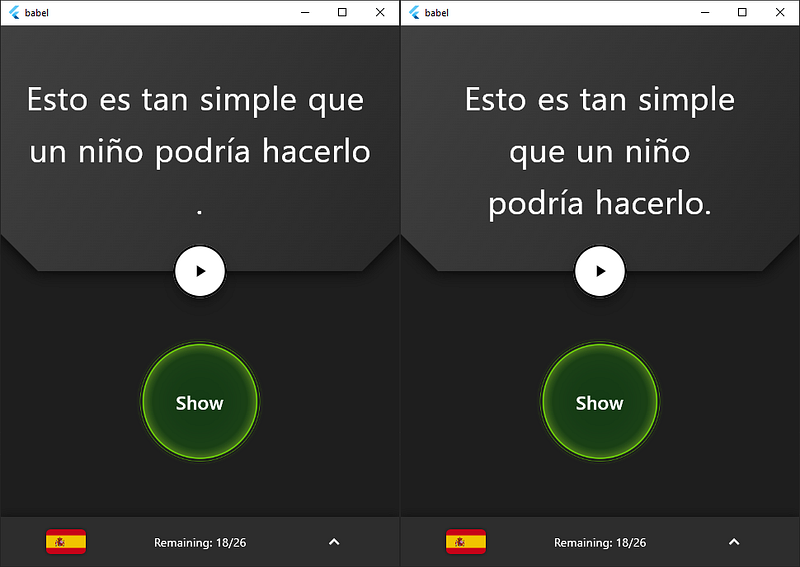
But it’s not perfect. The most obvious problem is if the word is longer than the available width. This is a bit rare, much more rare than the previous problem, but when it happens it is very ugly.

And it just so happens that some languages really like to have really long compound words. And when that happens this happens:
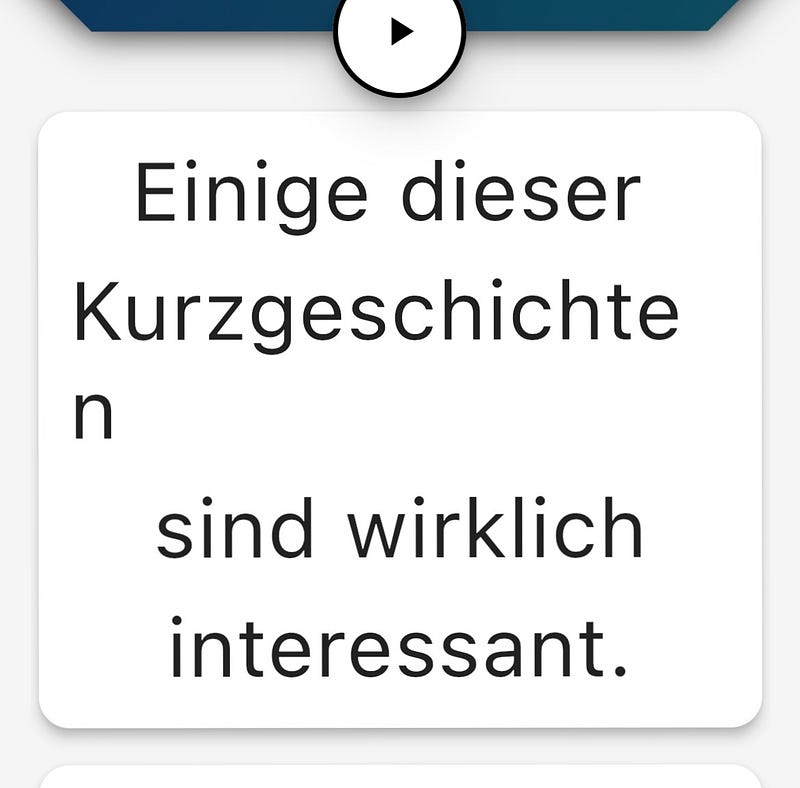
In all fairness, it’s not just German

You know a part of the Latex paper talks about this. It says we shouldn’t split the word anywhere we want, we should only split it at the end of a syllable. So what, am I going to have a look-up table for all the long words and know where to split them? Sounds like a lot of work.

Or I could just have an algorithm that tells us if the word is a perfect compound word (meaning it is literally 2+ words glued together without adding or subtracting letters) we can split it where the words come together.

Like I just added the word ‘nichtregierungsorganisationen’: nicht regierungs (government) organisationen. We can split it at the end of ‘nicht’ or at the end of ‘regierungs’. The problem is a lot of words aren’t actually perfect compound words. They tend to add an ‘s’ or something.

Oh well, I’ll figure it out eventually.

Wait. Before you go why not give this article a clap or two.

Text Layout
Text Formatting
Flutter
Programming
Algorithms
Recommended from ReadMedium