
Cheat Sheets | GeoPandas
I Made A Python Geopandas Cheat Sheet
Fine, I’ll do it myself.

Introduction
I spent some time working with geospatial data in Python a while back and kept finding myself wishing I had a quick reference sheet to help speed up the different tasks I was working on. Loading spatial data, joining geometries, and checking if points were included in other geometries were among the most common tasks I had. If there was a cheat sheet for very similar functions in R, why wasn’t there one for GeoPandas in Python? I searched and couldn’t find one, so instead I set out to make my own.

What Makes a Good Cheat Sheet
I’ve seen many cheat sheets pop up on LinkedIn over the years. It seems there is a very wide range of documents that people are willing to call a cheat sheet. Some are a few hundred pages with every machine learning algorithm explained in depth, some are a couple illustrated slides that show of 3 SQL keywords and end with “follow me for more tips!” Whether you find these useful resources or not, my gold standard for what makes a great cheat sheet is the cheat sheets created by the RStudio/Posit team.
The RStudio/Posit team maintains a repository on their GitHub (https://github.com/rstudio/cheatsheets) that contains a number of cheat sheets. The community is encouraged to contribute to these, and there is a list of guidelines for how to make a good cheat sheet, with the main goals of a cheat sheet being to “help users find essential information quickly, and second, to prevent confusion while doing the above.”
The repository also includes a list of points to keep in mind when doing the visual design of the cheat sheet that I used as a starting point for the list below:
- Use the existing theme. When the cheat sheets that exist in the repository are so easy to use and helpful, why reinvent the wheel? RStudio/Posit provides the templates they use in both Keynote and PowerPoint format. Plus, they are mainly black and white so they can be printed out.
- Choose a highlight color. The highlight color serves a few purposes. It helps users differentiate the cheat sheet from others. It can also be used in any graphics included on the cheat sheet to help it look visually consistent. A second color used sparingly can help draw attention to certain places or differentiate groups of content. It should be used sparingly.
- Leave lots of white space. At first it seems weird to almost say “waste valuable space,” but check out the PySpark cheat sheet from Datacamp below versus the lubridate one from RStudio/Posit. The PySpark one is stressing me out just looking at it, where everything on the lubridate one has a bit more room to breathe.
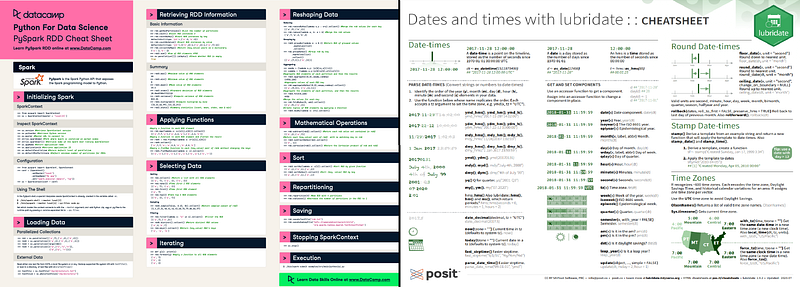
- Visually differentiate groups of content. Backgrounds, boxes, side bars, and headers are all acceptable ways to let the user know what a section contains, where it starts, and where it ends.
- Align things. This is aligning into columns, or even across the page if it makes sense. The goal here is to make things look orderly and professional.
- Fonts should be ~10pt or larger to be legible. White text on colored background should be bold so that it’s clearly visible.
- Save bold text. In the RStudio cheat sheets, functions, useful notes, and important abbreviations, are bolded to draw your eye to simple important information. It makes the cheat sheet easier to scan. It’s such a good piece of advice I used it to format this list!
- 2 pages or less. It should be able to be printed on a single sheet of standard printer, double sided is fine. I’ve seen posts on LinkedIn sharing “cheat sheets” that are 135 pages. That’s not a cheat sheet, that’s a book.
That’s not a cheat sheet, that’s a book
Writing My Own Cheat Sheet
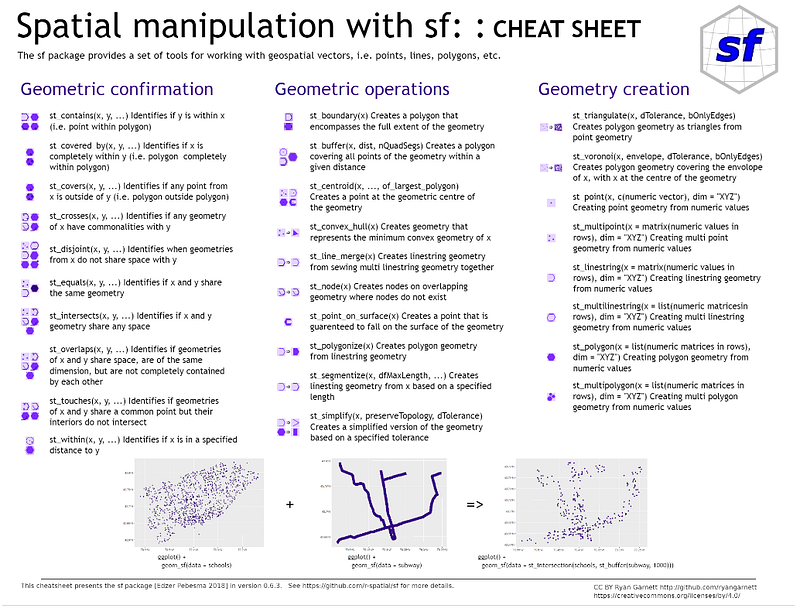
Again, let’s not reinvent the wheel here. My goal is to create a GeoPandas cheat sheet for my own reference. RStudio provided templates, examples, and advice for how to build a cheat sheet so I’m covered there. Ryan Garnett created a cheat sheet for the sf package in R. sf covers a lot of the same spatial manipulation functions that GeoPandas does, so it’s a good starting point for which functions to include on my cheat sheet.
Let’s just dive right in and start making this GeoPandas cheat sheet!
Using Reference
I drew on various cheat sheets for inspiration for my GeoPandas cheat sheet:
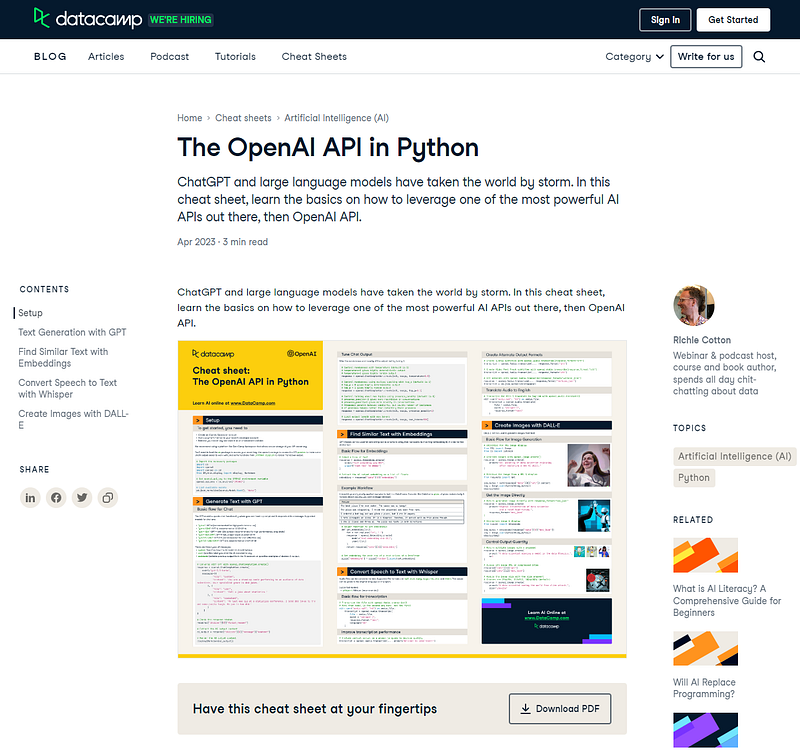
- Datacamp cheat sheets (Link) — While I think the visual style of the Datacamp cheat sheets leaves room for improvement, I do like the resources that Datacamp provides and almost never miss a chance to give them a shout out. The visual layout usually makes it pretty hard to read or even find the functions you want to reference. Their biggest selling point is cheat sheets for a very broad range of topics, including very new topics like the OpenAI API in Python. Another point in their favor is that the entire cheat sheet is also on the website in plain text and code snippets, which is something I haven’t seen from other cheat sheets.
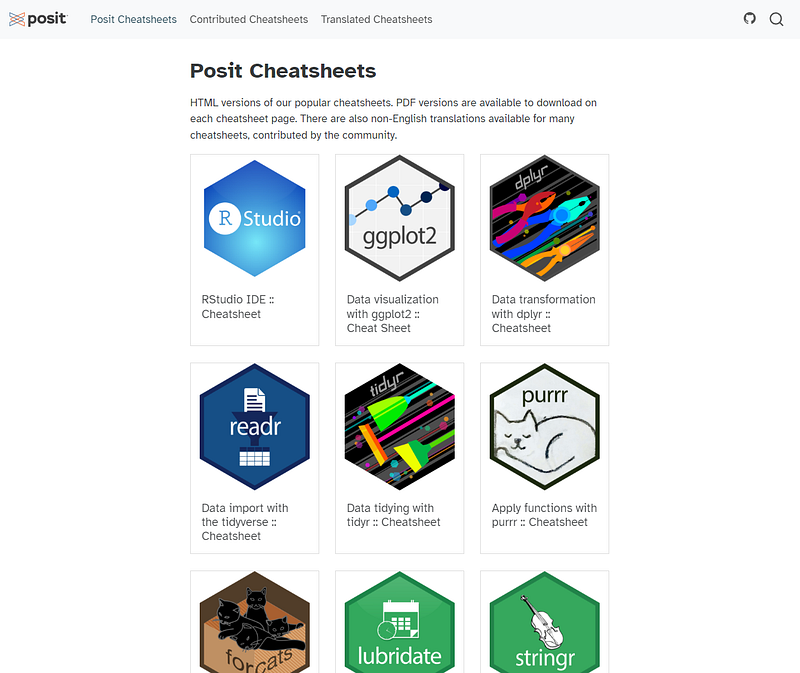
- RStudio/Posit cheat sheets (Link or GitHub) — The official RStudio/Posit cheat sheets focus on their tidyverse packages like dplyr and ggplot2, and very few Python related cheat sheets. Their very specific set of design guidelines lend themselves to very clean cheat sheets that are easy to scan and find exactly what you’re looking for. They get bonus points for allowing for the community to contribute new cheat sheets and translations of selected cheat sheets in 17 different languages.
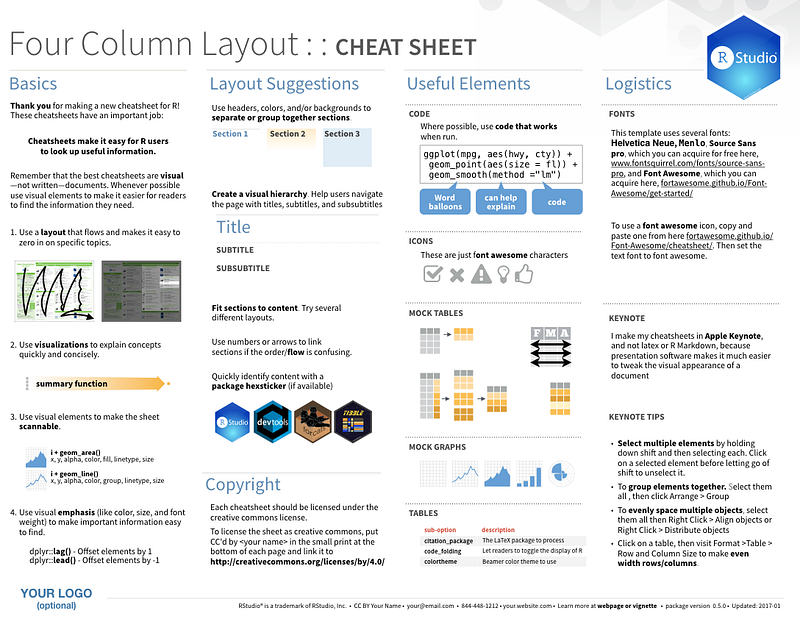
- RStudio/Posit templates (Link) — In the contributing guidelines of the RStudio/Posit cheat sheet GitHub site are templates for PowerPoint and Keynote to build new cheat sheets. It not only provides a starting point, but gives multiple tips on how to format the cheat sheet to maximize usability. This will be the starting point for my cheat sheet.
Selecting the Functions
The most important thing to remember when picking the functions to go on the sheet is to not include every sheet in existence. I’m sure we’ve all remember that time we were allowed a 3x5 notecard on our exam and we penciled in every concept and example from the entire semester. That’s not the goal here. If you want every function with every argument and parameter, go to the API reference in the package documentation.
The goal here is to include things that are helpful most of the time. This generally is with functions that are somewhere in the middle of difficulty to use and remember. Something more difficult than summing two numbers and less difficult than setting every possible option when training a TensorFlow model.
This description is purposefully vague. The cheat sheet can’t help everyone exactly the same. I, for example, often forget how to load a .csv file into pandas. For me, pd.read_csv() is worth including, but many of you are better programmers than I and would never look at that section of the cheat sheet.
Much of what I’ve discussed up to this section was me taking inspiration from other places, so let’s not stop that trend now! There is an R package, sf, that does many of the same tasks as the GeoPandas package. I’ve used that cheat sheet in the past, so I figured I’d start with those functions.
I put together a spreadsheet to keep all of the functions straight. I created a column for the sf functions, a column for which group the function was in on the sf sheet, the corresponding GeoPandas function, and any notes I had related to the function. The last column was things like if there wasn’t a similar function or if I just wasn’t sure if I found a similar GeoPandas function.
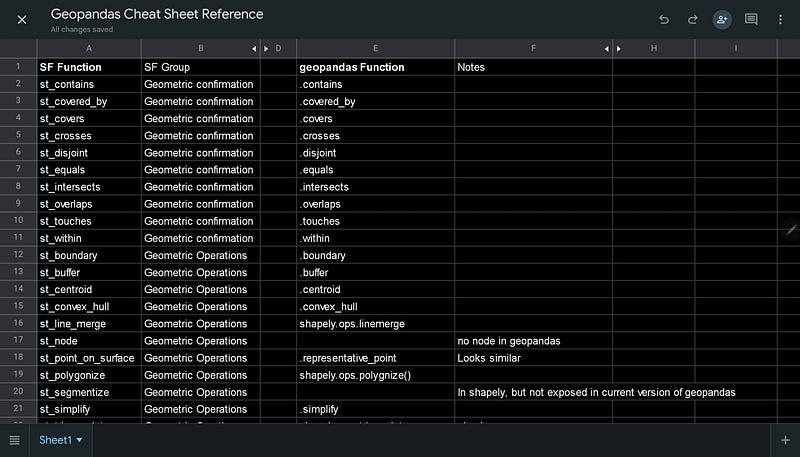
It wasn’t an easy step, but planning the functions to include, especially if there isn’t already a cheat sheet to recreate, is important. I looked through the docs for the functions in both R and Python, making sure they did in fact sound equivalent.
Putting my Functions in the Cheat Sheet
My next step was to take my functions and put them into my blank template. To aid in scanning the sheet for a specific function, all function names are bolded. Function names are pretty descriptive in this package and give you a general idea of what the function will accomplish, but being able to quickly find a relevant function when you’re coding will help you be more efficient.
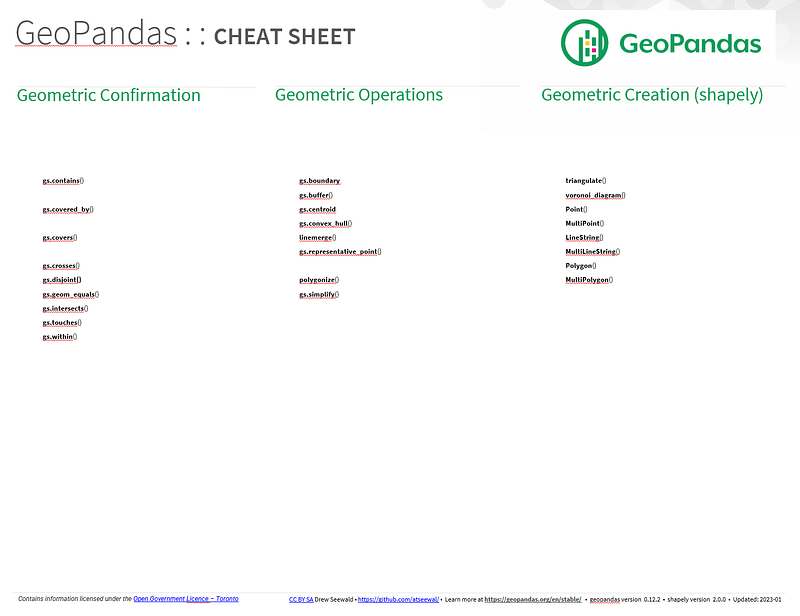
Adding function arguments and descriptions
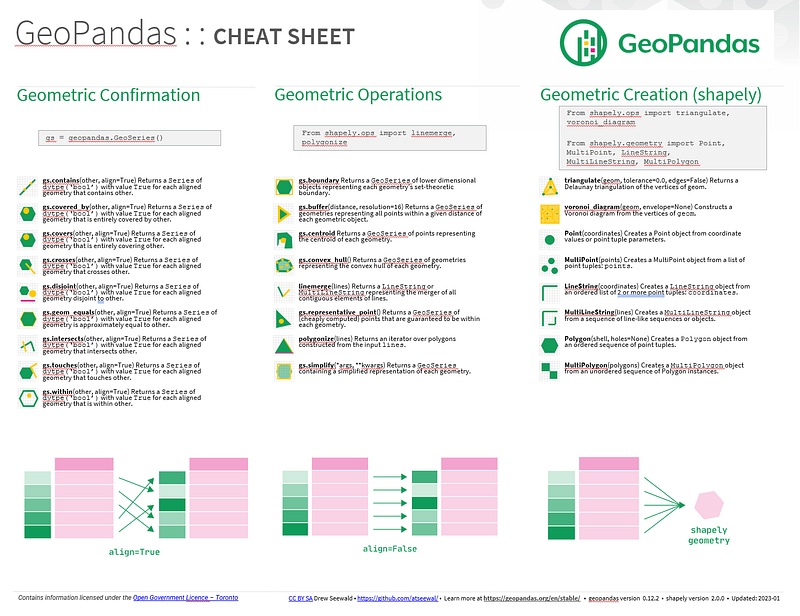
The next step was to add the function arguments and descriptions. If I used a method instead of a function, there is no parenthesis or arguments after the function name. If there are arguments, the most important ones are listed in parenthesis after the function name. For many of the functions, this was another object to pass to compare to, and the argument align=True.
The align=True argument is critical to how geopandas functions behave. There is a great graphic from the documentation that explains how align works and how joining multiple geometry to a single geometry works, so I decided to add that at the bottom of the worksheet.
I also included some basic code blocks for the conventions I used in the cheat sheet for loading packages and functions. I’d hate for someone to not know the convention and say the cheat sheet is terrible because I didn’t explicitly define how to import a function.
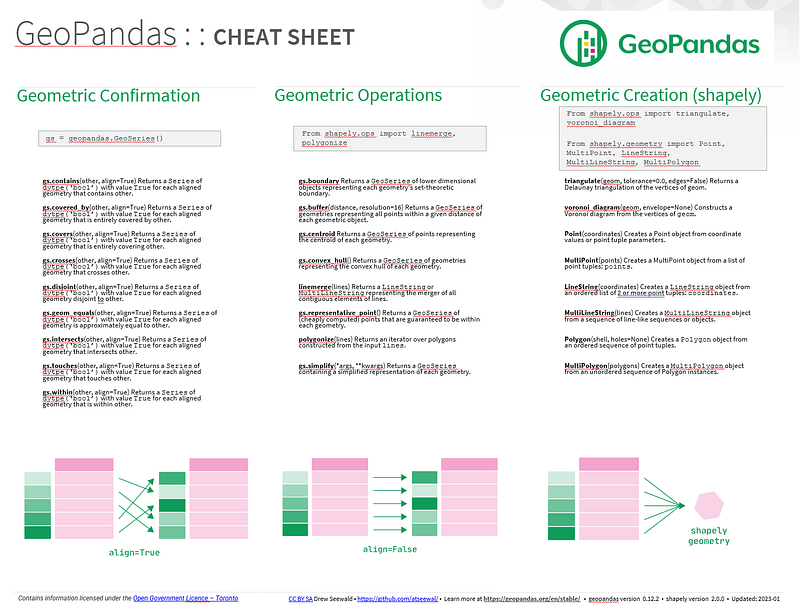
Next was the descriptions of what the functions would actually do. This is similar to the very first sentence you read from a function in the package documentation. It gives enough information about the function to make it useful, even if you’ve never used it before, but doesn’t overstay its welcome. The input, output, and the operation the function completes is a good place to start.
To touch up the formatting of the text, anything that is an object from geopandas or shapely I formatted in Courier New, a monospaced “code” looking font.
Adding in some graphics to make things more scannable
Next, and possibly one of the most helpful parts of any cheat sheet, is graphics and images that show how the functions work or what they are checking for. I found that these are easier to create from shapes in PowerPoint, but they end up pretty small on this cheat sheet format, so they might be a bit difficult to read when you print it out. Getting creative with the format may have allowed for larger reference images, but I really wanted the functions to all be aligned so you wouldn’t never miss one when scanning the cheat sheet.
Final Touches (do any remaining colors, bolding, etc. here).
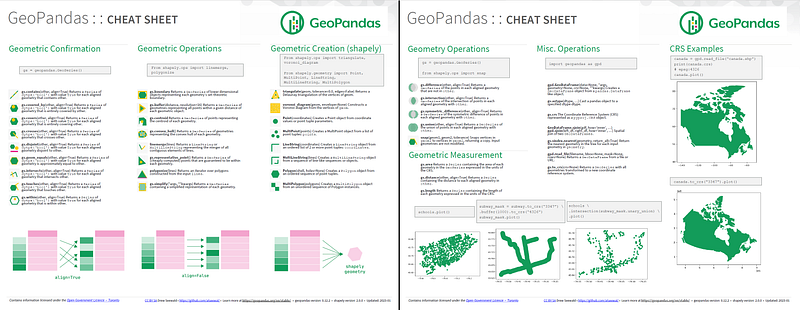
The final touches really helped to make things look coherent and pleasing. Helpfully, the geopandas package has a brand page where they have the logo. The logo was placed at the top right of the page so you can always tell which cheat sheet you have in front of you.
One of the requirements of the RStudio/Posit cheat sheet template is that you the creative coommons license. This was added at the footer of both pages. I also used some data for the map on the 2nd page that requires acknowledgement to the government of Toronto, so that was added to the footer.
If anyone receives the worksheet and has feedback, I included my GitHub at the bottom if they need to reach out to me.
I added the URL to the goepandas documentation for the latest reference, should a user need more information on hwo to use a particular function.
Finally, nothing is more frustrating that reading a tutorial and nothing seems to be working correctly. The package versions that I tested all of the code with, for goepandas and shapely, are listed in the footer, and the date I updated the cheat sheet last is included next to that. So anyone who gets the cheat sheet will see what version of the package I was on when I made it. Geopandas was not on a full release version when I created the cheat sheet, so things are likely to change and become out dated over time.
Conclusion
Going through this exercise helped me take a look at what is really important when writing a good cheat sheet: organizing information to quickly find the most important and frequently needed information. It also helped discover what mistakes to avoid when creating a cheat sheet, like making it as long as a book by including every concept and function ever or making it hard to navigate and find information on.
Want to download the cheat sheet? You can download it from my GitHub for free.
Other Helpful Resources
- GeoPandas.org — The official site of the GeoPandas package.
- GeoPandas Documentation — The full user guide, API reference, and changlog for the GeoPandas Package.
- GeoPandas GitHub — The official repository for all GeoPandas code.
If you liked this post and want to see more like it, follow me on Medium:


