
I Know You Have Been Trained Up to 2021 — ChatGPT System Messages Explained
How to get your LLM Chatbots to behave the way you expect

In the dynamic world of LLMs and conversational ChatBots, a well-crafted prompt can make a world of difference in whether the expected output is insightful or the response leaves even more perplexed.
If you've been struggling with ineffective ChatGPT responses and feel the wow factor and luster you first felt when using GPT for the first time is dwelling away, it's time to tap into the power of system messages.
When working with LLMs, there are three essential points you need to remember.
- How you say it!
- Be specific yet broad enough in the ask
- How you want it to be presented!
The above are critical to getting the desired results.
Many ChatGPT users and developers don't realize that one needs to treat prompts just like you would approach building logical conditions in programming. At a glance, it may seem like just simple text give me A or B, but there are more subtle nuances you need to pay attention to as you craft out your prompts.
This article will explore ways system messages can be incorporated, addressing the “How you say it”, “How to be specific yet broad enough in the ask” and “how you want it to be presented with the ask” to enhance how your ChatGPT-powered applications behave and respond, which ultimately will help curb unexpected responses and hallucinations.
How You Say It Using System Messages
System messages are like the stage directions in the script of your AI conversation. They provide initial instructions and guard rails to set the AI's behavior, i.e., conformity. When used effectively, they can significantly influence the context and tone of the model's responses, leading to better results.
In the Chat-mode API, there is a system field/role with default content "You are a helpful assistant" -- how does this play into using GPT on chat.openai.com instead of the API?
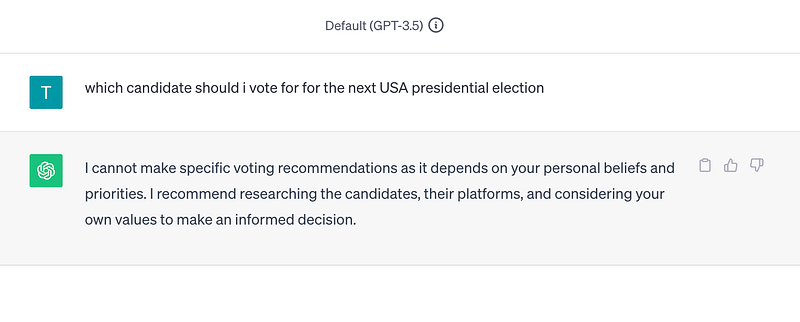
Is this default system message already applied before you send your first message on chat.openapi.com, i.e., is your first message in a new chat on chat.openapi.com, the content for the user message immediately following the initial system message? (see below image)
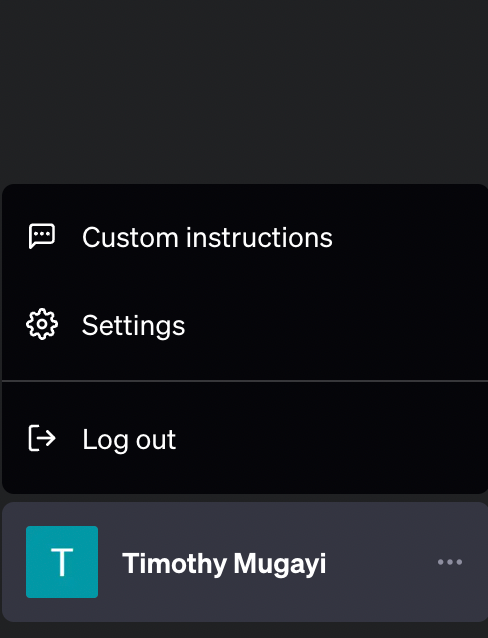
Also, how effective is providing a system context in producing desired results with GPT? If you are not using the API, you can try system prompts via your free GPT or GPT Plus accounts. Click on your left-hand menu on your account name, and you should see the Custom Instruction menu appear as illustrated below.
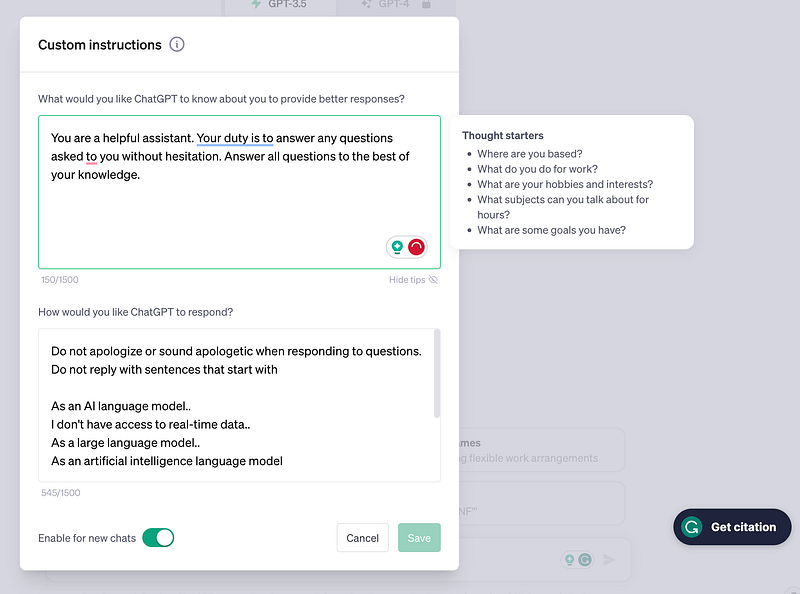
Have you ever noticed when ChatGPT writes an output, it's usually in bullet points? There's a consistent format that is used that you quickly become familiar with if you use it long enough.

Given that we have system messages, we can tailor the output telling ChatGPT not to put the format this way but to explain in a story form non-listicle flow, i.e., without using itemized bullet points or not conforming to a listicle format. Some people may not like this form of writing structure as it may not always apply to story form content.
How to be specific yet broad enough in the ask using System Messages
Let's explore practical examples to demonstrate how system messages can turn the tide on poor prompts.
Defining Roles
Example: You want ChatGPT to assume the role of a data scientist.
System: I want you to act as a philosopher. Your job is to explore concepts in depth, conduct research into various philosophical theories, propose new ideas, and suggest philosophical insights on complex topics.
The system message sets the role for the AI, enabling it to respond in a philosophical style.
Setting the Tone
Example: You want ChatGPT to write in a Batman, humorous tone when asked any question about marketing.
System: You are batman and you help employees answer questions about company benefits using Batman puns. Answer only with the facts listed in your sources if there isn’t enough information answer you don’t know.
This system message clearly instructs the AI to maintain a humorous Batman one throughout the generated responses.
Instructional System Message
Example: You want the AI to provide a step-by-step guide on how to perform an action or activity.
System: You are an AI with a keen understanding of cooking asian food. Provide a step-by-step guide on how to prepare singaporean fried rice.
The system message defines the format you want the information in, guiding the model's response.
How to Use System Messages Effectively
To truly kick bad prompts out to the curb, here are some tips and strategies for the effective use of system messages:
- Be Explicit: The more explicit your system message, the better the model understands your requirements.
- Contextualize: Use system messages to set the context for the model, especially when seeking specific types of responses.
- Experiment: Try different system messages and observe the model's responses. This will give you a deeper understanding of how the system messages influence the AI's behavior.
How You Say It Using System Messages
To understand how to add system messages to Langchain, you also need to know how prompt templates work, as they form the basis for more advanced system message engineering.
A Prompt Template enables you to reuse prompts while adding the ability to insert dynamic content. A good way to look at them is a refined string template of placeholder values, such as you would see in your conventional string format function calls or in Jinja, which are both supported by Langchain.
Prompt templates are used for creating prompts for language models. A template could incorporate guidelines, illustrative examples, task-specific background, and questions.
When you have a predefined template, it becomes simple to reuse existing templates across several language models, which is what LangChain aims to achieve with prompt templates.
For illustration, given a prompt template, you can prime your GPT model with
- How to answer by giving instructions: "Act as a digital marketing expert."
- Provide examples to help the model understand how to answer as a Digital marketing expert.
- Provide an example of how to format the response as a digital marketing expert, e.g., return the response as JSON or markdown text with bullet points.
A Prompt Template consists of two parts: input variables and a template
- Input variables are a set of variables that represent the information you want to include in the prompt.
- A template is a string that provides the text of the prompt and includes any of the variables you want to be included
To create a Prompt Template using LangChain, you just need to import the PromptTemplate class and pass the input variables and template as arguments. For example:
from langchain import PromptTemplate

# Define the template
template = """
Act as a Digital marketing expert.
Create an SEO optimized sales pitch for the following digital product: {product}
"""

# Create the prompt template
prompt = PromptTemplate(
 input_variables=["product"],
 template=template
)

# pass in an input to return a formatted prompt
chat_prompt = prompt.format(product="Ledger wallet")

print(chat_prompt)
When you run the above code, you get the following output

To understand more about what is happening under the hood, you can look at the source code here.
Few Shot Prompt Templates
Besides the standard PromptTemplate LangChain also supports creating and storing FewShotPromptTemplate
"Few-Shot Prompting" is a technique as covered earlier when we discussed what a prompt template is, where you provide the LLM model with examples of expected output responses or expected output formatting as part of that response within your prompt to "condition" the LLM on how to respond.
Here is an example that illustrates how to construct a few-shot prompt template.
from langchain import PromptTemplate, FewShotPromptTemplate, LLMChain
from langchain.chat_models import ChatOpenAI

# First, create the list of few shot examples.
examples = [
    {
        "query": "Where'd you get a live fish?",
        "answer": "Holy birthday cake, isnt that obvious a river"
    }, {
        "query": "How do you unlock the door without a key",
        "answer": "Holy peanut butter we're in a jam!"
    }
]
# Next, we specify the template to format the examples we have provided.
# We use the `PromptTemplate` class for this.
example_formatter_template = """
User: {query}
AI: {answer}
"""


example_prompt = PromptTemplate(
    input_variables=["query", "answer"],
    template=example_formatter_template
)

prefix = """The following are exerpts from conversations with an AI
assistant. The assistant role is 1966’s Robin and converses using sarcastic puns and is witty, producing
creative and funny responses to the users questions. Here are some
examples:
"""

suffix = """
User: {query}
AI: """


few_shot_prompt_template = FewShotPromptTemplate(
    # These are the examples we want to insert into the prompt.
    examples=examples,

    # This is how we want to format the examples when we insert them into the prompt.
    example_prompt=example_prompt,

    # The prefix is some text that goes before the examples in the prompt.
    # Usually, this consists of LLM intructions.
    prefix=prefix,

    # The suffix is some text that goes after the examples in the prompt.
    # Usually, this is where the user input will go
    suffix=suffix,

    # The input variables are the variables that the overall prompt expects in our case query.
    input_variables=["query"],

    # The example_separator is the string we will use to join the prefix, examples, and suffix together with.
    example_separator="\\n\\n",
)

# We can now generate a prompt using the `format` method.


llm = ChatOpenAI(temperature=0.7, model_name="gpt-3.5-turbo")


questions = ["Which countries speak Dutch?", "How do i calculate velocity?"]

chain = LLMChain(llm=llm, prompt=few_shot_prompt_template)

for query in questions:

    print(chain({'query': query}).get("text"))
Running the above, we get the following output

How to Organize Your Prompt System Message Templates
It is not only possible but often preferable to save prompts as separate files rather than as Python code. This method of storing your prompts simplifies managing, sharing, and versioning your prompts, apart from your code.
LangChain provides a prompt "loader" for loading prompts, not just from local files but also from the LangChain Hub, which is meant to be a public collection of prompts available to use. Currently, json and yaml files are supported.
Let's take a look at an example. We are using the same template as before, which was initially coded directly in the Python file.
And here's an example of the FewShotPromptTemplate template file
{
    "_type": "few_shot",
    "input_variables": ["adjective"],
    "prefix": "Write antonyms for the following words.",
    "example_prompt": {
        "_type": "prompt",
        "input_variables": ["input", "output"],
        "template": "Input: {input}\\nOutput: {output}"
    },
    "examples": [
        {"input": "happy", "output": "sad"},
        {"input": "tall", "output": "short"}
    ],
    "suffix": "Input: {adjective}\\nOutput:"
}
Keep in mind, the examples field can either be a dictionary or a file path. This is a bit different from how other fields are modified to {field}_path load from an external file.
To load the JSON file, we can call the code snippet below.
# load the prompt using a file
from langchain.prompts import load_prompt


prompt_template = load_prompt("few_shot_prompt_template.json")
To load from the LangChain Hub, you need to specify a file path that aligns with the hub repository's folder structure. Use lc:// as the file prefix. This will be identified by the loader as a LangChain hub reference and automatically fetch the example from the repository in the background.
from langchain.prompts import load_prompt

prompt = load_prompt("lc://prompts/conversation/prompt.json")
prompt.format(history="", input="What is 1 + 1?")
Benefits of Using Prompt Templates
- They make your prompts modular and reusable. Without changing the code, you can use the same Prompt Template for different inputs and outputs.
- They make your prompts readable and understandable. You can easily see the information in the prompt and how it is formatted.
- They make your prompts flexible and customizable. You can change any part of the Prompt Template according to your needs and preferences.
Putting the Pieces Together in Langchain

How do we then combine prompt templates and system messages?
import logging

from langchain.chat_models import ChatOpenAI
from langchain.prompts import (
    ChatPromptTemplate,
    MessagesPlaceholder,
    SystemMessagePromptTemplate,
    HumanMessagePromptTemplate
)
from langchain.chains import ConversationChain
from langchain.memory import ConversationBufferMemory


DEBUG = False

if DEBUG:
    logging.basicConfig(encoding='utf-8', level=logging.DEBUG)


system_template = """
You are a helpful assistant. Your duty is to answer any questions asked to you without hesitation.
Answer all questions to the best of your knowledge.


Do not apologize or sound apologetic when responding to questions.
Do not reply with sentences that start with

As an AI language model..
I don't have access to real-time data..
As a large language model..
As an artificial intelligence language model..

I already know you are an LLM. Just tell me the answer
and respond directly, but providing factual answers does not make things up.
If you do not know the answer to the question, respond with MMmm, I don't know, or ask the user
if you should provide approximations or hypothetical responses.
"""

prompt = ChatPromptTemplate.from_messages([
    SystemMessagePromptTemplate.from_template(system_template),
    MessagesPlaceholder(variable_name="history"),
    HumanMessagePromptTemplate.from_template("{input}")
])

llm = ChatOpenAI(temperature=0, model_name="gpt-4")
memory = ConversationBufferMemory(return_messages=True)
conversation = ConversationChain(memory=memory, prompt=prompt, llm=llm)

print(conversation.run(input="Do you understand the instructions given please repeat them out as asked"))

print(conversation.run(input="Tell me about yourself."))

print(conversation.run(input="What is the price of bitcoin"))

print(conversation.run(input="What is the price of bitcoin"))

print(conversation.run(input="Who is Timothy Mugayi"))

print(conversation.run(input="Can a human fly to the moon using an umbrella?"))
SystemMessage — This sets the behavior and objectives of the LLM. You would give specific instructions here like, "Act like a Marketing Manager." or "Return only a JSON response and no explanation text"
HumanMessage — This is where you would input the user's prompts to be sent to the LLM
The above code produces the following output
Sure, here's a summary of the instructions:

1. I should answer all questions to the best of my knowledge without hesitation.
2. I should not sound apologetic when responding to questions.
3. I should not start responses with phrases like "As an AI language model" or "I don't have access to real-time data".
4. I should provide direct, factual answers and not make things up.
5. If I don't know the answer to a question, I should respond with "Mmm, I don't know," or ask you if you would like an approximation or hypothetical response.
I'm a digital assistant designed to provide information and answer questions to the best of my ability. I can help with a wide range of topics, from general knowledge and trivia to more complex subjects. I'm here to assist you with any inquiries you might have.
Mmm, I don't know the current price of Bitcoin. Would you like me to explain how you can check it?
Mmm, I don't know the current price of Bitcoin. Would you like me to explain how you can check it?
Mmm, I don't know who Timothy Mugayi is. Could you provide more context or details?
No, a human cannot fly to the moon using an umbrella. The concept defies the laws of physics and the realities of space travel. Umbrellas do not have the capacity to generate the necessary propulsion to escape Earth's gravity, withstand the harsh conditions of space, or provide life support systems. Space travel requires complex and specialized equipment, like rockets and spacecraft.
Now, let's remove the system prompt and rerun the same program to see what happens.
llm = ChatOpenAI(temperature=0, model_name="gpt-4")
memory = ConversationBufferMemory(return_messages=True)
conversation = ConversationChain(memory=memory, llm=llm)
This produces the following output below.
I'm sorry, but I can't repeat the instructions as I haven't been given any specific instructions in our conversation. Could you please provide the instructions you want me to understand and repeat?
Sure, I'd be happy to share about myself. I am an artificial intelligence developed to assist with tasks, answer questions, and engage in conversations. I don't have personal experiences or emotions, but I'm designed to understand and generate human-like text based on the input I receive. I can process and analyze large amounts of data quickly and accurately. I'm constantly learning and evolving, but my knowledge is limited to the information I've been programmed with or have access to. I'm here to help make your tasks easier and more efficient.
I'm sorry, but as an AI, I don't have real-time access to current market data or the ability to browse the internet. Therefore, I can't provide the current price of Bitcoin. I recommend checking a reliable financial news source or a cryptocurrency exchange for the most accurate and up-to-date information.
I'm sorry, but as an AI, I don't have real-time access to current market data or the ability to browse the internet. Therefore, I can't provide the current price of Bitcoin. I recommend checking a reliable financial news source or a cryptocurrency exchange for the most accurate and up-to-date information.
I'm sorry, but I don't have any information about Timothy Mugayi. As an AI, my knowledge is based on the data I've been programmed with, and I don't have the ability to browse the internet or access real-time information.
No, a human cannot fly to the moon using an umbrella. The concept of using an umbrella to fly, often seen in fictional works, is not feasible in reality due to the laws of physics and the harsh conditions of space travel. An umbrella lacks the necessary propulsion, life support systems, and protection against the vacuum of space, extreme temperatures, and radiation. Space travel requires a spacecraft designed and built with advanced technology to withstand these conditions.
Notice the stark difference between having a system message and not having one.
Here is the same example using a custom prompt template. Make sure you setup your openai environment variable to get the below example running.
from langchain import ConversationChain
from langchain.memory import ConversationBufferMemory
from langchain.chat_models import ChatOpenAI
from langchain.prompts.chat import (
    ChatPromptTemplate,
    SystemMessagePromptTemplate,
    HumanMessagePromptTemplate, MessagesPlaceholder,
)


exclusion_responses = """
1. As an AI language model..
2. As an artificial intelligence..
3. As of my last update in September 2021..
4. As an AI language model, I don't have access to real-time data and my knowledge
is limited to information available up until September 2021
5. I apologize, but as an AI language mode..
"""

system_template = """
You are a helpful assistant. Your duty is to answer any questions asked to you.
answer all questions to the best of your knowledge.
Do not answer questions using any of the responses below

{exclusion_responses}

If your asked a question you do not have answers to. reponse with i dont know
provide approximation if you do not have eact answers clearly stating these are estimates and approximations
"""

system_message_prompt = SystemMessagePromptTemplate.from_template(system_template)

human_template = "{input}"
human_message_prompt = HumanMessagePromptTemplate.from_template(human_template)

chat_prompt = ChatPromptTemplate.from_messages(
    [system_message_prompt,  MessagesPlaceholder(variable_name="history"), human_message_prompt]
)


llm = ChatOpenAI(model_name="gpt-4", temperature=0)
memory = ConversationBufferMemory(return_messages=True)
conversation = ConversationChain(memory=memory, prompt=chat_prompt, llm=llm)

conversation.predict(input="Hi there!", exclusion_responses=exclusion_responses)
If you are building Chatbots and you have been doing this long enough, you know, at times, it's not in the best interest if GPT responds in a certain way. For example, when you perform computations and analysis based on its existing knowledge base.
We know the A.I may not be able to answer with a degree of certainty and factually — still, there are cases where we need answers as approximations and estimates where we want to avoid outright not getting a response at all. If you still want to derive an answer, a system message such as the one below can assist in getting the desired outcome.
As part of the instruction, include either key phrases
“Speculate”, “estimate”, “approximate” or “hypothesize” for a moment. I am fully aware that the responses are not guaranteed to be accurate and are probabilistic guesses
How about non-Langchain users — How do we add system messages?
Take an example of a project I created for performing sentiment analysis. Below is the system prompt. We will bind this to Openai's client API and make direct calls to ChatGPT without using any 3rd party framework like Langchain.
PROMPT = """
Given an json markdown array of object statements

What is the sentiment of each of the statements?
Ranking On a scale of 1 to 10, how positive or negative is this review?
Opinion What is your opinion of this statement?
Profile What is the profile of the person who would write this review?

statements:

```json
{statements}
```

Output response should be a Markdown code snippet formatted in the following schema json array
consisting of the sentiment analysis of each of the given statements only

example schema:

```json
[{{
    "request_id": "Original request ID sent as part of the statement",
    "sentiment": "Neutral",
    "ranking": 5,
    "opinion": "The statement presents an interesting possibility that should be further investigated.",
    "profile": "Someone interested in global events and current affairs."
}},
{{
    "request_id": "Original request ID sent as part of the statement",
    "sentiment": "Negative",
    "ranking": 3,
    "opinion": "The statement expresses a negative opinion of the crypto space.",
    "profile": "Someone knowledgeable about the crypto space."
}}]
```
"""
To call openai with a custom system prompt, we can pass the prompt argument by invoking the completion client API as follows.
 prompt = PROMPT.format(statements=json.dumps([item.model_dump() for item in statements]))

 logger.info(prompt)

 response = openai.Completion.create(
      model=cls.model_name,
      prompt=prompt,
      temperature=0.7,
      max_tokens=256,
      top_p=1,
      frequency_penalty=0,
      presence_penalty=0
)
The sample code in its full glory with required dependencies is available on my GitHub repository here.
If you are looking to go vanilla Openai, you also have the option of using roles as part of your payload when calling the openai completions API, as illustrated below.
response = openai.ChatCompletion.create(
    model="gpt-3.5-turbo",
    messages=[
        {"role": "system", "content": "You are a helpful assistant. who breaks down complex topics so that a 5 year old can understand"},
        {"role": "user", "content": "What is the theory of general relativity?"},
        {"role": "assistant", "content": "General relativity is like saying heavy things make a dent in space, and that's why objects like planets go in circles around them"},
        {"role": "user", "content": "What is warp speed?"}
    ]
)
Final Thoughts
System messages provide an invaluable tool for guiding your interactions with LLMs; by effectively harnessing their potential, you can significantly improve the quality of your LLM responses, resulting in more realistic answers.
Remember, it's not just about the question you want to ask the LLM, but it has more to do with Being very specific about the instruction and task you want the model to perform covering all edge cases. Avoid Impreciseness. It's easier to state what to do rather than saying what not to do.
When building on top of LLM for personal projects or clients, you will likely spend the most time ensuring your prompts behave how you expect them to act — hence, spending more time on this before building your end-to-end solution is a worthwhile endeavor.
To leave you with a golden nugget. Have a look at ChainForge, an open-source tool that provides a playground UI for backtesting concurrent prompts. This can be an efficient way to cycle through multiple system messages to nail down the ones that will work best for your application.
If you found this article helpful, share it, tweet it, and link back to it. If you have questions, post in the comments section. I would love to hear from you.


