
How I Use Popplet as a Writing Tool
Gathering and structuring ideas
Ever had the urge to write something, but felt overwhelmed? You’ve brainstormed your thoughts onto paper, and it looks messy. Popplet is a useful tool to write down your ideas, then organize them into something cohesive.
I have been enjoying Popplet for over seven years. It’s helped me:
- Write essays
- Brainstorm topic ideas
- Make character bibles
- Form plots and subplots
- Create to-do lists
- Write articles. I’ll be showing how I used Popplet to write this article as an example.
Why it works for me
When I have an idea, Popplet keeps up with the speed of details coming to my mind. I can write points in quick succession, before fleshing it out with a mind map.
After brainstorming my mind map, I can organize my points into a framework for an article. It gives me a way to remember what I wanted to say in my work. Most of all, I enjoy the clarity of Popplet. Its visual appeal keeps me engaged in the process.
Popplet gives me a vivid picture of how much content I have. It enables me to see how my ideas fit together to make sense to the reader. I can tell if my story has enough ‘meat’ by looking at it. I’ve even abandoned ideas, because Popplet has shown I don’t have enough to say on a subject.
How to access Popplet
There are several ways to use Popplet. You can use it for free on your computer, or pay a small subscription fee. In the free version, you can only make one Popplet (mind map or flow chart).
The other way is to use Popplet as an iPhone or iPad app. The Popplet Lite version is free, and again, only allows you to create one Popplet. The full version is a one-off purchase, letting you create unlimited Popplets.
I’d suggest you don’t spend any money until you’ve used the free version. If you become a frequent user, then decide if it’s worth your while to pay for it.
This is not a sponsored post, nor am I affiliated with Popplet in any way. I’m just a long-term user.
Constructing an article with Popplet
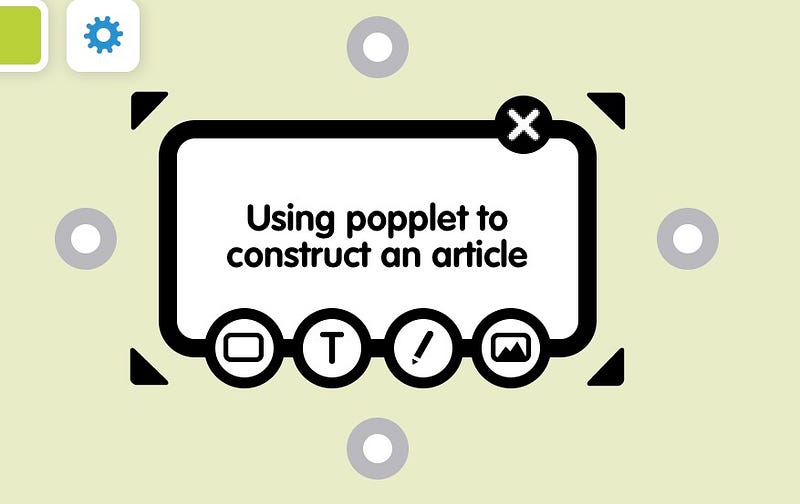
On the home page, click, ‘make a new Popplet.’ This will create one box, called a ‘popple,’ on the screen. You can add text to the box, and in the picture below, you can see four gray dots. Click on these dots to create a new popple that connects to this box.
Some of my popples contain headings and subheadings. Others contain points which, in my article, will form paragraphs. Sometimes, I use one sentence as a label for a paragraph; other times, I will write the entire paragraph into the box. It depends on my mood.
I find color coding my boxes helpful. In my Popplet for this article, my title popple is black. My sub headings are gray, and my paragraph boxes are bright colors. I choose one color to identify the paragraphs belonging under one sub heading, so I can see them as a group at a glance. Each sub heading has a different color allocated to its paragraph group, giving me a fast way to tell them apart.
If my ideas are flowing fast, I don’t worry about typos. If they’re coming to me slow and steady, I edit them as I come up with more ideas.
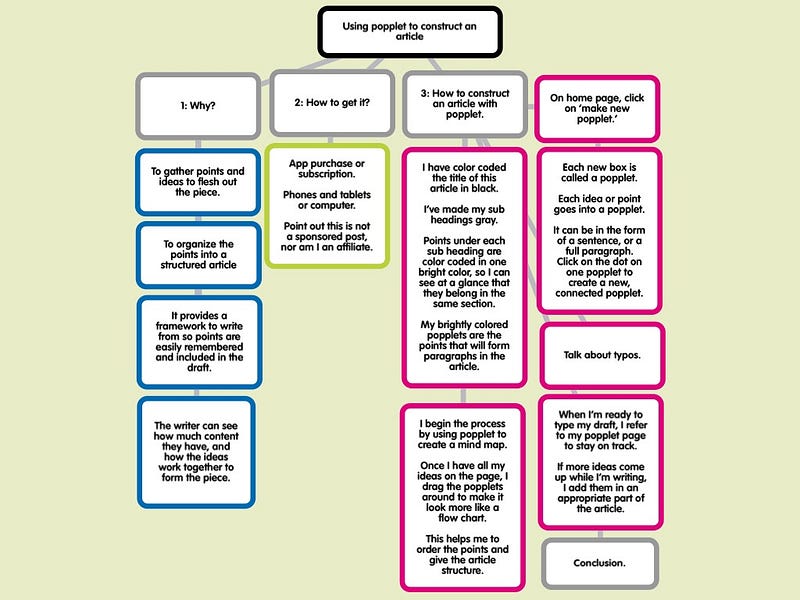
I begin the process by using Popplet to create a mind map. Once I’m content with the ideas I have, I clean up the mess. I drag the popples around, arranging them into more of a flow chart. My title is at the top of the page, sub headings are below the title. I have numbered my sub headings in this example, to show the order I intend to write the article. Often, I will number my paragraph boxes, too.
Now, I have a basic structure for my article:
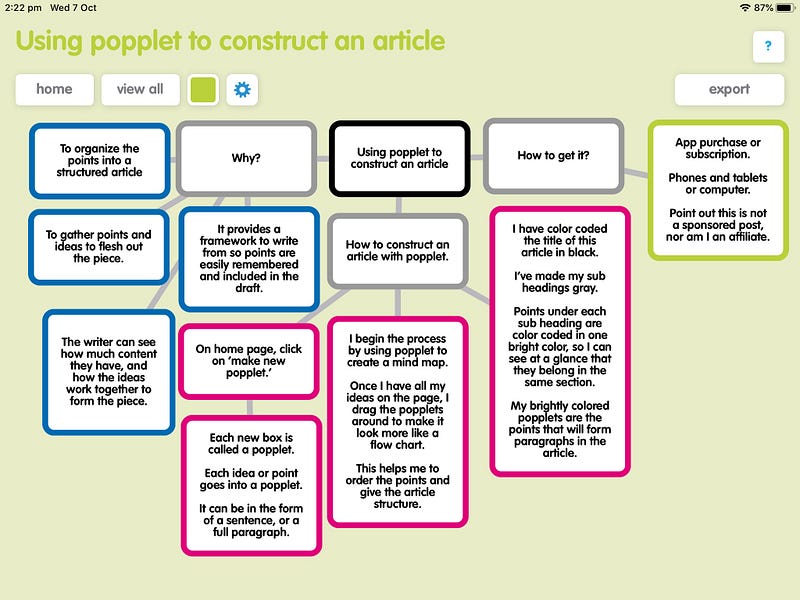
On the left, is the mind map version of my article, where I was spewing random ideas onto the page. On the right, I’ve moved all these ideas around to create my article outline.
I’m now ready to write my draft, referring to my Popplet as I go, to keep me on track. Most of the time, more ideas come to me as I write my draft, so I add them to the appropriate place as I go. Once I’ve written the contents of a popple into my draft, I delete that popple.
This serves three purposes:
- It clears up the screen, so I can find relevant points faster.
- It gives me a picture of how much work is ahead of me.
- It gives me a sense of accomplishment, which propels me forward.
Before starting my draft, I take a screenshot of the Popplet, in case I want to refer to the original, so my work isn’t lost.
I’ve reached the conclusion of my article, and am now staring at a blank Popplet page. I enjoy the focus this tool gives me. I have three children and am a carer to my partner. There’s lots of noise and interruptions to my writing.
Having a flow chart to refer to allows me to manage distractions. Most of all, Popplet makes the writing process enjoyable for me. Working through my draft, one popple at a time, motivates me to stay at my keyboard for the next popple. Before I know it, I’ve written my draft, then I can edit.
If you think Popplet could compliment your writing style, I recommend trying it.