
A FREE Medium Stats Tracking Tool
Download the Excel or use the Google Sheet and start tracking your progress
Not a Medium member? Read this article here.
Recently I implemented some changes in Medium. I write about everything, check my profile, or my weekly reviews where I summarize everything.
Is it working?
I knew I had to wait, but I needed proof.
So I decided to start tracking daily. I used a good old piece of paper and a pen.
But it was so hard to understand the trends.
So I created this template.
Why tracking?
- It’s not a business if it doesn’t bring results
- Validation of assumptions
- Progress fuels motivation
What is it?
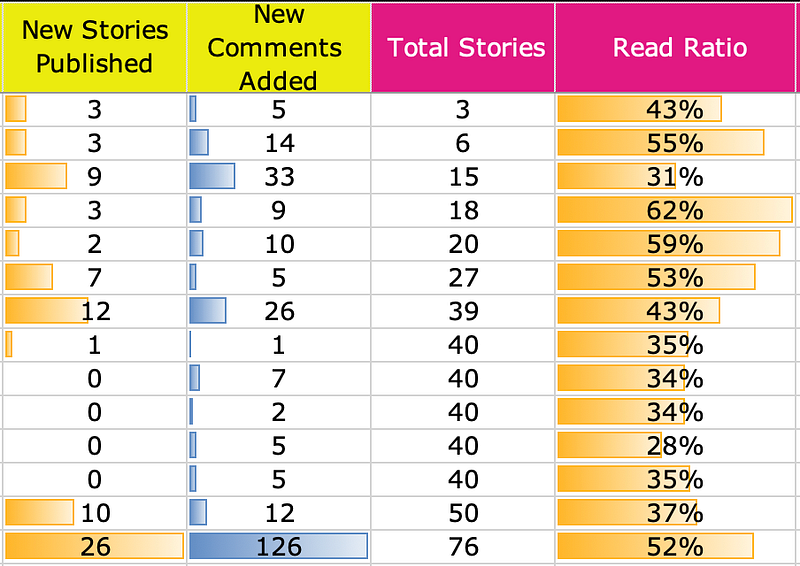
It’s an Excel file with two sheets: monthly and daily. You type the data in the yellow columns and the pink columns will automatically calculate the rest.
Hint: Use it to evaluate the success of other authors: a lot of us publish stats, so if you aim to achieve the numbers of someone else, put their data in this template, analyze, and use their KPIs as a reference.
Here’s how it looks daily:

And this is the monthly view:
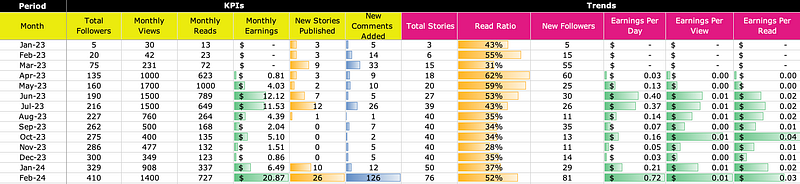
And today I give that to you for FREE. I uploaded it on Gumroad here:
Why for FREE?
Simple.
Because I have much more valuable stuff to bring, soon to be live in the CREATIVETECH HUB.
And this is just an Excel file with few formulas and nice formatting. Everyone could do it.
BUT…
If you feel this shouldn’t be free, just put a price you thinks it’s worth it and buy it.