
I did Google’s UX Design Course in 5 weeks, here’s where I am today
Not a Medium member? You can read the full story here.
In February 2023, only 8 months ago, I discovered UX design.
I’ve been running my little design side hustle ‘business’ for about 8 years now. Building websites, creating illustrations, SEO optimisation and all that kind of stuff.
After conducting a very brief research online, I soon signed up to Coursera’s Google Certified UX Design course (sorry, no affiliates here). Eager to dive into the topic of UX design and open myself up to new future possibilities, I rolled up my sleeves and got stuck in.
Course overview
According to Coursera and Google, the course can take around 6 months to complete at 10 hours a week. At the cost of $49 a month, with a 7 day free trial, you can gain a certificate for around $300. Not too bad, considering bootcamps charge around $10,000. But, as my title suggests, I completed mine in 5 weeks. How? I dedicated 5–7 hours a day, 6 days a week to watching the videos and doing the homework. Yes, that’s pretty much equivalent to a full time job. But, as I work for myself, it is entirely up to me what I do with my time. At the end of the day, I knew it was only going to be for a few weeks.
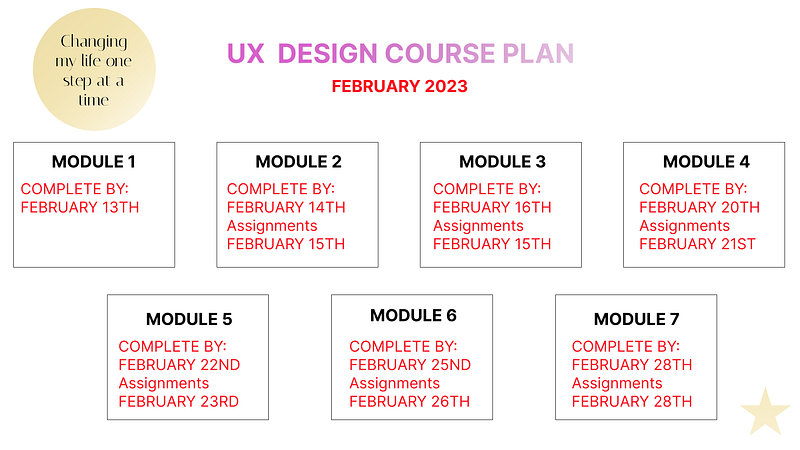
And while most of you who are reading this have other obligations, such as a full time job/family etc, it might not be feasible. And I strongly recommend that you do not rush it either. Especially if you are serious about becoming a full time UX/ UI Designer.
The course consists of 7 modules in total with a chance to earn a shareable certificate at the end. Each course is very detailed when it comes to UX, but in my opinion, very poor when it comes to UI. So, if your main focus is on getting a job where you work as a designer and not a researcher, you will need to find some other courses out there. (don’t worry, I’ll share some of the best ones with you soon)
What you also have to consider, is that the aim of this course is to source talents for our internet giant, Google. After you get deeper into learning about the topic, you will soon discover that it is the way Google does UX design — and that doesn’t necessarily mean that other companies do the same.
However, the design thinking process is always the same. It is a proven method for creating successful products, and so it seems to be the universal language within the niche.
The bottom line is, if it’s good enough for Google, it’s good enough for me.
I was working my way through this course at a steady pace, and as I already mentioned, I also had to find some more time to learn UI.
UX is not UI
UX is the research, the ‘WHY’ are you even doing what you’re doing, before you grab your pen and paper and start designing your masterpiece.
But, if you’re like me, also interested in the visual, than you will find UI more appealing.
UI is the design, the look and the feel of your product. So going back to what I was mentioning earlier, you will need to find other resources out there. And the good news is, there are plenty. And most of them are completely free, but not always informative enough.
My favourite ones, and the ones that really helped me become a ‘pro’ at Figma and prototyping were:
- Design with Arash — https://www.youtube.com/@DesignWithArash . I discovered Arash on YouTube, his courses on Skillshare are insanely good and well put together. If you are going to spend your time and energy on this, check him out. Everything I learnt about UI, is thanks to this guy. Forever grateful.
- Daniel Scott — aka Bring your own laptop — https://www.youtube.com/@BringYourOwnLaptop . I’ve learnt so much from Daniel over the years. From illustration to graphic design and now UI. Grateful is an understatement.
There are a lot of tutorials out there, most of them are free, but no other ones I found to date that really go deep and teach in a professional manner. At the end of the day, if you are planning to land a job, you need to stand out.
I always say: “If something is worth doing, it’s worth doing well.” (author unknown)
Where I am today
Since completing the course on the 18th March 2023, I have designed 6 apps to date. I did not go for a full time job, that was never my intention anyway. I did try freelancing on Upwork and Fiverr, but once again, freelancing online is not for me. You can read more about it in this story here.
So what did I do?
I casually reached out to local businesses.
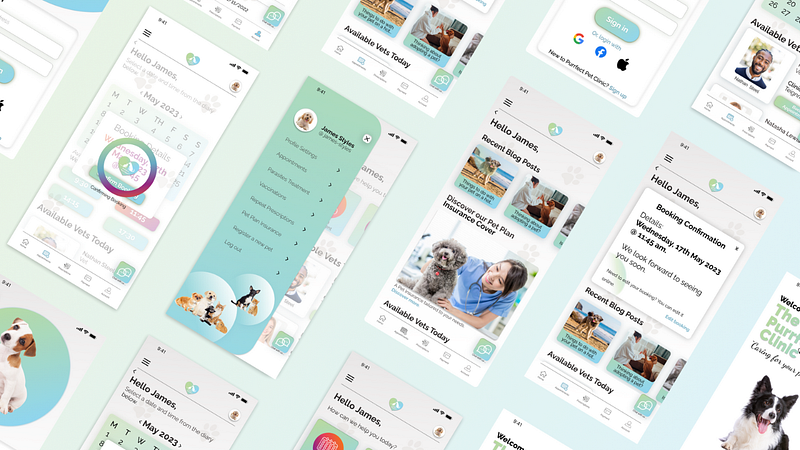
First one was a local take-away coffee trailer up in the forest where I walk my dogs. I showed them my portfolio that I created during the course and got stuck in. Second is my local vet. Once again, I emailed the owners and after a few emails back and forth, I designed their new app. Then came a local entertainment company with their bespoke in-house booking app. Soon after my local gym and hairdressing salon, followed by a restaurant.
Today I am working on a children's educational app for our local school, as well as adding some finishing touches to my own apps.
You can read a full article on my UX journey here:
Conclusion
Although I never applied for a UX job online and working full time was never my intention, I gained so much from this course. I can honestly say, it was probably the best $49 I’ve ever spent.
Yes, it was hard work. I was introduced to a lot of ‘new concept’, principles and other stuff. The course not only gave me a new skillset but it also made my previous ones better.
Apps are the next ‘big’ thing. And whilst you might be wondering if it’s even worth pursuing something like this, after all the AI headlines pointing to robots taking over the world, I can honestly say — Absolutely!
If you feel called to it, do it! Simple as that. If you do it and you can’t find work, don’t give up. Go and try freelancing. But don’t limit yourself to freelancing online. Reach out to your local community — quite often the pot of gold we are looking for is not at the end of the rainbow, but it’s right in front of our eyes.
And don’t forget to practice, practice and practice even more.
Thank you for reading. Please feel free to share your own experiences with me. I would love to read your story.
Here’s what I did after completing the UX course:
Found this article helpful? Why not subscribe to my newsletter here ?:)


