USEFUL WRITING ADVICE
I Created An Awesome Cheat Sheet to Help Me When FORMATTING Stories!
Do you make yourself short cuts to help you write and format your stories?

For as long as I’ve been writing on Medium, I’ve always had little tips and tricks that I use, to help me be a more productive writer.
These activities have more to do with the technical part of the writing and publishing process, as in the things you do and resources you use, to format, enhance, and promote your stories.
For instance,
Take the issue of me formatting links and information for the footer section of my story (After the “Final Thoughts”).
Before I started using the yellow footer “image” that you see below; whenever I completed writing the end of my story, I would always copy & paste the same comments and links, from my cheat sheet, from the section labeled footers.
This regular routine helped me keep the details in the footer readily available, just like everything else on the cheat sheet.
So besides this useful template containing links and the wording contained in my footer, it also contains all types of resources that I regularly use to enhance my stories.
There are some of my story links that I find myself using over and over again.
It stands to reason that since I publish a lot of stories that provide writing advice, I often refer to some of the same stories, because they offer the help people need.
That was why I decided to enhance my simple cheat sheet, and make it even more useful.
Now, it really prevents me from hopping back and forth, and searching through titles for the stories I refer to the most.
The great thing about having options at your fingertips, is that you start to take an active part in the potential for your stories to earn more.
Try to follow what I mean, as you consider the following section. As you read, keep in mind how important it is to constantly be linking your stories together.
But also keep in mind, that variety is the spice of life. So ask yourself this…
How much variety do you use when inserting links?
Since we writers on Medium typically post links in three different ways, my cheat sheet contains all three easy to copy methods, for the links I use the most.
For example:
Just Like New is my current focus, so to promote it, I use this “title” text link like this: Just Like New
Or sometimes I use an “anchor” text link like this: “Please check out my new Medium publication.
But the third option is to use the “image” link like this:
To save time whenever I want to use this image link, I keep the actual url link available on the cheat sheet, just like this: https://medium.com/just-like-new
Not only can I simple hit “enter” and turn this into an image, but it also gives me the option of inserting the url into some different text, other than what’s in the “anchor” text (mentioned above).
As you can see, that’s three different ways to use your links. And even though you may already know this information, you may not always take advantage of it.
Why? Because it’s not convenient. You probably have one basic way of doing things when you write, and it’s not always the most strategic method.
When it comes to placing links in your stories, this shouldn’t be a hit or miss or hap hazard decision.
Each strategically placed link to another story will potentially result in more earnings in the long run.
But just as importantly, some type of links work better in some stories (or sections of a story) than other types of links.
By having all your link options right at your fingertips can make a world of difference.
If what I’m saying is not really clear yet to some of you readers, just continue reading, and it will all make sense.
What I’m talking about, is having certain options available for easy use, every time you write and publish a story.
You’ll end up producing more stories and the kind that earn you more money.
Consider the following details about this cheat sheet writing resource tool.
There is lots you can do with a good cheat sheet
Once you start making an itemized list of the stories and links you refer to often, another practical idea may occur to you.
Not only should you include all the links and various ways to post them, but this might be a good place to keep some other important notes.
- You could have a section on your cheat sheet, devoted specifically for writing tips that you want to remember to use on a regular basis.
- You could have a section for cute little images that you like to insert, as part of your own particular style or branding.
There’s no limit to how creative you can get, when it comes to creating a handy list to help you craft your stories.
Don’t just stop at one cheat sheet
For even more effectiveness, you don’t have to stop at creating just one cheat sheet.
It’s up to you whether you have the ONE resource tool, or you make more than one, each with different writing aids that you may want to refer to.
Is the idea of a cheat sheet really starting to appeal to you? It should.
One useful way you could put the idea into effect, would be to create a cheat sheet with writer names and quotes from their stories.
You could create it, then add to it whenever you read a story worth referencing later on.
That would make it easy to use the information and mention your favorite writers in future stories that you write.
NOW, just where are you going to keep this helpful document, that’s so packed full of useful information?
The same place where you created it…
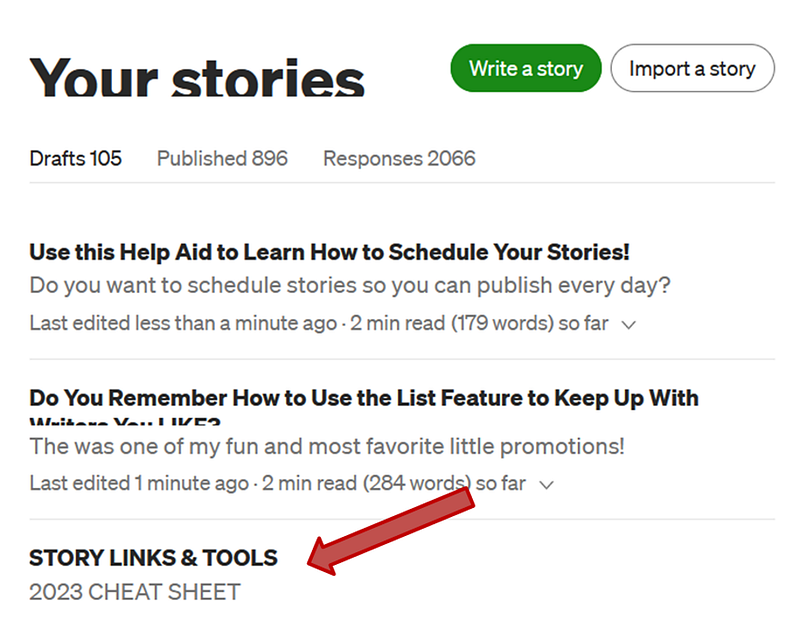
Just leave it on your Medium dashboard as a DRAFT.
Give it a short generic title, something like: “STORY LINKS & TOOLS” and make sure the words are in all capital letters.
I also added a noticeable subtitle in all caps.
This will make the cheat sheet draft stand out, and easy to locate, in case you have a long list of story drafts.
But since you’ll be opening and referring to the document every time you write, it will more than likely remain somewhere close to the top of your story drafts, just like you see here:
Final Thoughts
By now, you must realize what a system this is, because it provides you with all the short cuts you need, when writing and formatting your stories.
Doesn’t this sound like a practical idea?
The important concept for you to get is this: This cheat sheet should contain the items that are most useful and beneficial to YOU.
The items that I include on my particular cheat sheet are relevant to the type of stories I regularly write.
The same should apply to you.
Figure out the various tools that you typically use when you write, and which of your own stories you like to promote or quote from.
Then use this cheat sheet method, to compile anything you consider useful, so you can have it handy. And don’t worry. You can always add more to the page later.
This is a never ending resource tool that you perfect exactly the way you want it.
If you decide to follow this writing advice about creating a practical cheat sheet, you will end up with a valuable, user-friendly resource that contains all the writing and formatting help you could possibly need.
If you don’t believe me, use the following link to visit my personal cheat sheet that I know is going to save me time and energy with all my future story writing.
Here’s My Cheat Sheet for YOUR Viewing Pleasure!
There’s nothing that I love better than a fresh start, so I created two brand new footers to include in my future stories.
But that’s only one of the important items that I’ve added to my new cheat sheet. To see what else is there, you’ll have to go take a peek.
After you look it over, start selecting and organizing the stories, tips, and details that you rely on the most, and create your own new cheat sheet for 2023.
This will definitely help you have a more productive year!
Not a Medium Member yet? Click here and JOIN NOW with my Affiliate link. You’ll have access to more than 800 Justiss Goode stories, plus you can write your own!