
The perks of falling in love with Apple products
I bought the 2020 iPad pro and sold it in one week.
Try to not repeat my mistake.
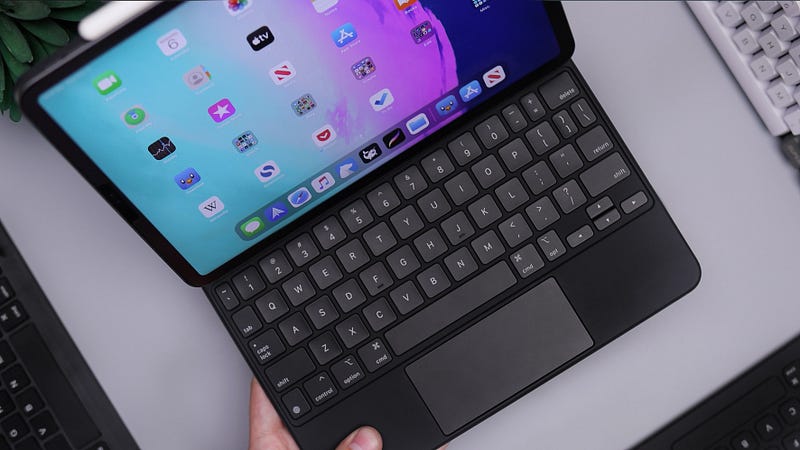
The thought of having a new iPad has been playing with my mind for a while since I gave my old iPad to my Mother in 2015. I used to have the old iPad and the oldie classic Macbook air. Each one of them had a separate function back in the day; I used the iPad for playing games and watch Youtube while the Macbook air mainly for my work. It was easy to switch between the two given that both of them was made for a different reason.
Fast forward, Apple released the 2020 iPad pro and I knew I would find a way to convince myself to fork a £1000 to get one.
A little about me, I am a full-time doctor. What I can call as productivity in my field is mainly writing and reviewing medical articles, finishing presentations for different meetings and working on multiple excel spreadsheets. And aside from the casual internet browsing, that is basically it. I currently own a 2017 Macbook pro which has been serving me well — apart from an occasional butterfly keyboard button getting stuck every once in a while and having to clean it.
I opted for the 12.9-inch iPad and once I opened it — like a 10 year old kid looking at his new toy — the first thing that impressed me as you can probably guess was the screen. The colour reproduction on the iPad was nowhere near my Macbook pro. Don’t get me wrong the MBK screen is great, but something about the iPad screen just made the colours pop.
After setting it up in the first day, I woke up the next morning, got ready for work and decided to take the iPad with me. On my first afternoon department meeting I took the iPad out and started taking notes, and thats when I felt I was missing something, yup! A keyboard. Don’t get me wrong, I am not new to touch screens but typing on the 12.9 screen made the experience a bit… awkward — If that is the word, but I decided to ignore that feeling for now.
Things started to take a different turn at that point.
With the iPad learning curve, it did not take me a lot really to master the task switching and multitasking interface — something which I commend Apple on. I mainly use Spark for my emails instead of the stock Mail app and that went on just fine. The new support for the file system made attaching documents and working through my OneDrive cloud space super doable — again with a slight learning curve. I was slightly surprised that the new Office app is not supported on the iPad, but the separate Microsoft Excel and Word apps worked perfectly fine.
The following day, I went on thinking, should I buy the new Magic Keyboard? I think It will make the iPad experience much better and will solve the one issue I have with it, I told myself. Well, thats another £300 to fork out!
By the middle of the week, I got into that point where I was subconsciously making comparison between the MBK and the iPad Pro.
From a portability point of view: both of them are more or less the same, even If I decided to buy the Magic Keyboard. I do not think anyone would say that one is more portable than the other one.
From a battery point of view: I would say the iPad has the longer battery life from my experience, but then again that could be because of my aging MBK battery. However, both of them can get me through the day without me thinking I would lose power at any point.
I figured out that I don’t need both of them really, one of them can do everything an average person — like me — would want from a Computing device.
Then what is the really the difference between these two powerful machines? Why is Apple selling both?
Well, I got to the conclusion that both of these machines will get you to do everything you want,
BUT…
…in a different way.
With the Macbook pro, I felt that I am in my familiar home, It is a screen and a keyboard. You open the lid and you start typing your notes, browsing or watching. My hands know where to rest and my viewing angle is not something I need to think about.
With the iPad Pro, I felt I am using a pumped-up version of my phone. Do I want to look cool and use a pen on the screen? I can. A keyboard? I can buy one and attach it. Maybe mouse instead of touching the interface? That is supported as well. I have to admit that it is a very versatile machine and I can see why anyone would be intrigued to buy it.
I think at the time of writing this, Apple has made two equally powerful breed of machines, Macbooks and iPads, both will get you anything you throw at them done equally effective yet, in a different way. And it all depends on which interface you prefer.
Apple is really smart in a way that It looks like it is eating Its own market share rather than waiting for someone else to eat it.
My verdict is, Try both; I personally feel that If you are coming from a Macbook, you’ll stick with a Macbook. while If you are holding an iPhone and you are looking for a replacement for your Windows Laptop, You will love the iPad Pro. So, with whatever you choose you won’t go wrong…
but only buy one of them!