
HuggingFace: The Best Gateway to the Llama2 Model?

Hey friends, today I’m going to introduce you to something new — the Llama2 model, which was launched by Meta (yes, the company behind Facebook).
You can directly download this model from Llama’s official website and then follow the guide on their GitHub to call it.
However, personally, I would recommend downloading and importing the model from HuggingFace.
Why, you might ask?
Because the world of models changes so rapidly; what’s popular with Llama today might be replaced by a new trending model tomorrow.
But HuggingFace is always there, supporting a variety of open-source models.
When it comes to learning, we definitely want to choose knowledge that can be reused and remains effective over time, right?
I’ll also talk about the Code Llama series, which are also open-source models.
Code Llama is a large AI model for code generation based on Llama 2.
Let’s take a look at the features of the Llama2 model and how to apply for its use.
Model Features
Llama 2 is a series of large-scale pre-trained and fine-tuned language models, with parameter sizes ranging from 7B to 70B — quite massive, right?
Compared to Llama 1, it has significant improvements.
Llama 2 supports a 4096 context window, and the 70B parameter version utilizes Grouped Query Attention (GQA) to enhance inference performance.
What’s even more exciting is the introduction of Code Llama, a dedicated series of language models for coding.
It’s a top contender among publicly available models!
Code Llama is not only capable of rapidly generating code but also supports large input contexts and zero-shot programming tasks.
Moreover, Code Llama models come in various parameter sizes, from 7B to 34B, to accommodate different application needs.
Now, Llama 2 and Code Llama have been released under a permissive license, available for both research and commercial uses.
Using Llama2
For first-time users, applications are made at https://llama.meta.com/llama-downloads by filling in the information, where you can apply for all three types of large models.
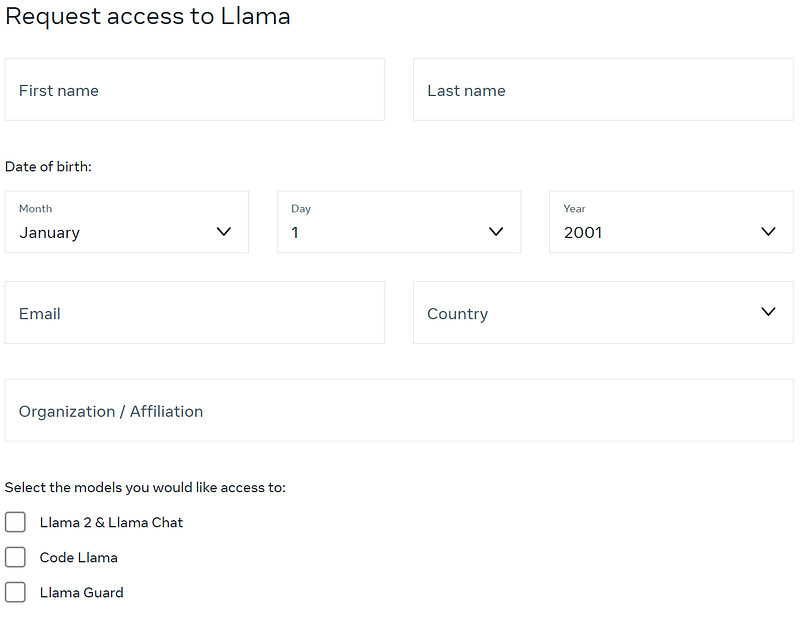
I applied for all the large models and received three emails.

The URLs in the emails allow you to download the model weights, and they are valid for 24 hours.
Of course, our share today does not follow the official GitHub usage method as provided on the website.
The above method is for first-time users to leave their email information with Meta;
otherwise, the application through HuggingFace for llama2 will not be approved.
In HuggingFace’s Models, you can find https://huggingface.co/meta-llama/Llama-2-7b.
Note that there are a plethora of Llama2 model versions; the one we are using here is the smallest 7B version.
Additionally, there are 13B, 70B, chat versions, as well as various unofficial Meta versions.
After selecting the meta-llama/Llama-2–7b model, you’ll be able to see its basic information.
Click to apply, and be aware that if you don’t leave an email on the official website, from personal experience, it will continuously get stuck.
After the above steps, the application is usually approved within minutes.
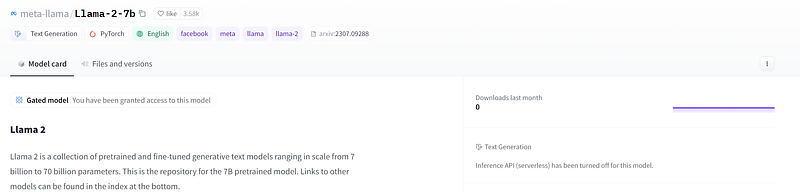
I have already applied, so there’s a sentence in the middle of my screen saying: “You have been granted access to this model”.
Next, we will register and install HuggingFace, in order to authorize the use of open-source libraries.
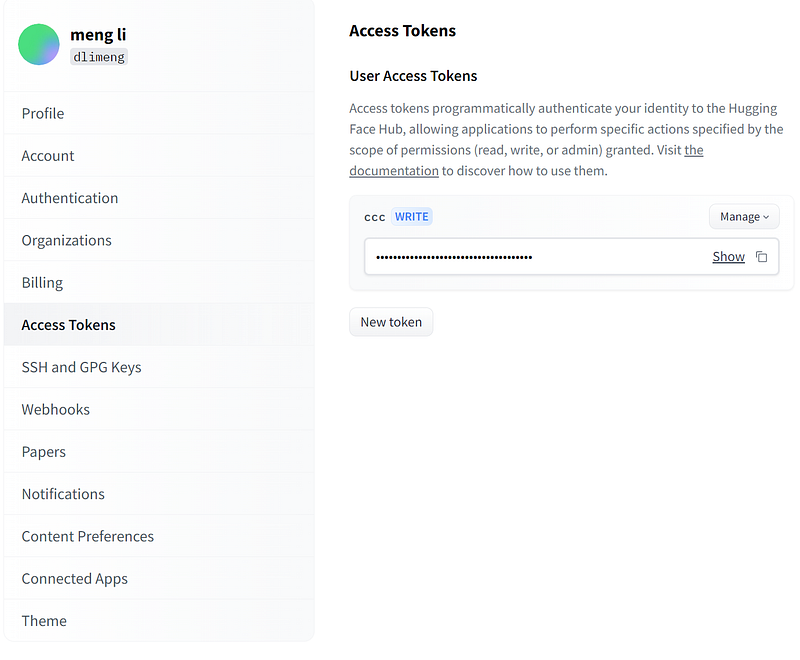
First Step: Register on the official website to obtain an API Token.
Second Step: Install the HuggingFace Library using pip install transformers.
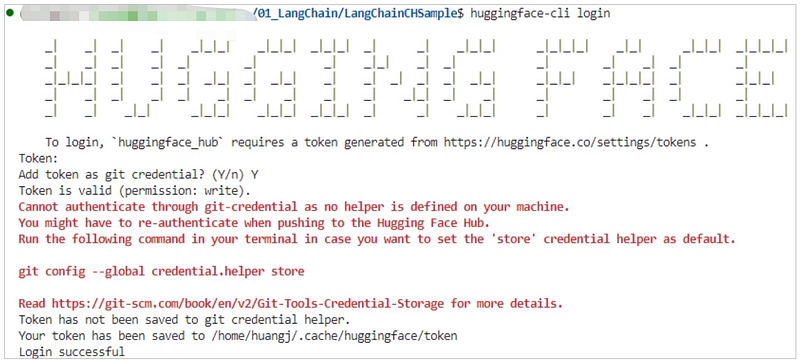
Third Step: Run huggingface-cli login in the command line to set up your API Token.
Llama2 Example Code
```python
# Import necessary libraries
from transformers import AutoTokenizer, AutoModelForCausalLM

# Import HuggingFace API Token
import os
os.environ['HUGGINGFACEHUB_API_TOKEN'] = 'API Token'

# Load the tokenizer for the pre-trained model
tokenizer = AutoTokenizer.from_pretrained("meta-llama/Llama-2-7b-chat-hf")

# Load the pre-trained model
# Use the device_map parameter to automatically load the model onto available hardware devices, such as GPU
model = AutoModelForCausalLM.from_pretrained(
          "meta-llama/Llama-2-7b-chat-hf",
          device_map = 'auto')

# Define a prompt for the model to generate a story based on
prompt = "Can it be possible that transferring Thomas Song from Class A to Class B raises the average IQ of both classes?"

# Use the tokenizer to convert the prompt into a format the model can understand, and move it to the GPU
inputs = tokenizer(prompt, return_tensors="pt").to("cuda")

# Use the model to generate text, setting the maximum number of tokens to generate to 2000
outputs = model.generate(inputs["input_ids"], max_new_tokens=2000)

# Decode the generated tokens into text, skipping any special tokens like [CLS], [SEP], etc.
response = tokenizer.decode(outputs[0], skip_special_tokens=True)

# Print the generated response
print(response)
```
This script is a typical use case for the HuggingFace Transformers library, which offers a wide array of pre-trained models and related tools.
Import AutoTokenizer: This tool is for automatically loading the tokenizer associated with a pre-trained model.
The tokenizer is responsible for converting text into a numerical format that the model can understand.
Import AutoModelForCausalLM: This tool is for loading a causal language model (used for text generation).
Use the from_pretrained method to load the pre-trained tokenizer and model.
Here, device_map = ‘auto’ is used to automatically load the model onto an available device, such as a GPU.
Then, provide a prompt: “Can it be possible that transferring Thomas Song from Class A to Class B raises the average IQ of both classes?” and use the tokenizer to convert this prompt into a format that the model can accept, return_tensors=”pt” indicates it returns PyTorch tensors.
The statement .to(“cuda”) is for device format conversion to GPU because I run the script on a GPU, and it will throw an error without it. If you are using a CPU, you might try removing it.
Finally, use the model’s .generate() method to produce a response.
max_new_tokens=2000 limits the length of the generated text.
Use the tokenizer’s .decode() method to convert the numerical output back into text, skipping any special tokens.
Since it’s a local inference, it’s quite time-consuming.
On my machine, it takes about 30 seconds to 2 minutes to generate results.
HuggingFace Spaces offers trial environments.
Using Code Llama
The model application process has been completed in the aforementioned steps.
Code Llama Example Code
from transformers import AutoTokenizer
import transformers
import torch

model = "codellama/CodeLlama-7b-hf"

tokenizer = AutoTokenizer.from_pretrained(model)
pipeline = transformers.pipeline(
    "text-generation",
    model=model,
    torch_dtype=torch.float16,
    device_map="auto",
)

sequences = pipeline(
    'import socket\n\ndef ping_exponential_backoff(host: str):',
    do_sample=True,
    top_k=10,
    temperature=0.1,
    top_p=0.95,
    num_return_sequences=1,
    eos_token_id=tokenizer.eos_token_id,
    max_length=200,
)
for seq in sequences:
    print(f"Result: {seq['generated_text']}")
HuggingFace Spaces offers a trial environment.
Conclusion
In this era of information overload, we deal with massive amounts of data every day.
Large language models, such as Llama2 and Code Llama, are powerful tools that help us process, understand, and generate textual data.
Through learning and practice, we can better master these technologies and apply them in our work and daily lives.
The Llama2 series has contributed to the current prosperity of open-source large models, and it’s worth giving them a try.
Feel free to leave a comment and join the discussion.
If you enjoyed this story, feel free to subscribe to Medium, and you will get notifications when my new articles will be published, as well as full access to thousands of stories from other authors.
I am Li Meng, an independent open-source software developer, and author of SolidUI, highly interested in new technologies, and focused on the AI and data fields. If you find my content interesting, please follow, like, and share. Thank you!


