
HTTP and everything you need to know about it

HTTP stands for Hypertext Transfer Protocol, and HTTP is the communication protocol used for browsing the web. This protocol uses a message based model where your client makes an HTTP request to a web server and that server responds with a resource which is displayed in the browser.
Every HTTP interaction includes a request and a response. By its nature, HTTP is stateless.
Stateless means that all requests are separate from each other so every request must contain enough information on their own to fulfill the request. That means that each transaction of message based model of HTTP is processed separately from each other.
URL
The URL (Uniform Resource Locator) is probably the most known concept of the Web. It is also one of most important and useful concepts. URL is a web address used to identify resources on the Web.
The idea of the web is structured around the resources, from its beginnings the Web was the platform for sharing text/HTML files, documents, images etc, and as such it can be considered a collection of resources.
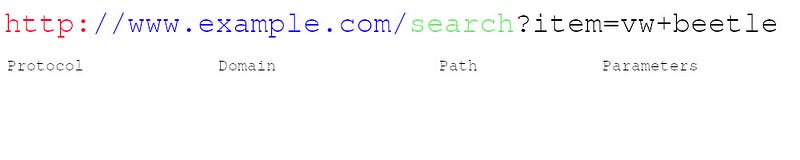
Protocol — Most often they are HTTP (or HTTPS for a secure version of HTTP).
Other notable protocols are:
- File Transfer Protocol (FTP) — is a standard protocol used for transfering of files between a client and a server over a network.
- Simple Mail Transfer Protocol (SMTP) is an standard for email transmission.
Domain — Name that is used to identify one or more IP addresses where the resource is located.
Path —Specifies the resource location on the server. It uses the same logic as a resource location used on the device you are reading this article (i.e. /search/cars/VWBeetle.pdf or C:/my cars/VWBeetle.pdf).
Parameters — Additional data used to identify or filter the resource on the server.
NOTE
When searching for articles and more information about HTTP you may encounter the term URI (or uniform resource identifier). URI is sometimes being used instead of URL but mostly in formal specifications and by people who want to show off :)
HTTP Requests
In HTTP, every request must have an URL address. Additionally, request needs a method. The four main HTTP methods are:
- GET
- PUT
- POST
- DELETE
I will explain these methods, and more, in HTTP Methods section of this article.
And these methods directly correspond to actions:
- read
- update
- create
- delete
All HTTP messages have one or more headers, followed by a optional message body. The body contains the data that will be sent with the request or the data received with the response.
First part of every HTTP request holds three items:
Example:
- GET /adds/search-result?item=vw+beetle HTTP/1.1
When a URL contains a “?” sign means it contains a query. That means it sends parameters of the requested resource.
- First part is a method which tells which HTTP method is used. Most commonly used is the GET method. GET method retrieves a resource from the web server and since GET doesn’t have a message body nothing after the header is needed.
- Second part is a requested URL.
- Third part is a HTTP version being used. Version 1.1. is the most common version for most browsers, however, version 2.0 is taking over.
There are also some other interesting things in a HTTP request:
Referer header — tell the URL from which the request has originated.
User-Agent header — additional information about the browser being used to generate the request.
Host header — uniquely identify a host name, it is necessary when multiple web pages are hosted on the same server.
Cookie header — submit additional parameters to the client.
HTTP Responses
Just like in HTTP requests HTTP responses also consist of three items:
Example:
HTTP/1.1 200 OK
- First part is the HTTP version being used.
- Second part is the numeric code of the result for the request.
- Third part is a textual description of the second part.
There are some other interesting things in a HTTP response:
Server header — information which web server software is being used.
Set-Cookie header — issues the cookie to the browser.
Message body — it is common for a HTTP response to hold a message body.
Content-Length header — tells the size of the message body in bytes.
HTTP Methods
Most common methods are GET and POST, however there are more of them.
GET — used to request data from a specified resource where data is not modified it in any way as GET requests do not change the state of resource.
POST — used to send data to a server to create a resource.
PUT — method to update existing resource on a server by using the content in body of the request.
HEAD — this method has the same function as GET method but with a difference that the return of a HEAD method should not contain body in the response. However, the return will contain same headers as if GET was used. HEAD method is used to check if the resource is present prior of making a GET request.
TRACE — method designed for diagnostic purposes. Response will contain in its body the exact content of the request message.
OPTIONS — this method is used to describe the communication options (HTTP methods) that are available for the target resource.
PATCH — The PATCH method is used to apply partial modifications to a resource.
DELETE — The DELETE method deletes the specified resource.
REST
Representational state transfer (REST) is a architecture style where request and responses contain representation of the current state of the systems resource.
“Normal” way:
REST-style:
I’ll be talking more about REST APIs in my other article so please feel free to check it out.
HTTP Headers
There are three main components that make up the request/response structure. This includes:
- First line
- Headers
- Body/Content
We already talked about the first line in HTTP requests and responses, body function was mentioned and now we will talk about HTTP headers.
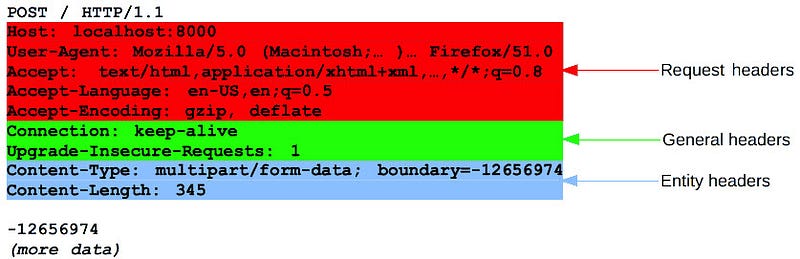
The HTTP headers are added after the First line and are defined as name: value pairs separated by a colon. HTTP headers are used to send additional parameters along with the request or response.
As we already said, the body of the message includes the data to be sent with the request or the data received along with the response.
There are different types of headers we group based on their usage into 4 broad categories:
- General header — Headers that can be used in both requests and response messages and that are independent of the data being exchanged.
- Request header — These headers define parameters for the data requested or parameters that give important information about the client making the request.
- Response header — These headers contain information about the incoming response.
- Entity header — The entity headers describe the content that makes up the body of the message.
HTTP status codes
Every HTTP response message must contain a HTTP status code in its first line, telling us the result of the request.
There are five groups of status codes which are grouped by the first digit:
- 1xx — Informational.
- 2xx — The request was successful.
- 3xx — The client is redirected to a different resource.
- 4xx — The request contains an error of some kind.
- 5xx — The server encountered an error fulfilling the request.
Full list of HTTP Status Response Codes and their explanation: https://developer.mozilla.org/en-US/docs/Web/HTTP/Status
HTTPS (Hypertext Transfer Protocol Secure)
Secure version of HTTP protocol is HyperText Transfer Protocol Secure (HTTPS). HTTPS provides encrypted communication between a browser (client) and the website (server).
In HTTPS, the communication protocol is encrypted using Transport Layer Security (TLS) or Secure Sockets Layer (SSL).
Protocol is therefore also often called as HTTP over TLS, or HTTP over SSL.
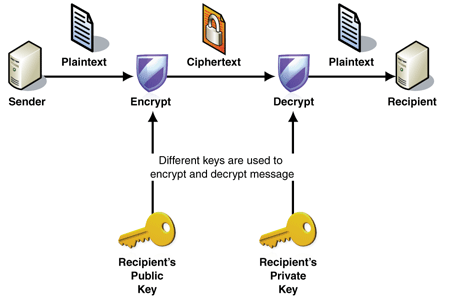
Both the TLS and SSL protocols use an asymmetric encryption system. Asymmetric encryption system uses a public key (encryption key) and a private key (decryption keys) to encrypt a message. Anyone can use the public key to encrypt a message. However, private keys are secret, and that means that only the intended receiver can decrypt the message.
SSL/TLS handshake
When you request a HTTPS connection to a website, the website sends its SSL certificate to your browser. That proces where your browser and website initiate communication is called the “SSL/TLS handshake”. The SSL/TLS handshake involves a series of steps where browser and website validate each other and start communication through the SSL/TLS tunnel.
As you probably noticed, when a trusted secure tunnel is used during in a HTTPS connection, the green padlock icon is displayed in the browsers address bar.

Benefits of HTTPS
The major benefits of a HTTPS are:
- Customer information, like credit card numbers and other sensitive information, is encrypted and cannot be intercepted.
- Visitors can verify you are a registered business and that you own the domain.
- Customers know they are not suppose to visit sites without HTTPS, and therefore, they are more likely to trust and complete purchases from sites that use HTTPS.
Thank you for reading! Check out more articles like this, and other fun stuff I do on my Github profile: https://github.com/GoranAviani

Join our community Slack and read our weekly Faun topics ⬇