
How variables are saved in Python and Rust. Side by Side 5: list/array
Series article to show how variables work in Python and Rust. Give us a better understanding of both languages. This is the 5th article about list/array.
Background
In this series of articles, I will show how variables work in Python and Rust side by side such that we could have a better understanding of both. In this article, we will check how list/array works in both.
In addition, I am not comparing which language is better. They all have their pros and cons. Also, please comment if there is anything that my understanding is wrong.
Environment
Python: version 3.9.7
Rust: 1.56.1
OS: 64bits Linux 5.12.19–1-MANJARO
Use CPython as the Interpreter of Python
`list` data type in Python
In Python, we could add new elements into list, remove elements from list, and modify a specific element in list. It’s really powerful. Let’s dive in and see how the list is saved in memory. Below is how the PyListObject defined in CPython:
typedef struct {
    PyObject_VAR_HEAD
    /* Vector of pointers to list elements. list[0] is ob_item[0], etc. */
    PyObject **ob_item;
    /* ob_item contains space for ‘allocated’ elements. The number
    * currently in use is ob_size.
    * Invariants:
    * 0 <= ob_size <= allocated
    * len(list) == ob_size
    * ob_item == NULL implies ob_size == allocated == 0
    * list.sort() temporarily sets allocated to -1 to detect mutations.
    *
    * Items must normally not be NULL, except during construction when
    * the list is not yet visible outside the function that builds it.
    */
    Py_ssize_t allocated;
} PyListObject;
The PyObject_VAR_HEAD is 24 bytes struct with below three fields: (it’s not exactly like the original code of CPython, just showing the structure)
struct {
    Py_ssize_t obj_refcnt;
    PyTypeObject *ob_type;
    Py_ssize_t ob_size;
};
The struct of PyListObject is quite straightforward. Let’s calculate the memory usage for an empty list first, x = [].
Since the list is empty, the ob_item will hold a NULL (8 bytes) and allocated is 8 bytes as well. The the total size of PyListObject should be: 24 bytes + 8 bytes + 8 bytes = 40 bytes. Let’s check whether the result is the same with sys.getsizeof(x).
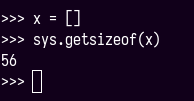
Oops! The output is 56 which has 16 bytes more than what we calculated.
Actually, the extra 16 bytes are the size of PyGC_Head. The reason is the function, getsizeof, will add size of list and the size of PyGC_Head. (This is the source code of adding GC head in CPython)
In addition, we noticed that there is a comment in PyListObject:
/ * ob_item contains space for ‘allocated’ elements. The number
  * currently in use is ob_size.
… */
It means the allocated memory could be larger than the number of elements are saved in list. Still, let’s check this difference the hard way.
Below is the code will add 10 elements into the list, and print out the size each loop.
x = []
for i in range(1, 11):
    x.append(i)
    print(f”Added {i}: size {sys.getsizeof(x)}”)
The output is below:
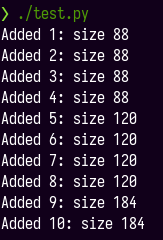
We could see that the list allocated 88 – 56 (empty list) = 32 bytes. When adding 1st element, it created 3 more allocations. And then, after filling all 32 bytes by 4 elements, the list will increase the allocation again when inserting a new one. This is how Python allocates memory and adds elements into list dynamically.
But wait! The size of int 1 should be 28 bytes, which we already learned from the 2nd post of this series. Why list only contains 8 bytes for each int?
Actually, the ob_item saves the pointer which points to the target PyObject. The pointer size is 8 bytes, although different PyObjects could have different sizes. The below graph is showing how the list uses the memory.
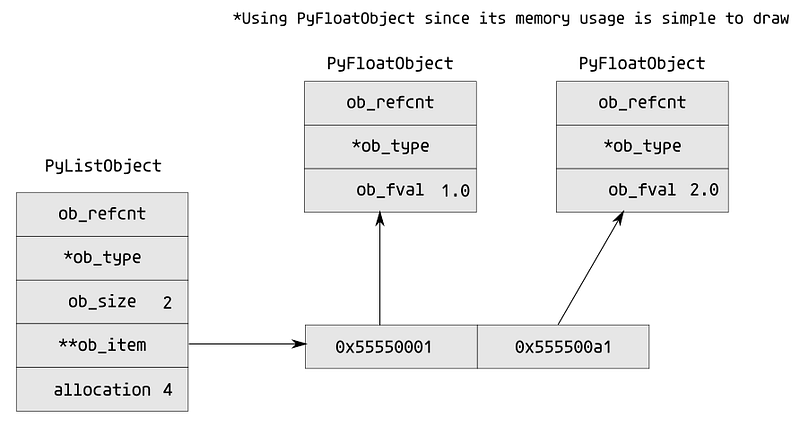
To convince us, let’s add a single-element list into our list x in the above code. I will change the 3rd line in the above code to be x.append([i]). Let’s see the output:
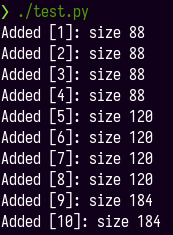
The output is exactly the same with inserting int. This could convince us that the list uses pointer in memory.
One more thing. If we check sys.getsizeof([1]) directly, it returns 64 instead of 88 which shows in the above example. The difference between two is sys.getsizeof([1]) is checking a new generated list (PyList_New function), but in the above example, the 1st loop result, [1], is used PyList_Append function.
`Array/Vec` in Rust
[T]
array in Rust could be defined by [T; N], T is element type and N is a non-negative number. Like the below examples:
let a = [1, 2, 3]; // Rust compile will help us to find out the data type.let b: [i32; 3] = [1, 2, 3];When the array is created, continuous stack memory is allocated in Rust. Using gdb, we could see the below memory usage for array a:
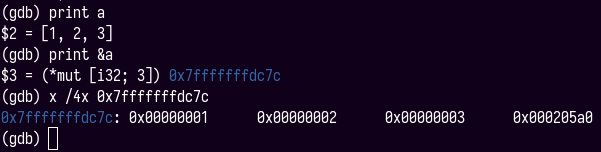
The size of an array is the size of each elements times the number of elements in the array, size(T) * N. For above a, the size is 4 bytes * 3 = 12 bytes.
Normally, when we use the array in our code, we will use the slice and pass it to other functions. &[T] is the same with &str, a fat pointer, which includes a pointer to the data and the length. SO, when we run std::mem::size_of::<&[i32]>(), it will output 16.
array is good, but we have to know the size of it at compiling time. It cannot be dynamic adding or removing elements. The struct Vec and Box<[T]> will help us to solve this dynamic problem.
Vec<T>
Vec<T> is one of the smart pointers in Rust. It contains a pointer to data, capacity, and length. The elements T of Vec are saved in the heap. Vec<T> likes the list in Python, we could add and remove elements. Same with String, the Vec<T> takes 24 bytes to save the smart pointer.
For instance, if we define let x = vec![1, 2, 3];. The smart pointer looks like below in memory:
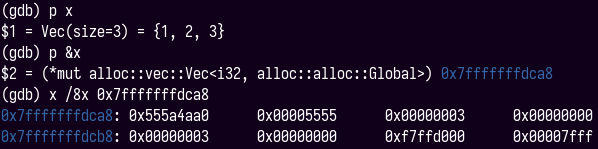
We could see that both the capacity and the length are 3. The pointer points to 0x5555555a4aa0.
And the pointed data memory likes below:

In addition, if we define a Vec<T> as mutable, then we could add and remove elements. But when adding elements, if the new Vec<T> length is larger than the capacity, a new memory may be reallocated, which can be slow. Please read more at the document about Capacity and reallocation.
Box<[T]>
Box<[T]> has the same property with [T], but we could define the fixed-length array at the running time instead of the compile time. We could use create Vec and add elements into it. After the Vec fills all necessary elements, we could use function into_boxed_slice to convert it into Box<[T]>. It will drop any excess capacity.
Of course, we could define Box<[T]> like Box::new([0; 100]). This operation will create an array in the stack first and then copy data into the heap with Box wrapper, when we are using the build mode. It means if the array is super large, the program will have stack overflow. But this operation got optimized in release mode, the array will be directly created in the heap with Box wrapper.
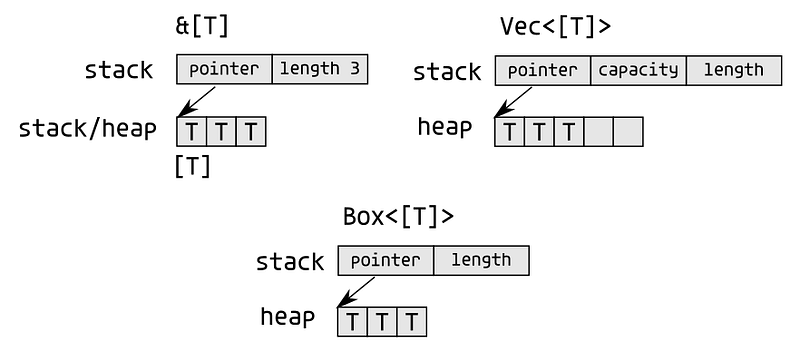
The below graph shows how the array, array slice, Vec<T> and Box<[T]> are saved in the memory in Rust:
Conclusion
Above is how list/array is saved in Python and Rust. Python has a single type list. But in Rust, there are several ways to represent it.
Thanks for reading. Next article, we will check how tuple works.
Please feel free to follow me on Twitter @marshal_shi or LinkedIn @marshal-shi. I like to meet and talk with people, share our different experiences, and make the world slightly better.


