
How URL Shorteners Work and How to Build One
Explore how long URLs get shortened for ease of sharing, concealing malicious links, and better looks

URLs are everywhere. You send them; you receive them; you use them in your web browser. Sometimes, though, they can get quite long so that they become aesthetically annoying. This is when URL shorteners come in handy. They literally consist in a tool that shortens URLs and are widely used for a variety of reasons, including:
- Shortening URLs to make them fit better in a web page or to be humanly copyable by hand, if anyone still does that.
- Hiding malicious URL behind an anonymous shortened one. The hidden link may point to a hacker’s website that might get you malware or trick you into giving out sensitive information.
- Traffic tracking to perform analysis on who visits your pages through the URL shortener.
- Rickrolling.
How do URL shorteners work
Now I’ll briefly go over what happens when you use a URL shortener. I’ll then provide a more detailed explanation in the code section.
First things first, the user inserts his long URL into a form on the shortener’s web page. It then gets sent to the server, which validates the link and checks for potential injections.
https://github.com/nic-obert/virtual-machine/blob/main/src/assembler/arguments_table.py#:~:text=)%2C-,%27mov%27%3A%20(,-%23%20RegisterAt this point, the server tries to insert the provided URL into a database. If successful, it will return to the user an identification code in the form of a short URL that gets used to retrieve the stored long link. Now the user can share the shortened URL in a web page or by any other mean.
https://my.shortener/?id=7486Some time later, another user inserts the shortened URL in a web browser. The server receives the request with the identification code, which will be used to retrieve the long URL from the database. If the resource exists, the user will be redirected to the target. Else, he should be redirected to an error page explaining the requested URL doesn’t exist.
Build a URL shortener with Python, Flask and SQLite
In the following guide I’ll be using Python for the code example. I believe it’s the best choice when it comes to simplicity and readability; anyone should be able to understand its English-like syntax. Anyway, any other tech stack will do the job just fine.
Let’s start with the simplest part, the web page. The main idea is to create an HTML form the user can enter his long URL in like this one:
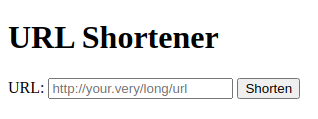
And the code for this simple interface:
The form takes a URL from the user and sends it to the /route of the server via a GET request.
The second code block may look unusual. In fact, that’s not regular HTML, but the Jinja notation. Jinja is a powerful tool used to insert logic inside HTML documents with a Python-like syntax. In this case, it checks if the url variable (containing the shortened URL) is set. If it is, then show it; if it’s not, don’t show anything.
I’ve placed this HTML file in a folder called templates, a default name for template files in Flask, a micro web framework written in Python. The final folder structure will look like this:
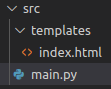
Now, let’s move to the backend part. I’ve decided to break it down in small bits, so that it’s easier to digest.
This first snippet is quite self-explanatory. I import some packages we’ll use in the code. I then create a Flask application and choose a name for the database file. The last code block is Python’s way of defining a main function. In there I first check and initialize the database (we’ll define initialize_database() later) and then run the app in debug mode.
This is the code snippet and the following are the database interface. These functions will be used to interact with it on a higher level. Note that in this code snippet I am using Python’s type hinting features in order to make the code clearer. If you’re not familiar with this notation, I suggest you checked my article of type hinting in Python.
Firstly, I import some packages we’ll need in the code. The function initialize_database() first checks if the database file exists. If it does, it connects to it and gets a cursor, an interface used to execute queries. It then evaluates a SQL query to check whether the database already contains a table named urls. If the table doesn’t exist, it gets created.
If the database file doesn’t exist, it gets created along with the urls table. The table holds an integer as its primary key, used to identity the requested long URL. The text field simply stores the long URL.
This function takes an integer, the long URL id, and returns the URL if it exists. If it doesn’t, it returns None(in other languages it may be translated as NULL or null).
A connection to the database gets created, along with a cursor. A SQL query to fetch the requested URL corresponding to the provided id is executed. Its result is then returned, after checking data actually contains anything.
The store_url() function behaves similarly to the one I’ve explained before. It connects to the database and executes a query to insert the provided long URL into the urls table of the database. It then returns the integer id of the newly created entry in the table.
The exists_url() function connects to the database and checks whether the provided URL is already present in the urls table with a SQL query. The last expression is used to interpret the presence of a return value of the cursor.fetchone() as a boolean value. Specifically, it returns True if the URL is not None (aka it exists); else, returns False.
The get_url_id() function connects to the database and selects and returns the integer id corresponding to the provided long URL.
Now, let’s move to the code for receiving the user’s requests and respond.
Here I create a route for the application that accepts GET requests. The route name is /, the base route. If the website address domain name is “my.shortener”, the / route corresponds to the http(s)://my.shortener/ URL.
Firstly, it checks if any id has been sent as an argument in the GET request. Such a request’s URL would look like this, where id is used to retrieve the long URL from the database.
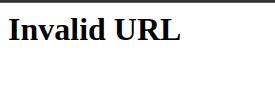
http(s)://my.shortener/?id=4513If an id has been provided, it gets validated. In this case, it must be an integer number. In case it’s not, show an error page. It’s then converted to an integer (from a string) and used to retrieve the long URL. If the latter exists, redirect the user to it; else, show an error page.
The second code block gets executed only if the id parameter is set. Firstly, it’s checked whether the url GET request parameter is set. If it is, call the shorten_url() function to get it shortened; we’ll define it later. url.strip() removes trailing and leading spaces in the string. Finally, the shortened URL is shown to the user in the main web page.
The render_template() function takes as parameters the HTML template file name, which is contained in the templates folder I’ve talked about before. Optionally, you can provide some keyword arguments (in this case url=shortened_url) that will be used by the Jinja templating engine to create the web page.
In case none of the GET request arguments (url and id) are set, just return the web page.
The shorten_url() function takes the long URL as a parameter and returns a short link used to access the given resource. It first checks if the provided long URL already exists and gets its id. If it’s not present in the database, store it and get the id.
Finally, build and return the short URL. request.base_url is the base URL that has been requested, for example http(s)://my.shortener/. Then the id GET request parameter gets added using the ? followed by the named argument.
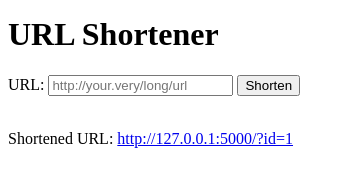
Note that the server address is 127.0.0.1:5000(localhost at port 5000). This means you cannot access the URL shortener server outside your local machine. Continue reading to fund out how to access the website from an external network.
In case you were interested, here’s the GitHub repository I’ve based this article on. You can find the full source code there.
Further Tips
This project is just a demonstration of how URL shorteners work. My approach is definitely not the most secure one, as it doesnt’t perform checks for malicious URLs, nor could handle efficiently thousands of users.
You could also implement the possibility to create custom string links, such as http(s)://my.shortener/science-presentation.
To make the URL shortener accessible from outside your local machine network or local area network, you might want to rely on a cloud service provider to host your server. This approach may save you some time, as you wouldn’t have to do the server setup yourself. Moreover, many service providers even offer free plans for individuals. I suggest you checked out my article on free cloud service providers for more information:
Thanks for reading!


