
How touch events are delivered in Android
This is a repost of an answer I wrote on Stack Overflow.
When a user touches the screen, who gets notified of the touch? In what order are views notified?
Let’s take a look at a visual example.
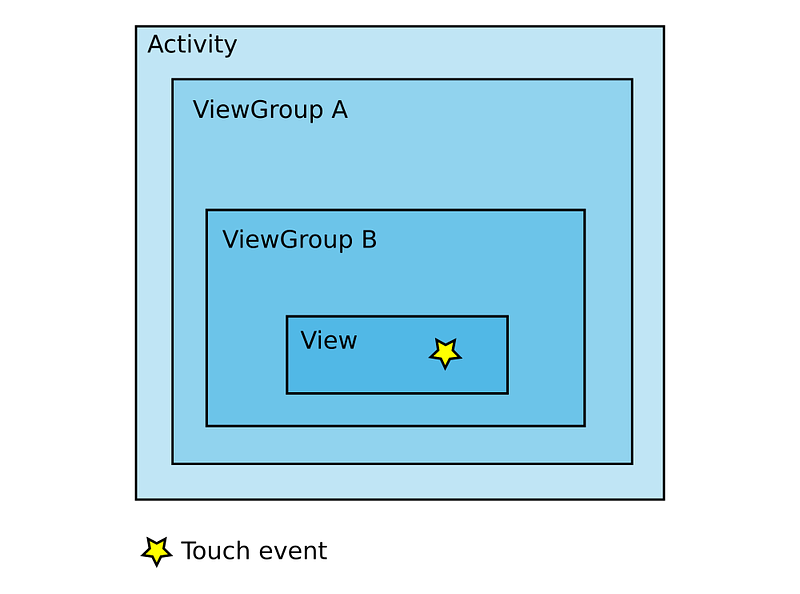
When a touch event occurs, first everyone is notified of the event, starting at the Activity and going all the way to the view on top. Then everyone is given a chance to handle the event, starting with the view on top and going all the way back to the Activity. So the Activity is the first to hear of it and the last to be given a chance to handle it.
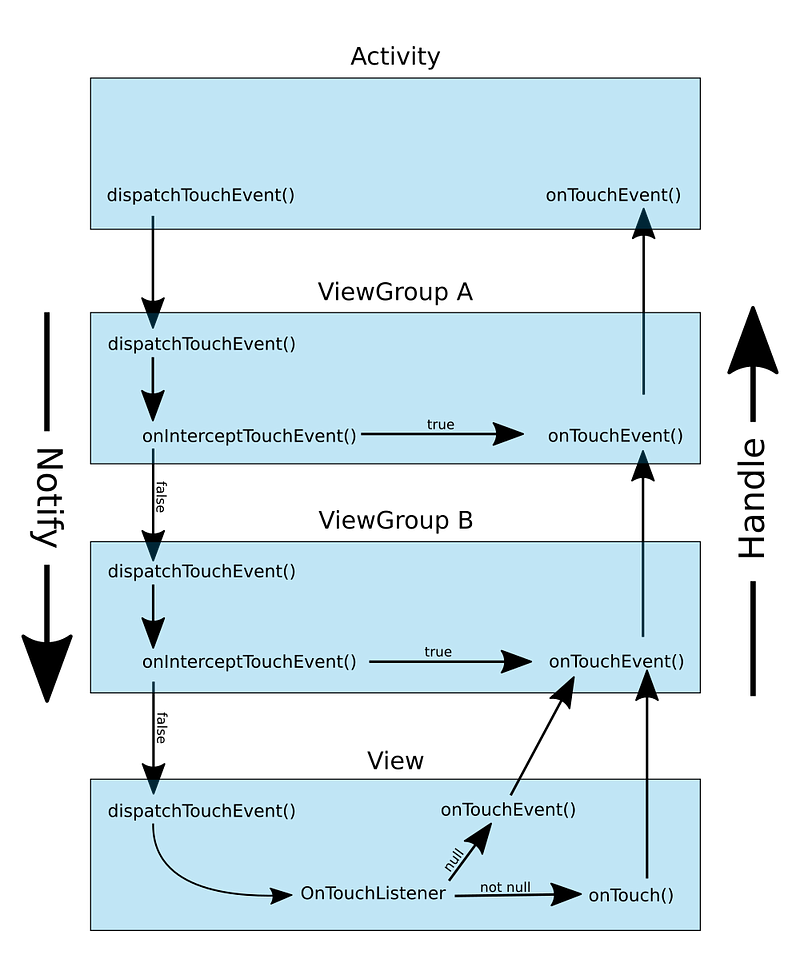
If some ViewGroup wants to handle the touch event right away (and not give anyone else down the line a chance at it) then it can just return true in its onInterceptTouchEvent(). An Activity doesn't have onInterceptTouchEvent() but you can override dispatchTouchEvent() to do the same thing.
If a View (or a ViewGroup) has an OnTouchListener, then the touch event is handled by OnTouchListener.onTouch(). Otherwise it is handled by onTouchEvent(). If onTouchEvent() returns true for any touch event, then the handling stops there. No one else down the line gets a chance at it.
More detailed explanation
The above diagram makes things a little more simple than they actually are. For example, between the Activity and ViewGroup A (the root layout) there is also the Window and the DecorView. I left them out above because we generally don’t have to interact with them. However, I will include them below. The description below follows a touch event through the source code. You can click a link to see the actual source code.
(Update: the source code has been updated so the line numbers are off now, but clicking the links will still get you to the right file. Just do a search for the method name.)
- The Activity’s
dispatchTouchEvent() is notified of a touch event. The touch event is passed in as aMotionEvent, which contains the x,y coordinates, time, type of event, and other information. - The touch event is sent to the Window’s
superDispatchTouchEvent().Windowis an abstract class. The actual implementation isPhoneWindow. - The next in line to get the notification is DecorView’s
superDispatchTouchEvent().DecorViewis what handles the status bar, navigation bar, content area, etc. It is actually just aFrameLayout subclass, which is itself a subclass ofViewGroup. - The next one to get the notification (correct me if I’m wrong) is the content view of your activity. That is what you set as the root layout of your activity in xml when you create the layout in the Android Studio’s Layout Editor. So whether you choose a
RelativeLayout, aLinearLayout, or aConstraintLayout, they are all subclasses ofViewGroup. And ViewGroup gets notified of the touch event indispatchTouchEvent(). This is the ViewGroup A in my diagrams above. - The
ViewGroupwill notify any children it has of the touch event, including anyViewGroupchildren. This is ViewGroup B in my diagrams above. - Anywhere along the way, a
ViewGroupcan short-circuit the notification process by returningtrueforonInterceptTouchEvent(). - Assuming no
ViewGroupcut the notifications short, the natural end of the line for the notifications is when the View'sdispatchTouchEvent() get's called. - Now it is time, to start handling the events. If there is an
OnTouchListener, then it gets the first chance at handling the touch event withonTouch(). Otherwise, the View'sonTouchEvent() gets to handle it. - Now all the ViewGroups recursively up the line get a chance to handle the touch event in the same way that
Viewdid. Although, I didn't indicate this in the diagram above, aViewGroupis aViewsubclass, so everything I described aboutOnTouchListener.onTouch()andonTouchEvent()also applies to ViewGroups. - Finally, if no one else wanted it, the Activity also gets the last chance to handle the event with
onTouchEvent().
FAQ
When would I ever need to override dispatchTouchEvent()?
Override it in the Activity if you want to catch a touch event before any of the views get a chance at it. For a ViewGroup (including the root view), then just override onInterceptTouchEvent() and onTouchEvent().
When would I ever need to override onInterceptTouchEvent()?
If you just want to spy of the touch notifications that are coming in, you can do it here and return false.
However, the main purpose of overriding this method is to let the ViewGroup handle a certain type of touch event while letting the child handle another type. For example, a ScrollView does this to handle scrolling while letting its child handle something like a Button click. Conversely, if the child view doesn't want to let its parent steal its touch event, it can call requestDisallowTouchIntercept().
What are the touch event types?
The main ones are
ACTION_DOWN- This is the start of a touch event. You should always returntruefor theACTION_DOWNevent inonTouchEventif you want to handle a touch event. Otherwise, you won't get any more events delivered to you.ACTION_MOVE- This event is continuously fired as you move your finger across the screen.ACTION_UP- This is the last event of a touch event.
A runner up is ACTION_CANCEL. This gets called if a ViewGroup up the tree decides to intercept the touch event.
You can view the other kinds of MotionEvents here. Since Android is multi-touch, events are also fired when other fingers (“pointers”) touch the screen.
Further study
- Android onTouchEvent Part 1, Part 2, and Part 3 (YouTube video — good summary of some of the links below)
- Mastering the Android Touch System (thorough video by Google developer)
- Android UI Internal : Pipeline of View’s Touch Event Handling
- Managing Touch Events in a ViewGroup (Android docs)
- Input Events (Android docs)
- Gestures and Touch Events


