
How to write own connector to Rest API in Spark Databricks
Access for free via a friend’s link https://databrickster.medium.com/how-to-write-own-connector-to-rest-api-in-spark-databricks-42321a5021dd?sk=89c9b3cf0c1d008d54c9d0bce73ac769
Imagine all a data engineer or analyst needs to do to read from a REST API is:
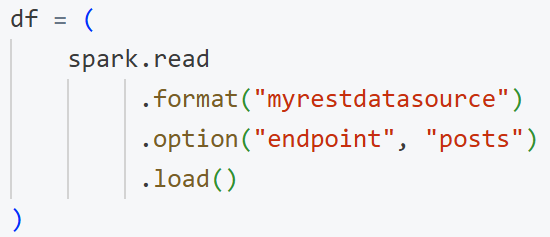
No direct requests calls, no manual JSON parsing — just Spark in databricks notebook. That’s the power of a custom Spark Data Source. In this article, we’ll explore how to build such a connector in Python using Spark’s newer Python Data Source API.
We’ll demonstrate using the JSONPlaceholder public API, which provides fake JSON data.
The Big Picture
In many organizations, analysts and data scientists often need to grab data from internal or external REST APIs. Typically, they end up writing boilerplate code:
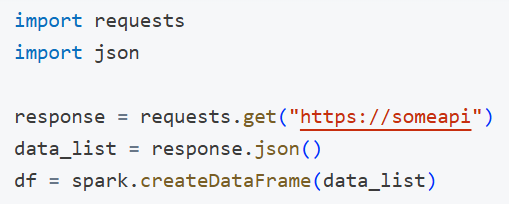
This approach is repeated in multiple notebooks or pipelines — leading to duplication, inconsistency, and lots of maintenance headaches. By creating one custom connector, you:
- Hide the complexity of making HTTP requests.
- Standardize on a single approach for error handling, authentication, etc.
- Let anyone do a simple .format(“myrestdatasource”).option(“endpoint”, “…”).load() to access the data.
We can do this entirely in Python using the new Python Data Source API (already available in Databricks).
Quick Demo: How an Analyst Would Use It
Imagine you’ve created a package named myrestdatasource that does all the heavy lifting. Your analysts could then do the following:
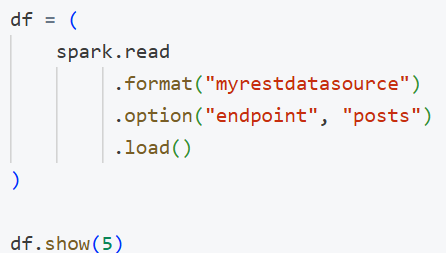
Boom! They get a Spark DataFrame with columns like userId, id, title, and body.
No more repetitive code — just a consistent DataFrame interface.
Implementation: The Core Classes
Below is a minimal example of a data source named MyRestDataSource. For demonstration, we’ll use the public JSONPlaceholder API (a fake REST service).
Project structure:
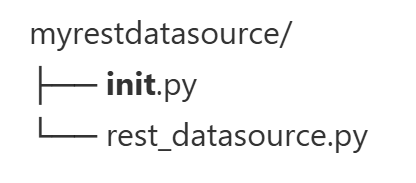
rest_datasource.py:
import requests
from pyspark.sql.datasource import DataSource, DataSourceReader, DataSourceWriter, WriterCommitMessage
from pyspark.sql.types import (
    StructType,
    StructField,
    StringType,
    IntegerType
)
from typing import Iterator, List
from pyspark.sql.types import Row
from dataclasses import dataclass

# -----------------------------------------------------------------------------
# 1) Define a custom DataSource
# -----------------------------------------------------------------------------
class MyRestDataSource(DataSource):
    """
    A custom data source for reading (and optionally writing) data from a REST API.

    Example options:
    - endpoint: e.g. 'posts' => https://jsonplaceholder.typicode.com/posts
    - method: (for writes) e.g. 'POST', 'PUT'
    """

    @classmethod
    def name(cls):
        # The short name used in spark.read.format("myrestdatasource")
        return "myrestdatasource"

    def schema(self):
        """
        Return a schema string (or a StructType) that Spark can use.
        For this example, we assume a fixed schema for JSONPlaceholder 'posts':
          userId (int), id (int), title (string), body (string)
        """
        return "userId int, id int, title string, body string"

    def reader(self, schema: StructType):
        """
        Create and return a DataSourceReader for batch reads.
        """
        return MyRestDataSourceReader(schema, self.options)

    def writer(self, schema: StructType, overwrite: bool):
        """
        Create and return a DataSourceWriter for batch writes (if needed).
        """
        return MyRestDataSourceWriter(self.options, overwrite)


# -----------------------------------------------------------------------------
# 2) Define a DataSourceReader to handle reads
# -----------------------------------------------------------------------------
class MyRestDataSourceReader(DataSourceReader):
    def __init__(self, schema: StructType, options: dict):
        self.schema = schema
        # options is a dictionary of strings
        self.options = options

    def read(self, partition):
        """
        Called on each partition to return an iterator of rows.
        For simplicity, this example does NOT implement multiple partitions.
        """
        base_url = "https://jsonplaceholder.typicode.com"
        endpoint = self.options.get("endpoint", "posts")  # default to 'posts'
        url = f"{base_url}/{endpoint}"

        # Make a GET request
        resp = requests.get(url)
        resp.raise_for_status()
        data = resp.json()

        # data is a list of dicts (JSONPlaceholder format).
        # We yield tuples matching the schema [userId, id, title, body].
        for item in data:
            yield (
                item.get("userId"),
                item.get("id"),
                item.get("title"),
                item.get("body"),
            )

    def partitions(self):
        """
        If you want multiple partitions, you would define them here.
        For now, we'll return a single partition.
        """
        from pyspark.sql.datasource import InputPartition
        return [InputPartition(0)]


# -----------------------------------------------------------------------------
# 3) (Optional) Define a DataSourceWriter to handle writes
# -----------------------------------------------------------------------------
@dataclass
class SimpleCommitMessage(WriterCommitMessage):
    partition_id: int
    count: int

class MyRestDataSourceWriter(DataSourceWriter):
    """
    This is a minimal example of writing to a REST API.
    JSONPlaceholder won't actually persist the data, but let's illustrate.
    """

    def __init__(self, options: dict, overwrite: bool):
        self.options = options
        self.overwrite = overwrite

    def write(self, rows: Iterator[Row]) -> WriterCommitMessage:
        """
        Called on each partition to write data.
        Return a commit message for the partition.
        """
        from pyspark import TaskContext
        context = TaskContext.get()
        partition_id = context.partitionId()

        base_url = "https://jsonplaceholder.typicode.com"
        endpoint = self.options.get("endpoint", "posts")
        url = f"{base_url}/{endpoint}"
        method = self.options.get("method", "POST").upper()

        count = 0
        for row in rows:
            count += 1
            # Convert row to a dict for JSON
            payload = row.asDict()
            if method == "POST":
                resp = requests.post(url, json=payload)
            elif method == "PUT":
                resp = requests.put(url, json=payload)
            else:
                raise NotImplementedError(f"Method {method} not supported.")
            if not resp.ok:
                raise RuntimeError(
                    f"Failed to write row {payload}, status: {resp.status_code}"
                )

        return SimpleCommitMessage(partition_id=partition_id, count=count)

    def commit(self, messages: List[SimpleCommitMessage]) -> None:
        total_count = sum(m.count for m in messages)
        print(f"SUCCESS: Wrote {total_count} rows to REST API.")

    def abort(self, messages: List[SimpleCommitMessage]) -> None:
        print(f"ABORT: Some tasks failed to write to the REST API.")
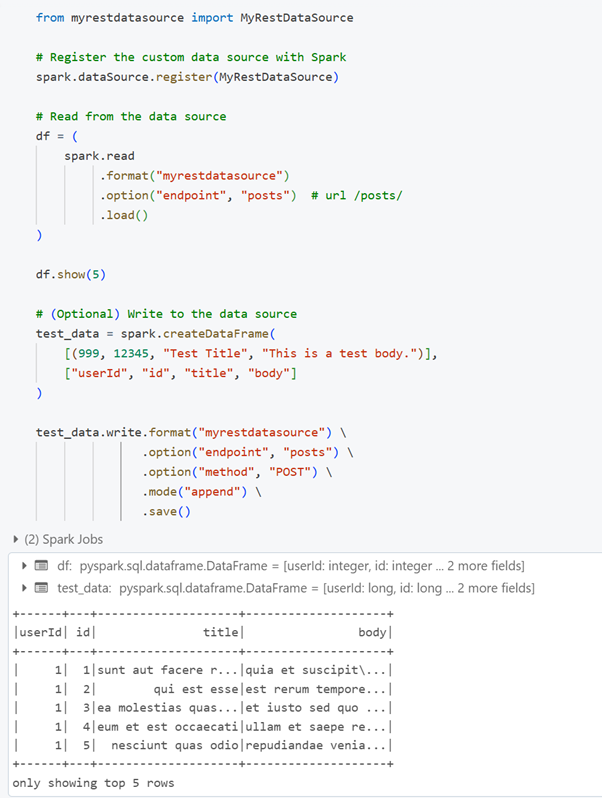
Using in Databricks
To use your data source in Databricks notebook:
Packaging as a Wheel
To share this connector with your team, you can package it as a wheel and upload it to volumes.
Conclusion
By wrapping REST logic into a custom Spark Python Data Source:
- Analysts get a single-line interface to fetch data:

- Engineers standardize how REST calls happen (pagination, error handling, auth tokens) in one place.
- Teams can version and reuse the connector as a wheel in Databricks.
With Spark Python Data Source API, you can create your own connectors for essentially any REST or proprietary endpoint, unlocking consistent, streamlined data ingestion for your entire organization.
Happy coding, and may your analysts never have to write requests code again!
The code used in that article can be downloaded from:

If you like this blog post, consider buying me a coffee :-) https://ko-fi.com/hubertdudek


