One minute Python
3 Ways To Write Numbers In Python

There are a few different ways to write numbers in Python that can be useful in different situations.
The standard way
Just type all digits of the number:
Summary
The website content provides an overview of three methods for writing numbers in Python, including standard notation, the use of underscores for readability, and scientific notation for conciseness with large numbers.
Abstract
The article "3 Ways To Write Numbers In Python" discusses different numeric representations in Python code. It begins by stating the standard way of writing numbers by typing out all digits. It then introduces the use of underscores in numbers with more than one digit to enhance readability, especially for large numbers where it can be unclear how many zeros are involved. Lastly, the article covers scientific notation, which is particularly useful for very large numbers with multiple zeros, allowing developers to represent such numbers more succinctly using an 'e' or 'E' followed by an exponent. The author, Jacob Ferus, provides examples and images to illustrate these concepts and invites readers to explore more Python content through a provided reading list and a referral link for a Medium membership.
Opinions

There are a few different ways to write numbers in Python that can be useful in different situations.
Just type all digits of the number:
Any number with more than one digit can include underscores between the digits (but not next to the decimal separator). This is useful to increase readability, e.g. is this 100 million or a billion? The previous numbers can be written:
More clear, isn’t it?
With very large numbers, scientific notation can be useful to show how many digits are included without typing them out. This is especially true when there are many zeros. To do this an e or E followed by an integer can be used at the end of a number to multiply it by 10 to the power of the integer following e/E. For instance:
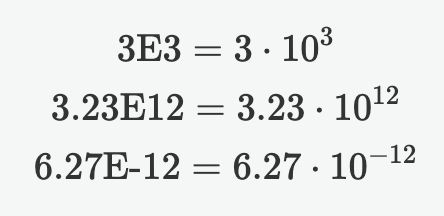
In Python:
If you’re interested in reading more articles about Python, check out my reading list below:
If you’d like to get a Medium membership you can use my referral link if you wish. Have a nice day.
Austin StarksIt literally took one try. I was shocked.
Alexander NguyenEveryone is hiring.
Abhay ParasharBoost Your Productivity with These Time-Saving Python Solutions
Go beyond the basics: advanced features to make the most of Jupyter Notebooks
Anshul KummarThe end of an era.