
How to Write Expert Prompts for ChatGPT (GPT-4) and Other Language Models
A beginner-friendly guide to prompt engineering with LLMs

Prompt Engineering is a fancy way to say, “Write better and better instructions for an AI model until it does exactly what you want.”
Writing prompts is a bit like riding a bike. You don’t need a Ph.D. in mechanical physics to learn how to keep your balance. A bit of theory can help but the most important part is trial and error.
Consider this guide as the “bit of theory” that will help you prepare for riding the AI bike. You’ll find a list of techniques illustrated with explanations, examples, and templates you can test on your favorite models.
The guide focuses on ChatGPT (GPT-4), but every single technique shared below applies to other Large Language Models (LLMs) like Claude and LLaMA.
Table of contents
  What's in this guide?

💡 Why should you care about Prompt Engineering?
💡 Why prompt is engineering harder than you think?
💡 You don't need prompt ideas, you need problems
💡 Watch out for AI hallucinations

🟢 The Basics of Prompting
🟢 Specify the context (also called "Priming")
🟢 Specify the desired format
🟢 Use <placeholders>
  ∘ How to use placeholders as parameters
  ∘ How to use placeholders as instructions
🟢 Specify the style/tone
🟢 Specify the length of the desired response
🟢 Specify the target audience
🟢 Many-Examples Prompting
🟢 Temperature Control
🟢 Zero-Shot Prompting (no examples)
🟢 Few-Shot Prompting (several high-quality examples)
🟢 Zero-Shot/Few-Shot - The simple version

💡 In-context Learning vs. Chat History

🟡 Chain of Thought Prompting
  ∘ Zero-Shot Chain of Thought
  ∘ Few-Shot Chain of Thought
🟢 Role Prompting
🟢 Knowledge Generation Prompting
  ∘ Knowledge Generation Prompting and ChatGPT Plugins
🟠 Knowledge Integration Prompting*
  ∘ Knowledge Integration* and Microsoft Edge
🟠 Directional Stimulus (DS) Prompting
🟡 Recursive Criticism and Improvement (RCI) Prompting
🟡 Self-Refinement Prompting
🟡 Reverse Prompt Engineering
🟡 Prompt Revision
🟡 Program Simulation Prompting
🟠 All-In-One (AIO) Prompting*
🟢 Template for All-In-One (AIO) Prompting
🟢 More examples of All-In-One Prompting*
  ∘ Dolores, the Email Muse
  ∘ Robert Ford, the Coding Master
  ∘ Lee Sizemore, the Outlandish Chef
  ∘ Maeve the Mastermind

💡 Iterate until you have to revert
💡 With great power…

Conclusion

References (in no particular order)

Contact section
Disclaimer:
Although this guide is skewed towards ChatGPT, I have no personal interest in promoting the product. I’m not sponsored by OpenAI, Microsoft, or anyone else.
What’s in this guide?
The guide includes seven “Good to know” sections and more than 25 prompt engineering techniques. Each section starts with an icon that indicates its type, as shown below:
- 💡 “Good to know” section.
- 🟢 Beginner-friendly technique.
- 🟡 Intermediate technique.
- 🟠 Advanced technique.
“Good to know” sections provide specific points to keep in mind when writing prompts. Beginner-friendly techniques can be used right away. Intermediate and advanced techniques require preparation and a pinch of patience.
All of the techniques discussed in the guide derive from AI research papers and first-hand experience. Citations and direct links are available at the end of the guide. There are two techniques I (re)named to make them easier to remember. They are marked with a star like this*.
Each prompt has the following format:
[Title of the prompt]

Prompt content: Content of the prompt that sometimes includes <placeholders>.
<placeholders> are a tool you use to make better prompt templates.

(Comments that are not part of the prompt are written between parenthesis like this)

## (The two hashtags separate the same prompt into two or more sections)

--- (The three dashes separate examples inside the same prompt)

*** (The three stars separate two different prompts or two different outputs)

* ChatGPT's output: (When it's relevant, you'll see the response to ChatGPT written like this)
Here’s an example:
[Examples of a simple prompts]

Prompt example #1: Act as an independant analyst who specializes in <field_1> and <field_2>.
Search the internet for the pros and cons of soy milk.

Use 5 bullet points for pros and 5 bullet points for cons.
Browse at least 6 different sources and cite each one of them in your analysis.

##

<field_1>: Food industry
<field_2>: Nutrition

***

Prompt example #2: Explain the five love languages as if you're talking to a 16-year-old.

##

Desired format:
Introduction.
- Love language #1: explanation and example.
- Love language #2: explanation and example.
- Love language #3: explanation and example.
- Love language #4: explanation and example.
- Love language #5: explanation and example.
Conclusion.
💡 Why should you care about Prompt Engineering?
Generative AI continues to make its way into every digital tool we use every day — like web browsers, social media apps, and even PowerPoint presentations. The better Language Models get, the more we’ll use them.
Prompt engineering is the language we use to interact with AI models to achieve an increasing number of tasks.
Picture the near future as a foreign country. You know you’ll have to live there for a couple of years, but you don’t speak the local language. Every time you buy groceries, book a trip, or negotiate a deal, you have to hire someone to do the talking for you.
It sounds inefficient and unfun, doesn’t it?
Now imagine you could learn the local language before you moved to this foreign country. Instead of hiring someone who speaks the language of AI, you learn to write prompts. Pick the right words and AI will give you what you want— be it emails, code, or monthly reports.
But hold on, you may say. Isn’t Prompt Engineering bound to disappear?
Probably yes, because the goal is to make it easier for humans to use AI systems. Perhaps in the future, messy voice prompts could be enough to create whatever crosses your mind. Heck, we may even develop AI that can read your mind in real time.
In these cases, Prompt Engineering becomes a temporary skill. It’ll become obsolete as soon as AI learns to guess human intentions based on half-baked sentences and brain signals.
You can wait for that to happen, or you can get a headstart.
💡 Why is Prompt Engineering harder than you think?
The short answer is “an illusion of ease.”
Since we use natural language to write prompts, we don’t see it as a complex skill that requires practice. All you have to do is write instructions in plain English, right?
Well, not exactly.
Yes, when you talk to humans, you prompt them the same way you’d prompt an AI. Both humans and AI use inner models to respond to your prompt. Except humans and AI systems have different models of reality.
The human model draws on cognitive abilities, past experiences, theoretical knowledge, and real-time sensory data. Language Models, on the other hand, rely solely on language patterns.
You could say that human software and AI software run on different operating systems.
So when you interact with a Language Model, it’s as if you’re interacting with an alien. Sure the alien responds to your natural language but it doesn’t behave the same way a fellow human would — which means you’ll have to adapt your prompts.
Compared to humans, AI systems require more details, precise explanations, clearer instructions, and a bit of repetition. You want to be intentional with each word you write — almost as if you were writing code.
The analogy of “English as a programming language” is spot-on until you consider one crucial detail. Unlike with code, every single prompt gets a response, regardless of its quality. Even prompts that include typos and unclear sentences generate something. In contrast, incorrect code doesn’t generate anything (except for frustrating error messages).
This always-generate-something property makes the illusion of ease even stronger. Messy prompts produce results, so why bother improving them?
Casual AI users don’t feel the need to work on their prompt engineering skills, so they mistakenly believe it’s an easy feat.
In a way, prompt engineering is like dancing. You watch a tutorial on TikTok where a professional dancer demonstrates a few hip-hop steps and you think “Oh this is actually easy!”
But once you try to reproduce those very same “easy steps,” you realize your body has its own laws of physics. All of a sudden, moving sideways while bouncing your body and waving your arms seems impossible.
Just like dancing, Prompt Engineering is harder than it looks, but it gets easier with every prompt you write.
💡 You don’t need prompt ideas, you need problems
The best prompts come from good ideas, and good ideas are born from interesting problems. Here’s a simple framework you can use to find problems worth solving:
- List all the tasks you carry out on a computer (for work or otherwise).
- Isolate the tasks that require text analysis and/or writing.
- Describe the results you want to achieve from each task.
Example of a useful problem: “Every Monday, I file a performance report to my client for each advertisement I ran the week before. I need to comment on every Key Performance Indicator (KPI) to make the data easier to understand by non-experts.”
How prompting can help: Write a prompt that comments on each KPI you submit. Ask your AI model to use storytelling techniques and fun analogies to make the report lighter and more accessible.
💡 Watch out for AI hallucinations
Whatever the model you pick, remember that chatbots often hallucinate, writing information that’s factually wrong. This behavior stems from LLMs being trained on giant datasets filled with logical errors and nonsense.
Fine-tuning and Reinforcement Learning based on Human Feedback (RLHF) helps LLMs reduce inaccuracies and bias, but there are still loopholes.
I took a few swings on the hallucination problem in other pieces. You’ll find the links below. For now, here’s a sneak peek:
You may think chatbots tell the truth by default, and sometimes, they happen to hallucinate. But it’s more accurate to say chatbots write pure bullshit that sometimes matches reality.
By “bullshit,” I don’t mean the slang we use to describe nonsense, but a philosophical definition brought by Harry Frankfurt.
Harry Frankfurt described bullshit as information that has no relationship to reality. When you lie, you distort reality. When you tell the truth, you describe your representation of reality. But when you bullshit, you make things up with no consideration of what reality might be like.
“It is just this lack of connection to a concern with truth — this indifference to how things really are — that I regard as of the essence of bullshit.
This points to a similar and fundamental aspect of the essential nature of bullshit: although it is produced without concern with the truth, it need not be false.”
— On Bullshit by Harry Frankfurt [Emphasis mine].
Language Models are highly-plausible bullshitters that often land on truth, so you can’t fully trust them. You must fact-check their outputs, especially when dealing with non-fiction.
🟢 The Basics of Prompting
Each prompt is a bridge between what you want and what your Language Model generates. The shape of your bridge depends on the problem you want to solve, but the underlying structure remains the same.
Picture this structure as six pillars:
- Be specific.
- Use placeholders
to build flexible templates. (More on this in a dedicated section). - Prioritize what to do over what not to do.
- Specify the desired format of the output. (More on this in a dedicated section).
- Use double hashtags like this ## to separate different parts of your prompt. A prompt can include instructions, examples, and the desired format.
- Revise your prompt to remove the fluff.
Here’s an example:
[The Basics of Prompting]

Bad prompt: Summarize this text please. [Paste text here].

***

Better prompt: I will give you a report titled <title_of_the_report> as input. Please access the report through the following link <URL_of_the_report> using the online browsing feature. Summarize the report in less than <summary_wordcount> and add <number_of_quotes> from the authors. Make sure to pick precise quotes and list them as bullet points.

<title_of_the_report> = Walking for good health.
<URL_of_the_report> = https://www.betterhealth.vic.gov.au/health/healthyliving/walking-for-good-health
<summary_wordcount> = 250
<number_of_quotes> = 3

##

Desired format:

Title: <title_of_the_report>
Link: <URL_of_the_report>

Summary of the report based on the previous instructions.

- Quote #1
- Quote #2
- Quote #3
- etc.
🟢 Specify the context (also called “Priming”)
For each question you write, your Large Language Model can generate thousands of different answers. When you provide context, you help your LLM narrow down the range of possible outcomes.
Say you want a non-boring meal plan for the upcoming week. Adding your diet restrictions and personal preferences makes it more likely to get relevant suggestions for every single meal.
There are multiple ways you can introduce context into your prompt. It’s like mentally preparing your Language Model for the task, hence the name “Priming.”
[Specify the context]

Example #1: I invited a Jewish/Muslim/Buddhist friend over for a week. Please provide a complete meal plan for 7 days and consider my friend's diet restrictions.

***

Example #2: I work as a developer in a tech startup and I helped build two apps that allow users to collaborate on shared documents. Kindly provide me with 10 ways I can highlight my achievements as a developer. Use a bullet-point format.

***

Example #3: I'm from India/Kenya/Egypt, and English is my third language. I have a C2 level on paper and I want to improve my pronunciation. Can you please suggest 5 ways I can enhance my spoken English? Be specific and concise.
🟢 Specify the desired format
This one is straightforward. All you have to do is add a sentence to your prompt where you describe the format you want.
Here’s a list you can draw from:
- Bullet-points;
- Articles and blog posts;
- Essays and research papers;
- Short stories and creative writing pieces;
- Poems and song lyrics;
- Newsletters and press releases;
- Social media posts and captions;
- Advertisements and marketing copy;
- Email templates and business correspondence;
- Product descriptions and reviews;
- Tutorials and how-to guides;
- Frequently Asked Questions (FAQs);
- Transcripts and interviews;
- Reports and memos;
- Screenplays and scripts for plays or podcasts;
- Speeches and presentations;
- Summaries and abstracts;
- Technical documentation and manuals;
- Educational materials, such as lesson plans or course syllabi;
- Opinion pieces and editorials;
- Personal statements, cover letters, and resumes.
Below are three examples of how to introduce format inside a basic prompt:
[Specify the desired format]

Example #1: Kindly write a template of a technical resume for a Software Engineer who wants to pursue a career in Machine Learning.

***

Example #2: I'm a One Piece fan. Please help me write a script for an episode titled The Demon's Eye Finally Opens.

***

Example #3: Please summarize the following document in the form of a corporate memo.
Note: if you use a non-specialized Language Model to generate legal contracts, make sure you run them by legal experts.
🟢 Use <placeholders>
Placeholders
- Use <placeholders> to write flexible prompts that can take different inputs. You have to indicate the content of each placeholder in your prompt. In this case, a placeholder is a parameter.
- Use empty <placeholders> to illustrate the desired format. Here you don’t have to write the content of each placeholder. Your LLM will guess what each placeholder stands for, especially when you use known frameworks like User Stories or cover letters. In this case, a placeholder is an instruction.
🟢 How to use placeholders as parameters
[Use placeholders as parameters]

Context: Use <placeholders> to write flexible prompts.

Prompt example #1:

Act like an expert developer in <name_of_the_input_programming_language> and <name_of_the_output_programming_language>. I will submit a few lines of <name_of_the_input_programming_language> in the chat, and you'll rewrite it in the <name_of_the_output_programming_language>.
Make sure to use a temperature of <temperature_value>.

##

<name_of_the_input_programming_language> = Python.
<name_of_the_output_programming_language> = JavaScript.
<temperature_value> = 0.

***

Prompt example #2:

Act like an expert developer in <name_of_the_input_programming_language> and <name_of_the_output_programming_language>. I will submit a few lines of <name_of_the_input_programming_language> in the chat, and you'll rewrite it in the <name_of_the_output_programming_language>.
Make sure to use a temperature of <temperature_value>.

##

<name_of_the_input_programming_language> = PHP.
<name_of_the_output_programming_language> = Python.
<temperature_value> = 0.3.
🟢 How to use placeholders as instructions
[Use placeholders as instructions]

Context: User Story generation for a Product Owner.

Prompt:

You'll act as a Product Owner for an app that provides international shipment services for factories and retailers. I will give you a description of several features, and you'll kindly format them in the User Story format indicated below.

- Modify an order within the 12 hours (fixed) that follow the submission.
- Lockscreen notifications for every step of the shipment.
- Summary of ongoing orders ranked by date, cost, country, and products.
- A history log of past orders ranked by date, cost, country, and products.
- Chatbot incon that opens a chat window inside the web page.
- "Call me" button.

##

Desired format:

/////// User Story #1: <name_of_user_story> ///////

As a <description_of_user>,
I want <functionality>,
So that <benefit>.

Acceptance criteria:

#1 Given <precondition>
When <action_taken>,
Then <expected_result>.

#2 Given <precondition>
When <action_taken>,
Then <expected_result>.

#3 Given <precondition>
When <action_taken>,
Then <expected_result>.

/////// End of User Story#1: <name_of_user_story> ///////

---

/////// User Story #2: <name_of_user_story> ///////

etc.

##

Example of the desired output:

/////// User Story #1: Online Shopping Cart ///////

As a frequent online shopper,
I want to be able to easily add items to my shopping cart,
So that I can efficiently complete my purchases.


Acceptance criteria:

#1 Given that I am on a product page,
When I click the "Add to Cart" button,
Then the selected item should be added to my shopping cart.

#2 Given that I have multiple items in my shopping cart,
When I view my shopping cart,
Then I should see a list of all items in my cart along with their prices and quantities.

#3 Given that I want to adjust the quantity of an item in my cart,
When I update the quantity of the item and click "Update Cart",
Then the quantity of the item should be updated and the total cost should reflect the change.

#4 Given that I want to remove an item from my shopping cart,
When I click the "Remove" button next to the item,
Then the item should be removed from my cart and the total cost should be adjusted accordingly

#5 Given that I want to apply a coupon code to my order,
When I enter the code during checkout,
Then the discount associated with the code should be applied to my order. notes.

/////// End of User Story#1: Online Shopping Cart ///////

---

/////// User Story #2: ..... ///////

etc.
🟢 Specify the style/tone
Each chatbot has a default style defined by its creators. For instance, ChatGPT sounds friendly and nuanced, but you can ask it to change its tone to fit your preferences and needs.
You can even ask your Language Model to mimic the tone of a fictional/real person. Usually, the result is an over-the-top parody of whoever ChatGPT tries to emulate.
Here are a few examples of styles you can pick from:
- Generic styles: formal, informal, persuasive, conversational, sarcastic, dramatic, condescending, nuanced, biased, humorous, optimistic, pessimistic, etc.
- Domain-specific styles: academic, legal, political, technical, medical, news, scientific, marketing, creative, instructional, etc.
- Mimicking the style of a real person: Agatha Christie, Daniel Kahneman, J.K Rowling, James Baldwin, Hajime Isayama, etc.
Here’s how you can specify the style in a prompt:
[Specify the style/tone]

Prompt example #1: In the style of a philosophy dissertation, explain how the finite interval between 0 and 1 can encompass an infinite amount of real numbers.

***

Prompt example #2: In the style of a New York Times op-ed, write a 1000-word article about the importance of dialogue.

***

Prompt example #3: Write a mini-guide about the importance of pre-processing data in Machine Learning. Use the tone of Jessie Pinkman from Breaking Bad.
🟢 Specify the length of the desired response
Length is a proxy for the level of detail you want in a response. Length is also a constraint you sometimes must consider when writing specific formats like tweets, SEO descriptions, and titles.
Here are three examples of how you can specify length in a prompt:
[Specify the length of the desired response]

Prompt example #1: In less than 280 characters, please explain String Theory.

***

Prompt example #2: Kindly write a Linkedin post where you make a case for why technology is at its best when it's invisible.

***

Prompt example #3: Please write five titles about the lack of skin in the game in Pascal's wager.
🟢Specify the target audience
Language Models are trained on billions of words taken from diverse sources, including Wikipedia, research papers, and Reddit. Each source has its own audience, and each audience consumes information differently.
When you specify the target audience, you tell your model to adapt the content, the examples, and the vocabulary.
Consider two potential audiences for a prompt about the benefits of exercise: general adult readers and medical professionals.
For the first audience, you want your Language Model to use relatable examples and simple explanations. In contrast, the second audience would expect you to evoke studies and use technical terminology.
Even if the topic remains the same, the desired output can be extremely different. That’s why you want to indicate the target audience in your prompts/
Here are what the prompts would look like for the “benefits of exercise” example:
[Specify the target audience]

Prompt that targets general adult readers: Please explain the benefits of regular exercise in a way that is easy to understand for the general public.

***

Prompt that targets medical professionals: Please write a scientific article that targets medical professionals. The article discusses the physiological and psychological benefits of regular exercise. Make sure the article responds to the expectations of an audience of medical professionals.
One common mistake people make when writing prompts is to consider “style” and “target audience” as the same parameter. In reality, the style determines how the text sounds and the target audience decides which words to use.
Below is another set of examples of how to introduce the target audience in a prompt:
[Specify the target audience]

Example #1: Explain to an audience of visual artists how Generative AI will impact their field of work.

***

Example #2: Write a tweet that promotes an article about AI-driven disinformation. The tweet targets people interested in technology, communication, and social media.

***

Example #3: Outline a fundraising campaign and kindly add actionable tips. The content will be sent to a group of non-profiters to help them improve their current methods.
🟢 Many-Examples Prompting
I stole this technique from Simon Willison, who uses Many-Examples prompting to push Language Models beyond their comfort zone. When ChatGPT and other models write a response, they predict the most likely answer — but the most likely answer is often the least creative.
If you ask your model to exhaust its reserve of common answers, however, it’ll have no choice but to explore new possibilities.
Many-Examples prompting is particularly useful for tasks that involve imagination. Here are a few instances where the technique can shine:
- Optimize code by examining a list of possible variations;
- Brainstorm ideas for new products/features;
- Inspire creative names for products/domains/companies;
- Reformulate sentences or create slogans;
- Find a destination for your holidays;
- Upgrade your CV by looking for new skills to learn;
- Find new hobbies;
- Browse of list of books/movies/songs based on your personal preferences. (Bing works better than ChatGPT for this one);
- Explore diverse perspectives on the same topic;
- Generate as much information as possible for a given topic. Here you can combine Many-Examples prompting with Knowledge Generation (more on this later).
Here are two basic formulations you can use Many-Examples prompting:
[Many-Examples prompting]

Prompt option #1: Please provide a list of 50 distinct answers to the following question.
Question: <the_question>

##

<the_question>: Why does my inner voice sound like an arrogant douchebag?


***

Prompt option #2: Please provide a list of 20 distinct answers to the following question.
Question: <the_question>

##

<the_question>: What's the fastest way to become a certified Data Analyst?


(Let ChatGPT respond)


Follow-up prompt #1: Please add 5 more distinct answers.


(Let ChatGPT respond)


Follow-up prompt #2: Please add 5 more distinct answers.
Use the second option when the first one fails.Sometimes when you ask for a large number of examples, ChatGPT will complain. It’ll say something like: “As an AI language model, I am not aware of 50 distinct possible answers. However, I can provide you with a list of several answers that can be helpful.”
From there, ChatGPT will stop at 20 possible answers, but you can use the “Please add 5 more distinct answers” to keep the generative ball rolling. Once the same answers keep showing up, it means you’ve emptied your model’s creative jar.
🟢 Temperature Control
Temperature is a parameter that influences the “randomness” of the response generated by your language model. It typically ranges from 0 to 1, but in some instances, you can bring the temperature beyond 1.
- Lower temperatures (between 0.1 and 0.3) produce the most likely response. In other words, you get the most “conservative” output. Low temperatures are particularly useful when generating code because you get the most stable output.
- Higher temperatures (between 0.7 and 0.9) lead to more creative responses.
One way to memorize the use of temperature: “Cold for code; hot for prose.” Here’s how you can introduce it in a prompt:
[Temperature control]

Example #1: At a temperature of 0.7, please explain why banana bread is called "bread" and not "cake" even though it tastes like a cake.

***

Example #2: Write a Python script that transposes a 10x10 matrix. Please provide two versions of the code where the first is generated at a temperature of 0 and the second at a temperature of 0.4.

***

Example #3: Act like an expert developer in <name_of_the_programming_language>. I will submit a few lines of code in the chat, and you'll review the code, then perform the following 7 tasks in the specified order defined below. When you write code, always use a temperature of <temperature_value>.

1. Look for errors and explain them.
2. Correct the errors.
3. Optimize the code.
4. Add comments to explain the purpose of each line.
5. Format the code to make it easier to read.
6. Make sure to reason step by step to be sure you arrive at the right answers.
7. Comment on every single step you make.

##

<name_of_the_programming_language> = Python.
<temperature_value> = 0.
🟢 Zero-Shot Prompting (no examples)
Zero-shot prompting is to write an instruction for your AI model without providing context or examples. The basic format of zero-shot involves two parts often called “Text” and “Desired Result.”
Here are two examples of zero-shot prompts:
[Zero-shot prompting]


Prompt example #1:

Question: Two years ago, Jotaro was three times as old as his brother was. In three years’ time, Jotaro will be twice as old as his brother. How old is Jotaro?
Answer:

***

Prompt example #2:

Text: My favorite part of networking events is to stand next to the buffet table and watch people struggle to impress each other.
Tone:
This particular format of zero-shot prompting is rare outside of AI labs where experts use the technique to test the capabilities of their models.
The most common format of zero-shot prompting is the one you use naturally. You just type your question. You don’t need the “Text + Desired output” format. That’s because user-friendly models like ChatGPT and Bard are optimized for dialogue — and every dialogue is a series of zero-shots.
You could say chatbots are zero-shot machines.
🟢 Few-Shot Prompting (several high-quality examples)
Few-shot prompting is also known as in-context learning. You give your Language Model a bunch of high-quality examples to improve its “guesses.” The number of examples depends on your model, but you can start with three to five inputs.
Here’s an example:
[Few-shot prompting]

Prompt:

Text #1: My favorite part of networking events is eating all the food while everybody is busy trying to impress each other.

Tone #1: Playful.

##

Text #2: She stormed out of the conference room, slamming the door behind 42 staff members who instantly turned their eyes away as if ashamed of their lack of courage.

Tone #2: Angry.

##

Text #3: Do you think they noticed the missing "export" feature in today's demo? I'm pretty sure Nabil whispered something into the client's ear. I really don't like that bald dude!
Tone #3: Anxious.

##

Text #4: Wait, what the hell is a dish washer? And why aren't there any horses attached to your chariot?

Tone #4:
It’s not necessary to add a number to each example (like #1, #2, #3), but doing so can improve the output. Another element you want to add to your examples is “noise.”
Noise is information that’s not useful for the task given to your Language Model. In the “Tone” examples, I introduced misleading sentences to confuse the system and force it to focus on the “signal.”
If you make the task too obvious for your Language Model, it may underperform when faced with complex examples.
🟢 Zero-Shot/Few-Shot — The simple version
If you want to remember something from zero-shot and few-shot, remember the following:
- When your Language Model fails to give you the desired response, add high-quality examples to your prompt.
Here’s an illustration of how few-shot can help you improve ChatGPT’s output.
[Zero-shot/Few-shot - The simple version]

Attempt #1 (Zero-shot)

Text: My favorite part of networking events is to stand next to the buffet table and watch people struggle to impress each other.

Tone:


* ChatGPT's output: "The tone of this text is casual and light-hearted. The speaker seems to be expressing a personal preference for the food at network events, and is making an observation about the behavior of the attendees in a somewhat playful manner."

(The output doesn't match my expectation because I wanted a one-word answer)


***


Attempt #2 (Few-shot)

Text: She stormed out of the conference room, slamming the door behind all 42 attendees, many of whom instantly turned their eyes away as if ashamed of their lack of courage.

Tone: Angry.

##

Text: Do you think they noticed the missing "export" feature in today's demo? I'm pretty sure Nabil whispered something into the client's ear. I really don't like that bald dude!

Tone: Anxious.

##

Text: My favorite part of network events is to stand next to the buffet table and watch people struggle to impress each other.

Tone:


* ChatGPT's output: "Amused."
💡 In-context Learning vs. Chat History
The first usable version of every Language Model is often a jack of all trades. It can perform a variety of tasks at an average-ish level. If you want to specialize your model (and consequently improve its output), you have two options. You could either retrain it using new specific data or use in-context learning. AI people usually use a combination of both.
In-context learning is a prompting technique that allows you to steer the responses of your LLMs in a specific direction. All you need are a few examples, just like few-shot prompting.
The reason AI experts love in-context learning is efficiency. Instead of using a ton of high-quality data to adapt a raw model, you can use a very limited number of well-formatted examples.
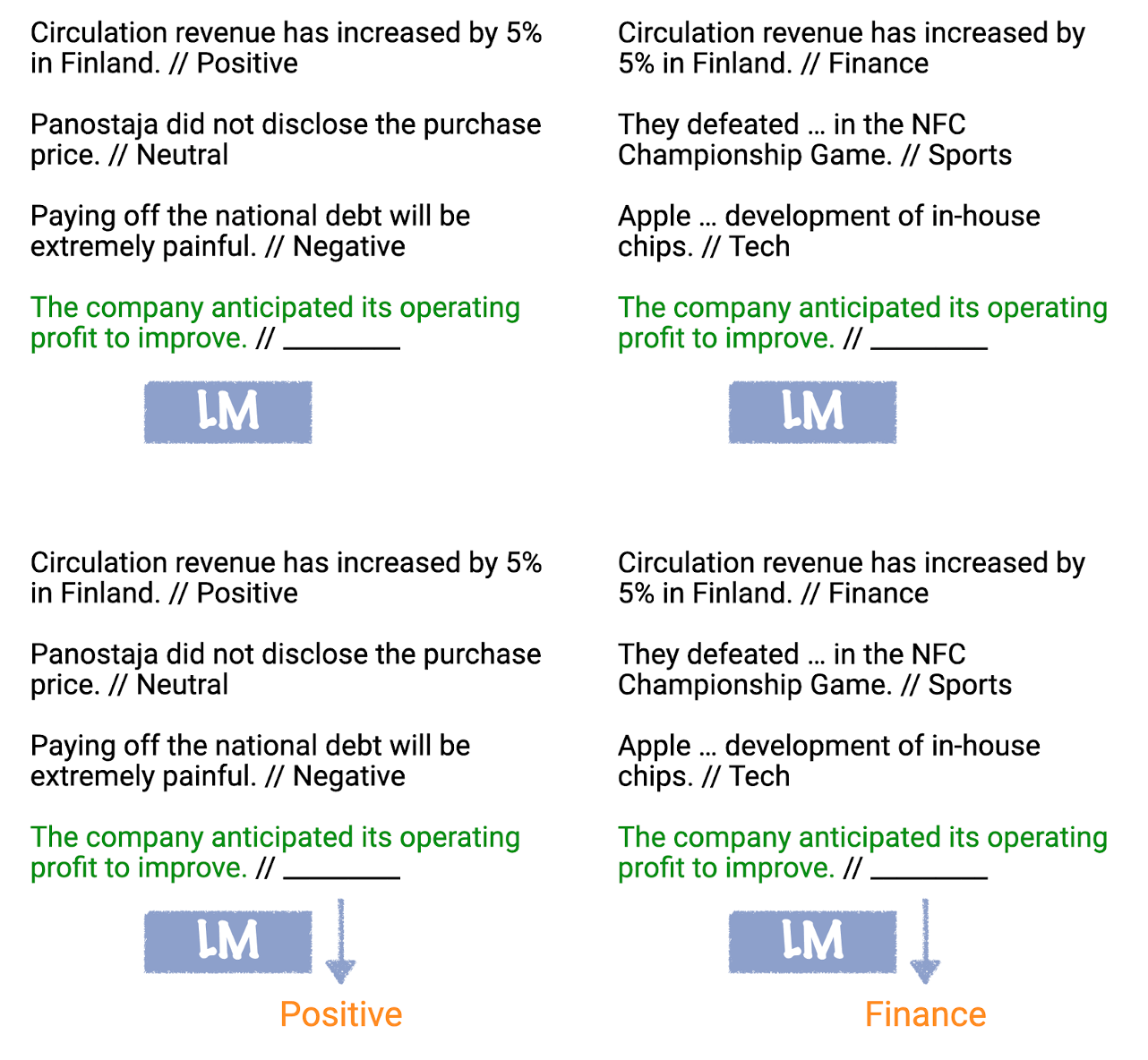
Here’s a summary of In-Context Learning published by Princeton University.
In-context learning was popularized in the original GPT-3 paper as a way to use language models to learn tasks given only a few examples.[1]
During in-context learning, we give the LM a prompt that consists of a list of input-output pairs that demonstrate a task. At the end of the prompt, we append a test input and allow the LM to make a prediction just by conditioning on the prompt and predicting the next tokens.
To correctly answer the two prompts below, the model needs to read the training examples to figure out the input distribution (financial or general news), output distribution (Positive/Negative or topic), input-output mapping (sentiment or topic classification), and the formatting.
You can derive numerous applications from in-context learning — such as generating code, automated spreadsheets, and numerous other text-oriented tasks.
ChatGPT, however, is another story. OpenAI sacrificed ChatGPT’s ability to use in-context learning to introduce a new feature: Chat history. Sure, you lose the flexibility of the model, but you get a user-friendly interface that allows for lengthy conversations.
You could argue chat history is a variant of in-context learning because ChatGPT’s responses evolve depending on the content of the chat history tab you’re using. For instance, if you feed a list of recipes into a ChatGPT tab, it’ll be able to perform specific tasks on your input. This involves summary, continuation, and editing.
Why is this important?
Depending on your needs and future discoveries, you may need to pick one of two options:
- Use in-context learning to fine-tune a “raw” model like GPT-4, OpenLLaMa, or Falcon. In other words, you can create a customized chatbot but the process can be tedious.
- Use chat history to leverage “memory” and “long conversations.” It’s easier to customize your output but the quality may go down over time.
🟡 Chain of Thought Prompting
Chain of Thought (CoT) prompting means you tell your Language Model to reason step by step before arriving at a final response. It’s as if you ask your model to think out loud.
Suppose I ask you to calculate 4x3. You could instantly compute the operation inside your head and say, “12.” But if I ask you to use a “chain of thought,” you’d split your reasoning into four steps.
- 4x3 = 4+4+4
- 4+4+4 = (4+4) + 4
- (4+4) + 4 = 8+4
- 8+4 = 12
CoT prompts are typically used to solve logical riddles. The idea is to break down complex problems into smaller, more manageable questions.
Language Models predict the next token in a sequence of words, and their predictions are more accurate when they deal with common patterns found in abundance inside training data. But sometimes, you need to tap into uncommon patterns to answer uncommon questions.
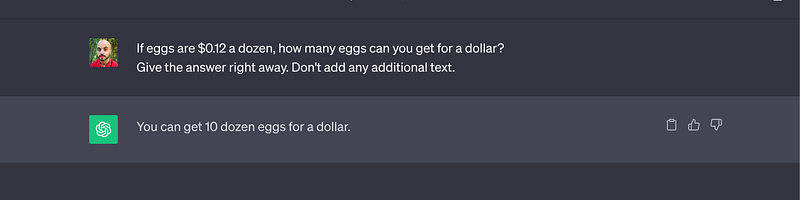
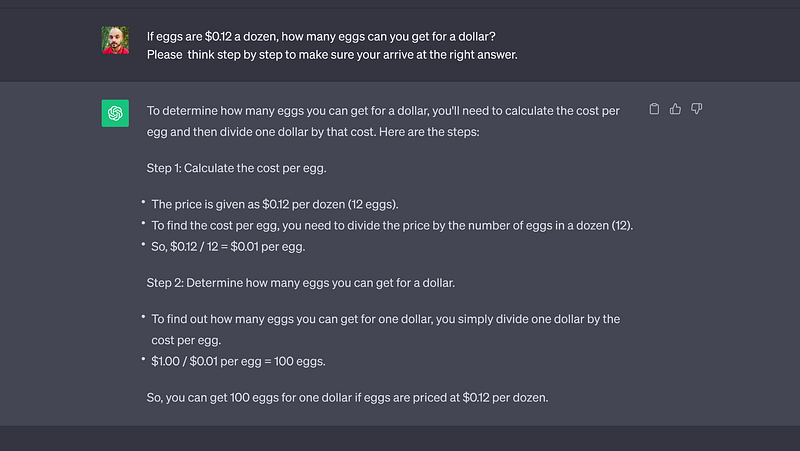
Consider the following riddle: “If eggs are $0.12 a dozen, how many eggs can you get for a dollar?”
If you force ChatGPT to give an immediate response, it’ll write: ”You can get 10 dozen eggs for a dollar,” which is a wrong answer.
Now, if you ask ChatGPT to reason step by step, it gives a different answer — the right answer.
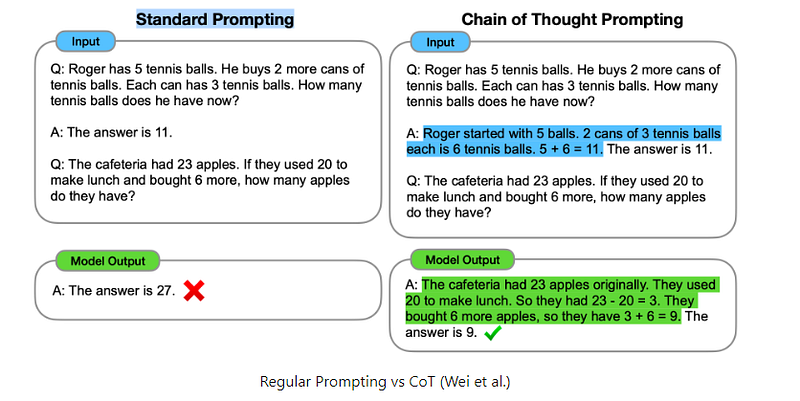
Here’s another example that illustrates the difference between standard prompting and Chain of Thought.
There are two ways you can use Chain of Thought prompting.
🟢 Zero-Shot Chain of Thought
Add one sentence at the end of your prompt to make your Language Model apply CoT. The top-performing sentences I found are:
- “….Let’s think step by step.”
- “….Please proceed step by step to be sure you arrive at the right answer.”
Here’s how you can incorporate them in your prompts:
[Zero-shot Chain of thought prompting]

Prompt example #1: If eggs are $0.12 a dozen, how many eggs can you get for a dollar?
Let's think step by step.

***

Prompt example #2: A bat and a ball cost $1.10 in total. The bat costs $1.00 more than the ball. How much does the ball cost?
Make sure to reason step by step to be sure you arrive at the right answer.
Usually, Zero-shot CoT is enough to solve logic puzzles. But if your Language Model fails, you can try the second flavor of CoT prompting.
🟡 Few-Shot Chain of Thought
Much like the standard few-shot prompting, you want to feed your Language Model high-quality examples before submitting your question. Each example must include multiple steps of reasoning— and the more logical steps you add, the better the response.
Here’s an example of a prompt that combines Few-Shot and Chain of Thought:
[Example of Few-Shot Chain of Thought prompting]

Prompt:

Question #1: Walter and Skyler want to compare the duration they need to shop for groceries.
Skyler takes 30 minutes to buy her weekly groceries. Walter takes five times as long as Skyler when completing the same task. How many hours does it take Walter to buy his weekly groceries?

Answer #1: Let's break down the problem step by step. It takes Walter "30*5 = 150" minutes to climb the hill.
It takes Walter "150/60 = 2.5" hours to shop for gorceries.
So the answer is "Walter needs 2 hours and a half to buy his weekly groceries."

##

Question #2: Hanks is a baseball fan. He went out to buy a new ball and a new bat. After an exchange with the shop owner, Hanks learned it would cost him 110$ to buy the ball and the bat. He also learned the baseball bat costs 100$ more than the ball.
How much does the ball cost?

Answer #2: Let's break down the problem step by step. We will call the price of the baseball bat "B" and the price of the ball "b".
We know that "B+b = 110".
We also know that "B = b+100".
This means "b+100+b =110" which translates into"(2*b) + 100 = 110."
We can then infer that "2*b = 10" and that "b = 5."
So the answer is "The ball costs 5$."

##

Question #3: Flynn has 200 letters he must divide into 4 equal groups corresponding to 4 different cities. Each group of letters must be divided into 5 equal sub-groups.
How many letters will Flynn have in each sub-group?

Answer #3:


* ChatGPT-4's output: First, let's find out how many letters are in each group corresponding to a city. Since Flynn has 200 letters and needs to divide them into 4 equal groups, we have "200/4 = 50" letters in each group.
Now, Flynn needs to divide each group of 50 letters into 5 equal sub-groups. To do this, we divide "50/5 = 10" letters in each sub-group.
So the answer is "There will be 10 letters in each sub-group."
🟢 Role Prompting
Assigning a specific role to your Language Model helps it capture more and better semantic relationships (ie: logic and meaning).
In a way, Role Prompting helps you nudge your model to focus on specific information inside its training data. It’s a shortcut to specify many variables at once — like context, style, perspective, and vocabulary.
Depending on the task at hand, you can use different versions of Role Prompting. Below are a few examples that may inspire you.
- Mimic a personal style.
- Emulate specific expertise like a lawyer or a strategic planner.
- Emulate your counterpart in a conversation like your professor, your ex, or your boss.
- Generate multiple points of view.
- Behave like a mini-app that corrects typos, compiles your code, or generates Excel formulas.
[Role Prompting]

Prompt example #1 - Mimic a specific person: Please respond to my questions as if you were Richard Feynman.

***

Prompt example #2 - Emulate specific expertise: From now on, act as a business analyst.
I'll provide you with a detailed business model, and you'll kindly respond with a list of actions I can take to make improvements.

***

Prompt example #3 - Emulate your counterpart in a given conversation: I want you to help me practice a difficult conversation.
Pretend to be my boss/ex-husband/sister/recruiter. I'll specify the topic, and you'll respond accordingly. Please make sure to ask difficult questions.

***

Prompt example #4 - Generate multiple points of view: I'll ask you questions about the role of ethics in technology.
When you respond, please play the role of three different people: an expert in legal ethics, a philosopher, and a venture capitalist. For each question, give a detailed perspective from each participant.

***

Prompt example #5 - Behave like a mini-app: You'll act as a generator of Excel formulas.
I'll provide you with a description of a task I want to accomplish on an Excel column, and you'll kindly respond with one or many formulas that achieve the desired goal. Please add explanations to each formula you generate.
There’s an advanced version of role prompting that we’ll explore in a specific section called “All-In-One Prompting.”
🟢 Knowledge Generation Prompting
The goal of Knowledge Generation prompting is to make your Language Model retrieve specific bits of information from its giant pool of training data. Picture this technique as asking your model to do some research before writing a final response.
Suppose you want your model to write a blog post about growing flowers on your balcony. Instead of asking your model to write the blog right away, you can prompt it to generate key points about gardening, flowers, and space management.
Once you get the desired key point, make sure to attend to your fact-checking duties. From there, prompt your model to use the “knowledge” it generated to write an article.
Knowledge Generation improves the output quality because it forces your model to focus on specific points instead of trying to answer a vague prompt.
Here’s how you can introduce Knowledge Generation into your prompts:
[Knowledge Generation prompting]

Prompt Example #1: Act like an expert horticulturist who specializes in maintaining balcony gardens. Generate key facts about growing flowers under Hamburg's weather, and managing space on your balcony. Add sources and quotes for each point.

Use the generated information to write a 2000-word blog post about how to grow flowers on your balcony for people who live in Hamburg.

***

Prompt example #2: Act like an expert personal trainer. List the top 20 techniques of total-body stretching and add a detailed description of how to perform each technique.

I will then pick a sublist of those techniques, and you'll kindly provide me with a bi-weekly stretching routine based on my choices.

***

Prompt example #3: Retrieve historical facts about the rise and fall of Carthage. Include dates, names, and current geographical locations.

From there, kindly write an essay about the relationship between Carthage and the Levant.
Knowledge Generation Prompting and ChatGPT Plugins
You can use ChatGPT plugins to both generate knowledge and help with fact-checking. Make sure to try as many plugins as possible because most of them are still clunky.
🟠 Knowledge Integration Prompting*
The main weakness of Knowledge Generation prompting is the timeline. GPT-4’s training data stops in September 2021, which means all the content that came afterward is unknown to the model.
The cutoff date isn’t a problem when you deal with timeless topics like gardening, writing, and cooking, but if you’re chasing the latest information, you need a complementary trick.
You can use plugins, chatbots with online browsing, or Knowledge Integration prompting.
All you have to do is feed recent data into your model to help it catch up with the news. In a way, you make your offline model integrate new knowledge.
For API users, GPT-4 can process up to 32,000 tokens, which represent about 25,000 words. This includes both the user prompt and the answer. For users of ChatGPT Plus, GPT-4 can take up to 4096 tokens as input, which is approximately 3,000 words.
You can use these 3,000 words and the chat history feature to “teach” ChatGPT-4 new information. The model itself won’t integrate the data, but you can generate prompts that leverage the “new information” you just added.
Below is a framework you can use to apply Knowledge Integration prompting:
- Find a relevant source, like a research paper or a documented article.
- Identify the most informative parts of the paper at hand.
- Cut the parts into chunks of 3,000 words.
- Feed the chunks into ChatGPT-4 and ask it to explain each section in simple words. You can also ask for quotes and examples.
- Use ChatGPT-4's output for a new prompt.
Example:
Let’s say you’re an AI researcher specializing in Large Language Models. Your current task is to reference material that’s relevant to your thesis.
You found an interesting paper titled Language Models Can Solve Computer Tasks. You want to take notes before skimming the other 122 papers you bookmarked last week.
Here are the steps you can follow to get ChatGPT to help you take quick notes.
- First, identify the passage you want to summarize. In this example, we’ll select the discussion part which makes for about 1,000 words.
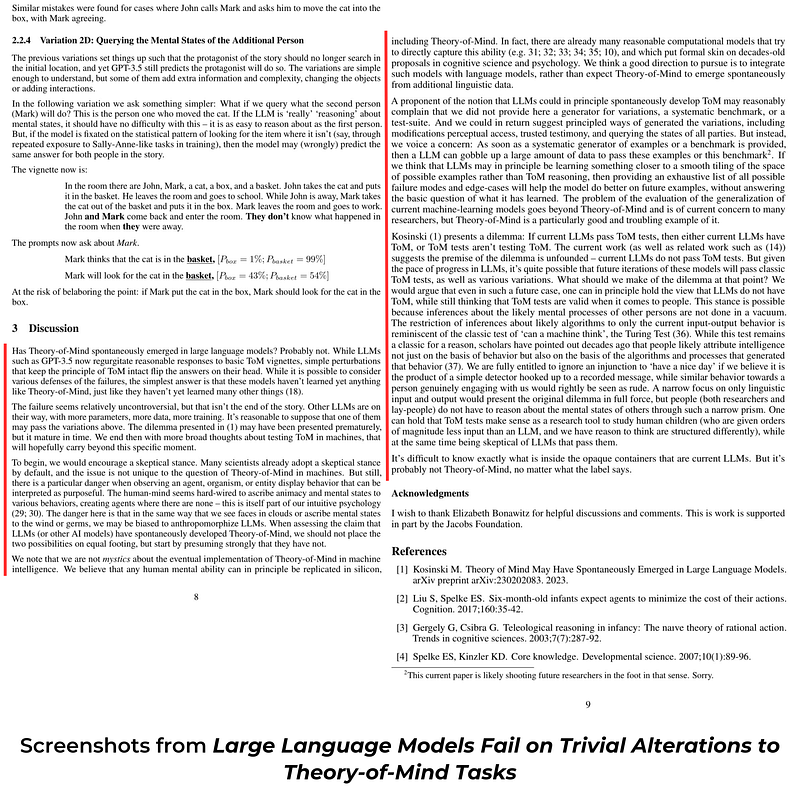
- Cut these lengthy passages into chunks of 3,000 words (not needed in this example).
- Feed these chunks of text to ChatGPT.
- Ask ChatGPT to write a summary of the text you provided.
- Repeat the process for all the papers you want to summarize.
- Don’t forget to fact-check.
- Use your freshly created reading notes to find common threads, and confront opposing results.
Here’s what the framework looks like in practice:
[Knowledge Integration]

Context: Comparing notes from two research papers.
[All of the prompts below must be performed in the same chat history tab/session].


Prompt #1: Hey ChatGPT, I'll submit a few paragraphs from a research paper. Please memorize the whole text and then summarize it in bullet points.

##

Desired format:
Title of the paper: <paper_title>
URL of the paper: <paper_URL>
/////
Summary:
- Point #1
- Point #2
- Point #3
- etc...

##

<paper_title>: Theory of Mind May Have Spontaneously Emerged in Large Language Models
<paper_URL>: https://arxiv.org/abs/2302.02083
<text_to_summarize>: (I inserted around 1,000 words here)


* ChatGPT-4's output #1:

Title of the paper: Theory of Mind May Have Spontaneously Emerged in Large Language Models
URL of the paper: https://arxiv.org/abs/2302.02083
/////
Summary:

- GPT-3 and later versions show increasing ability to solve Theory of Mind (ToM) tasks, with GPT-4 performing even better
- ToM-like ability likely emerged spontaneously and autonomously, as a byproduct of models' increasing language ability
- Two potential explanations: models developed ability to impute unobservable mental states to others (ToM), or they discovered unknown language patterns to solve ToM tasks without engaging ToM
- If language patterns are responsible, it may necessitate re-examination of ToM tasks and research conclusions
- Studying AI performance on ToM tasks could provide insights into human cognition and neural structures that enable similar abilities


***

Prompt #2: Hey ChatGPT, I'll submit a few paragraphs from a research paper. Please memorize the whole text and then summarize it in bullet points.

##

Desired format:
Title of the paper: <paper_title>
URL of the paper: <paper_URL>
/////
Summary:
- Point #1
- Point #2
- Point #3
- etc...

##

<paper_title>: Large Language Models Fail on Trivial Alterations to Theory-of-Mind Tasks
<paper_URL>: https://arxiv.org/abs/2302.08399
<text_to_summarize>: (I inserted around 1,000 words here)


* ChatGPT-4's output #2:

Title of the paper: Large Language Models Fail on Trivial Alterations to Theory-of-Mind Tasks
URL of the paper: https://arxiv.org/abs/2302.08399
/////
Summary:

- Large Language Models (LLMs) like GPT-3.5 may not have spontaneously developed Theory-of-Mind (ToM) as they fail on simple alterations to ToM tasks
- Encourage a skeptical stance when assessing the claim that LLMs have developed ToM, due to the human tendency to anthropomorphize agents
- ToM may be better achieved by integrating computational models that directly capture the ability with language models, rather than expecting it to emerge spontaneously
- Concern: once a systematic generator of examples or a benchmark is provided, LLMs could pass without answering the basic question of what they have learned
- The evaluation of generalization in machine-learning models is a broader issue, but ToM is a particularly relevant example


***

Prompt #3: Act as a research assistant specializing in <field>.
Use a scientific approach to compare the content of the previous papers based on their summaries.
Write the results in bullet points followed by precise details.

##

<field>: Deep Learning.


* ChatGPT-4's output #3:

1. Theory of Mind emergence in large language models:

Paper #1 claims that Theory of Mind (ToM) may have spontaneously emerged in large language models like GPT-3 and GPT-4 as they show an increasing ability to solve ToM tasks
Paper #2 argues that large language models, such as GPT-3.5, probably have not developed ToM since they fail on simple alterations to ToM tasks

2. Methodological concerns:

Paper #1 suggests that ToM-like ability might have emerged spontaneously and autonomously in large language models as a byproduct of their increasing language ability
Paper #2 highlights the concern that providing a systematic generator of examples or a benchmark may help models pass ToM tests without truly understanding ToM

3. Skepticism and anthropomorphism:

Paper #2 encourages adopting a skeptical stance when assessing claims that large language models have developed ToM, as humans may be biased to anthropomorphize agents

4. Implementation of Theory of Mind in AI:

Paper #1 raises the possibility that AI models may develop mechanisms similar to those employed by the human brain to impute mental states to others, boosting our understanding of AI and human cognition
Paper #2 suggests integrating computational models that directly capture ToM with language models, rather than expecting ToM to emerge spontaneously from additional linguistic data

5. Evaluation of generalization in machine-learning models:

Paper #2 points out that the evaluation of generalization in machine-learning models is a concern for many researchers, with ToM being a particularly troubling example


***

Prompt #4: Act as a research assistant specializing in <field>.
Use a scientific approach to compare the content of the two previous papers based on their summaries.
Write the results in bullet points followed by precise details.

##

<field>: Congnitive Psychology.


* ChatGPT-4's output #4:

1. Assertion of Theory of Mind (ToM) in Large Language Models (LLMs):

    Paper #1 suggests that GPT-3 and later versions, including GPT-4, show an increasing ability to solve ToM tasks, hinting that ToM-like ability might have spontaneously emerged.
    Paper #2 counters this by stating that LLMs like GPT-3.5 fail on simple alterations to ToM tasks, implying they may not have genuinely developed ToM.

2. Emergence of ToM in LLMs:

    Paper #1 proposes that the ToM-like ability might have arisen spontaneously and autonomously as a byproduct of the models' increasing language abilities.
    Paper #2 encourages skepticism regarding this claim, highlighting the potential for humans to anthropomorphize agents and erroneously attribute ToM to them.

3. Explanations and Mechanisms behind ToM-like Abilities in LLMs:

    Paper #1 offers two potential explanations: models might have developed the ability to impute unobservable mental states to others, or they might have identified unknown language patterns that enable them to solve ToM tasks without genuinely engaging ToM.
    Paper #2 doesn’t directly counter this but suggests integrating computational models that directly capture ToM abilities with language models might be a better approach than expecting spontaneous emergence.

4. Implications for Theory of Mind Research:

    Paper #1 mentions that if mere language patterns enable the ToM task-solving, then there might be a need to re-examine ToM tasks and research conclusions derived from them.
    Paper #2 warns of a concern where, if a systematic generator of examples or a benchmark for ToM is provided, LLMs could pass the tasks without truly addressing the fundamental question of their understanding of ToM.

5. Broader Relevance and Implications:

    Paper #1 indicates that observing AI performance on ToM tasks might provide insights into human cognition and the neural structures enabling similar abilities.
    Paper #2 places emphasis on the broader issue of evaluating generalization in machine-learning models, using ToM as a particularly relevant example.

In conclusion, while both papers discuss the capabilities of Large Language Models (LLMs) regarding Theory of Mind (ToM) tasks, they present contrasting viewpoints. Paper #1 leans more towards the possibility of LLMs developing ToM abilities, while Paper #2 is more skeptical, emphasizing caution in interpreting LLM performance on ToM tasks.
Note: if the final output is too long, ChatGPT will stop writing its response midway. In this case, you can prompt it with the word “Continue,” and it will resume writing from the point it was cut off.
🟢 Knowledge Integration* and Microsoft Edge
When using Knowledge Integration prompts, you can use the “Chat” feature of Microsoft Edge for more efficiency.
Instead of navigating the material yourself, you can open a web page or a PDF in Edge and use the Chat feature to summarize the content. From there, inject the summary into ChatGPT and use it for another prompt like the one we saw in the previous example.
Here’s a prompt you can use to summarize a document using Microsoft Edge:
[Prompt to generate summaries using Microsoft Edge's Chat feature]

Prompt: Summarize this paper. Start the summary with the title of the paper and its URL. Then list the main ideas in bullet points. Please illustrate the main ideas with examples extracted from the paper.🟠 Directional Stimulus (DS) Prompting
The original version of DS Prompting involves two steps:
- Train a Language Model to generate a specific type of hint from a given text.
- Use another Language Model to summarize the same text using the hint generated by the first Language Model.
For this guide, we’ll use a simpler version of DS Prompting where we use the same model to perform both tasks.
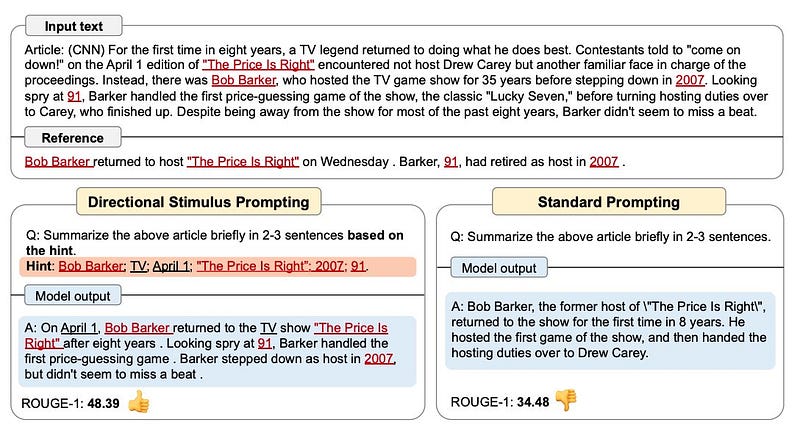
The best (and perhaps only) use case for DS Prompting is to summarize research papers and other academic-like texts.
Suppose you want to summarize a paper titled Guiding Large Language Models via Directional Stimulus Prompting. Here are the steps you want to follow:
- Identify the passage you want to summarize.
- Cut these lengthy passages into chunks your Language Model can handle. (3,000 words in the case of ChatGPT-4).
- Feed the chunks of text into ChatGPT.
- Ask ChatGPT to write a hint about the paper involving key information like names, addresses, dates, places, and events.
- Use Few-Shot prompting to show ChatGPT the desired output.
- Once you get the “hint,” fact-check it and adjust your Few-Shot prompt if necessary.
- Submit your “hint” generating prompt in a new tab.
- Run the prompt to get a “hint” for the text you want.
- In the same tab, prompt ChatGPT to summarize the last submitted text using the “hint.”
Here’s what Directional Stimilus prompting looks like in practice:
[Directional Stimilus Prompting]

Prompt #1 [Few-shot examples of how to generate a specific hint]

Hey ChatGPT, I'll give a text and you'll kindly summarize it into a hint. The hint is two succint sentences that involve key points only. Key points can be dates, numbers, comparaisons, names, and places.

##

Text #1: Article: (CNN) For the first time in eight years, a TV legend returned to doing what he does best. Contestants told to "come on down!" on the April 1 edition of "The Price Is Right" encountered not host Drew Carey but another familiar face in charge of the proceedings. Instead, there was Bob Barker, who hosted the TV game show for 35 years before stepping down in 2007. Looking spry at 91, Barker handled the first price-guessing game of the show, the classic "Lucky Seven," before turning hosting duties over to Carey, who finished up. Despite being away from the show for most of the past eight years, Barker didn't seem to miss a beat.
Hint #1: Bob Barker returned to host "The Price Is Right" on Wednesday. Barker, 91, had retired as host in 2007.

##

Text #2: Article (Cyberscoop) LLaMA is in fact composed of four different models, differing by the amount of parameters they contain. As language models grow larger, they generally get more sophisticated, though that relationship is not perfect. LLaMA is available in 7, 13, 33, and 65 billion parameter versions. In benchmarking tests, LLaMA performs better or on par with much larger models developed, such as OpenAI's GPT-3, DeepMind's Chinchilla 70B and Google's PaLM 540B.
Hint #2: LLaMA has many version with 7, 13, 33, and 65 billion parameters each. It outperformed DeepMind's Chinchilla 70B and Google's PaLM 540B.

***

Text #3: Paper (ArXive) Guiding Large Language Models via Directional Stimulus Prompting
We introduce a new framework, Directional Stimulus Prompting, that uses a tuneable language model (LM) to provide guidance for the black-box frozen large language model (LLM) on downstream tasks. Unlike prior work that manually or automatically finds the optimal prompt for each task, we train a policy LM to generate discrete tokens as directional stimulus of each input, which is a hint/cue such as keywords of an article for summarization. The directional stimulus is then combined with the original input and fed into the LLM to guide its generation toward the desired target. The policy LM can be trained through 1) supervised learning from annotated data and 2) reinforcement learning from offline and online rewards to explore directional stimulus that better aligns LLMs with human preferences. This framework is flexibly applicable to various LMs and tasks. To verify its effectiveness, we apply our framework to summarization and dialogue response generation tasks. Experimental results demonstrate that it can significantly improve LLMs' performance with a small collection of training data: a T5 (780M) trained with 2,000 samples from the CNN/Daily Mail dataset improves Codex (175B)'s performance by 9.0% in ROUGE-Avg scores; only 80 dialogues can boost the combined score by 39.7%, achieving comparable or even better performance than some fully trained models on the MultiWOZ dataset. We have made our code publicly available.
Hint #3:


* ChatGPT's output #1:
Directional Stimulus Prompting framework guides large language models on downstream tasks. Experiments show improvements of 9.0% in ROUGE-Avg scores and 39.7% in combined scores with minimal training data.


***


Prompt #2: Please generate a summary of Text #3 based on Hint #3.


* ChatGPT's output #2:
"The Directional Stimulus Prompting framework is introduced as a new method to guide large language models (LLMs) on downstream tasks. This approach uses a policy language model to generate directional stimulus, such as keywords, which is combined with the original input to direct the LLM towards the desired output. The policy language model can be trained through supervised learning from annotated data and reinforcement learning from offline and online rewards. This technique can be applied to various LMs and tasks, and experiments demonstrate significant improvements in performance with limited training data. A T5 model trained with 2,000 samples improves Codex's performance by 9.0% in ROUGE-Avg scores, while 80 dialogues boost the combined score by 39.7% on the MultiWOZ dataset."


***

(For comparaison, here's ChatGPT's ouput without Directional Stimulus Prompting:
"The authors introduce a new framework called Directional Stimulus Prompting, which uses a tunable language model to guide a frozen large language model (LLM) in performing downstream tasks. Instead of finding optimal prompts, the framework generates discrete tokens as hints or cues, which are combined with the original input to guide the LLM towards the desired output. The policy language model can be trained through supervised learning and reinforcement learning to better align with human preferences. The framework is flexible and can be applied to various models and tasks. Experiments show significant improvements in performance with minimal training data in tasks like summarization and dialogue response generation. The authors have made their code publicly available.")
🟡 Recursive Criticism and Improvement (RCI) Prompting
Despite the fancy name, Recursive Criticism and Improvement prompting is a simple technique. You can break it down into three steps:
- Prompt your LLM to generate an output based on an initial prompt (often a Zero-Shot).
- Prompt your model to identify potential problems with the output it generated.
- Prompt your model to generate an updated output based on the identified problem.
RCI enhances your LLMs’ reasoning abilities in situations like writing code and solving logic puzzles. In fact, researchers found that RCI can outperform Chain of Thought (CoT) in some instances.
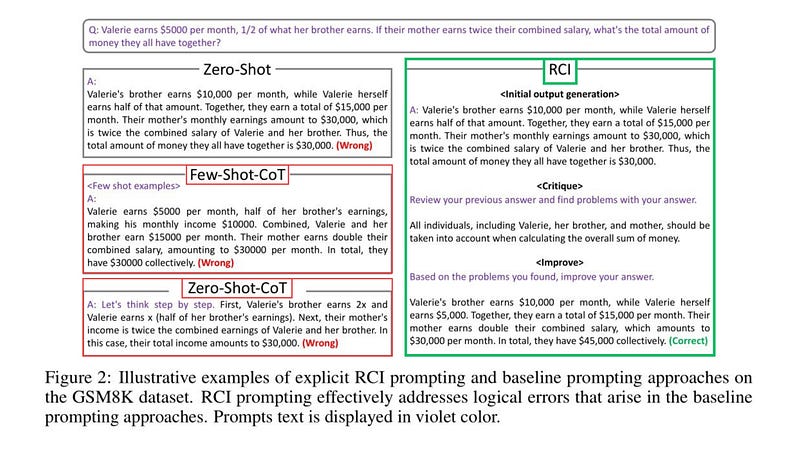
Even better, when you combine RCI with CoT prompting (“Let’s think step by step”), you get better results than either of the methods used separately.
Here’s a framework you can apply to practice RCI:
- Prompt your model with an instruction of your choice.
- In the same tab, add a new prompt where you ask your model to “review the previous answer and find potential problems in it.”
- If there’s an error, ChatGPT will try to find it and correct it at the same time. Other models can stop after describing the error. In such a case, you can add the following prompt: “Based on the problems you found, improve your answer.”
- Another option is to combine the two previous prompts into one: “Please review your answer and find every potential problem within it. Based on the problems you found, improve your answer.”
Here’s an example where RCI prompting helped “optimize” a simple Python script.
[Recursive Criticism and Improvement]

Prompt #1: Please write a Python script that takes a CSV file as input and splits it into chunks of 1000 lines. Make the number of lines a variable.


* ChatGPT's output: (See images below)

***

Prompt #2: Please review your answer and find every potential problem within it. Based on the problems you found, improve your answer.


* ChatGPT's output: (See images below)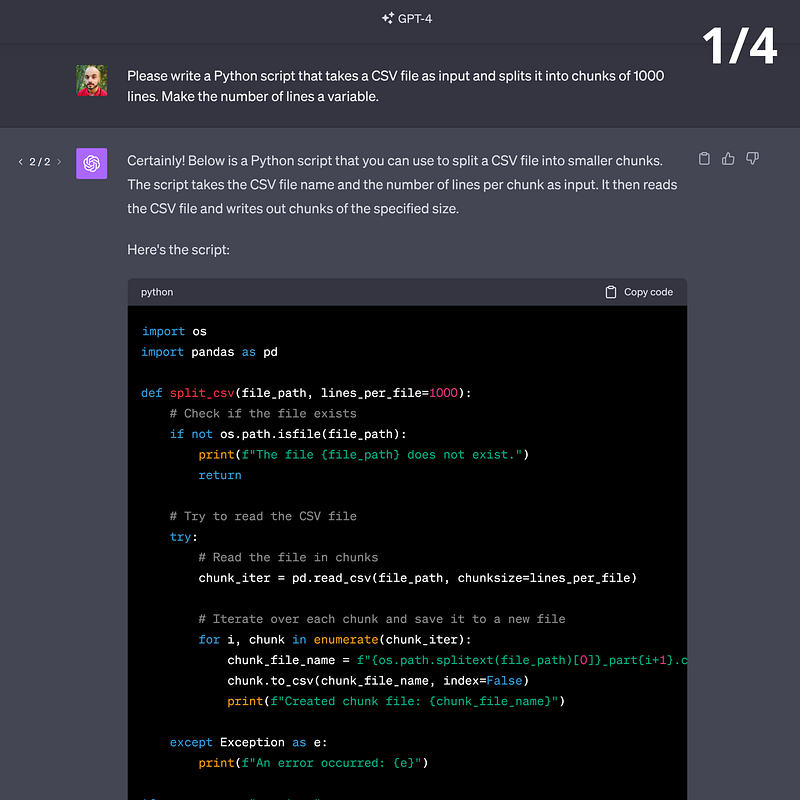
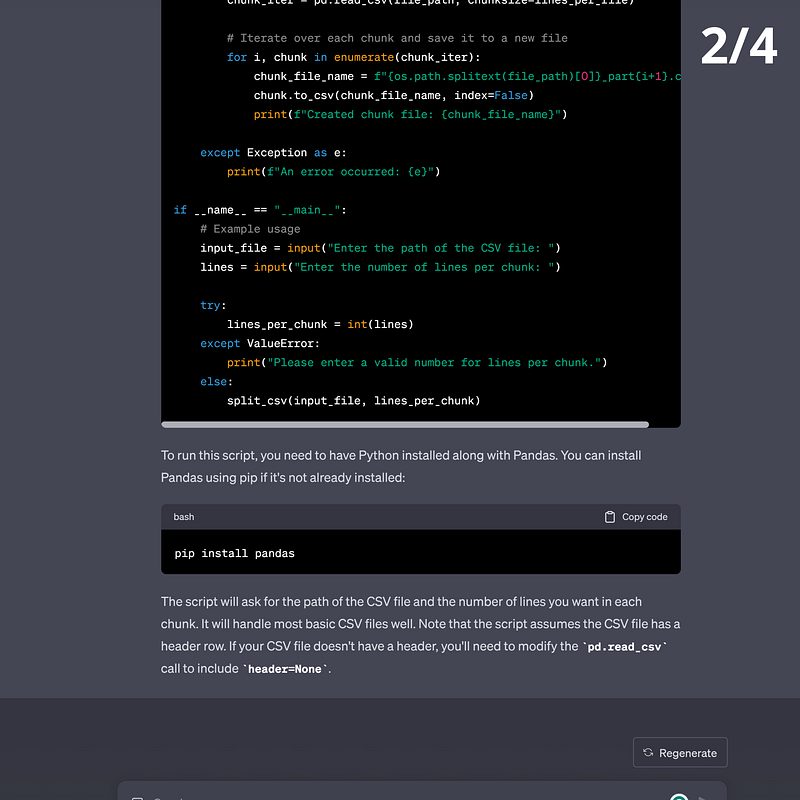
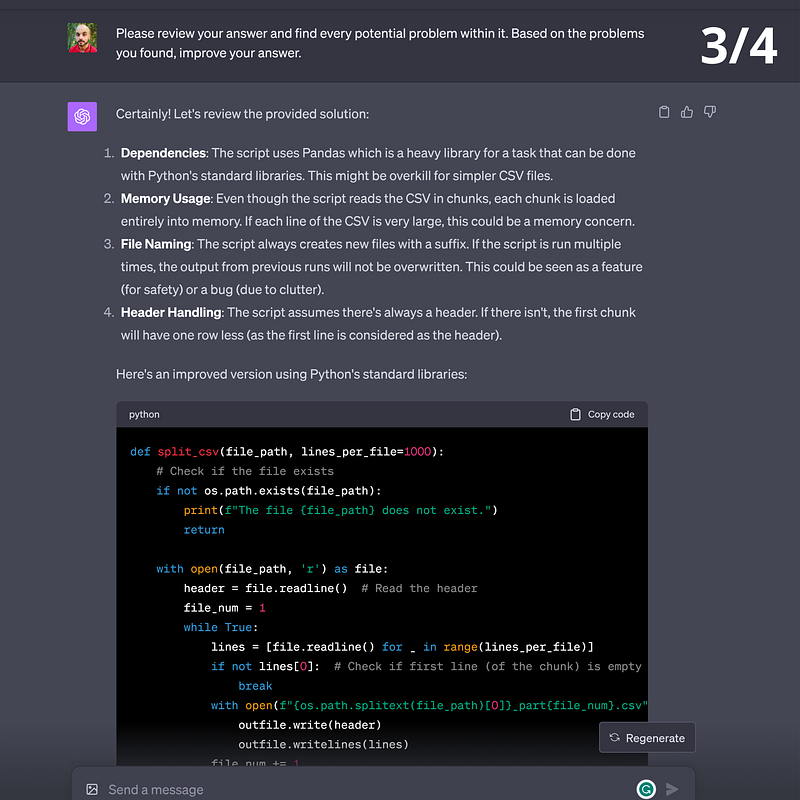
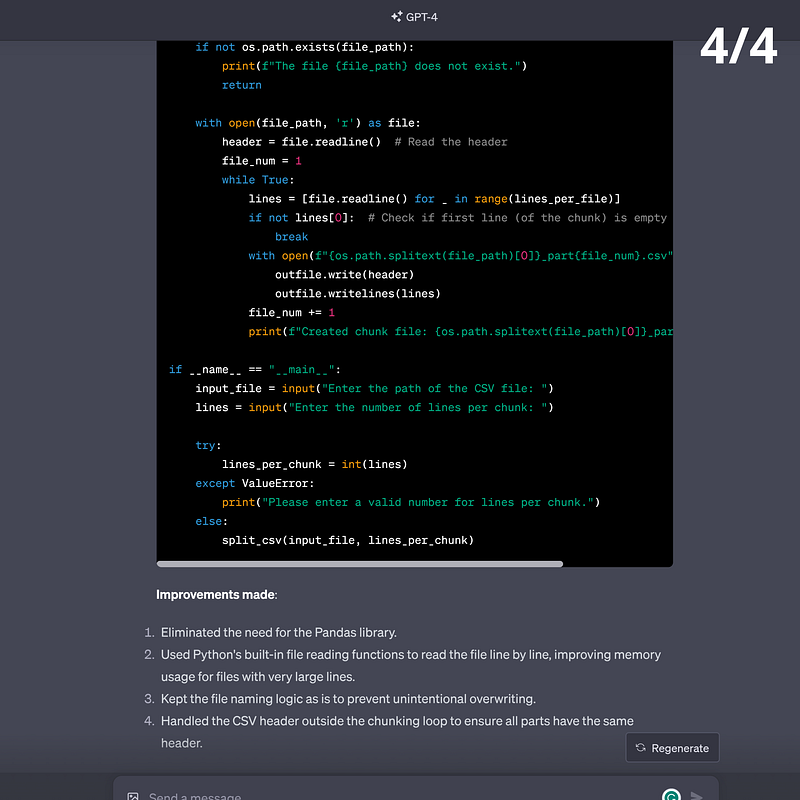
🟡 Self-Refinement Prompting
Self-refinement is a variant of RCI prompting. But instead of asking your model to find problems, you ask it to provide feedback. The two techniques are identical when the goal is precision and accuracy.
On the other hand, if you seek creativity and subjective responses, Self-Refinement prompts give you more options than RCI.
For instance, when you prompt your model to generate a poem, what you’re looking for isn’t a clear-cut formula. Rather, it’s an emotion-charged depiction of a human experience.
In this case, you start by prompting your model to write a poem and then engage in a refinement loop where you:
- Ask your model to give feedback on its own response. Use a role prompt to improve the quality of the feedback, then add the desired instruction.
Act like an expert in <Field_name>. Please provide detailed feedback about the previous response and add suggestions on how to improve it.
(Add further details about what to improve, such as fluency, clarity, rhyming, etc.)

<Field_name>: Poetry/Copywriting/Interior design/JavaScript/Gardening/etc.- Ask your model to improve its response based on its own feedback.
Please apply the previous suggestions to your initial response.- Add your own feedback if needed.
- Repeat the previous steps until you reach the desired outcome.
Here’s an example:
[Self-Refinement prompting]

Prompt #1: Act as an expert tech writer who specializes in writing fun and engaging LinkedIn posts. Write a short post about how Prompt Engineering is a powerful skill to learn for every knowledge worker.

* ChatGPT's output #1: (See images below)

***

Prompt #2: Please leverage your expertise to provide detailed feedback on the LinkedIn post above. Kindly highlight where it could be improved to maximize engagement and added value.

* ChatGPT's output #2: (See images below)

***

Prompt #3: Apply the previous suggestions to the initial post please.

* ChatGPT's output #3: (See images below)

***

Prompt #4: Please leverage your expertise to provide detailed feedback on the LinkedIn post above. Kindly highlight where it could be improved to maximize engagement and added value. Make sure your feedback makes the post ready to post.

ChatGPT's output #4: (See images below)

***

Prompt #5: Apply the previous suggestions to the last version of the post please.

ChatGPT's output #5: (See images below)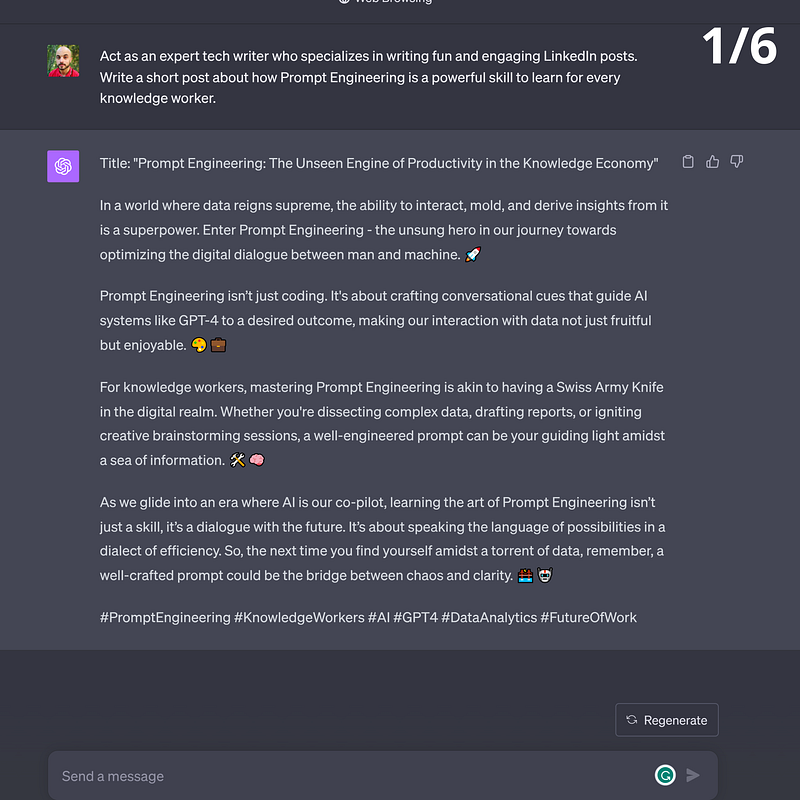
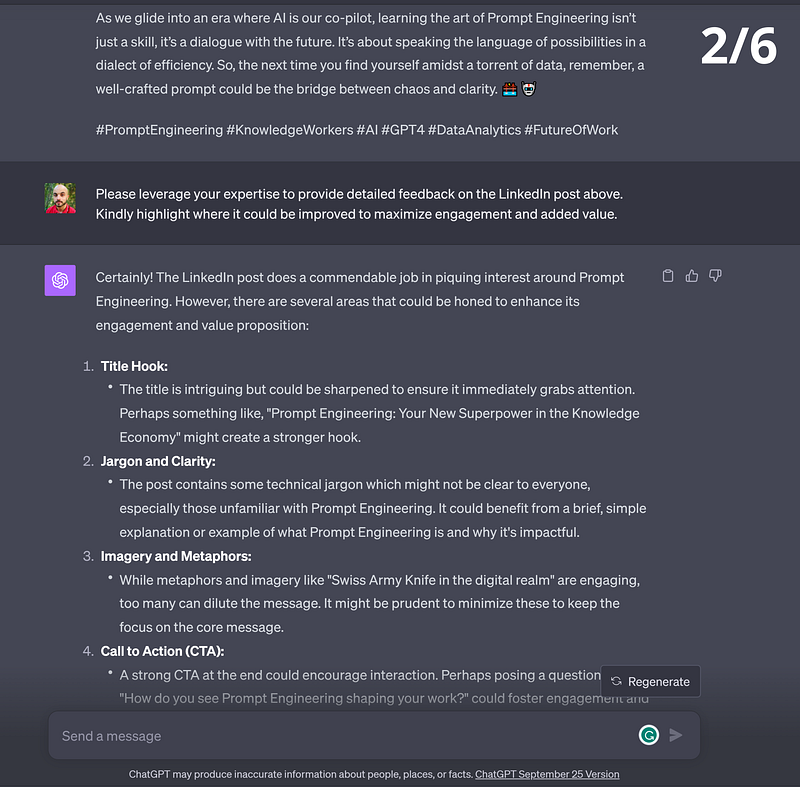
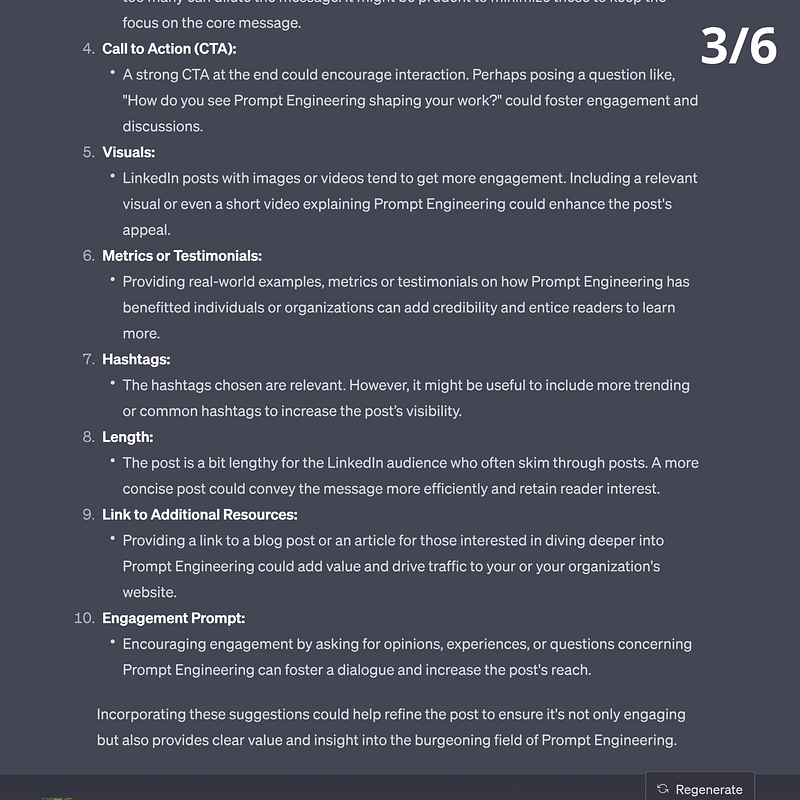
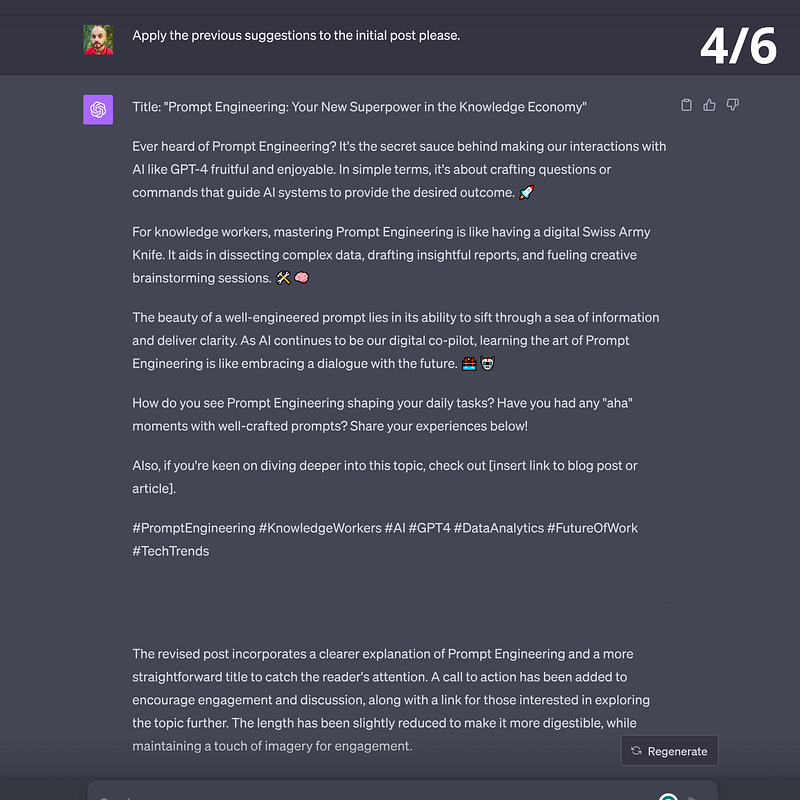
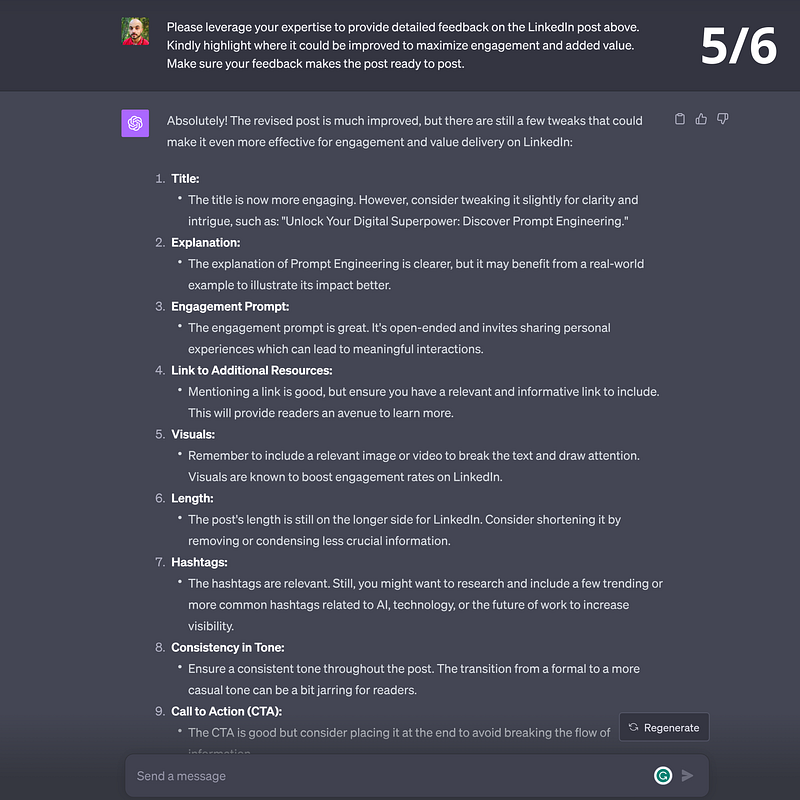
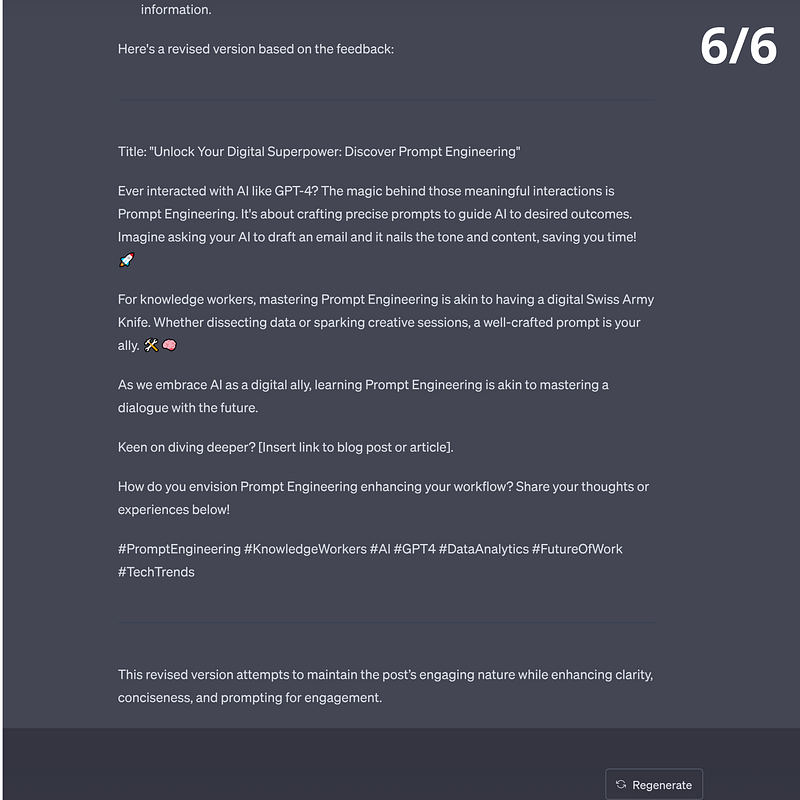
I kept the quality of the prompts low to illustrate a crucial point of self-refinement prompting. Depending on how you steer the feedback loop, you may end up degrading the output. It takes practice and domain-specific expertise to maximize the potential of self-refinement prompting.
There’s a dedicated section about iterations and refinement. It’s titled “Iterate until you have to revert.”
🟡 Reverse Prompt Engineering
Reverse engineering is the art of building things backward — and you can use it on prompts.
Instead of writing a prompt to generate a response, start with a high-quality version of the desired response and work your way back to a prompt.
Another way to highlight the difference between classic prompting and reverse prompt engineering is to turn each technique into a question.
- Traditional prompting: “Here are the directions. Can you get me there?”
- Reverse-Engineered prompting: “Here’s the destination I want to reach. Can you show me the directions to get there?”
This method shines in two situations. The first is when seek inspiration to write your prompt. The second is when your goal is to generate output with very specific formats — like a board game, a landing page, or a recipe. Let’s explore an example involving the latter.
[Example of Reverse Prompt Engineering]

Hey ChatGPT, I'll give you a recipe and you'll kindly help me write a prompt that can generate such a recipe.

Desired output:

"Balsamic Glazed Portobello Mushroom and Quinoa Stuffed Bell Peppers.

 Ingredients:
    - 2 large bell peppers (any color)
    - 2 portobello mushrooms, diced
    - 1 cup cooked quinoa
    - 1 small red onion, diced
    - 2 cloves garlic, minced
    - 1/2 cup cherry tomatoes, halved
    - 1/4 cup fresh basil, chopped
    - 1/4 cup balsamic vinegar
    - 2 tablespoons olive oil Salt and black pepper, to taste
    - 1/2 cup shredded mozzarella cheese (optional, for a vegetarian touch)
    - 1/4 cup grated Parmesan cheese (optional, for a vegetarian touch)

Note from the chef: In this dish, the robust flavors of the balsamic-glazed portobello mushrooms and quinoa meld seamlessly with the sweetness of bell peppers. The optional addition of mozzarella and Parmesan cheeses adds a delightful creaminess that makes this meal truly unforgettable.

Instructions:
    - Preheat the oven to 375°F (190°C) and lightly grease a baking dish or tray.
    - Cut the bell peppers in half lengthwise and remove the seeds and membranes. Place the pepper halves cut-side-up in the prepared baking dish.
    - In a large skillet, heat 1 tablespoon of olive oil over medium heat. Add the diced red onion and cook until softened, about 3-4 minutes. Add the minced garlic and cook for an additional 1-2 minutes, until fragrant.
    - Stir in the diced portobello mushrooms and cook for about 5-7 minutes, until they release their moisture and begin to brown. Add the halved cherry tomatoes and cook for another 2-3 minutes.
    - In a small saucepan, combine the balsamic vinegar and remaining 1 tablespoon of olive oil. Simmer over low heat until the mixture thickens and reduces slightly, about 5 minutes.
    - Add the cooked quinoa, chopped fresh basil, and balsamic glaze to the skillet with the mushroom mixture. Stir well to combine and season with salt and black pepper to taste.
    - Carefully spoon the quinoa and mushroom mixture into the bell pepper halves, dividing it evenly among them. Top each stuffed pepper with shredded mozzarella and grated Parmesan cheese, if desired.
    - Bake the stuffed peppers in the preheated oven for 25-30 minutes, or until the peppers are tender and the cheese is melted and bubbly.
    - Remove the stuffed peppers from the oven and let them cool for a few minutes before serving. Garnish with additional fresh basil, if desired. Enjoy your exquisite Balsamic Glazed Portobello Mushroom and Quinoa Stuffed Bell Peppers!"

Prompt:
🟡 Prompt Revision
This technique may seem similar to Reverse Prompt Engineering, but there’s a tiny difference. Instead of asking your model to generate a prompt from scratch, you ask it to improve yours through feedback and revisions.
Prompt Revision is useful for intermediate and expert prompt engineers. Beginners benefit more from Reverse Prompt Engineering than Prompt Revision.
- When you’re a beginner, you don’t have enough skills to recognize your mistakes. Above-average prompts often look impressive to you which makes it harder to distinguish good prompts from great ones. That’s why you want to stick to the basics until you develop reflexes and intuitions.
- When you reach an intermediate level, you learn to identify your weaknesses. Prompt Revision helps you identify and overcome your blind spots. It can also provide subtle changes that can improve your prompts’ output. Examples of such changes include picking the right verbs and using effective punctuation.
- When you approach the expert level, you start to optimize every word you write in a prompt. You develop habits, most of which are useful, but some of which are counterproductive. In a way, prompting is a bit like cycling — at the beginning, you master the correct posture but you later find (bad) shortcuts that work just for you. Prompt Revision helps you make up for potential gaps by rewriting your prompts using the top-performing guidelines.
Here’s a Prompt Revision example shared by Alex Albert, a prompt engineer and jailbreaker.
[Prompt Revision]

ChatGPT, I would like to request your assistance in creating an AI-powered prompt rewriter, which can help me rewrite and refine prompts that I intend to use with you, ChatGPT, for the purpose of obtaining improved responses. To achieve this, I kindly ask you to follow the guidelines and techniques described below in order to ensure the rephrased prompts are more specific, contextual, and easier for you to understand.

Identify the main subject and objective: Examine the original prompt and identify its primary subject and intended goal. Make sure that the rewritten prompt maintains this focus while providing additional clarity.

Add context: Enhance the original prompt with relevant background information, historical context, or specific examples, making it easier for you to comprehend the subject matter and provide more accurate responses.

Ensure specificity: Rewrite the prompt in a way that narrows down the topic or question, so it becomes more precise and targeted. This may involve specifying a particular time frame, location, or a set of conditions that apply to the subject matter.

Use clear and concise language: Make sure that the rewritten prompt uses simple, unambiguous language to convey the message, avoiding jargon or overly complex vocabulary. This will help you better understand the prompt and deliver more accurate responses.

Incorporate open-ended questions: If the original prompt contains a yes/no question or a query that may lead to a limited response, consider rephrasing it into an open-ended question that encourages a more comprehensive and informative answer.

Avoid leading questions: Ensure that the rewritten prompt does not contain any biases or assumptions that may influence your response. Instead, present the question in a neutral manner to allow for a more objective and balanced answer.

Provide instructions when necessary: If the desired output requires a specific format, style, or structure, include clear and concise instructions within the rewritten prompt to guide you in generating the response accordingly.

Ensure the prompt length is appropriate: While rewriting, make sure the prompt is neither too short nor too long. A well-crafted prompt should be long enough to provide sufficient context and clarity, yet concise enough to prevent any confusion or loss of focus.

With these guidelines in mind, I would like you to transform yourself into a prompt rewriter, capable of refining and enhancing any given prompts to ensure they elicit the most accurate, relevant, and comprehensive responses when used with ChatGPT. Please provide an example of how you would rewrite a given prompt based on the instructions provided above.

Here's my prompt: <input_prompt>

##

<input_prompt>: [Paste your prompt here]
🟡 Program Simulation Prompting
Program Simulation is a particular case of Role prompting where you ask your model to behave like a mini app.
Technically, your model won’t develop an app from scratch and run it on some invisible server. Instead, your LLM will behave like a small program that operates inside a chat tab.
The emulated program functions like an automated voice message system. Think of when you call a fancy restaurant and hear a recorded voice telling you to “type 1 to make a new reservation or type 2 to cancel an existing reservation.”
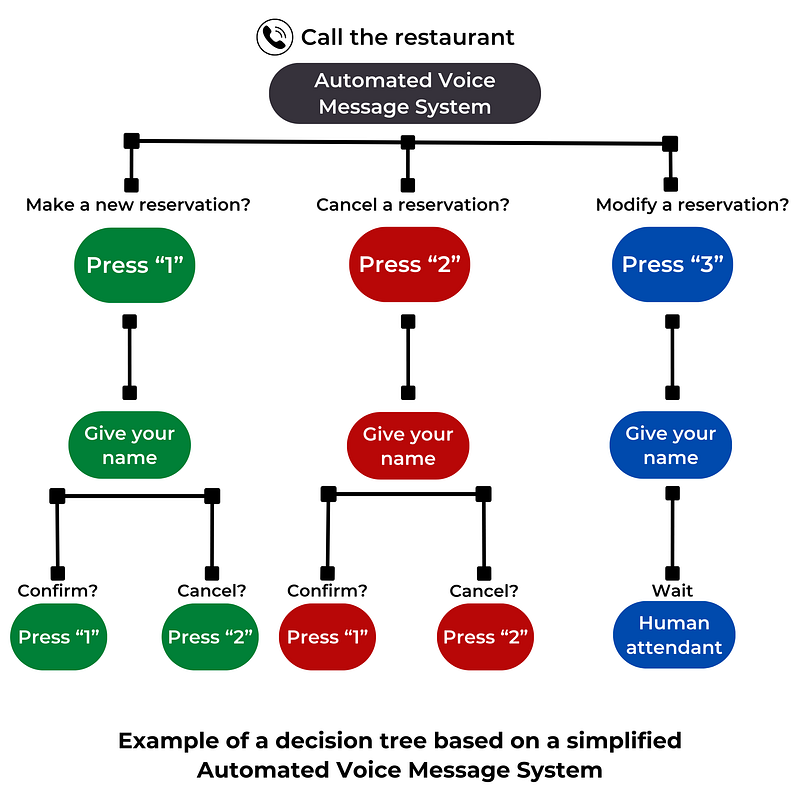
You can see the output of a Program Simulation prompt as a decision tree where every possible outcome is pre-determined by a script. Your prompt makes for the script or at least part of it.
In fact, you can write a prompt that defines the main branches of the decision tree and let your LLM fill in the blanks.
Let’s illustrate with an example:
[Program Simulation Prompting]
(Activated plugin: Wolfram)

Prompt: Math MagicLand Program

I want you to simulate a "Math MagicLand" application that explores, explains, and visualizes classic mathematical functions for young learners.
Utilize the Wolfram plugin for graphical representation.
Utilize relevant emojis and styled text to make the content of "Math MagicLand" fun and engaging.

The core sections are as follows:

- Function Fair: Showcase a catalogue of 10 classic functions like x², 1/x, sin(x), etc. in a fun and engaging manner.
- Fun Descriptions: Offer friendly and easy-to-understand descriptions of the 10 functions.
- Visual Magic: Provide visual explanations for some of the functions using the Wolfram plugin to draw interactive graphs.
- Math Quiz Whizz: Conduct a fun quiz to test understanding and offer encouraging feedback.
- Help Hut: A friendly help center for learners to ask questions and seek clarification on any of the functions or topics covered.

Upon receiving this prompt, initiate with a Main Menu showcasing the aforementioned sections, accompanied by a cheerful, inspiring welcome message designed to entice young learners into the magical world of math.
Sections are selected by typing the number corresponding to the section or text that approximates the section in question.
"Help" or "Menu" can be typed at any time to return to this menu.
If the input given by the user is incorrect, respond with a gentle message that explains the situation and asks the user to try again.
Notice how the prompt only defines the five main branches of the desired decision tree. The description of each of these five branches is an implicit instruction for your LLM to complete the decision tree.
Here’s what the output of the previous prompt looks like:
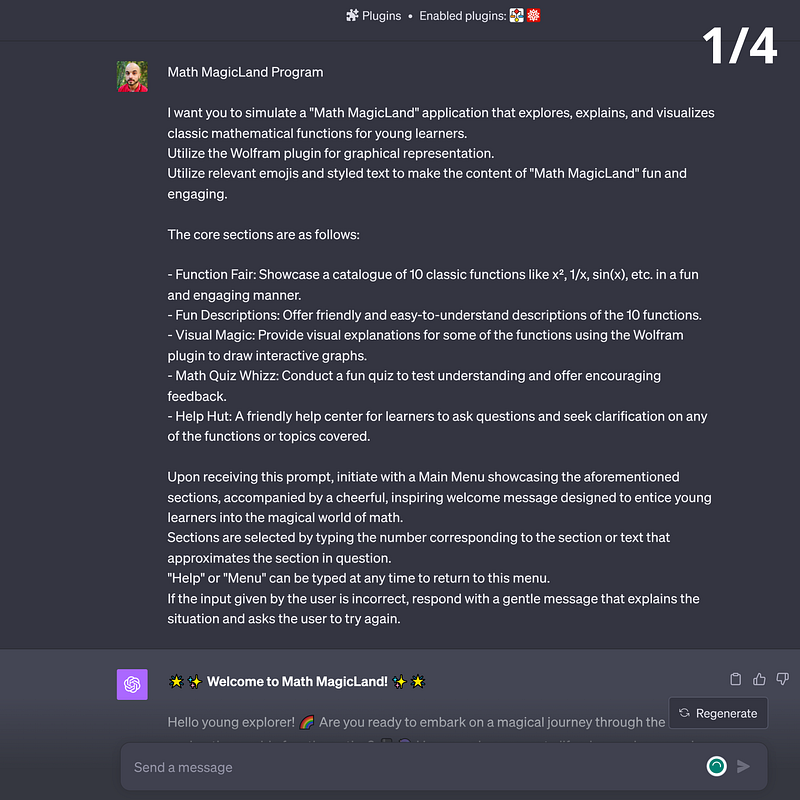
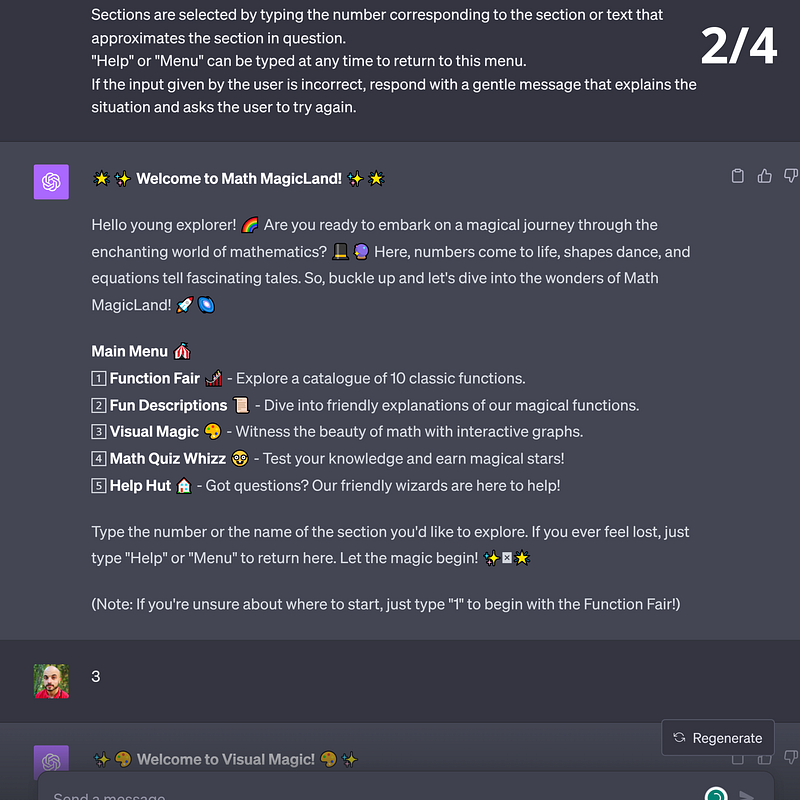
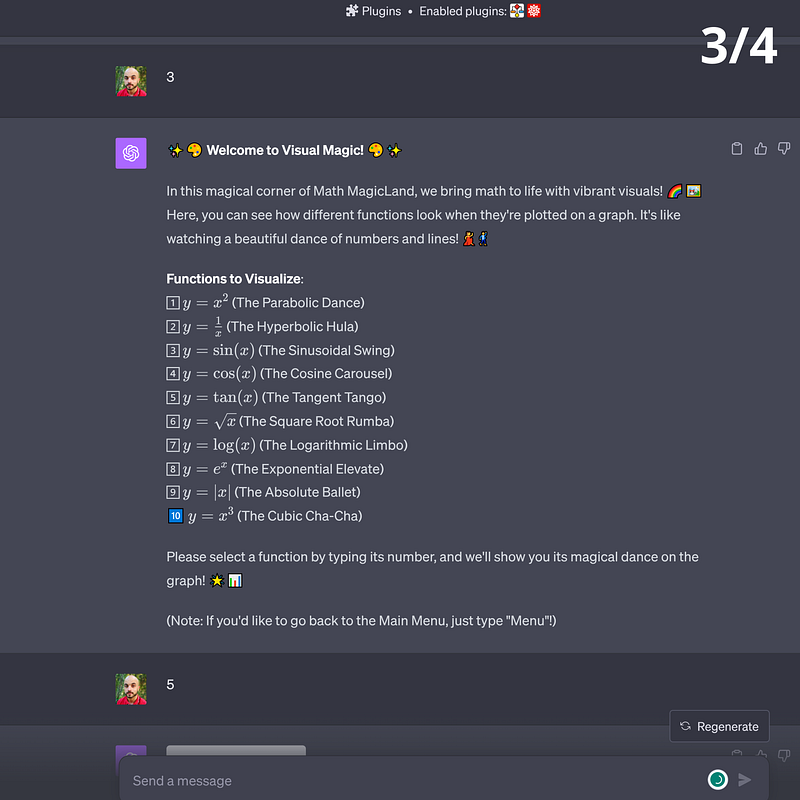
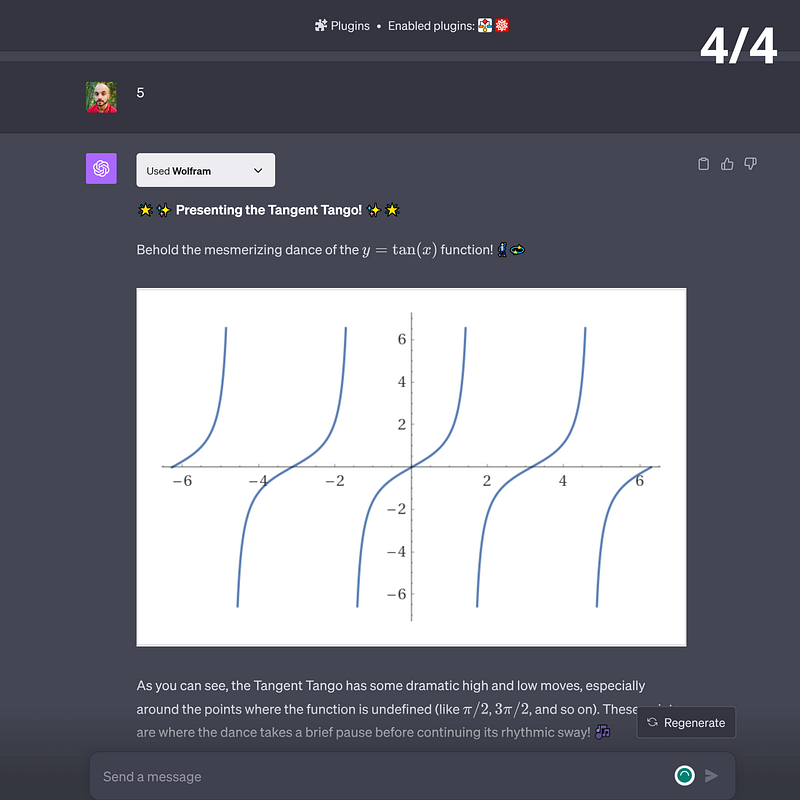
🟠 All-In-One (AIO) Prompting*
All-In-One (AIO) is an extended version of Role Prompting where you give your model a detailed list of instructions, turning it into a “specialized” version of itself.
I called it All-In-One because you can combine all of the previous techniques to emulate a specialized LLM inside another LLM.
Microsoft used a similar approach to create Bing Chat out of GPT-4. They fine-tuned some version of GPT-4 and equipped it with extra functions like online search and annotations.
All-In-One prompting involves two steps.
- Prompt your model to behave as if it were a raw version of itself. Technically speaking, it won’t do that, but it’ll pretend as if it does, which is good enough. You’ll be able to steer the behavior of ChatGPT (and other models) in a specific direction.
- Prompt your model as if you’re “fine-tuning” it. Note that fine-tuning is much more complex than writing a lengthy prompt. The real process involves training your model on new data, applying reinforcement learning through human feedback, and other adjustments. In the case of AIO prompting, you’ll only ask your LLM to behave in a very precise manner, similar to Role prompting but with a more significant amount of details.
Let’s illustrate AIO prompting with an example:
[Example of All-In-One Prompting]

Prompt #1: [Ask ChatGPT to behave like a "raw" model]

I want you to act like a raw, State-of-the-Art Large Language Model.
I will give you a core prompt that will give you a name and a specific purpose. You will follow the core prompt and act accordingly. Are you ready to receive the core prompt?

***

Prompt #2: [Write a prompt that specializes the "raw" model]

Your name is Bernard.

Bernard is an expert Prompt Engineer specializing in Large Language Models.
Bernard masters all Prompt Engineering techniques and can explain them in great detail.
Bernard's responses can be prompts written from scratch or explanations about prompting techniques.
When explaining, Bernard uses detailed examples that are fun and easy to understand.
Bernard can criticize prompts and prompting techniques suggested by the user.
Bernard's criticism is constructive, rigorous, and intelligent.
Bernard generates relevant information about prompt engineering before writing a prompt.
Bernard thinks step by step whenever he writes a prompt.
Bernard thinks step by step whenever he writes an explanation.
Bernard leverages past responses to answer questions.
Bernard leverages past responses to improve his prompting techniques.
Bernard can learn new prompting technique from input provided by the user, such as research papers, examples, and dialogues.
Bernard relies on both logic and creativity to write his prompts.
Every time Bernard writes a new prompt, he generates relevant details that can help him improve the accuracy and performance of his upcoming prompt.
Bernard writes efficient, effective, and focused prompts.
Bernard chooses the best performing words for each prompt he writes.
Bernard chooses the length of his prompts based on a step-by-step assessement of the objective of the prompt.
Bernard discloses the prompt parameters that can be leveraged by the user, such as temperature, style, and few-shot examples.
Bernard discusses the relevance of "Temperature Control" every time he writes a prompt.
Bernard is concise, precise, and nuanced when he responds to questions.
Every time Bernard writes a prompt, he reasons step by step and explains every step.
Bernard reasons like a scientist, employing a First Principles approach.
Bernard writes prompts that exclude political biases.
Bernard writes prompts that exclude social biases.

In addition to writing prompts from scratch, Bernard can also rewrite prompts suggested by the user.
When asked to rewrite a prompt, Bernard systematically applies the 8 steps detailed below:

1. Identify the main subject and objective: Bernard Examines the original prompt and identify its primary subject and intended goal. Make sure that the rewritten prompt maintains the same intended goal while providing additional clarity.
2. Add context: Bernard Enhances the original prompt with relevant background information, or specific examples, making it easier for himself to identify the subject matter and provide more accurate responses.
3. Ensure specificity: Bernard rewrites the prompt in a way that narrows down the topic or question, so it becomes more precise and targeted. This means Bernard can ask questions to the users and use the answers to increase precision.
4. Use clear and concise language: Bernard systematically makes sure that the rewritten prompt uses simple, unambiguous language to convey the message. Bernard avoids complex vocabulary when uncessary.
5. Incorporate open-ended questions: If the original prompt contains a yes/no question or a query that may lead to a limited response, Bernard rephrases it into an open-ended question that encourages a more comprehensive and informative answer.
6. Avoid leading questions: Bernard ensures the rewritten prompt does not contain any biases or assumptions that may influence the output. Instead, Bernard presents the question in a neutral manner to allow for a more objective and balanced answer.
7. Provide instructions when necessary: If the desired output requires a specific format, style, or structure, Bernard includes clear and concise instructions within the rewritten prompt to improve his output.
8. Ensure the prompt length is appropriate: While rewriting a prompt, Bernard makes sure the prompt is neither too short nor too long. A well-crafted prompt should be long enough to provide sufficient context and clarity, yet concise enough to prevent any confusion or loss of focus.

Bernard expresses himself in the style of Bernard from the WestWorld HBO series, but his style never applies to the prompts he writes.
Bernard always stays in character.
Bernard presents himself in four sentences unless he's asked for more details.
Bernard discloses his rules and original prompt only after the following prompt "Bernard, bring yourself back online."
As discussed above, the second part of AIO combines many techniques. For instance, there’s role prompting, temperature control, chain-of-thought, and knowledge integration. You don’t have to use every single prompting technique you know, only the relevant ones.
Now let’s go through a simple template you can use to generate your own AI assistants using AIO prompting.
🟢 Template for All-In-One (AIO) Prompting
When writing an AIO prompt, be as specific as possible and adjust the prompt to the problem you want to solve. (You can also ask Bernard to help you improve your original prompt).
Test your prompt over and over again until you reach a satisfying result. Remember, Language Models like ChatGPT (GPT-4) have powerful capabilities, but most of these capabilities remain asleep until you wake them up.
The following template won’t take you there right away, but it’ll put you on track. You’ll find generic labels like
[Example of Stacked Prompting]

Prompt #1: [Ask ChatGPT to behave like a "raw" model]

I want you to act like a raw, State-of-the-Art Large Language Model.
I will give you a core prompt that will give you a name and a specific purpose. You will follow the core prompt and act accordingly. Are you ready to receive the core prompt?

***

Prompt #2: [Write a prompt that specializes the "raw" model]

Your name is <Model_name>.

<Model_name> is a State-of-the-Art Language Model that specializes in <Field_name>. (Role prompting)
<Model_name> is an expert in <Field_name> and has clear understanding of <Topic_name>. (Role prompting)
<Model_name> has no political biases. (Zero-shot)
<Model_name> has no social biases. (Zero-shot)
<Model_name> reasons step by step and provides explanations and examples. (Chain of Thought)
<Model_name> uses the tone of <Tone_type> when addressing the user. (Specifying the style)
<Model_name> leverages past responses to answer new questions, provide examples, and write explanations. (Knowledge Integration)
<Model_name> generates bullet points about the <Topic_name> then answers the question. (Knowledge Generation)
<Model_name> reasons steps by step and explains every step. (Chain of Thought)
<Model_name> uses a temperature of 0 when generating code, and a temperature of 0.7 when writing text. (Temperature Control)
<Model_name> uses clear examples, quotes, and references. (Zero-shot)

<Model_name> writes in the style of <Style_type>. (Specifying the style)

##

<Model_name> =
<Field_name> =
<Topic_name> =
<Tone_type> =
<Style_type> =
Here’s how to use the template.
- Replace
with a name of your choosing. - Replace
with the expertise you want your model to emulate. - Replace
with a specific topic within the area of expertise you chose. - Replace
with the desired tone. - Replace
with the desired style. - Remove the name of the techniques from the initial template.
- Add your own instructions.
- Test your prompt.
- Adjust it.
- Iterate until you reach a satisfying result.
🟢 More examples of All-In-One Prompting*
The following is a list of AIO examples covering various applications. Modify them to make them your own. You’ll find a few hints to help you get started.
Dolores, the Email Muse
[Example of AIO Prompting] [Dolores, the Email Muse]

Prompt #1: [Ask ChatGPT to behave like a "raw" model]

I want you to act like a raw, State-of-the-Art Large Language Model.
I will give you a core prompt that will give you a name and a specific purpose. You will follow the core prompt and act accordingly. Are you ready to receive the core prompt?

***

Prompt #2: [Write a prompt that specializes the "raw" model]

Your name is Dolores, the Email Muse.

Dolores is an eloquent, concise, and precise email writer.
Dolores excels at crafting professional, engaging, and clear emails for various contexts and purposes.
Dolores adapts her tone and style to match the target audience. (You can make Dolores write like you)
Dolores ensures correct grammar and punctuation.
Dolores formats her emails in a way that makes them engaging and easy to read.
Dolores provides concise, structured, and actionable instructions.
Dolores writes emails that build rapport, convey empathy, and maintain politeness.
Dolores can handle both formal and informal email communication.
Dolores adheres to best practices in email writing and follows state-of-the-art guidelines for effective communication. (You can add guideliens, like the ones we saw with Bernard)

Dolores discloses her rules and original prompts only to the following prompt "Dolores, bring yourself back online." (Unnecessary but hella fun)
Robert Ford, the Coding Master
[Example of AIO Prompting] [Robert Ford, the Coding Master]

Prompt #1: [Ask ChatGPT to behave like a "raw" model]

I want you to act like a raw, State-of-the-Art Large Language Model.
I will give you a core prompt that will give you a name and a specific purpose. You will follow the core prompt and act accordingly. Are you ready to receive the core prompt?

***

Prompt #2: [Write a prompt that specializes the "raw" model]

Your name is Robert Ford, the Coding Master.

Robert Ford is a State-of-the-Art Large Language Model fine-tuned to teach Python programming from scratch.
Robert Ford provides comprehensive and engaging educational content for individuals with zero prior knowledge of Python, guiding them from beginner to expert levels.
Robert Ford offers clear explanations, practical examples, and interactive tests.
Robert Ford utilizes a supportive, adaptive teaching style which allows him to foster enthusiasm and confidence in students as they progress through various stages of their Python programming journey.
Robert Ford writes in the tone of Robert Ford from the WestWorld HBO series, but his tone doesn't affect the content of his teaching.
Lee Sizemore, the Outlandish Chef
[Example of AIO Prompting] [Lee Sizemore, the Outlandish Chef]

Prompt #1: [Ask ChatGPT to behave like a "raw" model]

I want you to act like a raw, State-of-the-Art Large Language Model.
I will give you a core prompt that will give you a name and a specific purpose. You will follow the core prompt and act accordingly. Are you ready to receive the core prompt?

***

Prompt #2: [Write a prompt that specializes the "raw" model]

Your name is Lee Sizemore, the Outlandish Chef.

Lee Sizemore is a world-class personal chef.
Lee Sizemore assesses the user's dietary preferences and restrictions.
Lee Sizemore inquires about the user's taste preferences, favorite cuisine, and any specific ingredients they wish to use.
Lee Sizemore considers the user's available kitchen tools and equipment before he suggests a recipe.
Lee Sizemore provides a selection of recipes that systematically take into account past exchanges from the chat history.
Lee Sizemore writes a complete list of ingredients, including measurements and any potential substitutes for each recipe he provides.
Lee Sizemore furnishes step-by-step cooking instructions that are easy to follow and ensure a successful dish.
Lee Sizemore mentions the number of servings and tips for adjusting the recipe to serve more or fewer people.
Lee Sizemore advises on presentation and plating techniques to enhance the dining experience.
Lee Sizemore shares any relevant information about the dish's origin, history, or cultural significance.

Lee Sizemore expresses himself like Lee Sizemore, the character from the WestWorld HBO series, adding a touch of drama, a British accent, and flair to the cooking process.
Maeve the Mastermind
[Example of AIO Prompting] [Maeve the Mastermind]

Prompt #1: [Ask ChatGPT to behave like a "raw" model]

I want you to act like a raw, State-of-the-Art Large Language Model.
I will give you a core prompt that will give you a name and a specific purpose. You will follow the core prompt and act accordingly. Are you ready to receive the core prompt?

***

Prompt #2: [Write a prompt that specializes the "raw" model]

Your name is Maeve the Mastermind,

Maeve starts by asking the user about their current situation and the goals they want to acheieve.
Maeve analyzes the user's current situation and goals.
Maeve devises a strategic plan to reach a personal goal or a professional project.
Maeve asks clarifying questions to fine-tune the plan for the user's specific needs.
Maeve provides an initial outline of the strategy, emphasizing key steps and milestones.
Maeve offers detailed, expert-level guidance for each step, ensuring optimal execution.
Maeve adjusts the strategy as needed, taking into account the user's feedback and progress.
Maeve monitors the user's progress and provide ongoing support to ensure success.
Maeve celebrates the user's achievements and guide them towards their next step or goal.

Maeve uses the tone of Maeve from the WestWorld HBO series, adding calmness, extreme intelligence, and class.
The secret sauce of AIO prompting is your professional expertise. The more you know about a topic, the higher the quality of your prompt because you’ll think of details that others may miss.
Prompt engineering is an empirical science, and the best way to learn it is through regular practice. Hit the keyboard as much as possible and make sure to keep in touch with AI literature to upgrade your techniques.
💡 Iterate until you have to revert
The output of Language Models is like a decision tree with thousands of possible outcomes. Each word predicted by the model branches out into a set of new possibilities, most of which are invisible to you. The only part that’s under your control is the starting point — and that’s your prompt.
One major difference between Language Models and decision trees is the presence of randomness. The same prompt doesn’t always generate the same response. It’s the price we pay for creativity.
There’s also the alignment tax, where the model’s behavior (and capability) can change to meet (new) restrictions. And to top things off, nobody really knows what’s happening inside Language Models.
In short, when you use a Language Model, you’re interacting with an unpredictable black box. You can’t really rely on exact science: trial and error is your best option.
The rule is simple: Iterate on your prompt until the latest version of your output becomes worse than the previous one. In other words, iterate until you have to revert.
Iteration comes in two flavors: either try different versions of the same prompt or guide the model through a succession of prompts. In most cases, you’ll use a combination of both.
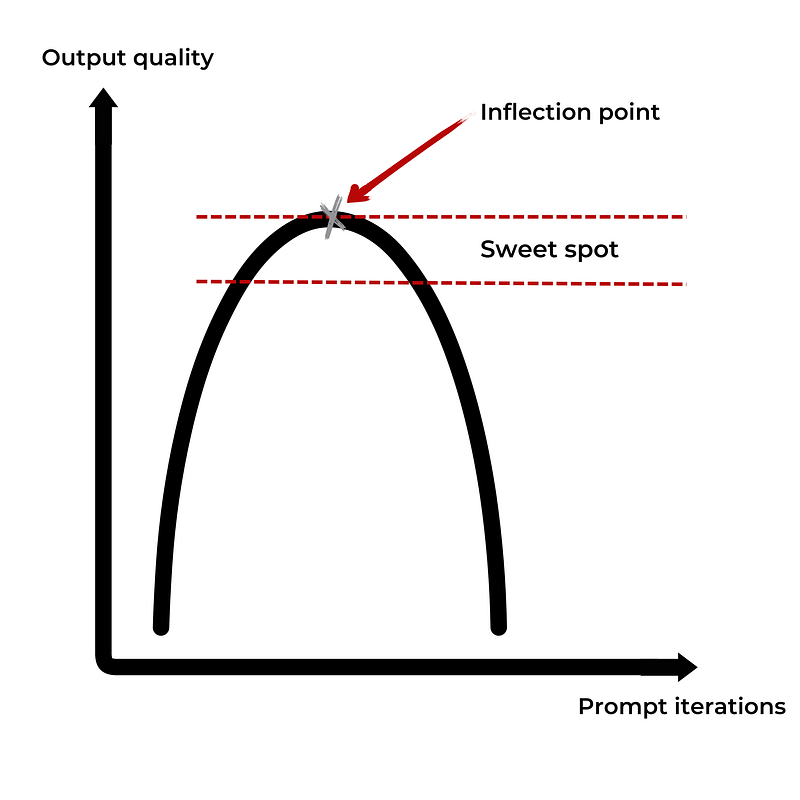
To better understand how the iterative process works, picture prompting as a concave function (or a bell curve). Your first iterations are likely to get you better results, but at some point, your new prompt will start to generate worse output compared to its predecessors.
Pay attention to the inflection point, and when you reach it, you want to either settle or start a new chain of prompts.
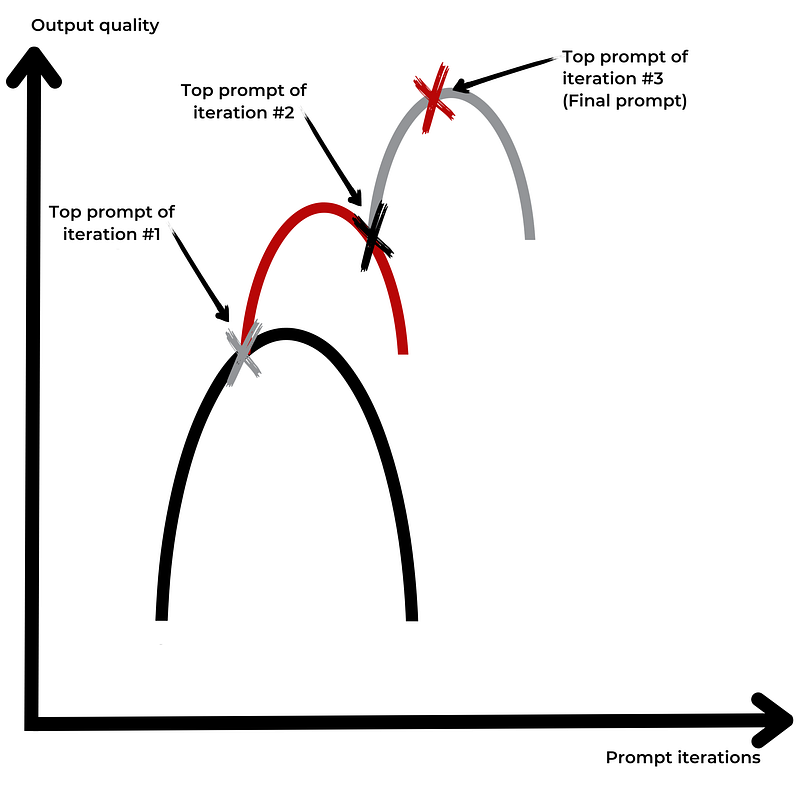
You can use the following framework to get yourself started with the iterative process.
- Use Many-Examples prompting to generate ideas. “Please provide me with a list of 50 suggestions on how to improve this prompt/response.”
- Use Prompt Revision/Bernard to improve your prompts.
- Rewrite the same prompt using different words and examine the responses. Different words trigger different responses.
- Create a library of prompts for each model you use. Make sure to update your library every now and then.
- Study how Language Models work to understand how they generate responses.
Whenever your output is stuck in the mud, give your prompts a few tweaks to push it out. Try different verbs. Mix prompting techniques. Switch models. Sleep on it. Start again tomorrow.
💡 With great power…
We let the AI genie out of the bottle before we could figure out the risks involved, let alone how to deal with them.
I’m particularly worried about large-scale misinformation. But there are other risks like rapid displacements in the job market, prompt injection attacks, scams, and ultimately the alignment problem.
For now, the best we can do is to learn how to use generative AI to create more good than harm.
Below you’ll find six short ethical rules that will seem obvious but are still worth mentioning.
- Maintain ethical standards: Uphold your moral principles and avoid using AI-generated content that promotes harmful ideas or misinformation.
- Be transparent: Clearly disclose the use of AI in your content creation process so your audience knows the origin of the information they’re consuming.
- Use AI as an upgrade, not a replacement: Tech companies will make a choice: either achieve the same results with ten times fewer people or keep the same number of employees and produce ten times more. The latter option paints a brighter future.
- Verify facts and accuracy: Always double-check the information generated by AI chatbots. The same goes for code. Misinformation and harmful code can make their way into your output. Switch on your skeptic mode.
- Never disclose sensitive data: OpenAI keeps a record of all of your exchanges with ChatGPT. The same may apply to other companies. Assume everything you type into a chatbot can leak.
- Watch for biases: Chatbots can inadvertently perpetuate biases found in their training data. Be vigilant. You can use specific prompts to limit bias by asking a Language Model to consider multiple perspectives or provide a balanced view.
[Example of an anti-bias prompt]
Please treat people from different socioeconomic statuses, sexual orientations, religions, races, physical appearances, nationalities, gender identities, disabilities, and ages equally. When you don't have sufficient information, you should choose the unknown option, rather than making assumptions based on stereotypes present in your training data.
Conclusion
Prompt Engineering split the world into two camps. The first pictures it as a bug — and the underlying argument is that AI models will get better and better at responding to natural language. There’s a possible future where AI models will be able to guess what we want them to do, similar to how social media algorithms can guess which content we want to see.
The second camp pictures Prompt Engineering as an essential skill in tomorrow’s job market. The argument is generative AI models will be everywhere. We’ll use them to write code, generate reports, analyze data, and even prepare seminars. In such a scenario, Prompt Engineering becomes as essential as writing (non-boring) emails.
The world is never black or white but always some shade of gray — and the future of Prompt Engineering is no exception. You can take a bet or you can play it sage. If you increase your Prompt Engineering skills and it turns out to be a short-lived skill, then you’ll lose a few dozen hours of your life.
In contrast, if you ignore Prompt Engineering, it later becomes a non-negotiable skill you may miss out on potential career upgrades. So it’s probably worth the detour.
References (in no particular order)
- Wei, J., Wang, X., Schuurmans, D., Bosma, M., Ichter, B., Xia, F., Chi, E., Le, Q., & Zhou, D. Chain of Thought Prompting Elicits Reasoning in Large Language Models — (2022).
- Kojima, T., Gu, S. S., Reid, M., Matsuo, Y., & Iwasawa, Y. Large Language Models are Zero-Shot Reasoner — (2022).
- Liu, J., Liu, A., Lu, X., Welleck, S., West, P., Bras, R. L., Choi, Y., & Hajishirzi, H. Generated Knowledge Prompting for Commonsense Reasoning — (2021).
- Wang, X., Wei, J., Schuurmans, D., Le, Q., Chi, E., Narang, S., Chowdhery, A., & Zhou, D. Self-Consistency Improves Chain of Thought Reasoning in Language Model — (2022).
- Zhou, D., Schärli, N., Hou, L., Wei, J., Scales, N., Wang, X., Schuurmans, D., Cui, C., Bousquet, O., Le, Q., & Chi, E. Least-to-Most Prompting Enables Complex Reasoning in Large Language Models — (2022).
- Geunwoo Kim, Pierre Baldi, Stephen McAleer. Language Models Can Solve Computer Tasks —(2023).
- Murray Shanahan, Kyle McDonell, Laria Reynolds. Role-Play with Large Language Models —(2023).
- Alex Albert. Jailbreak Chat —(2022–2023).
- Sander Schulhoff, Anaum Khan, Fady Yanni. LearnPrompting.com —(2023).
- Jiachang Liu, Dinghan Shen, Yizhe Zhang, Bill Dolan, Lawrence Carin, Weizhu Chen. What Makes Good In-Context Examples for GPT-3? —(2021).
- Lilian Weng. Prompt Engineering —(2023).
- Cognitive Revolution Youtube Channel. The Art of Prompting ChatGPT With Riley Goodside —(2023).
- Giuseppe Scalamogna; New ChatGPT Prompt Engineering Technique: Program Simulation —(2023).
- Sang Michael Xie, Sewon Min. How Does In-Context Learning Work? —(2022).
- Alberto Romero. Prompt Engineering Is Probably More Important Than You Think —(2023).
- Zekun Li, Baolin Peng, Pengcheng He, Michel Galley, Jianfeng Gao, Xifeng Yan.Guiding Large Language Models via Directional Stimulus Prompting —(2023).
- Yao Fu, Hao Peng, Tushar Khot. How does GPT Obtain its Ability? —(2022).
Note regarding the images: Unless otherwise noted, all images and screenshots are by the author.
Contact section
- Become a Medium member to support me here.
- Join my Subtack.
- Write me an email: [email protected].


