
How To Write a Simple Script for MySQL Database Backup and Copied Into S3.
Here we are going to see to the steps to write a script for MySQL database backup.

- In this blog we are going to see how to configure or write a shell script to take MySQL database backup and copied into S3.
- We are going to install the MySQL on our test machine
- So here’s the command to update your existing repos and install MySQL in Ubuntu:
sudo apt update && sudo apt install mysql-server- Once you installed the mysql server then we have to install mysql client by following this below command
sudo apt install mysql-client
- To verify the current Installed mysql db version use this below command
mysql --version- The next step we have to verify the current machine which shell versions has been installed on our test machine
ubuntu $ which $SHELL
/bin/bash- Let’s connect the MySQL Database and create a new database and new test table.
mysql -u root
- To create a database script
mysql> create database test;
Query OK, 1 row affected (0.00 sec)
- Let’s create a tables inside the test database
CREATE TABLE tutorials_tbl(
 tutorial_id INT NOT NULL AUTO_INCREMENT,
 tutorial_title VARCHAR(100) NOT NULL,
 tutorial_author VARCHAR(40) NOT NULL,
 submission_date DATE,
 PRIMARY KEY ( tutorial_id )
 );

------Insert script--------

 INSERT INTO tutorials_tbl
(tutorial_title, tutorial_author, submission_date)
VALUES
("Learn PHP", "John Poul", NOW());


 INSERT INTO tutorials_tbl
(tutorial_title, tutorial_author, submission_date)
VALUES
("Learn MySQL", "Abdul S", NOW());


 INSERT INTO tutorials_tbl
(tutorial_title, tutorial_author, submission_date)
VALUES
("JAVA Tutorial", "Sanjay", '2007-05-06');- Instead of using the root user i am going to create a new username called “Hulk” with full privs
CREATE USER 'Hulk'@'localhost' IDENTIFIED BY 'Hulk@123$#@';

GRANT ALL PRIVILEGES ON *.* TO 'Hulk'@'localhost' WITH GRANT OPTION;- we usually were using the MySQL dump to take logical dump of the database but some scenarios we have to take the db periodically and requires a lot of manual effort in order to avoid this effort we are going to write a script.
#!/bin/bash

cdm=`date +"%Y_%m_%d"`
user_name="Hulk"
password="Hulk@123$#@"
db_name="test"
echo "Mysqldump database creation is progress"
start_time=`date +"%Y-%m-%d-%H-%M-%s"`
echo "$start_time Script Start Time"
mysqldump -u $user_name --password=$password $db_name > /backup-dir/$db_name-$cdm.sql
end_time=`date +"%Y-%m-%d-%H-%M-%s"`
echo "mysqldump $end_time completed"
Expected Output:
Mysqldump database creation is progress
2023-02-09-15-30-1675956646 Script Start Time
mysqldump: [Warning] Using a password on the command line interface can be insecure.
mysqldump 2023-02-09-15-30-1675956646 completed- Incase we have to copy the files directly into S3 we have to slightly modify the script
mysqldump -u $user_name -p $password $db_name | aws s3 cp - s3://backup-dir/$db_name-$cdm.sql --region us-west-2- In above we have passed the dump output into standard input of s3.
- Here the final script is
#!/bin/bash

cdm=`date +"%Y_%m_%d"`
user_name="Hulk"
passwd="Hulk@123$#@"
db_name="test"
echo "Mysqldump database creation is progress"
start_time=`date +"%Y-%m-%d-%H-%M-%s"`
echo "$start_time Script Start Time"
mysqldump -u $user_name --password=$password $db_name | aws s3 cp - s3://backup-dir/$db_name-$cdm.sql --region us-west-2
end_time=`date +"%Y-%m-%d-%H-%M-%s"`
echo "mysqldump $end_time completed" - Now we are getting the warning message we are using the password directly into our script
Expected-output:
Mysqldump database creation is progress
2023-02-09-15-30-1675956646 Script Start Time
mysqldump: [Warning] Using a password on the command line interface can be insecure.
mysqldump 2023-02-09-15-30-1675956646 completed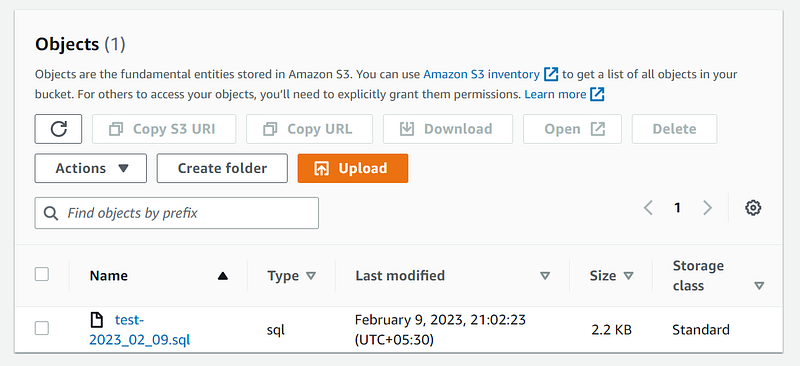
Note: To move the backup in S3 we have to install the awscli in our bastion as well as we need to configure access-key and security-access in aws configure command,otherwise it will through an error.
Mysql Warning Using a Password on The Command Line Interface Can be Insecure
- To fix the above warning message we have to create text filename called “myhostalias”
vi myhostalias

mysql_config_editor set --login-path=myhostalias --host=localhost --user=Hulk --password=Hulk@123$#@- Here our new scripts
#!/bin/bash

cdm=`date +"%Y_%m_%d"`
db_name="test"
echo "Mysqldump database creation is progress"
start_time=`date +"%Y-%m-%d-%H-%M-%s"`
echo "$start_time Script Start Time"
mysqldump --login-path=myhostalias $db_name > $db_name-$cdm.sql
end_time=`date +"%Y-%m-%d-%H-%M-%s"`
echo "mysqldump $end_time completed"
Expected output:
Mysqldump database creation is progress
2023-02-09-15-38-1675957098 Script Start Time
mysqldump 2023-02-09-15-38-1675957098 completed- Now our scripts doesn't contain username and password because all of the required information has been maintained in the myalias file.
Note: It is for reading purpose don't try to copy and execute on your production environment