
How to work with Nested Data
Cheat Sheet when working with Nested Data Structures

In the field of Data Science or Business Intelligence, one often comes into contact with nested data, for example when working with data from Google Maps or its open source counterpart OpenStreetMap and many other data sources. How you can easily query this data I will show shortly so you can use it as a template for your own use cases.
Toolset
In this walkthrough, I will use Google’s BigQuery (You can also use it in the FreeTier), SQL and the free dataset OpenStreetMap Public Dataset. It’s great that Google published it for free in their public data sets. So you can easily query geo information with SQL [1]. Keep in mind that Google uploaded this data set once without any updates yet.
What is Nested Data?
BigQuery but also many other newer database systems supports loading and querying nested and recurring data from source formats that support object-based schemas for example JSON. Here is a short illustration of nested data:
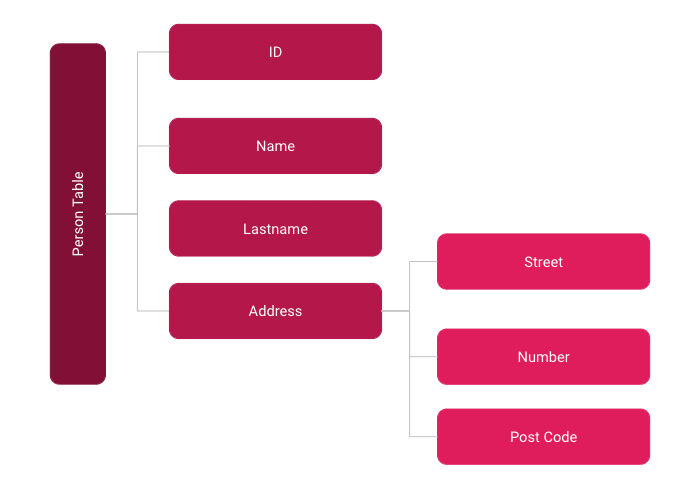
The address column contains an array of values. The different addresses in the array are the recurring data. The different fields within each address are the nested data.
First Example
So we start with our first query, in this record nested fields are all_tags.key and all_tags.value in which information like the name, address or additional information about what kind of object it is is stored. While the fields like osm_id and osm_timestamp are normal fields.

In this example I want to query points which represent a supermarket:
SELECT * FROM `bigquery-public-data.geo_openstreetmap.planet_features`Where (‘shop’,’supermarket’) IN (SELECT (KEY, value) FROM unnest (all_tags))This would give the above result. But feel free to test it yourself. More keys and values you can query you will find on the OpenStreetMaps documentary[2].
Second Example
It would be too simple, however, if it were to always follow the same pattern. In JSON formats, there are also double-nested fields — that is, an array within an array. This is mapped in nested field like here in OpenStreetMap dataset with colons:
SELECT * FROM `bigquery-public-data.geo_openstreetmap.planet_features`Where (‘addr:city’,’Berlin’) IN (SELECT (KEY, value) FROM unnest (all_tags))So here I have to specify the desired connected object city after the key addr and the colon. The result would then be all objects that are assigned to the address:city = Berlin. Actually the same pattern as in the first example, but you have to know it. Here you usually have to study the data source carefully, so that you do not stumble over such pitfalls.
Summary
New systems like BigQuery offer extremely high computing power and fast results through column-based databases. With the above examples, you should be able to query and process most of your nested data use cases very well.
Sources and further Readings
[1] Google, OpenStreetMap Public Dataset
[2] OpenStreetMap, https://www.openstreetmap.de/ (2021)