
Reading and Editing PDF’s Documents Using Python

In this article, we will learn about how we can use python pdf modules to read and modify the pdf files. PyPDF2 is an updated version of the PyPdf module which supports the python version 3 and greater. We will work through each function of PyPDF2 to deal with pdf files.
Setup Installation:
You can find the PyPdf2 module on the PyPI a website that holds python modules files. When you install python a pip module is preinstalled with it. Using the following command will install Pypdf2 in your system. The command is the same for all Operating systems.
pip install PyPDF2
Reading PDF file:
In this section, we will learn about reading and writing pdf files let start with reading the file first thing first we need to load the Pypdf2 module in our program.
Well, line 2 shows we had loaded them PyPDF2 in our program, and then we read the pdf file using the python open() reading method. But one change we made we are not reading in normal mode we are reading it in the Byte mode using rb and next we pass out the variable that had the file in the byte form to PdfFileReader() the function which will read the pdf content. On the next line for verifying that we successfully read the pdf file or not we used numpages the method of Pypdf2 which will count the pages of our pdf and return an integer number. And in the end, we close the pdf file.
You can use PyPDF2 to extract metadata and some text from a PDF. This can be useful when you’re doing certain types of automation on your pre-existing PDF files.
Here are the current types of data that can be extracted:
- Author
- Creator
- Producer
- Subject
- Title
- Number of pages
Output:
    Information about sample.pdf:
    Author: None
    Creator: Rave (http://www.nevrona.com/rave)
    Producer: Nevrona Designs
    Subject: None
    Title: None
    Number of pages: 2
Extracting Content from Pdf
By using PyPDF 2 we can extract the content of any pdf using its extraction function. check the code below
As you can see we already implemented the reading metho, we will tweak our program to extract the content of reading pdf files using extractText() the function but before that, we get the specific page by using getPage() a function and store it in a variable name pageObj and then call extractText() a method on it. Check the below input and Output pdf file.
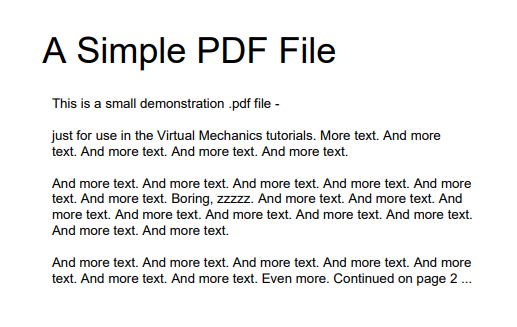
Output:
A Simple PDF File This is a small demonstration .pdf file — just for use in the Virtual Mechanics tutorials. More text. And more text. And more text. And more text. And more text. And more text. And more text. And more text. And more text. And more text. And more text. Boring, zzzzz. And more text. And more text. And more text. And more text. And more text. And more text. And more text. And more text. And more text. And more text. And more text. And more text. And more text. And more text. And more text. And more text. Even more. Continued on page 2We can extract all the pages of pdf by iterating each pdf page and performing the same line 10 and 13. We need page count so our loop knows where to stop. Remember numPages the method we see in the reading section. We will use it to get pdf pages to count and then we will use while loop by setting i<pagecount and in the loop body we will line 10 and 13. A simple change we will do is changing the getPage(0) to getPage(i). Well on every iteration value i will increase by 1 number so we can iterate the whole pdf.
Splitting documents page by page:
By using PyPdf2 we can split the pdf file page by page. In simple words, we can split the pdf and store each page as a pdf. Check the code below.
We imported the reading and writing methods of pydf2 and in the next line, we implemented a function. In which are passing the pdf file name and on line # 6 we are iterating the Pdf file with on basis of page count by using getNumPages(). If you see getNumPages() do same the job as the numPages but in loop area getNumPages() method give more benefit with python range function. In the loop body, we set the PdfWriter and add the current iterating page in writer and write that pdf file as we did in the writing section. Now loop will iterate until the last page and it will perform all lines again. In that way, we split our pdf document pages into multiple pages pdf.
Merging documents page by page:
So far we learn how we can split a pdf document. In this section, we will learn how we can merge two pdf into a single pdf using Pypdf2 in python. Check the code below.
If you had seen the code you can get that the code little bit similar to the code of splitting pdf. Well, there is a little change we are using two loops this time the first loop will iterate the pdf documents by reading them one by one as we passed a list form variable holding all the names of pdf files. In the current case, I had 2 pdf files that I passed. Next, after reading the pdf, we are writing each page of pdf with Pdf writer and after iterating all pdf documents on line # 13 we are writing pdf file. We can split the procedure into 3 steps
- Reading pdf one by one
- Writing each page of pdf
- Output the pdf file
Rotating PDF:
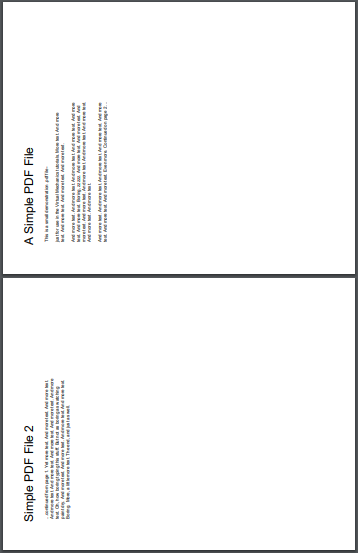
PyPdf 2 provides us function to rotate the pdf document at any angle. By using the rotateClockwise method in which we need to pass an integer value. If we pass 90 numbers in the method that will rotate each page in the pdf document to a 90-degree angle. Check the code below
Output:
Encrypt PDF File:
Sometimes you need to add some security to your documents because no one wants to share the important information with anyone you can add encryption to your pdf file using the Encryption method with Pypdf2.
We made a function name encryption and as a parameter, we pass input file name, output file name, and password we want to be set on our file and one line # 10 we used encrypt(). If you look at that code line we give 3 parameters user_pass, owner_pass, and use_128bit. The default is for 128-bit encryption to be turned on. If you set it to False, then 40-bit encryption will be applied instead.
Conclusion:
The PyPDF2 the package is quite useful and is usually pretty fast. You can use PyPDF2 it to automate large jobs and its capabilities to help you do your job better! You can learn more about its function on the PyPDF2 official website.
In this tutorial, you learned how to do the following:
- Reading PDF files
- Extract metadata from a PDF
- Rotate pages
- Merge and split PDFs
- Add encryption
There are many other PDF modules in python. You can learn their function and use them in your projects or programs. Hope you find this article useful and feel free to share your response to it.


