avatarParis Nakita Kejser

Free AI web copilot to create summaries, insights and extended knowledge, download it at here

2111

Abstract

            <iframe class="gist-iframe" src="/gist/parisnakitakejser/df2483a1781b54456d447c25ec217b27.js" allowfullscreen="" frameborder="0" height="undefined" width="undefined">
          </div>
        </div>
    </figure></iframe></div></div></figure><h2 id="35f7">VPC Network</h2><p id="174d">The VPC Network there will be created is created with public and private NAT subnets, we are allowed only to spin a single NAT Gateway up.</p><h2 id="f4da">Peering role</h2><p id="4339">It's required to create a new IAM Role there can be assumed from our second AWS Account so it's allowed to create the right VPC Peering between our two AWS Account’s VPC Network.</p><h1 id="7749">VPC Network Two — Second</h1><p id="761f">In VPC Network Two we will create a VPC Network, after it's created we will try to set up the peering connection and after our VPC Peering is successfully created we will add it to the routing table for our subnet to be sure traffic from our VPC Network One can be routed into our network.</p><blockquote id="c21c"><p>Be sure you have added the VPC Network One — VPC ID into the settings.py file else its will not working and the peering will not be created.</p></blockquote>
    <figure id="84cc">
        <div>
          <div>
            
            <iframe class="gist-iframe" src="/gist/parisnakitakejser/91fe3cd0fa85cd57dc04fe4bce0521e0.js" allowfullscreen="" frameborder="0" height="undefined" width="undefined">
          </div>
        </div>
    </figure></iframe></div></div></figure><h2 id="ec08">VPC Network</h2><p id="8aaa">We are doing the same as we did on the VPC Network One by creating a VPC Network with public and private NAT subnets, after that, we defined it with a max 1 NAT gateway running on this VPC Network.</p><h2 id="d31c">VPC Peering</h2><p id="745a">In our VPC Peering, we set up the connection settings to explain our AWS Account it should create a Peering connection based on peer_vpc_id, peer_owner_id, peer_region, peer_role, and our AWS Account VPC ID for our Network.</p><h2 id="300e">Subnet route

Options

table</h2><p id="de70">When the VPC Peering is created we need to allow traffic incoming from our peering network to be accepted, it's happening by adding the IP CIDR block in the routing table for the subnets</p><h1 id="d5ca">Route table in VPC Network One</h1><p id="c33f">If we want to connect from our VPC Network One to our VPC Network Two we need to create the rules inside the route table for our VPC Network’s subnet as we did for our VPC Network Two, so that's what we gonna do in this last section.</p> <figure id="c60e"> <div> <div>

            <iframe class="gist-iframe" src="/gist/parisnakitakejser/bbfe6536c94a7cfd6ac19ac18ee9fe67.js" allowfullscreen="" frameborder="0" height="undefined" width="undefined">
          </div>
        </div>
    </figure></iframe></div></div></figure><h2 id="f536">Route table</h2><p id="4696">We are using our VPC CIDR block for VPC Network Two to allow incoming traffic from that VPC Network like de did on VPC Network One.</p><h1 id="d5da">Download prototype source code from GitHub</h1><p id="be60">The full prototype source code can be found on my GitHub account, you can download it and play around with it, it’s fully free and I hope you enjoy the code and it learns something new about how to use AWS CDK with Python.</p><div id="26f3" class="link-block">
      <a href="https://github.com/parisnakitakejser/video-tutorial-python-code/tree/main/aws/AWS-CDK/VPC/vpc-cross-account-peering">
        <div>
          <div>
            <h2>video-tutorial-python-code/aws/AWS-CDK/VPC/vpc-cross-account-peering at main ·…</h2>
            <div><h3>You can't perform that action at this time. You signed in with another tab or window. You signed out in another tab or…</h3></div>
            <div><p>github.com</p></div>
          </div>
          <div>
            <div style="background-image: url(https://miro.readmedium.com/v2/resize:fit:320/0*ukkMth5HBDdOvfsW)"></div>
          </div>
        </div>
      </a>
    </div></article></body>

How to use VPC Peering cross-accounts in AWS CDK in Python between two different VPC Networks between AWS Accounts
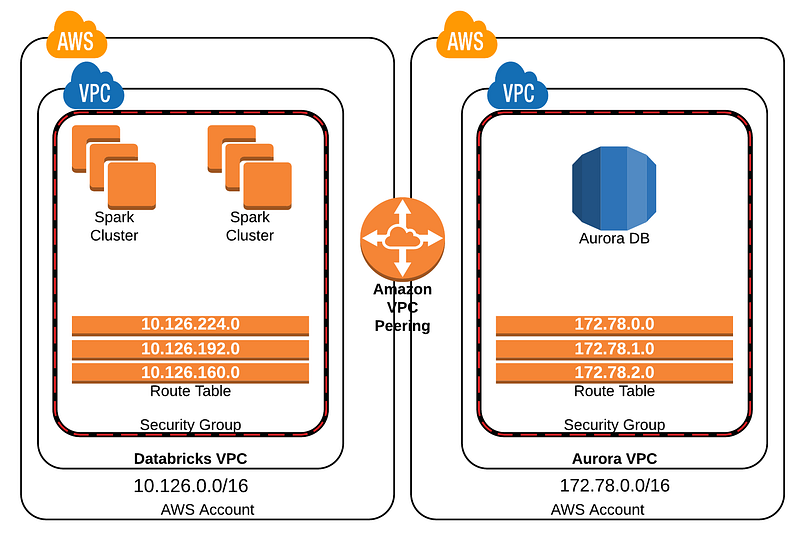
VPC Peering is a quick way to connect to different VPC networks, you can use it with two different VPC Networks on a single account read how to use VPC Peering with two different VPC networks on a single AWS account from my other article if you need the basic understanding for how VPC Peering is working, in this article, you will learn how to use VPC Peering between two different AWS Accounts and how you connect the VPC Networks together.

Basic settings file

We need to define different settings for cross-using our VPC Peering between two AWS accounts, fill this setting file out and be sure you did not replace the data you can’t before the stacks are deployed success.

We are using 10.21.x.x for our VPC Network one and we are using 10.22.x.x for our VPC Network two, this will make sure we can use VPC Peering correctly.

VPC Network One — Primary

First, we need to create our network for our primary account, the account we want to connect to, in this case, you will start creating a VPC Network a d create an IAM Role there allowed our second AWS Account to assume the role and create the peering connection between our two AWS Accounts.

VPC Network

The VPC Network there will be created is created with public and private NAT subnets, we are allowed only to spin a single NAT Gateway up.

Peering role

It's required to create a new IAM Role there can be assumed from our second AWS Account so it's allowed to create the right VPC Peering between our two AWS Account’s VPC Network.

VPC Network Two — Second

In VPC Network Two we will create a VPC Network, after it's created we will try to set up the peering connection and after our VPC Peering is successfully created we will add it to the routing table for our subnet to be sure traffic from our VPC Network One can be routed into our network.

Be sure you have added the VPC Network One — VPC ID into the settings.py file else its will not working and the peering will not be created.

VPC Network

We are doing the same as we did on the VPC Network One by creating a VPC Network with public and private NAT subnets, after that, we defined it with a max 1 NAT gateway running on this VPC Network.

VPC Peering

In our VPC Peering, we set up the connection settings to explain our AWS Account it should create a Peering connection based on peer_vpc_id, peer_owner_id, peer_region, peer_role, and our AWS Account VPC ID for our Network.

Subnet route table

When the VPC Peering is created we need to allow traffic incoming from our peering network to be accepted, it's happening by adding the IP CIDR block in the routing table for the subnets

Route table in VPC Network One

If we want to connect from our VPC Network One to our VPC Network Two we need to create the rules inside the route table for our VPC Network’s subnet as we did for our VPC Network Two, so that's what we gonna do in this last section.

Route table

We are using our VPC CIDR block for VPC Network Two to allow incoming traffic from that VPC Network like de did on VPC Network One.

Download prototype source code from GitHub

The full prototype source code can be found on my GitHub account, you can download it and play around with it, it’s fully free and I hope you enjoy the code and it learns something new about how to use AWS CDK with Python.

AWS
Networking
DevOps
Cloud Computing
Vpc Peering
Recommended from ReadMedium
avatarMunidimple Muchalli
AWS GuardDuty

AWS Guard Duty

4 min read