
How To Use Try With Resource In Java | Exception Handing
How to handle exceptions using try-with-resource statement

The Java try with resources construct, AKA Java try-with-resources, is an exception handling mechanism that can automatically close resources like a Java InputStream or a JDBC Connection when you are done with them.
Oracle added the try with resources construct to the Java language in 2011 to help guarantee objects such as network sockets, database connections and references to files and folders are cleanly terminated after their use. Failure to close these resources after a developer opens a handle to them can cause memory leaks, trigger avoidable garbage collection routines and strain a server’s CPU.
· Before Java 7 · How to use try-with-resource statement? · Why do i have to use try-with-resource statement? · Example · Suppressed Exceptions · Advantages of using try-with-resources · try-with-resources With Multiple Resources · Java 9 — Effectively Final Variables
Before Java 7
In Java, if you use a resource like input or output streams you always have to close it after using. It also can throw exceptions so it has to be in a try-catch block. The closing has to be in the finally block. This is a least the way until Java 7. This has several disadvantages:
- You’d have to check if your ressource is null before closing it
- The closing itself can throw exceptions so your finally had to contain another try-catch
- Programmers tend to forget to close their ressources
visite try-catch-finally
How to use try-with-resource statement?
It was initially introduced in Java 7 and the whole idea behind it was that the developer doesn’t need to worry about resource management for resources they use only in one try-catch-finally block. This is achieved by removing the need for finally blocks, which developers only used to close resources in practice.
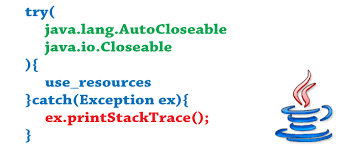
In Java, the try-with-resources statement is a try statement that declares one or more resources. The resource is as an object that must be closed after finishing the program. When the execution leaves the try-with-resources block, any resource opened within the try-with-resources block is automatically closed, regardless of whether any exceptions are thrown either from inside the try-with-resources block, or when attempting to close the resources.
To use Java’s try-with-resources language feature, the following rules apply:
- All objects managed by a try with resources statement must implement the AutoCloseable interface.
- Multiple AutoCloseable objects can be created within Java’s try with resources block.
- Objects declared in a try with resources statement have scope within the try block, but not the catch and finally blocks.
- The close() method of objects declared in a try with resources block is invoked regardless of whether an exception is thrown during execution.
- If an exception is thrown in the close() method, it may get categorized as a suppressed exception.
The catch and finally blocks can still be used in a try-with-resource block, and they will operate in the same manner as they would in a regular try block.
The resource referenced by the AutoCloseable object will always be closed if a try with resources statement is used, and potential memory leaks commonly caused by a misallocation of resources are eliminated.
Syntax
try(declare resources here) {
    // use resources
}
catch(FileNotFoundException e) {
    // exception handling
}
Using try-with-resources
Simply put, to be auto-closed, a resource has to be both declared and initialized inside the try:
try (PrintWriter writer = new PrintWriter(new File("test.txt"))) {
    writer.println("Hello World");
}
Replacing try–catch-finally With try-with-resources
The simple and obvious way to use the new try-with-resources functionality is to replace the traditional and verbose try-catch-finally block.
Let’s compare the following code samples.
The first is a typical try-catch-finally block:
Scanner scanner = null;
try {
    scanner = new Scanner(new File("test.txt"));
    while (scanner.hasNext()) {
        System.out.println(scanner.nextLine());
    }
} catch (FileNotFoundException e) {
    e.printStackTrace();
} finally {
    if (scanner != null) {
        scanner.close();
    }
}"); background-repeat: no-repeat; background-position: center center; background-color: rgb(99, 177, 117);">Copy
And here’s the new super succinct solution using try-with-resources:
try (Scanner scanner = new Scanner(new File("test.txt"))) {
    while (scanner.hasNext()) {
        System.out.println(scanner.nextLine());
    }
} catch (FileNotFoundException fnfe) {
    fnfe.printStackTrace();
}
Difference between try and try-with-resource
When it comes to exceptions, there is a difference in try-catch-finally block and try-with-resources block. If an exception is thrown in both try block and finally block, the method returns the exception thrown in finally block.
For try-with-resources, if an exception is thrown in a try block and in a try-with-resources statement, then the method returns the exception thrown in the try block. The exceptions thrown by try-with-resources are suppressed, i.e. we can say that try-with-resources block throws suppressed exceptions.
Why do i have to use try-with-resource statement?
The try-with-resources statement ensures that each resource is closed at the end of the statement execution. If we don’t close the resources, it may constitute a resource leak and also the program could exhaust the resources available to it. that’s what happend mostly when you use try-catch-finally block
Prior to Java SE 7, you can use a finally block to ensure that a resource is closed regardless of whether the try statement completes normally or abruptly. The following example uses a finally block instead of a try-with-resources statement:
static String readFirstLineFromFileWithFinallyBlock(String path) throws IOException {

    FileReader fr = new FileReader(path);
    BufferedReader br = new BufferedReader(fr);
    try {
        return br.readLine();
    } finally {
        br.close();
        fr.close();
    }
}
However, this example might have a resource leak. A program has to do more than rely on the garbage collector (GC) to reclaim a resource’s memory when it’s finished with it. The program must also release the resoure back to the operating system, typically by calling the resource’s close method. However, if a program fails to do this before the GC reclaims the resource, then the information needed to release the resource is lost. The resource, which is still considered by the operaing system to be in use, has leaked.
In this example, if the readLine method throws an exception, and the statement br.close() in the finally block throws an exception, then the FileReader has leaked. Therefore, use a try-with-resources statement instead of a finally block to close your program's resources.
Example
The following example reads the first line from a file. It uses an instance of FileReader and BufferedReader to read data from the file. FileReader and BufferedReader are resources that must be closed after the program is finished with it:
import java.io.*;
class Main {
  public static void main(String[] args) {
    String line;
    try(BufferedReader br = new BufferedReader(new FileReader("test.txt"))) {
      while ((line = br.readLine()) != null) {
        System.out.println("Line =>"+line);
      }
    } catch (IOException e) {
      System.out.println("IOException in try block =>" + e.getMessage());
    }
  }
}
In this example, the resources declared in the try-with-resources statement are a BufferedReader. The declaration statements of this resource appear within parentheses immediately after the try keyword. The classes BufferedReader, in Java SE 7 and later, implement the interface java.lang.AutoCloseable. Because the BufferedReader instances are declared in a try-with-resource statement, they will be closed regardless of whether the try statement completes normally or abruptly (as a result of the method BufferedReader.readLine() throwing an IOException).
Suppressed Exceptions
If a try block throws an exception and one or more exceptions are thrown by the try-with-resources, the exceptions thrown by try-with-resources are suppressed. In other words, we can say, exceptions which are thrown by try-with-resources are suppressed exceptions.
You can get these exceptions by using the getSuppress() method of Throwable class.
Example :
In the above example, exceptions can be thrown from the try-with-resources statement when:
- The file test.txt is not found.
- Closing the BufferedReader object.
An exception can also be thrown from the try block as a file read can fail for many reasons at any time.
If exceptions are thrown from both the try block and the try-with-resources statement, exception from the try block is thrown and exception from the try-with-resources statement is suppressed.
Retrieving Suppressed Exceptions
In Java 7 and later, the suppressed exceptions can be retrieved by calling the Throwable.getSuppressed() method from the exception thrown by the try block.
getSuppress() It returns an array containing all of the exceptions that were suppressed by the try-with-resources statement. If no exceptions were suppressed or suppression is disabled, an empty array is returned.
We get the suppressed exceptions in the catch block.
catch(IOException e) {
  System.out.println("Thrown exception=>" + e.getMessage());
  Throwable[] suppressedExceptions = e.getSuppressed();
  for (int i=0; i<suppressedExceptions.length; i++) {
    System.out.println("Suppressed exception=>" + suppressedExceptions[i]);
  }
}
Advantages of using try-with-resources
Here are the advantages of using try-with-resources:
- More readable code and easy to write.
- Automatic resource management.
- Number of lines of code is reduced.
- When multiple resources are opened in try-with-resources, it closes them in the reverse order to avoid any dependency issue.
finally block not required to close the resource
Before Java 7 introduced this feature, we had to use the finally block to ensure that the resource is closed to avoid resource leaks.
Here’s a program that is similar to Example 1. However, in this program, we have used finally block to close resources.
Example : Close resource using finally block
import java.io.*;
class Main {
  public static void main(String[] args) {
    BufferedReader br = null;
    String line;
    try {
      System.out.println("Entering try block");
      br = new BufferedReader(new FileReader("test.txt"));
      while ((line = br.readLine()) != null) {
        System.out.println("Line =>"+line);
      }
    } catch (IOException e) {
      System.out.println("IOException in try block =>" + e.getMessage());
    } finally {
      System.out.println("Entering finally block");
      try {
        if (br != null) {
          br.close();
        }
      } catch (IOException e) {
        System.out.println("IOException in finally block =>"+e.getMessage());
      }
    }
  }
}
Output
Entering try block
Line =>line from test.txt file
Entering finally block
As we can see from the above example, the use of finally block to clean up resources makes the code more complex.
Notice the try…catch block in the finally block as well? This is because an IOException can also occur while closing the BufferedReader instance inside this finally block so it is also caught and handled.
The try-with-resources statement does automatic resource management. We need not explicitly close the resources as JVM automatically closes them. This makes the code more readable and easier to write.
try-with-resources With Multiple Resources
We can declare multiple resources just fine in a try-with-resources block by separating them with a semicolon:
try (Scanner scanner = new Scanner(new File("testRead.txt"));
    PrintWriter writer = new PrintWriter(new File("testWrite.txt"))) {
    while (scanner.hasNext()) {
	writer.print(scanner.nextLine());
    }
}
Java 9 — Effectively Final Variables
Before Java 9, we could only use fresh variables inside a try-with-resources block:
try (Scanner scanner = new Scanner(new File("testRead.txt"));
    PrintWriter writer = new PrintWriter(new File("testWrite.txt"))) {
    // omitted
}"); background-repeat: no-repeat; background-position: center center; background-color: rgb(99, 177, 117);">Copy
As shown above, this was especially verbose when declaring multiple resources. As of Java 9 and as part of JEP 213, we can now use final or even effectively final variables inside a try-with-resources block:
final Scanner scanner = new Scanner(new File("testRead.txt"));
PrintWriter writer = new PrintWriter(new File("testWrite.txt"))
try (scanner;writer) {
    // omitted
}"); background-repeat: no-repeat; background-position: center center; background-color: rgb(99, 177, 117);">Copy
Put simply, a variable is effectively final if it doesn’t change after the first assignment, even though it’s not explicitly marked as final.
As shown above, the scanner variable is declared final explicitly, so we can use it with the try-with-resources block. Although the writer variable is not explicitly final, it doesn’t change after the first assignment. So, we can to use the writer variable too.
Happy learning 😃
Join Mouad Oumous Java WhatsApp Group JOIN
Join Mouad Oumous Telegram Channel JOIN
Do support our publication by following it


