
How to Use the Webull Trading App
The Stock Trading Platform that Fits In Your Pocket
Webull is a new trading app and is used from your phone that I previously wrote about some benefits of the Webull platform.
Technology has changed how to buy and sell stocks from your very own fingertips.
The advancement in technology has us close to advancement in technology as good as Luke Sky Walker and Han Solo in Star Wars.
Just kidding. Technology truly has changed the ease and the ability for any person to make trades right from their smartphone today.
This huge change was barely possible a decade ago.
So a stockbroker or financial adviser is not always needed unless you need assistance picking your stocks.
Webull wants to be your guide to walk you through with your trades with their online and offline support center.
This is one of the great benefits the internet has provided.

What does Webull provide?
You may be wondering about the security of this platform since there are so many scams going around.
Well, don’t let that deter you.
Webull started in 2018 trying to compete against the online trading app, Robinhood.
Webull did the hard work and paperwork to protect the securities of its members up to $500,000 or $250,000 for cash claims.
Several bloggers/investors also highlight the great performance Webull provides.
So this should put you at some ease.
Currently, Webull provides users with the ability to buy and sell stocks as well as options that were introduced this year.
The best part is there is no trading fee as many online brokers are going in this direction.
The $0 fee trading platform is gaining a lot of people’s attention.
Some stock platforms charge for making options trades but Webull doesn’t.
Additionally many financial advisers still charge you a fee for their service either hourly or by appointment. I am not encouraging you to avoid them but to do your homework before signing up with one.
There is no better way to learn than trying out this platform to see if it suits you or moving from your current broker that continues to charge you in this $0 fee trading era of 2020.
Another benefit this platform provides, Webull is bringing cryptocurrencies to you. This new trading platform is right around the corner and there is a waiting list once the platform goes live.
Webull is also working to add day trading. This platform will offer some of the more popular day trading stocks.
Forex is another tool Webull is adding.
Webull wants to be the one platform you use to make all of your trades right from your fingertips.
Your Accounts
Before writing this article, I really hadn’t explored all of the features on the Webull platform. After I look at every little section, tab, and resource on the site, so I was very impressed. There is so much available as compared to many full site brokerage sites.
There are four primary accounts available under the Webull platform. You have your ordinary stock brokerage account, Individual Retirement Account also known as an IRA, stock options, and the community board. The other trading platforms I previously mentioned will be added soon.
The stock brokerage account allows you to buy and sell stocks that you hear about daily, Apple, Netflix, Microsoft, Intel, and even Tesla. These are not buy recommendations but I am sharing some popular examples that other traders are buying.
With any stocks you buy and sell, you may owe taxes so be sure to verify this with your accountant since I am not a tax professional. Each person is in their own tax bracket and the tax law continues to change almost yearly. So I do not want to be blamed for giving out bad tax advice.
Under the 2020 IRS guidelines, you can invest up to $6000 in your IRA account and $7000 if you are over 50 years old.
To break this down by month, you can invest $500 a month if you’re under 50 years old and $583.33 a month if you are 50 and older.
With an IRA you are saving for your retirement since these funds can not be withdrawn until you are 59 1/2 years old without getting penalized.
Community Board
On Webull, the community board are other users sharing their thoughts and ideas on investments they recommend or they’re trying o get the opinion of others on these possible investments.
Some comments go off-topic as recently some were discussing the effects of the corona virus.
This is a very active part of the platform.
Watchlist
The watchlist is exactly as it sounds. You can edit the list to follow stocks and also see your current stock holdings.
So a stock you add to this section, you can click on it and get a quick snapshot of how the stock is performing.
Also included is some recent news, analyst comments, analysis, press comments, financials, and profile of the company.
This is a great tool for researching a company you want to invest in and can also trade directly from the section if you like.
Markets on Webull App
This section highlights the top areas Webull currently covers or planning to have on their site soon. The market section goes into a lot of detail for those who want to get a good summary or preview of the markets for stocks, cryptocurrencies, global market, and forex section.
In the stock section, it is broken down by the top gainer and losers of the day, and shows the most active stocks by volume, percentage turnover, and range.
This section additionally highlights the best performing ETFs, industries such as healthcare, retail, metals, semiconductors, and other areas.
The cryptocurrency section currently lists 15 cryptocurrencies such as Bitcoin, Ethereum, EOS, Bitcoin Cash, XRP, XLM, LTC, TRX, XMR, DASH, ETC, NEO, ZEC, BTG, and VET.
So we will have to wait and see how this section of the platforms evolves since it has not opened yet.
Your Portfolio
The next section or the middle tab on Webull is your account. You can switch from the type of account you have, your taxable and non-taxable accounts.
Then the site will list the performance of your account, the stocks you own, how much money you have in your account, and any pending orders you made on a stock.
There is a More tab on the site that takes you to anything you can imagine in regards to your trades, account, trading password, portfolio performance, making a deposit or withdrawal to the account, and tools for paper trading and creating a screener for stock sectors you want to watch.
Other sections located in here are the tax document, beneficiaries, and others.
This is a quick and easy snapshot of your portfolio right at your fingertips.

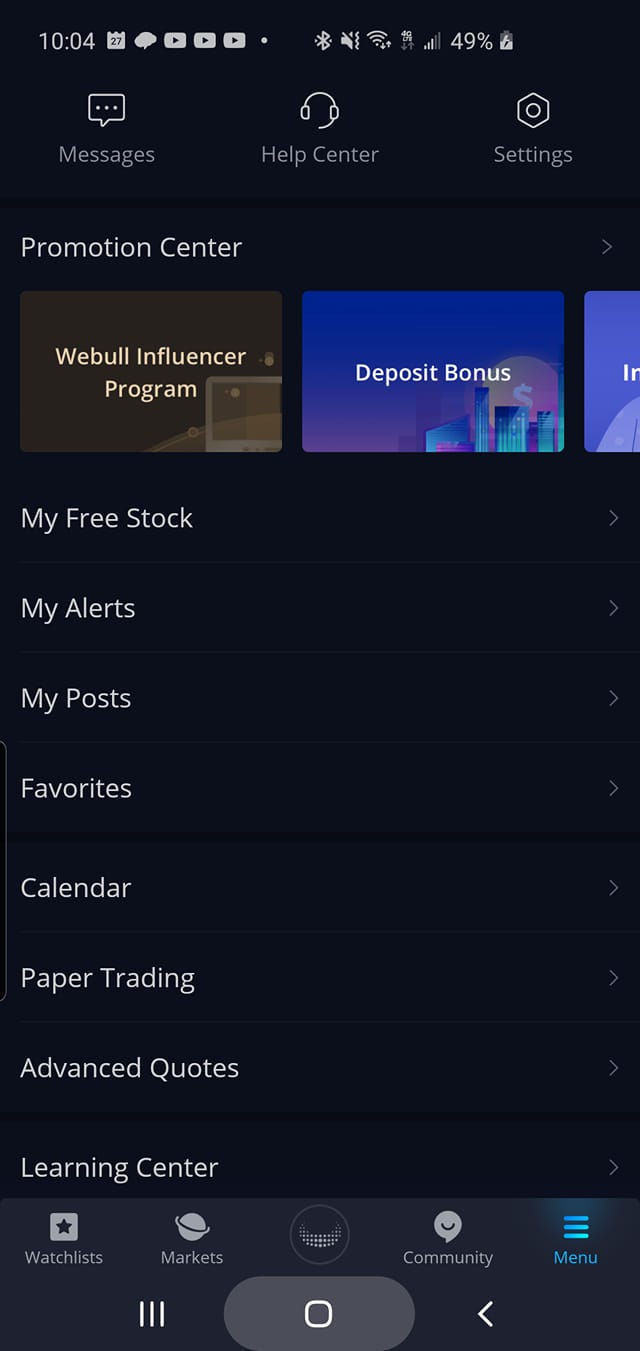
Menu Section
Webull has an extensive set up to help new users of this platform. In the menu section several options are available to help familiarize a new user with the platform. This is a key site for new users to check out.
Message Tab
On the top left, the company sends out information on the message tab. Here they will send some of the latest IPOs (Initial Public Offering) they are offering. IPOs are when a new stock is coming on the market that Webull offers.
Also, Webull sends out new information when they have added a new tool on the platform. For instance, one of the most recent messages is the introduction of common violation notifications. This is when a cash account liquidates stocks that were bought on unsettled proceeds.
Basically, this is when you use unsettled funds from a security you sold and make a new transaction.
For Webull, this was just one example of a message they send out.
Help Center Tab
The Help Center section provides a breakdown of some features on Webull. This could be one of the most used sections to find answers you need on Webull.
When you have a question, on where a feature is located on the site on unsure what a term is, you should use the Help Center tab. This section covers what to do when you open your account, how to make a deposit to your account, what is a margin call, and any promotions the company is running.
Directly below this is the Quick Access tab. The section under this takes you to the promotion center, pending accounts update, options trading, change the account type, and change trading password.
The FAQs section located on this page covers information for the Webull user, promotions the company is running, tips to opening your Webull account, how to make deposits and withdrawals on Webull, options trading, tips to transfer stocks to your Webull account from another brokerage account, trading questions, fees, IRA, an about us section, platforms on Webull, tips on how to use the Webull desktop, a glossary of terms and questions about the market.
Settings Tab
To the right of the help center, you will find the Webull settings tab.
In the settings tab, you will find the account & security, switching what account you want to see, general information on Webull, changing the bright or dark mode of your Webull site, night mode, how to receive notifications from Webull, privacy authorization, and facts about this platform.
Promotion Center
The next section in the middle of the menu page is the promotion center. The sections I mentioned may differ from a regular user of Webull since I am a promoter for the company. The promotion center contains the Webull Influencer Program, Deposit Bonus, Invitation Bonus, Options Trading, Advanced Quotes Bonus, and Cryptocurrency Sections.
As the platform adds Forex trading and day trading sections, I will make an update to this article so make sure you are subscribed to my channel.
Remaining Sections
At the end of this page are several other sections for Webull. These are all useful tabs you should check out when needed.
There are eight sections in total.
The first section is the free stocks received when opening an account. As discussed in a previous article I wrote on Webull that you can find here, users can get a free stock for opening an account and another free stock for making a $100 deposit. These promotions change often.

The next section is the My Alerts section where you can set reminders when a stock has reached a certain price. This feature allows you to set a price point for a stock if you want to buy it at a certain price or moved a certain percentage.
For example, say you want to buy Apple stock, ticker symbol AAPL. The stock is listed at $282.97 but you want to buy the stock at a lower price.
So you set the stock alert for AAPL at $270.
When the AAPL stock price reaches that level, you will get a notification from the Webull app notifying you that the stock has reached this price level.
Then you have the option to buy the stock at this alert price you set.
It’s as simple as that.
In the alert section, you can also check on recent news for AAPL and leave notes for yourself as well as other options.
Personally, I have not used all of the features of the Webull app. So here are other sections available — My Posts, Favorites, a Calendar for earnings reports, a Paper Trading, Advanced Quotes, and a Learning Center.
The Paper Trading section allows you to practice making simulated trades. Webull runs contests quite often with other users to see who performs the best using simulated trades based on real-time prices. I used this before and it is a good feature to allow you to practice and see how a stock might perform which out risking any of your own real money.
The Advanced Quotes allows you to subscribe to paid sites or newsletters.
The newsletters are Nasdaq Basic, National Best Bid and Offer, Nasdaq Total View, OPRA Real-Time Data, Toronto Stock Exchange Level 1, Taiwan Stock Exchange Level 1, Hong Kong Stock Exchange Level 2, and the London Stock Exchange Level 1.
Give Webull a try and get two FREE stocks.
You get one for opening an account and another for making a $100 deposit.
This is a good time to start building your portfolio.
Tom Handy is a Retired Veteran, Investor, and President of the El Paso Veterans Business Association. Keep in touch with Tom and his future articles@ Tom Handy.