
How to use the :has() pseudo class in Tailwind
Simply put, the :has() pseudo class is the best thing to happen to CSS since Flexbox and is now supported by all major browsers. As of version 3.4, it is also now available to be used in Tailwind and you can read the release notes here.
The :has() pseudo class presents ways of styling an element based on its own or siblings child elements. This gives you the powerful ability to select elements in a way never previously possible.

This article will outline several ways in which you can use the :has() pseudo class to select elements in Tailwind. Tailwind gives you the ability to add styles to an element based on its own descendants, one of its parents descendants, or one of its peers descendants.
Styling an element based on its own descendants
To style an element based on its own descendants we can use the following syntax in Tailwind has-[*]:class-name. Within the square brackets you can define a selector for whichever descendant you wish to target. After the square brackets you follow with a colon and whichever tailwind class you’d like to apply if the element selector is found.
// examples of the has-[*]:class selector

<article class="has-[a]:cursor-pointer"></article>


<div class="has-[img:hover]:border-sky-700">
  <img src="..." />
</div>


<label class="has-[:checked]:bg-indigo-100 has-[:checked]:border-indigo-200">
  <svg>...</svg> React
  <input type="radio" checked />
</label>

<label>...</label>
<label>...</label>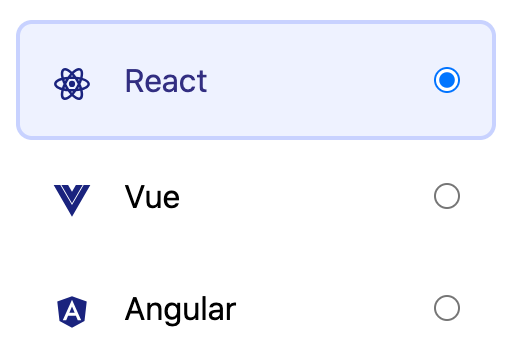
Styling an element based on one of its parents descendants
There may come a use case where you wish to style an element based on the descendants of one of its parents. We can do this by using the group-has-* selector in Tailwind.
To accomplish this, you will need to first assign the class group to whichever parent element you wish to check against. Then you can use the group-has-[*]:class-name syntax to style your target element.
<div class="group">
  <h4>Card Title...</h4>
  <img src="..." />
  <p>
    ...
    <a href="..." />
  </p>
  <button class="hidden group-has-[a]:block">Open link in new tab</button>
</div>
Styling an element based on one of its peers descendants
Finally, there may come a scenario where you wish to style an element based on the descendants of one of its peers. Similarly to the previous case, we need to assign an extra class to the sibling with which we want to target. We can do this by assigning the peer class to the sibling we want to check against. We can then use the syntax peer-has-[*]:class-name to style our target element.
It is important to note that currently the
peerselector can only be applied to previous siblings due to how subsequent sibling combinators work in CSS.
<label class="peer">
  <input id="mac" type="radio" name="os" checked />
  Mac
</label>
<svg class="hidden peer-has-[:checked]:block">...</svg>
If you are trying to target multiple peers of an element and would like to apply unique styles to each, you can give each peer a unique identifier and include this identifier after the square brackets in your has syntax when styling your target element.
<label class="peer/mac">
  <input id="mac" type="radio" name="os" checked />
  Mac
</label>
<svg class="hidden peer-has-[:checked]/mac:block">...</svg>

<label class="peer/windows">
  <input id="windows" type="radio" name="os" />
  Windows
</label>
<svg class="hidden peer-has-[:checked]/windows:block">...</svg>
And there you have it, you’re now fully equipped to explore the never ending possibilities of the has selector using Tailwind!


