avatarKevin Meneses González

Free AI web copilot to create summaries, insights and extended knowledge, download it at here

3177

Abstract

tart'</span>: <span class="hljs-string">'1'</span>, <span class="hljs-string">'limit'</span>: <span class="hljs-string">'10'</span>, <span class="hljs-string">'convert'</span>: <span class="hljs-string">'USD'</span> } headers = { <span class="hljs-string">'Accepts'</span>: <span class="hljs-string">'application/json'</span>, <span class="hljs-string">'X-CMC_PRO_API_KEY'</span>: <span class="hljs-string">'YOUR_API_KEY'</span> }

response = requests.<span class="hljs-keyword">get</span>(url, headers=headers, params=parameters) <span class="hljs-keyword">data</span> = response.json() print(<span class="hljs-keyword">data</span>)</pre></div><p id="0ca2">If all goes well you will the following on the Coinmarketcap API dashboard</p><figure id="7ea4"><img src="https://cdn-images-1.readmedium.com/v2/resize:fit:800/1*rqYCSMJVZ4z45rlm1qWFyg.png"><figcaption>Coinmarketcap API dashboard</figcaption></figure><p id="332e"><b><i>Example 2. Get info about ETH data</i></b></p><div id="9e6e"><pre><span class="hljs-keyword">import</span> requests

url = <span class="hljs-string">'https://pro-api.coinmarketcap.com/v1/cryptocurrency/info'</span> parameters = { <span class="hljs-string">'symbol'</span>: <span class="hljs-string">'ETH'</span> # Puedes cambiar <span class="hljs-string">'ETH'</span> por cualquier otro símbolo de criptomoneda } headers = { <span class="hljs-string">'Accepts'</span>: <span class="hljs-string">'application/json'</span>, <span class="hljs-string">'X-CMC_PRO_API_KEY'</span>: <span class="hljs-string">'YOUR_API_KEY'</span> }

response = requests.<span class="hljs-keyword">get</span>(url, headers=headers, params=parameters) <span class="hljs-keyword">data</span> = response.json()

print(<span class="hljs-keyword">data</span>[<span class="hljs-string">'data'</span>])</pre></div><p id="3c70"><b><i>3. Get data informational data on the Binance exchange</i></b></p><div id="7513"><pre><span class="hljs-keyword">import</span> requests

<span class="hljs-comment"># Definir la URL del endpoint y los parámetros de consulta</span> url = <span class="hljs-string">'https://pro-api.coinmarketcap.com/v1/exchange/info'</span> parameters = { <span class="hljs-string">'slug'</span>: <span class="hljs-string">'binance'</span> <span class="hljs-comment"># Slug del intercambio, puedes cambiarlo por otro como 'coinbase-exchange', 'kraken', etc.</span> } headers = { <span class="hljs-string">'Accepts'</span>: <span class="hljs-string">'application/json'</span>, <span class="hljs-string">'X-CMC_PRO_API_KEY'</span>: <span class="hljs-string">'YOUR_API_KEY'</span> <span class="hljs-comment"># Reemplaza 'YOUR_API_KEY' con tu clave API</span> }

<span class="hljs-comment"># Hacer la solicitud a la API</span> response = requests.get(url, headers=headers, params=parameters) data = response.json() <span class="hljs-built_in">print</span>(data)

<span class="hljs-comment"># Extraer y mostrar información relevante</span> exchange_info = data.get(<span class="hljs-string">'data'</span>, {}).get(<span class="hljs-string">'binance'</span>, {}) name = exchange_info.get(<span class="hljs-string">'name'</span>, <span class="hljs-str

Options

ing">'N/A'</span>) website = exchange_info.get(<span class="hljs-string">'urls'</span>, {}).get(<span class="hljs-string">'website'</span>, [<span class="hljs-string">'N/A'</span>])[<span class="hljs-number">0</span>] country = exchange_info.get(<span class="hljs-string">'country'</span>, <span class="hljs-string">'N/A'</span>) year_established = exchange_info.get(<span class="hljs-string">'year_established'</span>, <span class="hljs-string">'N/A'</span>)

<span class="hljs-built_in">print</span>(<span class="hljs-string">f"Exchange Name: <span class="hljs-subst">{name}</span>"</span>) <span class="hljs-built_in">print</span>(<span class="hljs-string">f"Website: <span class="hljs-subst">{website}</span>"</span>) <span class="hljs-built_in">print</span>(<span class="hljs-string">f"Country: <span class="hljs-subst">{country}</span>"</span>) <span class="hljs-built_in">print</span>(<span class="hljs-string">f"Year Established: <span class="hljs-subst">{year_established}</span>"</span>)</pre></div><h1 id="cec5">Conclusion</h1><p id="ffae">The CoinMarketCap API is a powerful tool for developers and investors interested in cryptocurrency. With a wide variety of available data, you can build robust applications for market tracking, data analysis, and trading automation. Review the official API documentation to explore all the available functionalities and capabilities.</p><p id="7fb5"><b>Follow me on Linkedin <a href="https://www.linkedin.com/in/kevin-meneses-897a28127/"></a></b><a href="https://www.linkedin.com/in/kevin-meneses-897a28127/">https://www.linkedin.com/in/kevin-meneses-897a28127/</a> <b>and Medium <a href="https://medium.com/@kevinmenesesgonzalez/subscribe"></a></b><a href="https://medium.com/@kevinmenesesgonzalez/subscribe">https://medium.com/@kevinmenesesgonzalez/subscribe</a> <b>Subscribe to the Data Pulse Newsletter <a href="https://www.linkedin.com/newsletters/datapulse-python-finance-7208914833608478720"></a></b><a href="https://www.linkedin.com/newsletters/datapulse-python-finance-7208914833608478720">https://www.linkedin.com/newsletters/datapulse-python-finance-7208914833608478720</a></p><p id="6074"><b>Join in my Patreon Community</b> <a href="https://patreon.com/user?u=29567141&amp;utm_medium=unknown&amp;utm_source=join_link&amp;utm_campaign=creatorshare_creator&amp;utm_content=copyLink">https://patreon.com/user?u=29567141&amp;utm_medium=unknown&amp;utm_source=join_link&amp;utm_campaign=creatorshare_creator&amp;utm_content=copyLink</a></p><h2 id="fe71">A Message from InsiderFinance</h2><figure id="2f53"><img src="https://cdn-images-1.readmedium.com/v2/resize:fit:800/0*10x5_2smmKq8oIlf.png"><figcaption></figcaption></figure><p id="dfe6">Thanks for being a part of our community! Before you go:</p><ul><li>👏 Clap for the story and follow the author 👉</li><li>📰 View more content in the <a href="https://wire.insiderfinance.io/">InsiderFinance Wire</a></li><li>📚 Take our <a href="https://learn.insiderfinance.io/p/mastering-the-flow">FREE Masterclass</a></li><li><b>📈 Discover <a href="https://insiderfinance.io/?utm_source=wire&amp;utm_medium=message">Powerful Trading Tools</a></b></li></ul></article></body>

How to Use the CoinMarketCap API: A Comprehensive Guide

What is CoinMarketCap?

CoinMarketCap is one of the most recognized platforms in the cryptocurrency world, providing real-time data on prices, market capitalization, trading volumes, and other essential metrics for over 7,000 cryptocurrencies. It is an indispensable tool for investors and developers looking to track market trends and conduct detailed analyses.

What is the CoinMarketCap API?

The CoinMarketCap API is an Application Programming Interface that allows developers to access cryptocurrency data provided by the platform. With this API, you can retrieve real-time data on prices, market caps, trading pairs, historical charts, and more. The API is designed to be flexible and scalable, making it easy to integrate into web and mobile applications.

Why Use the CoinMarketCap API?

The CoinMarketCap API is useful for a wide range of applications, including:

  1. Developing Cryptocurrency Tracking Apps: Create apps that display real-time prices, historical price charts, and comparisons between different cryptocurrencies.
  2. Market Analysis: Analyze market trends and conduct market research based on historical and current data.
  3. Developing Trading Bots: Implement bots that make buy/sell decisions based on real-time market data.
  4. Reports and Dashboards: Create financial reports and custom dashboards to visualize key market metrics.

How to Use the CoinMarketCap API

To use the CoinMarketCap API, you first need to sign up on their website and obtain an API key. Here’s a step-by-step guide to get you started:

1. Sign Up and Get Your API Key

  1. Go to the CoinMarketCap website.
  2. Register and log in to your account.
  3. Navigate to the API section and select the plan that best suits your needs (there are free and paid options).
ConMarketcap API prices

4. Obtain your unique API key, which you will need to authenticate your requests.

2. Making API Requests

The CoinMarketCap API supports multiple endpoints for accessing different types of data. Below are some basic examples using Python and the requests library.

Example 1: Get the List of top 10 market cap Cryptocurrencies

import requests

url = 'https://pro-api.coinmarketcap.com/v1/cryptocurrency/listings/latest'
parameters = {
  'start': '1',
  'limit': '10',
  'convert': 'USD'
}
headers = {
  'Accepts': 'application/json',
  'X-CMC_PRO_API_KEY': 'YOUR_API_KEY'
}

response = requests.get(url, headers=headers, params=parameters)
data = response.json()
print(data)

If all goes well you will the following on the Coinmarketcap API dashboard
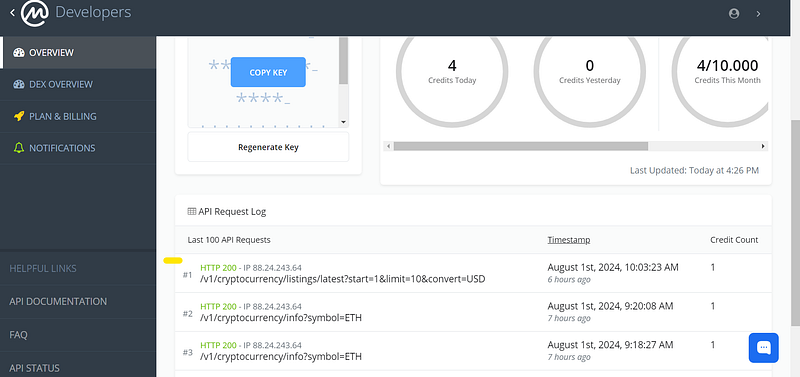
Coinmarketcap API dashboard

Example 2. Get info about ETH data

import requests

url = 'https://pro-api.coinmarketcap.com/v1/cryptocurrency/info'
parameters = {
  'symbol': 'ETH'  # Puedes cambiar 'ETH' por cualquier otro símbolo de criptomoneda
}
headers = {
  'Accepts': 'application/json',
  'X-CMC_PRO_API_KEY': 'YOUR_API_KEY'
}

response = requests.get(url, headers=headers, params=parameters)
data = response.json()

print(data['data'])

3. Get data informational data on the Binance exchange

import requests

# Definir la URL del endpoint y los parámetros de consulta
url = 'https://pro-api.coinmarketcap.com/v1/exchange/info'
parameters = {
  'slug': 'binance'  # Slug del intercambio, puedes cambiarlo por otro como 'coinbase-exchange', 'kraken', etc.
}
headers = {
  'Accepts': 'application/json',
  'X-CMC_PRO_API_KEY': 'YOUR_API_KEY'  # Reemplaza 'YOUR_API_KEY' con tu clave API
}

# Hacer la solicitud a la API
response = requests.get(url, headers=headers, params=parameters)
data = response.json()
print(data)

# Extraer y mostrar información relevante
exchange_info = data.get('data', {}).get('binance', {})
name = exchange_info.get('name', 'N/A')
website = exchange_info.get('urls', {}).get('website', ['N/A'])[0]
country = exchange_info.get('country', 'N/A')
year_established = exchange_info.get('year_established', 'N/A')

print(f"Exchange Name: {name}")
print(f"Website: {website}")
print(f"Country: {country}")
print(f"Year Established: {year_established}")

Conclusion

The CoinMarketCap API is a powerful tool for developers and investors interested in cryptocurrency. With a wide variety of available data, you can build robust applications for market tracking, data analysis, and trading automation. Review the official API documentation to explore all the available functionalities and capabilities.

Follow me on Linkedin https://www.linkedin.com/in/kevin-meneses-897a28127/ and Medium https://medium.com/@kevinmenesesgonzalez/subscribe Subscribe to the Data Pulse Newsletter https://www.linkedin.com/newsletters/datapulse-python-finance-7208914833608478720

Join in my Patreon Community https://patreon.com/user?u=29567141&utm_medium=unknown&utm_source=join_link&utm_campaign=creatorshare_creator&utm_content=copyLink

A Message from InsiderFinance

Thanks for being a part of our community! Before you go:

Cryptocurrency
Crypto Data
Coinmarketcap
Cripto
Cryptobot
Recommended from ReadMedium