
How To Use StoryOrigin To Build Your Newsletter as an Author
Exploring a new platform for author communities
If you’re an author in any genre and you’ve struggled to add subscribers to your newsletter, then StoryOrigin might be the answer for you. With their simple interface and detailed instructions on how to use each feature they offer, StoryOrigin has taken people from 0 subscribers to 1,000+ subscribers in just a few weeks.
I heard about StoryOrigin while looking up ways to build my newsletter. This included an exhaustive search of Google and asking some fellow authors in Facebook groups what they used. When someone mentioned StoryOrigin, I looked it up and joined immediately.
It was and still is free since it’s in beta, and all it would cost me was time to learn and utilize the site — and I had plenty of time if it translated into sales!
StoryOrigin hinges on the premise of being a community where you get involved in newsletter swaps and group promos.
Newsletter Swaps
This is where you send out specific books in your newsletter, preferably ones that your readers are going to want to click on. In exchange, the author you swapped with will send out your book in their newsletter. You can search for swaps by date and genre.
On the backend, you can track other authors and determine whether you should swap with them.
StoryOrigin will let you see their open rate and click-through rate, as well as their list size. Many authors also use the verified feature, which means that their information is immediately tied to MailerLite, MailChimp, or whatever email marketing system they use. This feature helps you to know that they aren’t making up numbers for the sake of getting people to swap with them since this is verified through their EMS. While you do have to manually click update stats every once in a while to refresh your list size and open and click-through rates, it conveniently pulls the information from your provider without you needing to look it up.
StoryOrigin will also let you look at other authors’ past campaigns, also known as previous newsletters they’ve sent out. This gives you a look at how many books they’re adding to each of their newsletters and how many clicks they’re sending to these books. The function helps you to understand whether this person with 1,000 subscribers only sending 5 clicks to the 10 books they’re promoting will be the right option for you.
You can also look at your past swaps with this author. When you’re first starting out, this tab remains blank because you likely haven’t swapped with anyone. After a couple of months, you may want to look and see how your previous swap with Jane Doe went. You’ll see how many clicks they sent to your books or promos and how many you sent to theirs. If you sent an unreasonably small amount of clicks to their book, you may realize that their work doesn’t resonate with your readers. Or if you both sent loads of clicks to one another, then signing up for another week may be beneficial to both of you.
I generally make it a rule to sign up for no more than six swaps per newsletter. The way that I arrange them is in a 3x2 grid, which means that readers don’t have to scroll as much to find the next book and therefore don’t get fatigued before reaching the end of the list. This allows them to see the six book covers in quick succession and click on ones that appeal to them.
Some people do more, some people do less. The reasoning for more is so that your book is seen by more people in other newsletters. However, that means you may not be sending a good number of clicks back to the author you swapped with and therefore they may not want to swap with you in the future.
Group Promos
Group promos allow you to giveaway a reader magnet in exchange for collecting someone’s email address. They also let you funnel readers toward books in Kindle Unlimited and books that are on sale. While the last two won’t build your mailing list, they will provide value for your readers. If they’re in Kindle Unlimited and looking for more options, then now you’ve joined a group promotion that has 20–40 books in it that they can choose from.
From the joiner’s side of things, you can see your tracking link, the share date that you’ve chosen, the number of clicks you’ve sent to the promo, and whether or not you were given a premium spot up at the top of the list.
Tracking link
This is featured both in newsletter swaps and group promos. This is how other authors know how many times you’ve had someone click on the book cover or group promo banner. It’s important to use the link given to you, especially in group promos, because if you are sending 0 clicks to a promotion, some authors will remove you. This is to ensure that all participants are pulling their weight. You don’t want to advertise someone who’s not advertising you back.
Clicks sent
You can share your tracking link on social media, in newsletters, on forums, etc. Every time someone clicks on it, it registers on StoryOrigin that you’ve sent a click to that promo. This is also available for authors to see when they look at your past campaigns to see if you’re a good person to add to their promo. If I see an author with 3,000 subscribers and they’ve only sent five clicks to their last few group promotions, I don’t accept them. But that’s a personal choice and it’s left entirely up to the host how they’d like to proceed when they see stats like that.
Share date
When signing up for a group promo, you are required to attach what campaign you’re going to send this in — this means whether you’re sending it on January 1st or January 10th, depending on the dates offered for the promo. Your campaigns are set up by you in advance, so all you have to do is choose a date that you’re going to send the promo in one of your newsletters.
Premium spots
Premium spots from other authors are a rarity, in my case. I came across the rule “premium spots will be given to the people who have the highest number of clicks sent.” Otherwise, the author who created the promo often puts their book(s) at the top. Obviously, if they’re taking on the responsibility of running the promotion, they can do whatever they’d like. I always feature two other authors in my premium spots, but other creators may have different rules.
As a rule of thumb, I do not accept more than four group promos per newsletter. Similar to newsletter swaps, I put these in a grid of 2x2 so that a reader can see them all quickly summed up. While each group promo creator may create a banner, I often make my own for the promos I’m promoting in an off-site designer, Canva. This is because I want my banners to fit with my brand, but also because sometimes I don’t like the banner created by the author.
Campaign Planner
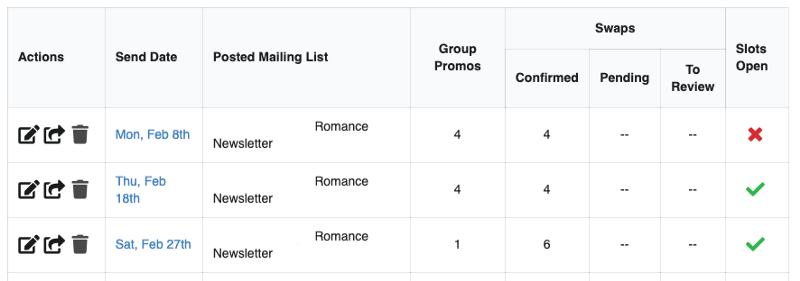
While I keep track of my promos and swaps in a Trello board, if you’re just interested in the organization that StoryOrigin offers, then the above is what the campaign planner looks like. You can see the dates I’ve chosen to send my newsletter in February, which generally follows a similar pattern of three newsletters per month.
It also tells me the group promos that I’ve been accepted into and the swaps I’ve confirmed. While swaps will tell you if you’re pending on another author’s newsletter, the same is not true for a group promo. This is why I keep track of my newsletter stats on a Trello board, that way I know I’m not applying to too many group promos and therefore overwhelming my newsletter readers.
When you go into your campaign through the edit button — the pencil on top of the piece of paper — you can find more information about the newsletter you plan to send. This will include all of your tracking links, notes from the authors you’re promoting, the number of clicks you’ve sent, and a list of the authors who are promoting your work and the clicks they’ve sent. I would include a full screenshot of that, but I don’t want to give away anyone else’s pen names/author names by mistake.
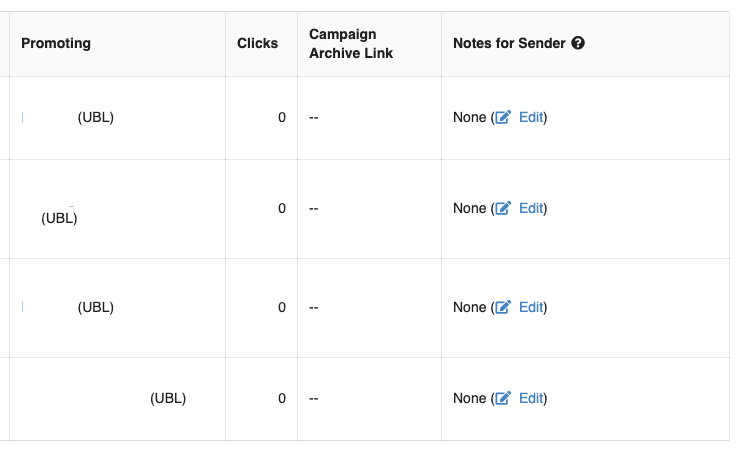
Without including identifying details of the individuals I’m swapping with, above you can see what some of the authors promoting your work will look like. You can see what book you’ve swapped with them, how many clicks they’ve sent you, their campaign archive link so you can look at their newsletter, and any notes you might have. Sometimes if your book is on sale on the date someone else is sharing it, you may want to let them know so that they’ll put that information in their newsletter.
What you aren’t seeing is the newsletter information that tells you who the author is you swapped with, the date that they’re sharing your book in their newsletter, and the size of their newsletter. Obviously, you will have seen this information when you decided to swap with them, but in case you’ve forgotten, it’s neatly listed for you as a reminder.
Other Features
While I tend to stick closely to the Campaign Planner, Group Promo, and Newsletter Swaps tabs, they aren’t the only features offered by StoryOrigin.
Goal trackers
If you want a handy dandy place to keep track of your word count or editing, StoryOrigin offers a comprehensive feature that will breakdown how many words or chapters you need to take care of per day to reach your goal date.
Review copies
Another feature StoryOrigin offers is the ability to offer free copies of your book in exchange for a review. They also track the history of the person applying to review your book, that way you can see if they’re just trying to get a free book or if they’re going to hold up their end and actually review it.
Direct downloads
In the back of your book, you might have a link to a free book for your readers, assuming they sign up for your newsletter. Instead of relying on another service to provide this free download, StoryOrigin can do that as well.
Audiobook review codes
This is similar to review copies for your book, except it’s for your audiobooks. StoryOrigin will also follow up with reviewers automatically, which is a nice feature since it takes one more thing off your plate!
There are a few other tabs that I didn’t go over offered by StoryOrigin, but those are more in the ways of setting up your mailing list and author profile, as well as tracking the stats on your giveaways.
My Case Study
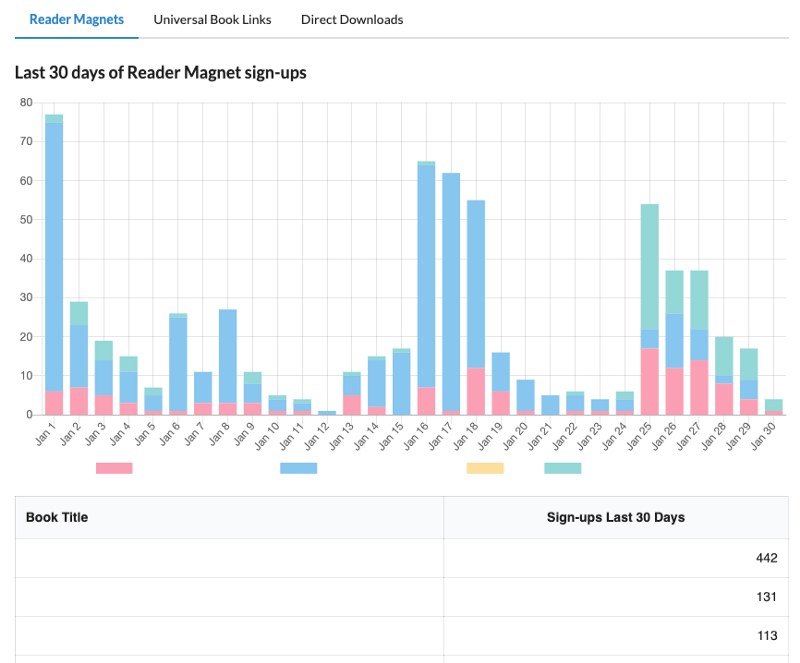
In the last 30 days, you can see that I’ve given away over 650 books. This should reasonably translate to, give or take, about the same number of subscribers. There could be some duplicate individuals downloading your books, in which case they’d only be signed up for your newsletter once, and I’m okay with that.
Since I started on November 1, 2020, I have had 1,630 people download my books. When you start sending out newsletters, you’ll find that the freeloaders who came for a free book unsubscribe almost immediately. Between MailChimp (the EMS I used when I started) and MailerLite (the EMS I use now), my reports say that I have had 220 unsubscribe. Across my nine newsletters since joining StoryOrigin, this is an average of about 25 people who’ve unsubscribed each time. I don’t think that’s a horrible average when my newsletter is constantly growing through StoryOrigin and people are still reading my content.
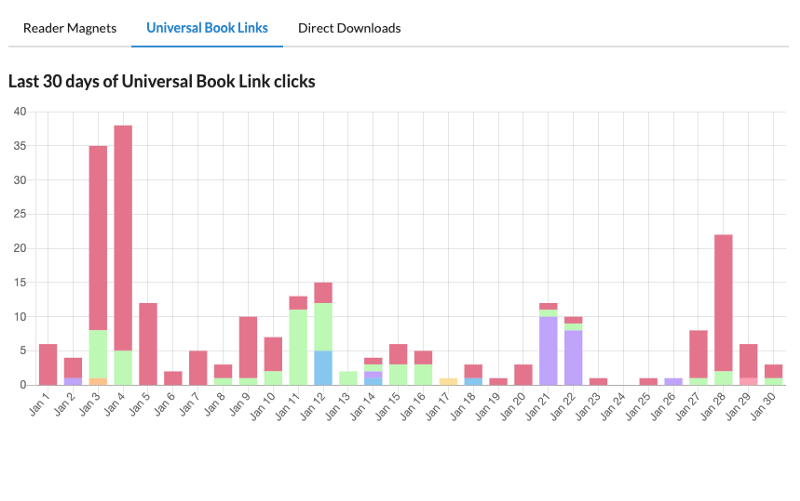
These stats show that over 240 individuals have clicked on my book links in Kindle Unlimited group promos that I’ve been a part of in the last 30 days. Whether they chose to download my book and read it is another story entirely, but at least they were taken to Amazon and were given the opportunity to read my blurb and see if my book was for them.
Conclusion
StoryOrigin is currently free. They are still in beta, but I haven’t noticed any issues. I joined their Facebook group and I’ve been able to communicate with Evan Gow — the indie developer behind StoryOrigin — about any problems I’ve had.
This is one of the most comprehensive tools in my author arsenal. Without StoryOrigin, I don’t know how many newsletter subscribers I’d have. I’d be entirely reliant on readers to click the link in the back of my book to sign-up, and many of us know that that doesn’t always do the trick.
If you’re an author who publishes in almost any genre — though I have noticed that for the most part, fiction writers tend to have better success on StoryOrigin — I would suggest looking into it. It’s free, it has a lot of opportunities, and the developer is always making adjustments to better the product. If nothing else, it’s an investment of a few minutes of your time to check out the site and see if you can utilize it for your newsletter success.
* StoryOrigin is exiting beta mode April 2021. It will no longer be free after that point, but I still endorse this product.