
How to Use Sklearn Pipelines For Ridiculously Neat Code
Everything I love about Scikit-Learn, in one place

Why Do You Need a Pipeline?
Data cleaning and preparation is easily the most time-consuming and boring task in machine learning. All ML algorithms are really fussy, some want normalized or standardized features, some want encoded variables and some want both. Then, there is also the issue of missing values which is always there.
Dealing with them is no fun at all, not to mention the added bonus that comes with repeating the same cleaning operations on all training, validation and test sets. Fortunately, Scikit-learn’s Pipeline is a major productivity tool to facilitate this process, cleaning up code and collapsing all preprocessing and modeling steps into to a single line of code. Here, check this out:
Above, pipe_lasso is an instance of such pipeline where it fills the missing values in X_train as well as feature scale the numerical columns and one-hot encode categorical variables finishing up by fitting Lasso Regression. When you call .predict the same steps are applied to X_test, which is really awesome.
Pipelines combine everything I love about Scikit-learn: conciseness, consistency and easy of use. So, without further ado, let me show how you can build your own pipeline in a few minutes.
Download the notebook from this link or run it on Kaggle here.
Intro to Scikit-learn Pipelines
In this and coming sections, we will build the above pipe_lasso pipeline together for the Ames Housing dataset which is used for an InClass competition on Kaggle. The dataset contains 81 variables on almost every aspect of a house and using these, you have to predict the house's price. Let's load the training and test sets:
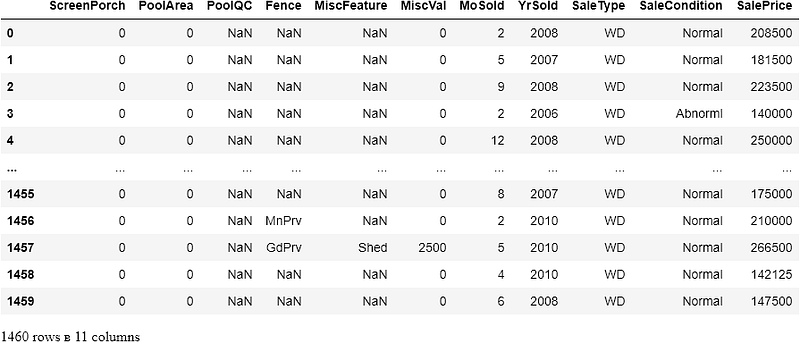
Everything except for the last column — SalePrice is used as features. Before we do anything, let's divide up the training data into train and validation sets. We will use the final X_test set for predictions.
Now, let’s do a basic exploration of the training set:
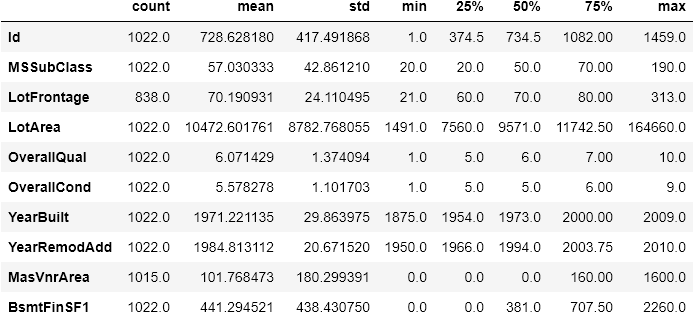
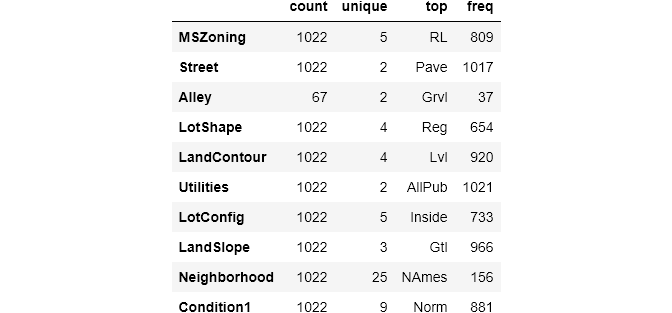
19 features have NaNs.
Now, on to preprocessing. For numeric columns, we first fill the missing values with SimpleImputer using the mean and feature scale using MinMaxScaler. For categoricals, we will again use SimpleImputer to fill the missing values with the mode of each column. Most importantly, we do all of these in a pipeline. Let's import everything:
We create two small pipelines for both numeric and categorical features:
Set
handle_unknowntoignoreto skip previously unseen labels. Otherwise,OneHotEncoderthrows an error if there are labels in test set that are not in train set.
sklearn.pipeline.Pipeline class takes a tuple of transformers for its steps argument. Each tuple should have this pattern:
('name_of_transformer`, transformer)Then, each tuple is called a step containing a transformer like SimpleImputer and an arbitrary name. Each step will be chained and applied to the passed DataFrame in the given order.
But, these two pipelines are useless if we don’t tell which columns they should be applied to. For that, we will use another transformer — ColumnTransformer.
Column Transformer
By default, all Pipeline objects have fit and transform methods which can be used to transform the input array like this:
Above, we are using the new numeric preprocessor on X_train using fit_transform. We are specifying the columns with select_dtypes. But, using the pipelines in this way means we have to call each pipeline separately on selected columns which is not what we want. What we want is to have a single preprocessor that is able to perform both numeric and categorical transformations in a single line of code like this:
full_processor.fit_transform(X_train)To achieve this, we will use ColumnTransformer class:
Remember that
numerical_featuresandcategorical_featurescontain the respective names of columns fromX_train.
Similar to Pipeline class, ColumnTransformer takes a tuple of transformers. Each tuple should contain an arbitrary step name, the transformer itself and the list of column names that the transformer should be applied to. Here, we are creating a column transformer with 2 steps using both of our numeric and categorical preprocessing pipelines. Now, we can use it to fully transform the X_train:
Note that most transformers return numpy arrays which means index and column names will be dropped.
Finally, we managed to collapse all preprocessing steps into a single line of code. However, we can go even further. We can combine preprocessing and modeling to have even neater code.
Final Pipeline With an Estimator
Adding an estimator (model) to a pipeline is as easy as creating a new pipeline which contains the above column transformer and the model itself. Let’s import and instantiate LassoRegression and add it to a new pipeline with the full_processor:
Warning! The order of steps matter! The estimator should always be the last step for the pipeline to work correctly.
That’s it! We can now call lasso_pipeline just like we call any other model. When we call .fit, the pipeline applies all transformations before fitting an estimator:
_ = lasso_pipeline.fit(X_train, y_train)Let’s evaluate our base model on the validation set (Remember, we have a separate testing set which we haven’t touched so far):
Great, our base pipeline works. Another great thing about pipelines is that they can be treated as any other model. In other words, we can plug it into anywhere we would use Scikit-learn estimators. So, we will use the pipeline in a grid search to find the optimal hyperparameters in the next section.
Using Your Pipeline Everywhere
The main hyperparameter for Lasso is alpha which can range from 0 to infinity. For simplicity, we will only cross-validate on the values within 0 and 1 with steps of 0.05:
Now, we print the best score and parameters for Lasso:
As you can see, best alpha is 0.95 which is the very end of our given interval, i. e. [0, 1) with a step of 0.05. We need to search again in case the best parameter lies in a bigger interval:
With the best hyperparameters, we get a significant drop in MAE (which is good). Let’s redefine our pipeline with Lasso(alpha=76):
Fit it to X_train, validate on X_valid and submit predictions for the competition using X_test:
Conclusion
In summary, pipelines introduce several advantages to your daily workflow such as compact and fast code, ease of use and in-place modification of multiple steps. In the examples, we used simple Lasso regression but the pipeline we created could be used for virtually any model out there. Go and use it to build something awesome!
Loved this article and, let’s face it, its bizarre writing style? Imagine having access to dozens more just like it, all written by a brilliant, charming, witty author (that’s me, by the way :).
For only 4.99$ membership, you will get access to not just my stories, but a treasure trove of knowledge from the best and brightest minds on Medium. And if you use my referral link, you will earn my supernova of gratitude and a virtual high-five for supporting my work.


