avatarDew Langrial

Free AI web copilot to create summaries, insights and extended knowledge, download it at here

2437

Abstract

</h1><p id="e299">A self-note is a private note that only you or an editor of a publication can read. It appears on the <b>right side </b>of the screen in the shape of an asterisk <b>— * — </b>of grey color.</p><h2 id="90ec">How to use a self-note</h2><p id="b0e9">To use a self note, select any text. An option bar opens with a locked bubble on the extreme right side of it.</p><figure id="12cb"><img src="https://cdn-images-1.readmedium.com/v2/resize:fit:800/1*uyaTnmn1U5sFOIFn6LZigw.png"><figcaption></figcaption></figure><p id="1680">Just press the extreme right bubble with a lock. When you click it, a self note opens to the right side of your selected text.</p><p id="4244">Now you can write your self-note. Click the green <b>send button </b>to save it<b>. </b>To clear this note, click the <b>dismiss button.</b></p><figure id="9b67"><img src="https://cdn-images-1.readmedium.com/v2/resize:fit:800/1*hk6ya5Oj6ZpoNpxg3PqhKg.png"><figcaption></figcaption></figure><p id="e648">When you <b>click away</b> from the self-note, it disappears — leaving a grey asterisk <b>‘ * Note to self </b>’ in its place. If you click the asterisk, it opens again. You can <b>reply </b>to your own self-note. You can <b>dismiss </b>a self-note at any time when you are satisfied that you have done what the note told you to do.</p><h1 id="f2e5">Combining a TK sign and a self-note</h1><p id="f5fe">Always try to use a self-note with a TK sign. It will remind you why you put the TK sign at a particular place.</p><p id="d980">For example, write TK where you want to add the ‘reference link to a research study’ and then create a self-note and type the reason why you are placing this TK sign.</p><figure id="a7fa"><img src="https://cdn-images-1.readmedium.com/v2/resize:fit:800/1*ABtyXIXt64laftHKVAfybQ.png"><figcaption></figcaption></figure><p id="9550">This duo will help you to maintain your state of flow when you are writing your deep thoughts, and any diversion would mean an hour of wasted time.</p><p id="f873">If you want to start working on some previous draft, say, your ten-day-old work, you can open it, and you’ll have a good idea of the things that you have to do to finalize the draft.</p><div id="d3e4" class="link-block"> <a href="https://readmedium.com/curation-guidelines-for-illumination-writers-in-simple-words-4b713516d1c6"> <div> <div> <h2>Curation Guidelines for Illumina # Options tion Writers — In Simple Words</h2> <div><h3>A step-by-step guide of the requirements for successful curation</h3></div> <div><p>medium.com</p></div> </div> <div> <div style="background-image: url(https://miro.readmedium.com/v2/resize:fit:320/1*PN0iDx2CFNMWRPsupj2HcQ.png)"></div> </div> </div> </a> </div><div id="b495" class="link-block"> <a href="https://readmedium.com/my-curated-stories-on-medium-that-encourage-me-to-keep-on-writing-8520435e81f"> <div> <div> <h2>My Long List of Curated Stories on Medium That Encourages Me to Keep Writing— Updated</h2> <div><h3>These stories were curated and distributed into different topics</h3></div> <div><p>medium.com</p></div> </div> <div> <div style="background-image: url(https://miro.readmedium.com/v2/resize:fit:320/1*em-WnC8Go2HslZgGmuGhRg.jpeg)"></div> </div> </div> </a> </div><div id="1297" class="link-block"> <a href="https://readmedium.com/why-reading-is-becoming-skimming-on-the-internet-8ca70959778c"> <div> <div> <h2>Why Reading Is Becoming Skimming on the Internet</h2> <div><h3>The writers have only ten seconds to persuade the reader</h3></div> <div><p>medium.com</p></div> </div> <div> <div style="background-image: url(https://miro.readmedium.com/v2/resize:fit:320/1*kL_jTiwgvuIP0AE9MfiPlw.jpeg)"></div> </div> </div> </a> </div><div id="f294" class="link-block"> <a href="https://readmedium.com/writing-styles-of-best-selling-authors-explained-in-simple-words-e09fc0728013"> <div> <div> <h2>Writing Styles of Best Selling Authors Explained in Simple Words</h2> <div><h3>A successful uncontroversial style is hard to find</h3></div> <div><p>medium.com</p></div> </div> <div> <div style="background-image: url(https://miro.readmedium.com/v2/resize:fit:320/1*3T_V0Gh9TeDko-2GXX4zNw.jpeg)"></div> </div> </div> </a> </div></article></body>

How to Use Self-Notes on Medium Drafts With TK for Future Reference

Using TK with self notes is a powerful trick to give you control over details of the draft during editing.

Image by rawpixel.com

We are going to explore self-notes and TK signs. You can use these features for editing and correction of the contents on a future date.

Medium has many hidden features for formatting that most of us never use. For example, if you write * — an asterisk with shift+8 — on a new line a press spacebar, you get bullet points:

  • Self-notes are private notes only for you.
  • TK gives you an orange-colored TK sign on the left side of the paragraph.

But what is the use of self-notes and TK-notes?

When you are writing in a state of flow, you can’t remember an exact quote, a date, or a name, and you start to google for the particular detail. And your flow is gone. TK signs and self-notes can help you to maintain your writing rhythm.

TK signs and self-notes also help your editors in correcting mistakes and giving instructions to improve your draft if you are trying to publish for a publication.

What is a TK Sign?

It is a printing industry practice to write TK, where you want to add a little more detail about the thing you are writing.

Say, you read detailed research about a topic a few days ago, but you don’t remember the name of the professor who had conducted the study, you can put a TK instead of immediately searching for it.

How to use a TK sign

When you write capital letters, T and K, a yellow TK appears on the left side of the paragraph or sentence. When you delete TK, the yellow TK disappears.

It is a marking system that helps you to remember that something is not complete. If you try to publish without removing a TK sign, Medium warns you to edit the draft before publishing.

What is a self-note?

A self-note is a private note that only you or an editor of a publication can read. It appears on the right side of the screen in the shape of an asterisk — * — of grey color.

How to use a self-note

To use a self note, select any text. An option bar opens with a locked bubble on the extreme right side of it.
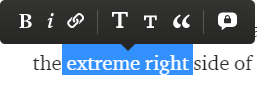
Just press the extreme right bubble with a lock. When you click it, a self note opens to the right side of your selected text.

Now you can write your self-note. Click the green send button to save it. To clear this note, click the dismiss button.

When you click away from the self-note, it disappears — leaving a grey asterisk ‘ * Note to self ’ in its place. If you click the asterisk, it opens again. You can reply to your own self-note. You can dismiss a self-note at any time when you are satisfied that you have done what the note told you to do.

Combining a TK sign and a self-note

Always try to use a self-note with a TK sign. It will remind you why you put the TK sign at a particular place.

For example, write TK where you want to add the ‘reference link to a research study’ and then create a self-note and type the reason why you are placing this TK sign.

This duo will help you to maintain your state of flow when you are writing your deep thoughts, and any diversion would mean an hour of wasted time.

If you want to start working on some previous draft, say, your ten-day-old work, you can open it, and you’ll have a good idea of the things that you have to do to finalize the draft.

Writing
Reading
Self
Life Lessons
Psychology
Recommended from ReadMedium