avatar___

Free AI web copilot to create summaries, insights and extended knowledge, download it at here

3182

Abstract

00/1*F-vcv3K0YM0IP5zVjgHMnw.png"><figcaption>Figure 2: Melayu BERT is not “compatible” with BERT</figcaption></figure><p id="c76a">This is because the <code>model_name: "bert"</code> parameter corresponds to the <a href="https://huggingface.co/transformers/model_doc/bert.html#tfbertmodel">TFBertModel </a>architecture while the Melayu BERT model was implemented using the <a href="https://huggingface.co/transformers/model_doc/bert.html#transformers.TFBertForMaskedLM">TFBertForMaskedLM</a> architecture.</p><p id="6e7c">A more prudent approach is to subclass <code>LanguageModelFeaturizer</code> to define how to extract features from models based on the TFBertForMaskedLM architecture. This helps avoid accidentally introducing bugs due to model missing crucial layers.</p><h1 id="e0da">Implementation Details</h1><p id="edea">A TFBertForMaskedLM model shares a lot of similarities with a TFBertModel. This means that we can reuse most of the existing methods in the <code>LanguageModelFeaturizer</code> class.</p><p id="110c">These are the only methods we need to override:</p><ol><li><code>_load_model_metadata</code></li><li><code>_load_model_instance</code></li><li><code>_add_lm_specifc_special_tokens</code></li><li><code>_lm_specific_token_cleanup</code></li><li><code>_compute_batch_sequence_features</code></li><li><code>_post_process_sequence_embeddings</code></li></ol><p id="c3b3">We will create a class named <code>CustomLanguageModelFeaturizer</code> to override the methods above. This class will be defined in a module named <code>custom_lm_featurizer.py</code> in a folder named <code>addons</code>.</p><h2 id="8a36">Step 1: How to load a model’s metadata</h2><p id="8f2e"><code>_load_model_metadata</code> controls how the configuration in <code>LanguageModelFeaturizer</code> gets processed.</p><p id="9948">Suppose we want the component to fail if <code>model_name</code> isn’t <code>StevenLimcorn/MelayuBERT</code> and if the model’s weights have not been downloaded. This is how this method can be implemented:</p><figure id="ffb8"><img src="https://cdn-images-1.readmedium.com/v2/resize:fit:800/1*ji_RVRBf8pSncFPiVuwKCw.png"><figcaption>Figure 3: How to process the component’s configuration parameters</figcaption></figure><h2 id="3ef0">Step 2: How to load a model</h2><p id="05bc"><code>_load_model_instance</code> defines the components tokenizer, model, and padding token. This is straightforward to implement:</p><figure id="0a65"><img src="https://cdn-images-1.readmedium.com/v2/resize:fit:800/1*e1qY-ykWl4DSbS9YU9fv4w.png"><figcaption>Figure 4: Defining the component’s tokenizer, model and padding token</figcaption></figure><h2 id="7676">Step 3: Adding language model specific tokens</h2><p id="ec33">We know that BERT models require adding the [CLS] and [SEP] tokens as part of their input. This part is handled by the <code>_add_lm_specific_special_tokens</code> method:</p><figure id="c80a"><img src="https://cdn-images-1.readmedium.com/v2/resize:fit:800/1*E475lXSN2To3xlYq57yb1Q.png"><figcaption>Figure 5: Adding the [CLS] and [SEP] tokens</figcaption></figure><h2 id="da65">Step 4: Cleaning up tokens</h2><p id="05b9">We also know that BERT’s

Options

tokenize sometimes breaks a single word into multiple words. For example, the word “strawberries” will be tokenized into “straw” and “##berries” in a <a href="https://huggingface.co/bert-base-uncased">bert-base-uncased</a> model.</p><p id="05a4">The <code>_lm_specific_token_cleanup</code> the method will remove the “##” so that we will have something more readable in case we want to stitch the tokens back together for further processing downstream:</p><figure id="6783"><img src="https://cdn-images-1.readmedium.com/v2/resize:fit:800/1*-YYFOX8pse1KsRNexiIBnw.png"><figcaption>Figure 6: Cleaning up the wordpiece tokenized tokens</figcaption></figure><h2 id="df7b">Step 5: How to extract features</h2><p id="d6e8">We want the DIET Classifier to use the last hidden state of Melayu BERT as a feature to perform intent classification and/or entity extraction. We define this behavior in the <code>_compute_batch_sequence_features</code> method:</p><figure id="dc62"><img src="https://cdn-images-1.readmedium.com/v2/resize:fit:800/1*Rzxa67KnjCsZjxtdghbMmw.png"><figcaption>Figure 7: Defining which features from Melayu BERT to use</figcaption></figure><h2 id="6ed7">Step 6: How to use the features</h2><p id="8b63">Once we’ve extracted the features from Melayu BERT, we need to tell DIET Classifier how to use it for intent classification and entity extraction. This is done in the <code>post_process_sequence_embeddings</code> :</p><figure id="f14a"><img src="https://cdn-images-1.readmedium.com/v2/resize:fit:800/1*4n8Tt6BbGZtTzDP8CkVnOA.png"><figcaption>Figure 8: How to use the features for intent classification (sentence_embeddings) and entity extraction (post_processed_sequence_embeddings)</figcaption></figure><p id="8dc5">Given a last hidden state from Melayu BERT, the feature to use for intent classification and entity extraction is the vector representation of the [CLS] token. The features to use for entity extraction are everything else except the [CLS] and [SEP] token. This logic is identical to the predefined <a href="https://github.com/RasaHQ/rasa/blob/0d97d427fd342b3f0fab4eaabc3d5169249dbf61/rasa/nlu/utils/hugging_face/transformers_pre_post_processors.py#L116-L134">post processor for the TFBertModel</a> which is why we’ve decided to reuse it (see line 85).</p><h1 id="74c1">Usage</h1><p id="1ff4">The following snippet shows how to include the <code>CustomLanguageModelFeaturizer</code> the component as part of the NLU pipeline:</p><figure id="8630"><img src="https://cdn-images-1.readmedium.com/v2/resize:fit:800/1*ZgjHA3m3ff0NiWDhXrwdhg.png"><figcaption>Figure 9: Configuring the <code>CustomLanguageModelFeaturizer component</code></figcaption></figure><p id="2bb2">Figure 9 assumes that the model artifacts have been downloaded into a folder named <code>.cache</code>.</p><h1 id="988e">Conclusion</h1><p id="4499">This article has described a way to use customize the LanguageModelFeaturizer component to use a TFBertForMaskedLM model as a featurizer in Rasa. A similar approach could be adapted to work with any model created using the transformers library.</p><p id="63fd">Let me know in the comments if you have any questions.</p></article></body>

Natural Language Processing

How To Use Rasa To Build A Bot That Understands Bahasa Melayu

A Tutorial On Extending The LanguageModelFeaturizer Component To Use Other Pretrained Models
Introduction

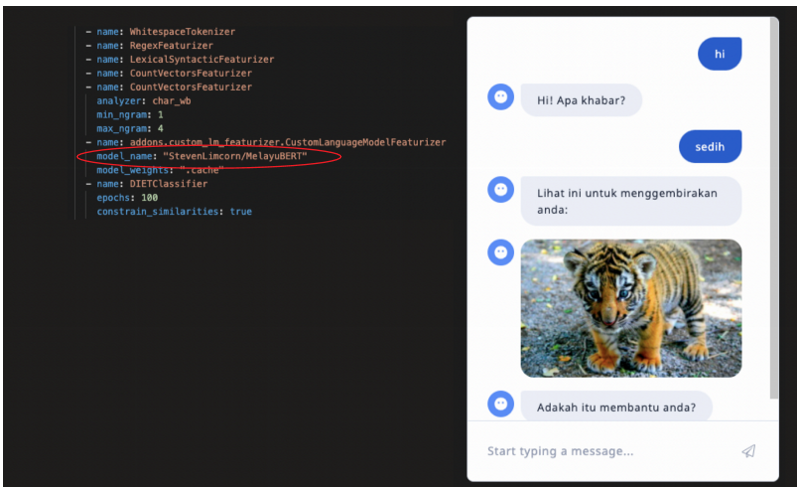
In this article, I will explain how to extend Rasa’s LanguageModelFeaturizer component to use other models on HuggingFace’s models repository.

I assume the reader is familiar with building chatbots using Rasa. If that is not the case, then watch these series of videos on YouTube to quickly get up to speed.

The code to reproduce the results described in this article can be found here.

Problem Statement

Suppose you are tasked with building a chatbot that will interact with users in the Malay language.

Since you are just starting out, you don’t have a lot of real-world conversations to train the NLU model on. However, there are a lot of conversations going on out there (e.g. social media) in the Malay language. How can we use these conversations to improve the NLU model?

Solution

One solution is to train a language model on a Malay language corpus that approximates the utterances you expect your users will utter to your bot. Then, you can treat the language model as a featurizer and feed those features into the DIET Classifier for further “fine-tuning”.

If the language model was built using Hugging Face’s transformers library, then it can be integrated into the NLU model’s prediction pipeline using the LanguageModelFeaturizer component.

The rest of this article assumes that we are interested in using the Melayu BERT model as a featurizer.

To Extend Or Reuse The LanguageModelFeaturizer Component?

Since Melayu BERT is based on the BERT model, a reasonable way to use the LanguageModelFeaturizer component is to configure it this way:

Figure 1: Configuring LanguageModelFeaturizer to use Melayu BERT

Although the training runs successfully, the logs show:

Figure 2: Melayu BERT is not “compatible” with BERT

This is because the model_name: "bert" parameter corresponds to the TFBertModel architecture while the Melayu BERT model was implemented using the TFBertForMaskedLM architecture.

A more prudent approach is to subclass LanguageModelFeaturizer to define how to extract features from models based on the TFBertForMaskedLM architecture. This helps avoid accidentally introducing bugs due to model missing crucial layers.

Implementation Details

A TFBertForMaskedLM model shares a lot of similarities with a TFBertModel. This means that we can reuse most of the existing methods in the LanguageModelFeaturizer class.

These are the only methods we need to override:

  1. _load_model_metadata
  2. _load_model_instance
  3. _add_lm_specifc_special_tokens
  4. _lm_specific_token_cleanup
  5. _compute_batch_sequence_features
  6. _post_process_sequence_embeddings

We will create a class named CustomLanguageModelFeaturizer to override the methods above. This class will be defined in a module named custom_lm_featurizer.py in a folder named addons.

Step 1: How to load a model’s metadata

_load_model_metadata controls how the configuration in LanguageModelFeaturizer gets processed.

Suppose we want the component to fail if model_name isn’t StevenLimcorn/MelayuBERT and if the model’s weights have not been downloaded. This is how this method can be implemented:
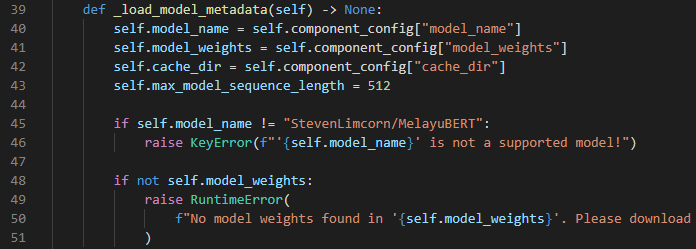
Figure 3: How to process the component’s configuration parameters

Step 2: How to load a model

_load_model_instance defines the components tokenizer, model, and padding token. This is straightforward to implement:
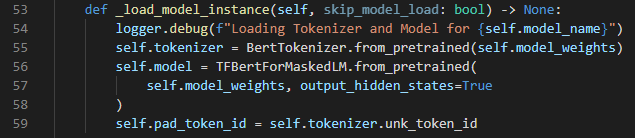
Figure 4: Defining the component’s tokenizer, model and padding token

Step 3: Adding language model specific tokens

We know that BERT models require adding the [CLS] and [SEP] tokens as part of their input. This part is handled by the _add_lm_specific_special_tokens method:
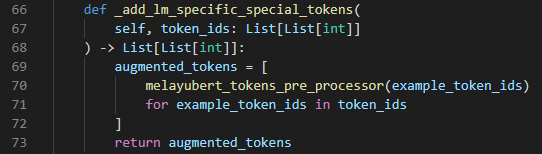
Figure 5: Adding the [CLS] and [SEP] tokens

Step 4: Cleaning up tokens

We also know that BERT’s tokenize sometimes breaks a single word into multiple words. For example, the word “strawberries” will be tokenized into “straw” and “##berries” in a bert-base-uncased model.

The _lm_specific_token_cleanup the method will remove the “##” so that we will have something more readable in case we want to stitch the tokens back together for further processing downstream:

Figure 6: Cleaning up the wordpiece tokenized tokens

Step 5: How to extract features

We want the DIET Classifier to use the last hidden state of Melayu BERT as a feature to perform intent classification and/or entity extraction. We define this behavior in the _compute_batch_sequence_features method:
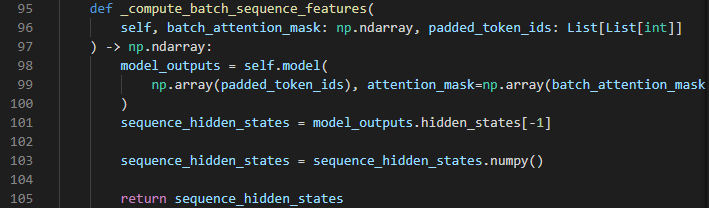
Figure 7: Defining which features from Melayu BERT to use

Step 6: How to use the features

Once we’ve extracted the features from Melayu BERT, we need to tell DIET Classifier how to use it for intent classification and entity extraction. This is done in the post_process_sequence_embeddings :
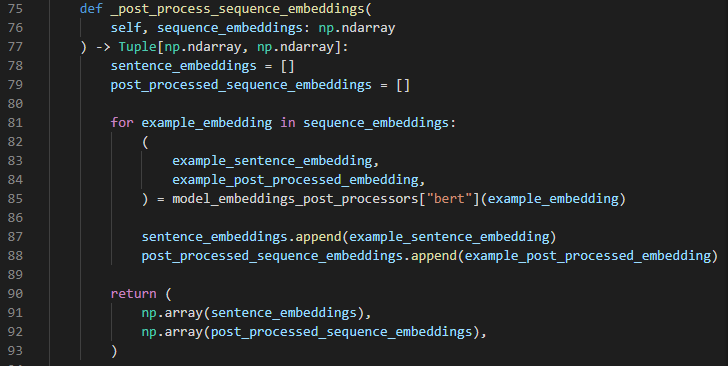
Figure 8: How to use the features for intent classification (sentence_embeddings) and entity extraction (post_processed_sequence_embeddings)

Given a last hidden state from Melayu BERT, the feature to use for intent classification and entity extraction is the vector representation of the [CLS] token. The features to use for entity extraction are everything else except the [CLS] and [SEP] token. This logic is identical to the predefined post processor for the TFBertModel which is why we’ve decided to reuse it (see line 85).

Usage

The following snippet shows how to include the CustomLanguageModelFeaturizer the component as part of the NLU pipeline:

Figure 9: Configuring the CustomLanguageModelFeaturizer component

Figure 9 assumes that the model artifacts have been downloaded into a folder named .cache.

Conclusion

This article has described a way to use customize the LanguageModelFeaturizer component to use a TFBertForMaskedLM model as a featurizer in Rasa. A similar approach could be adapted to work with any model created using the transformers library.

Let me know in the comments if you have any questions.

Rasa
Conversational AI
NLP
Data Science
Chatbots
Recommended from ReadMedium