
How to Use Python to Streamline Your Agisoft Metashape Workflow: Part II
Clean the sparse point cloud using iterative gradual selection

The first post in this series provided instructions and python code to automate image alignment in Agisoft Metashape. This post will show you how to use python to perform iterative gradual selection to remove low-accuracy tie points.
Iterative Gradual Selection
Gradual selection is the process by which low-accuracy tie points can be identified and removed. Gradual selection options can be accessed in the Metashape GUI by navigating to Model → Gradual Selection

Thresholds for each measure can be set, allowing tie points that exceed those thresholds to be removed from the point cloud. Removing tie points with low accuracy will enhance the accuracy interior and exterior camera parameters. Therefore, the camera optimization should be repeated after removing tie points. Iterative gradual selection is the process by which a threshold is adjusted to select low-accuracy tie points while not exceeding a specific percentage of the total number of tie points.
Gradual Selection Explained
The USGS has defined ideal threshold ranges for each parameter in a comprehensive Open File Report by Over et al. (2021).
The three accuracy measures used here include:
- Reconstruction uncertainty
- Projection accuracy
- Reprojection error
To understand these accuracy measures it is helpful to think of the sparse point cloud as a 3D jigsaw puzzle.
Reconstruction Uncertainty
The reconstruction uncertainty measures how sure you are that a given puzzle piece is in the right spot. If you’re really sure then the piece fits perfectly. If you’re not sure then it might not fit at all.
Projection Accuracy
The projection accuracy measures how accurately you can point to the location of each puzzle piece. Your projection accuracy is very good if you’re viewing the puzzle from across the room and you can point to a single puzzle piece with a laser pointer. On the other hand, your projection accuracy is very bad if you can only gesture broadly in the general direction of where a puzzle piece.
Reprojection Error
The reprojection error measures how close a puzzle piece is to where it should be. If a puzzle piece is in exactly the right spot then the reprojection error is low.
Coding Gradual Selection in Python
The USGS recommends using a reconstruction uncertainty threshold of 10, without selecting more than 50% of the points.
Reconstruction Uncertainty
With these goals in mind, define a function called grad_selection_RU.
This function reads in our initial threshold, the maximum number of iterations, the percentage of points it can delete per iteration, and the threshold increment. grad_selection_RU begins by adjusting the initial threshold, up or down, until a sufficient number of points have been selected. Then the threshold is adjusted until the number of points selected divided by the total number of points meets or exceeds the limit and these points are removed.
def grad_selection_RU(RU_thrsh, num_tries=4, pct_del=10, thrsh_incr=1):
    n=0
    target_thrsh = 10
    init_thrsh = RU_thrsh
    points = chunk.tie_points.points
    # compute number of starting points
    points_start_num = len(points)
    f = Metashape.TiePoints.Filter()
    f.init(chunk, criterion = Metashape.TiePoints.Filter.ReconstructionUncertainty)
    # select points that exceed initial threshold
    f.selectPoints(init_thrsh)
    # count number of points selected
    nselected = len([True for point in points if point.valid is True and point.selected is True])
    # check to see if any points were selected
    pct_selected = (nselected / points_start_num)*100
    # decrease the initial threshold if few points were selected
    if pct_selected <= 1:
        while True:
            print(f"Current threshold is {init_thrsh}. Adjusting downward by {thrsh_incr}")
            init_thrsh -= thrsh_incr
            f.selectPoints(init_thrsh)
            nselected = len([True for point in points if point.valid is True and point.selected is True])
            ps = (nselected / points_start_num)*100
            if ps >= 1:
                break
    # increase the initial threshold if too many points were selected
    elif pct_selected > pct_del:
        while True:
            if pct_selected > pct_del:
                init_thrsh += thrsh_incr
                f.selectPoints(init_thrsh)
                nselected = len([True for point in points if point.valid is True and point.selected is True])
                ps = (nselected / points_start_num)*100
                if ps < pct_del:
                    break
    print(f"New adjusted initial threshold is {init_thrsh}. Beginning gradual selection.")
    # begin iterative gradual selection
    n+=1
    print(f"Removing {nselected} points.")
    f.removePoints(init_thrsh)
    init_thrsh -= thrsh_incr
    chunk.optimizeCameras(adaptive_fitting=True,fit_f = True, fit_cx = True, fit_cy = True, fit_b1 = True, fit_b2 = True, fit_k1 = True, fit_k2 = True, fit_k3 = True, fit_k4 = True, fit_p1 = True, fit_p2 = True)
    points = chunk.tie_points.points
    npoints = len(points)
    while True:
        n+=1
        if n>num_tries or init_thrsh<=target_thrsh or (100*((points_start_num-npoints)/points_start_num))>=50:
            break
        else:
            points = chunk.tie_points.points
            npoints = len(points)
            f.selectPoints(init_thrsh)
            nselected = len([True for point in points if point.valid is True and point.selected is True])
            pct_selected = (nselected / npoints)*100
            while True:
                if pct_selected <= pct_del:
                    init_thrsh -= thrsh_incr/5
                    f.selectPoints(init_thrsh)
                    nselected = len([True for point in points if point.valid is True and point.selected is True])
                    pct_selected = (nselected/npoints)*100
                else:
                    break
            f.selectPoints(init_thrsh)
            nselected = len([True for point in points if point.valid is True and point.selected is True])
            if nselected > 0:
                print(f"Removing {nselected} points at a threshold of {init_thrsh}")
                f.removePoints(init_thrsh)
                init_thrsh -= thrsh_incr
                chunk.optimizeCameras(adaptive_fitting=True,fit_f = True, fit_cx = True, fit_cy = True, fit_b1 = True, fit_b2 = True, fit_k1 = True, fit_k2 = True, fit_k3 = True, fit_k4 = True, fit_p1 = True, fit_p2 = True)
                points = chunk.tie_points.points
                npoints = len(points)
Projection Accuracy
Tie points with a projection accuracy = 1 have the highest accuracy. A tie point with a projection accuracy of 2 has double the error, and so on. Images acquired by high-quality cameras may allow a projection accuracy threshold of 3 (perhaps even 2) to be used. Images obtained by lower quality cameras (e.g. action cams) or images that have been compressed should use thresholds > 5. Again, the USGS guidance suggests that threshold values should be approached iteratively without deleting more than 50% the points with each change in the threshold.
Let’s define a function called grad_selection_PA that reads in the threshold value and iteratively removes points.
def grad_selection_PA(PA_thrsh, num_tries=4, pct_del=10, thrsh_incr=1):
    n=0
    target_thrsh = 3
    init_thrsh=PA_thrsh
    points = chunk.tie_points.points
    points_start_num = len(points)
    npoints = len(points)
    f = Metashape.TiePoints.Filter()
    f.init(chunk, criterion = Metashape.TiePoints.Filter.ProjectionAccuracy)
    f.selectPoints(init_thrsh)
    # count number of points selected
    nselected = len([True for point in points if point.valid is True and point.selected is True])
    # check to see if any points were selected
    pct_selected = (nselected / points_start_num)*100
    if init_thrsh<=target_thrsh and pct_selected <= 50: # job done
        print(f"Now removing {nselected} points at a threshold of {init_thrsh}")
        f.removePoints(init_thrsh)
        chunk.optimizeCameras(adaptive_fitting=True,fit_f = True, fit_cx = True, fit_cy = True, fit_b1 = True, fit_b2 = True, fit_k1 = True, fit_k2 = True, fit_k3 = True, fit_k4 = True, fit_p1 = True, fit_p2 = True)
    else:
        while True:
            n+=1
            if n>num_tries or init_thrsh<=target_thrsh or (100*((points_start_num-npoints)/points_start_num))>=50:
                break
            else:
                points = chunk.tie_points.points
                npoints = len(points)
                f.selectPoints(init_thrsh)
                nselected = len([True for point in points if point.valid is True and point.selected is True])
                pct_selected = (nselected / npoints)*100
                while True:
                    if pct_selected <= pct_del:
                        init_thrsh -= thrsh_incr/5
                        f.selectPoints(init_thrsh)
                        nselected = len([True for point in points if point.valid is True and point.selected is True])
                        pct_selected = (nselected/npoints)*100
                    else:
                        break
                f.selectPoints(init_thrsh)
                nselected = len([True for point in points if point.valid is True and point.selected is True])
                if nselected > 0:
                    print(f"Removing {nselected} points at a threshold of {init_thrsh}")
                    f.removePoints(init_thrsh)
                    init_thrsh -= thrsh_incr
                    chunk.optimizeCameras(adaptive_fitting=True,fit_f = True, fit_cx = True, fit_cy = True, fit_b1 = True, fit_b2 = True, fit_k1 = True, fit_k2 = True, fit_k3 = True, fit_k4 = True, fit_p1 = True, fit_p2 = True)
                    points = chunk.tie_points.points
                    npoints = len(points)
Reprojection Error
A threshold of 0.25 — 0.3 pixels should be sufficient for most projects. USGS guidance suggests that the reprojection error threshold should selected such that it does not delete more than 10% of the remaining tie points in each iteration.
Let’s define a function called grad_selection_RE to do this.
def grad_selection_RE(RE_thrsh, num_tries=10, pct_del=10, thrsh_incr=0.1):
    n=0
    target_thrsh=0.3
    init_thrsh=RE_thrsh
    points = chunk.tie_points.points
    points_start_num = len(points)
    npoints = len(points)
    f = Metashape.TiePoints.Filter()
    f.init(chunk, criterion = Metashape.TiePoints.Filter.ReprojectionError)
    f.selectPoints(init_thrsh)
    # count number of points selected
    nselected = len([True for point in points if point.valid is True and point.selected is True])
    # check to see if any points were selected
    pct_selected = (nselected / points_start_num)*100
    if init_thrsh <= target_thrsh and pct_selected <= pct_del: # job done
        print(f"Now removing {nselected} points at a threshold of {init_thrsh}")
        f.removePoints(init_thrsh)
        chunk.optimizeCameras(adaptive_fitting=True,fit_f = True, fit_cx = True, fit_cy = True, fit_b1 = True, fit_b2 = True, fit_k1 = True, fit_k2 = True, fit_k3 = True, fit_k4 = True, fit_p1 = True, fit_p2 = True)
    else:
        while True:
            n+=1
            if n>num_tries or init_thrsh<=target_thrsh or (100*((points_start_num-npoints)/points_start_num))>=pct_del:
                break
            else:
                points = chunk.tie_points.points
                npoints = len(points)
                f.selectPoints(init_thrsh)
                nselected = len([True for point in points if point.valid is True and point.selected is True])
                pct_selected = (nselected / npoints)*100
                while True:
                    if pct_selected <= pct_del:
                        init_thrsh -= thrsh_incr
                        f.selectPoints(init_thrsh)
                        nselected = len([True for point in points if point.valid is True and point.selected is True])
                        pct_selected = (nselected/npoints)*100
                    else:
                        break
                f.selectPoints(init_thrsh)
                nselected = len([True for point in points if point.valid is True and point.selected is True])
                if nselected > 0:
                    print(f"Removing {nselected} points at a threshold of {init_thrsh}")
                    f.removePoints(init_thrsh)
                    init_thrsh -= thrsh_incr
                    chunk.optimizeCameras(adaptive_fitting=True,fit_f = True, fit_cx = True, fit_cy = True, fit_b1 = True, fit_b2 = True, fit_k1 = True, fit_k2 = True, fit_k3 = True, fit_k4 = True, fit_p1 = True, fit_p2 = True)
                    points = chunk.tie_points.points
                    npoints = len(points)
Summary
These functions perform basic iterative gradual selection using the reconstruction uncertainty, projection accuracy, and reprojection error and by applying the USGS processing guidelines.
The three functions contain repetitive sections that could be combined into a single function.
To use these functions, copy them into your python/text editor along with the code below.
#!/usr/bin/env python3
# -*- coding: utf-8 -*-

import Metashape

# Reconstruction Uncertainty (RU) filter threshold
RU_thrsh = 12
PA_thrsh = 6
RE_thrsh = 0.5

# gradual selection functions

def copy_new_chunk(chunk, old_label, new_label):
    new_chunk = chunk.copy()
    clbl_i = str("".join([old_label,new_label]))
    new_chunk.label = clbl_i
    return clbl_i

def find_chunk(doc, label):
    if type(doc) != Metashape.Document:
       print("Not a valid MetaShape file!")
       return False
    if type(label) != str:
       print("Please provide a string as input!")
       return False
    for chunk in doc.chunks:
       if chunk.label == label:
          print(f"Chunk {label} was found.")
          return(chunk)
    print(f"Chunk {label} was not found!")
    return None

# Main body of program

Projs = ["/data2/metashape_course/20230828_mcourse.psx"
]
# chunk(s) to process within a project
clbls = [
        "run1-OC",
        ]
doc = Metashape.app.document
for proj in Projs:
    doc.open(proj)
    proj_name = proj.split("/")[len(proj.split("/"))-1]
    proj_path = "/".join(proj.split("/")[:-1])
    for clbl in clbls:
        for chunk in doc.chunks:
            if chunk.label != clbl:
                continue
            print("")
            print("Now processing project <", proj_name, ">...")
            # find chunk by name
            chunk = find_chunk(doc, clbl)
            # sets selected chunk as active
            doc.chunk = chunk
            # reconstruction uncertainty
            ru_clbl = copy_new_chunk(chunk,clbl,"-GS-RU") # copy to new chunk before proceeding
            print(f"Now performing gradual selection using reconstruction uncertainty with a threshold of {RU_thrsh}")
            chunk = find_chunk(doc, ru_clbl)
            doc.chunk = chunk
            grad_selection_RU(RU_thrsh)
            doc.save()
            # projection accuracy
            pa_clbl = copy_new_chunk(chunk,  ru_clbl, "-PA")
            print(f"Now performing gradual selection using projection accuracy with a threshold of {PA_thrsh}")
            chunk = find_chunk(doc, pa_clbl)
            doc.chunk = chunk
            grad_selection_PA(PA_thrsh)
            doc.save()
            # reprojection error
            re_clbl = copy_new_chunk(chunk,  pa_clbl, "-RE")
            print(f"Now performing gradual selection using reprojection error with a threshold of {RE_thrsh}")
            chunk = find_chunk(doc, re_clbl)
            doc.chunk = chunk
            grad_selection_RE(RE_thrsh)
            doc.save()
Results
The gradual selection code starts with the chunk containing the sparse point cloud after camera optimization (run1-OC). The results of the gradual selection process are shown in the images below.

Before gradual selection, the point cloud contained 227,186 points.
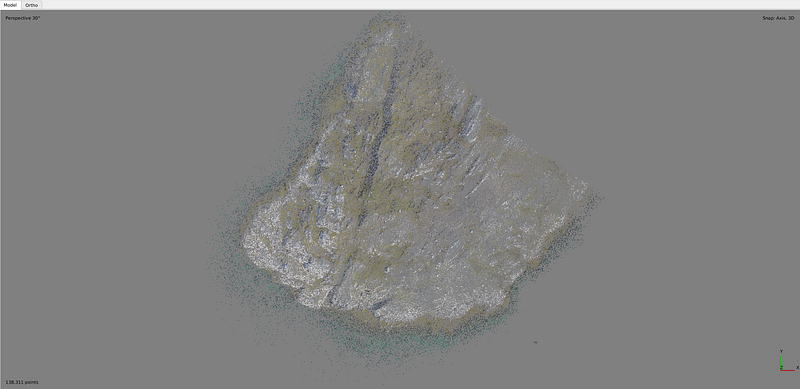
After calling the reconstruction uncertainty function, the number of points was reduced to 138,311.

The number of points was further reduced to 73,125 after calling the projection accuracy function.

Finally, after applying the reprojection error, the point cloud contained 62,991 points.
Wrapping Up
Now you should be able to automate gradual selection in Agisoft Metashape using python. Of course we can make this process more complex by checking camera parameters for convergence, but that’s a topic for another post!


