avatarAlain Saamego

Free AI web copilot to create summaries, insights and extended knowledge, download it at here

3494

Abstract

jlTAA0xg2vC6BE35gtxg.png"><figcaption></figcaption></figure><p id="a359">We can also view the last few rows of data:</p><div id="720c"><pre>df.tail<span class="hljs-comment">()</span></pre></div><p id="13b1">which would return the following output:</p><figure id="8c8c"><img src="https://cdn-images-1.readmedium.com/v2/resize:fit:800/1*FXjlTAA0xg2vC6BE35gtxg.png"><figcaption></figcaption></figure><p id="75f5">We can also view a summary of the data:</p><p id="b92d">df.describe()</p><p id="316f">which would return the following output:</p><figure id="c239"><img src="https://cdn-images-1.readmedium.com/v2/resize:fit:800/1*nsnwfuefdTRY7eDNq_smrw.png"><figcaption></figcaption></figure><p id="3a76">We can also view the data types of each column:</p><figure id="3560"><img src="https://cdn-images-1.readmedium.com/v2/resize:fit:800/1*IVVSV44vwv3TJXtJgDWRuQ.png"><figcaption></figcaption></figure><p id="df77">As we can see, the id column is of type int64, which means it contains integers. The name column is of type object, which means it contains strings.</p><div id="3002" class="link-block"> <a href="https://readmedium.com/python-for-beginners-the-7-basic-concepts-you-need-to-know-easy-and-efficient-120f930edf1c"> <div> <div> <h2>Python for Beginners: The 7 Basic Concepts You Need to Know — Easy and Efficient!</h2> <div><h3>In this tutorial, we will cover seven basic concepts in Python programming.</h3></div> <div><p>medium.com</p></div> </div> <div> <div style="background-image: url(https://miro.readmedium.com/v2/resize:fit:320/0*uXLlOWZcqzYBBPhV)"></div> </div> </div> </a> </div><p id="08f3"><b>Selecting Data</b></p><p id="ce04">We can select data from a DataFrame using the following methods:</p><div id="f624"><pre>df<span class="hljs-selector-attr">[column_name]</span> df<span class="hljs-selector-class">.loc</span><span class="hljs-selector-attr">[row_index]</span> df<span class="hljs-selector-class">.iloc</span><span class="hljs-selector-attr">[row_index]</span></pre></div><p id="2bd4">For example, if we wanted to select the id and name columns, we would use the following code:</p><div id="78e9"><pre>df[<span class="hljs-string">"BQ]</span></pre></div><p id="1be1">which would return the following output:</p><figure id="bac2"><img src="https://cdn-images-1.readmedium.com/v2/resize:fit:800/1*hDCKqs3yMzGqSXacieYbkg.png"><figcaption></figcaption></figure><p id="2e58"><b>Filtering Data</b></p><p id="be78">We can filter data using the following methods:</p><div id="0a29"><pre>df[df[column_name] <span class="hljs-operator">=</span><span class="hljs-operator">=</span> value] df.loc[df[column_name] <span class="hljs-operator">=</span><span class="hljs-operator">=</span> value] df.iloc[df[column_name] <span class="hljs-operator">=</span><span class="hljs-operator">=</span> value]</pre></div><p id="0a8e">For example</p><figure id="9492"><img src="https://cdn-images-1.readmedium.com/v2/resize:fit:800/1*8KQF_JPDI6loJwh1BSaGEg.png"><figcaption></figcaption></figure><p id="5aed">We can also use the loc and iloc methods to filter data. For example, if we wanted to filter the data to only include countries with an id less than 10, we would use the following code:</p><div id="aa71"><pre>df.loc[<span class="hljs-built_in">df</span>[“<span class="hljs-built_in">id</span>”] < 10]</pre><

Options

/div><p id="58ce"><b>Sorting Data</b></p><p id="a7e7">We can sort data using the following methods:</p><div id="005d"><pre>df.sort_values(<span class="hljs-attribute">by</span>=column_name) df.sort_values(<span class="hljs-attribute">by</span>=column_name, <span class="hljs-attribute">ascending</span>=<span class="hljs-literal">False</span>)</pre></div><p id="c07a">For example, if we wanted to sort the data by id in ascending order, we would use the following code:</p><div id="6706"><pre>df.sort_values(<span class="hljs-keyword">by</span>=”<span class="hljs-built_in">id</span>”)</pre></div><p id="f3e7"><b>Aggregation</b></p><p id="0428">We can aggregate data using the following methods:</p><div id="9090"><pre>df.<span class="hljs-built_in">mean</span>() df.<span class="hljs-built_in">median</span>() df.<span class="hljs-built_in">min</span>() df.<span class="hljs-built_in">max</span>() df.<span class="hljs-built_in">std</span>() df.<span class="hljs-built_in">sum</span>()</pre></div><p id="599b">In this tutorial, we have looked at one of the most popular library for data analysis: Pandas. We have seen how to use the library to load, examine and filter data.</p><div id="f691" class="link-block"> <a href="https://readmedium.com/7-advanced-python-features-you-should-know-about-b0d98733efcd"> <div> <div> <h2>7 Advanced Python Features You Should Know About</h2> <div><h3>Amazing Python Features That Will Change the Way You Code.</h3></div> <div><p>medium.com</p></div> </div> <div> <div style="background-image: url(https://miro.readmedium.com/v2/resize:fit:320/0*-5hXW1hjb53nYiMl)"></div> </div> </div> </a> </div><div id="e520" class="link-block"> <a href="https://readmedium.com/python-tutorial-mastering-python-pathlib-e8bb7746d4c5"> <div> <div> <h2>Mastering Python Pathlib — Step-by-Step Guide</h2> <div><h3>Pathlib provides a number of useful methods and attributes that allow you to navigate the filesystem.</h3></div> <div><p>medium.com</p></div> </div> <div> <div style="background-image: url(https://miro.readmedium.com/v2/resize:fit:320/0*EkO-pth8it5wpxqZ)"></div> </div> </div> </a> </div><p id="621a"><b><i>Before you leave:</i></b></p><p id="9d16">If you liked this article, don’t forget to give me a few claps, f<a href="https://medium.com/@alains">ollow me </a>and thus receive all updates about new publications.</p><p id="79a0">If you enjoy reading stories like these, consider <a href="https://medium.com/@alains/membership">signing up</a> to become a <a href="https://medium.com/@alains/membership">Medium member</a>. It’s $5 a month, and you’ll receive unlimited access to stories on Medium.</p><p id="d8fd">So don’t wait — <a href="https://medium.com/@alains/membership">sign up now</a> and start enjoying all that Medium has to offer.</p><p id="55d1"><b>About the author: <i>Alain Saamego</i></b>: Software engineer, writer and content strategist at <a href="https://selfgrow.co.uk">SelfGrow.co.uk</a></p><p id="9557"><b><i>Email</i></b>:[email protected]</p><p id="88bd"><a href="https://twitter.com/alainsamego"><i>Follow me on Twitter </i></a><i>if you want even more content.</i></p></article></body>

How to Use Python Pandas for Data Structures and Data Analysis.

It’s very easy to do, even a child can do it.

Photo by Hitesh Choudhary on Unsplash

There are many different libraries that can be used to easily analyse any dataset. However, some libraries are more popular than others.

In this tutorial, we will take a look at the three most popular libraries for data analysis: Pandas, NumPy and Matplotlib.

Pandas is a library that provides easy-to-use data structures and data analysis tools. NumPy is a library that provides efficient numerical computing tools. Matplotlib is a library that provides plotting tools.

We will start by looking at how to use Pandas to load and examine data. We will then take a look at how to use NumPy to perform numerical operations on data. Finally, we will use Matplotlib to create visualisations of data.

Loading Data

The first step in any data analysis is to load the data. Pandas makes it easy to load data from a variety of sources, including CSV files, Excel files, JSON files and SQL databases.

In this example, we will load a CSV file containing data about countries. The file can be downloaded from here:

https://raw.githubusercontent.com/jpatokal/openflights/master/data/countries.dat

We will use the read_csv() function to load the data:

import pandas as pd
df = pd.read_csv(“https://raw.githubusercontent.com/jpatokal/openflights/master/data/countries.dat")

The read_csv() function returns a DataFrame object. A DataFrame is a two-dimensional data structure that contains columns and rows.

Viewing Data

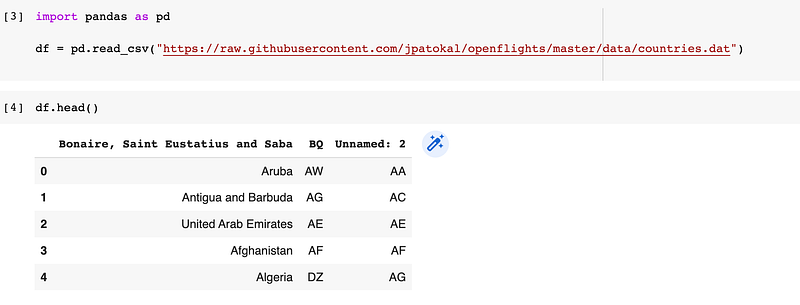
Once the data has been loaded, we can start to examine it. The first thing we might want to do is to view the first few rows of data:

df.head()

which would return the following output:
We can also view the last few rows of data:

df.tail()

which would return the following output:

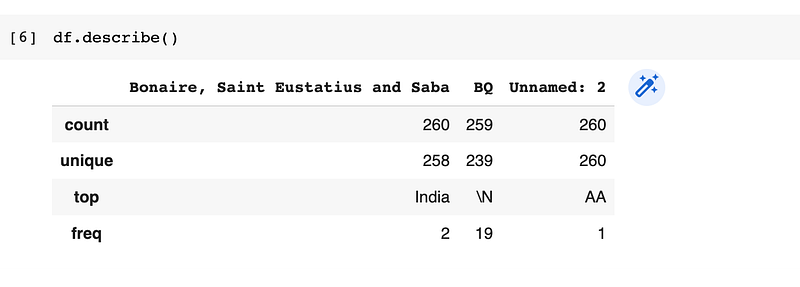
We can also view a summary of the data:

df.describe()

which would return the following output:
We can also view the data types of each column:

As we can see, the id column is of type int64, which means it contains integers. The name column is of type object, which means it contains strings.

Selecting Data

We can select data from a DataFrame using the following methods:

df[column_name]
df.loc[row_index]
df.iloc[row_index]

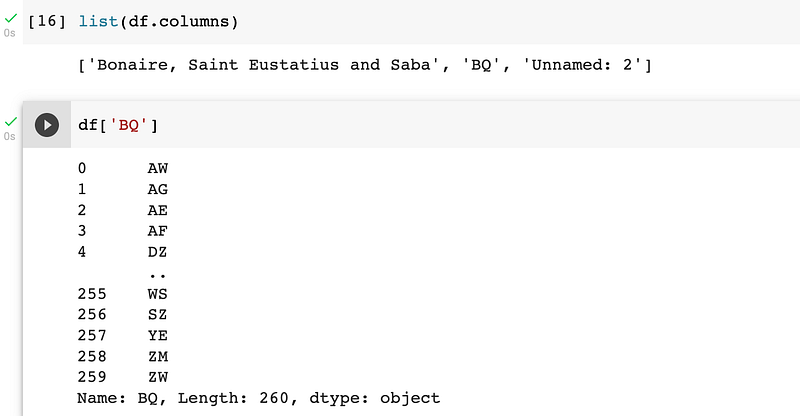
For example, if we wanted to select the id and name columns, we would use the following code:

df["BQ]

which would return the following output:
Filtering Data

We can filter data using the following methods:

df[df[column_name] == value]
df.loc[df[column_name] == value]
df.iloc[df[column_name] == value]

For example

We can also use the loc and iloc methods to filter data. For example, if we wanted to filter the data to only include countries with an id less than 10, we would use the following code:

df.loc[df[“id”] < 10]

Sorting Data

We can sort data using the following methods:

df.sort_values(by=column_name)
 df.sort_values(by=column_name, ascending=False)

For example, if we wanted to sort the data by id in ascending order, we would use the following code:

df.sort_values(by=”id”)

Aggregation

We can aggregate data using the following methods:

df.mean()
df.median()
df.min()
df.max()
df.std()
df.sum()

In this tutorial, we have looked at one of the most popular library for data analysis: Pandas. We have seen how to use the library to load, examine and filter data.

Before you leave:

If you liked this article, don’t forget to give me a few claps, follow me and thus receive all updates about new publications.

If you enjoy reading stories like these, consider signing up to become a Medium member. It’s $5 a month, and you’ll receive unlimited access to stories on Medium.

So don’t wait — sign up now and start enjoying all that Medium has to offer.

About the author: Alain Saamego: Software engineer, writer and content strategist at SelfGrow.co.uk

Email:[email protected]

Follow me on Twitter if you want even more content.

Python
Python3
Programming
Data Science
Machine Learning
Recommended from ReadMedium