
How to use MoSCoW in UX research and avoid featuritis
UX Design Essentials: Article 11
What is MoSCoW?
MoSCoW is the acronym for a concept called Must Have/Should Have/Could Have/Would Have. This conceptual tool is used to analyze the ranking of your product’s features.
What is featuritis?
Featuritis is the condition of Too Many Product Features. This condition arises when stakeholder and/or design teams add too many buttons, clicks, turns, or knobs to their product. This leaves the consumer utterly confused and overwhelmed, and thereby unable to use the product properly.
To prioritize product features, and avoid featuritis, we use the MoSCoW analytics tool at the beginning of the product’s design phase (or towards the end of the research phase)
What is the concept of a MoSCoW analysis?
MoSCoW is a research/design method that gives you a visual insight into how to prioritize your product’s features
MoSCoW is represented with this four-quadrant chart, each quadrant representing types of features in order of priority, in clock-wise ranking of priority:

Must-Have Features (top left quadrant): The product or app cannot exist without these features. They are mandatory and define the product’s functionality.
Should-Have Features (top right quadrant): Features that are important enough to add significant value, but not vital.
Could-Have Features (bottom right quadrant): Nice-to-have features, but ranking very low in the overall product’s functionality and design impact.
Won’t-Have Features (bottom left quadrant): These features are not a priority, have low feasibility, and have little or no impact on the success of the product.
How is a MoSCoW used in a real case scenario?
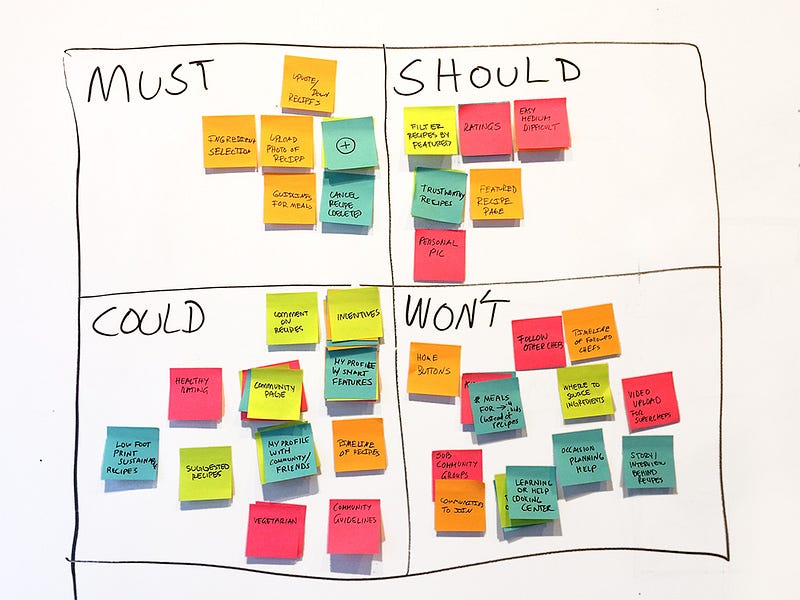
Let’s look at a actual website example…
Can you guess which website this MoSCoW represents?
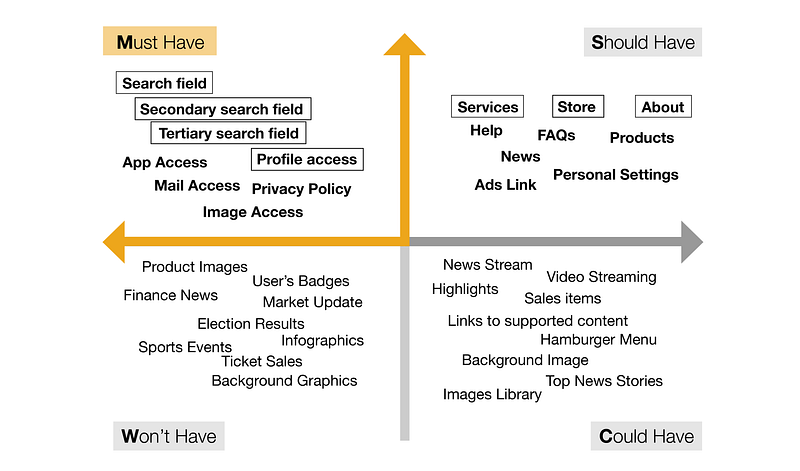
This is Google’s home page through a MoSCoW analysis. Check it against the actual page, and you can see how the features align.
Let’s look at another example… which website does this MoSCoW represent?
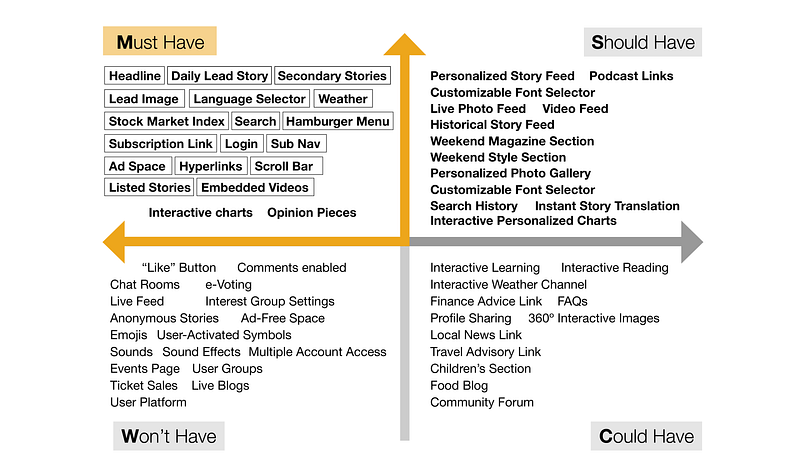
This MoSCoW represents the home page of one of the most comprehensive newspapers in the United States, the New York Times. Starting with the Must-Have features section, we can get a sense of how intricately this page must function to provide an in-depth news service. The other 3 quadrants tell us how this webpage could potentially engage in additional services. Check it against the actual page, and you can see how the features align.
As these two MoSCoW examples illustrate, prioritizing features is necessary to define the function of a product.
Through feature prioritization, we can avoid a glut of features, the condition called featuritis.
Use a MoSCoW as you finalize research or start with your design phase. As your design phase evolves, you might iterate a few of the features. Work with your stakeholder team to unify everyone’s expectations of what the product should offer.
At what stage in the product’s research/design process is a MoSCoW used?
Take a closer look at this Double Diamond diagram.
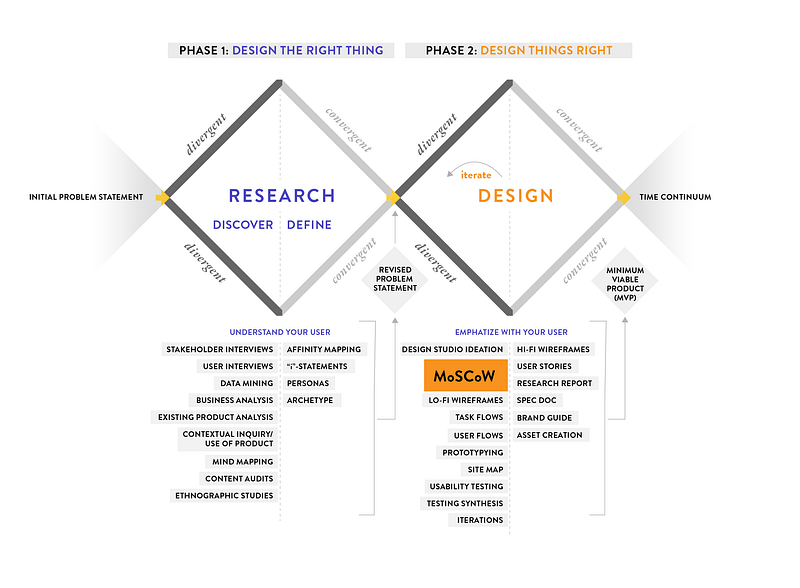
We can see that the MoSCoW method is used at the early stage of the design process. While the research phase tells us important details relating to content strategy, also referred to as Design The Right Thing, the design phase is all about Design Things Right. To design the right app, website or physical product, we must analyze the product’s features and prioritize them through using a MoSCoW. This is why the MoSCoW method is a very important tool in your design approach.
To read more about the concept of the Double Diamond in UX design, click on my story Why the Double Diamond is the Most Precious Diagram in UX Design. Link is provided below.
In summary
{ Research/Design + MoSCoW = Smart Product Design }
A MoSCoW serves as a blueprint to product features. It prioritizes certain features over others, so that stakeholder, research and design teams can find alignment on these features. Without identifying prioritized features, the product cannot provide the functionality intended for the user. Using the MoSCoW method at the beginning of the design phase (or towards the end of the research phase) can provide clarity of design strategy throughout the process.
Use it in your own product design!
Read up on other UX research and design strategies:
Want to learn more?
Want to get an industry-recognized Course Certificate in UX Design, Design Thinking, UI Design, or another related design topic? Online UX courses from the Interaction Design Foundation can provide you with industry-relevant skills to advance your UX career. For example, Design Thinking, Become a UX Designer from Scratch, Conducting Usability Testing or User Research — Methods and Best Practices are some of the most popular courses. Good luck on your learning journey!
Thank you for reading!


