
How To Use Mocking in JavaScript Tests Using Jest
Write awesome tests with ease using mocking

If you’ve ever written tests in software projects then you’re probably familiar with the various testing approaches.
Unit testing is the most basic but deceptively powerful way of testing. Unit tests are cheap to develop and easy to execute and debug, because they isolate failures and are executed rather fast, compared with more complex ways of testing like end-to-end testing.
You may have seen the testing pyramid:
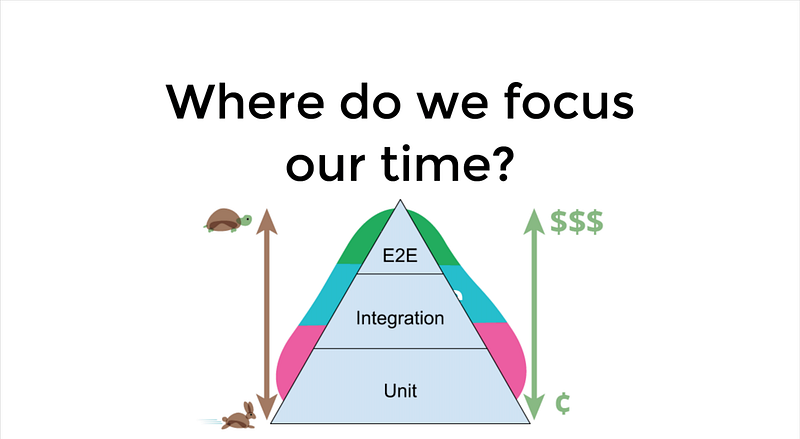
What can you test with unit tests?
- Functions
- Pure classes
- Components (including DOM): e.g. Angular / React / Vue.js / Web Components
Check out this post for examples of how to choose the most appropriate testing method.
Why Might Functions, Classes or Components Be Hard to Test?
- The class has dependencies which are hard to provide (e.g. the constructor expects multiple arguments)
- Some functionality of a class may not be accessible from outside (e.g. by using access modifiers like private in TypeScript)
- The function/class/component does far too much that we don’t want in our tests
How Does Mocking Help to Write Better Tests?
- Manual mocks are used to stub out functionality which we don’t really want in the scope of a test.
- Makes your tests faster and less flaky by avoiding dependencies (e.g. access to a real database, using a third-party library)
- Makes things easier to test. With mocking, you can easily create the ideal test setup to use in your tests.
- Reduce the setup of your tests. Many libraries expect some setup to be done in order to work. With mocking, you can ignore all this and focus on testing actual functionality instead.
- We don’t need to test third-party code as it is probably already tested. In unit tests, we want to focus on the smaller parts of our application that we developed ourselves. Mocking third-party dependencies help to keep tests more focused on our custom logic and less about internal implementation details.
It should be noted that mocking is also possible in end-to-end and integration tests. However, mocking makes much more sense for unit tests. Integration and especially end-to-end tests are provider a higher validity that your application and its building blocks are working as intended. Therefore, we will focus on mocking in unit tests.
I will be using TypeScript for the following examples but it works in a similar fashion with plain JavaScript as well. I prefer Jest as a testing framework in JavaScript projects. I have written posts about using Jest in both client-side and server-side applications as well as for end-to-end testing. In short, Jest is a great choice due to its simple usage and powerful capabilities (e.g. the CLI, many plugins, framework-agnostic support, no browser required).
Of course, you can use Jasmine, Mocha or another testing framework since most testing frameworks support mocking regardless of the language. This means the concept can also be applied in other programming languages such as Python, Java or C#.
Mocking a Function of a Class
describe('Email client', () => {
  it('can receive emails', () => {
     // we don't want to access any database in this test so we mock
     // the get function of the UserDao class which connects to a
     // database
     spyOn(UserDao, 'get').and.returnValue({id: 123, name: 'John Doe'});
     getEmails(UserDao.get('123'));
  });
});
Mocking an Exported Function or Constant
// dev.helpers.js contains this exported function
export function isProduction() {
  return process.env.NODE_ENV === 'production';
}

// email-client.spec.ts contains tests
// we need to import with an alias since we can't spy on exported functions or constants directly
import * as devHelpers from "helpers/dev.helpers";
describe('Email client', () => {
  it('can send emails', () => {
    spyOn(devHelpers, 'isProduction').and.returnValue(false);
    sendEmail(); // we don't want to attempt to send a real email in this test
  });
});
Mocking a Third-Party Library or Custom Module
// we don't care about the actual implementation of this module (e.g. jQuery) in our tests since it is not important for our tests
jest.mock('module_name');
Conclusion
Thanks for reading this piece on how to use mocking for writing easier and more reliable tests in JavaScript. As you can see, mocking helps us to write more stable and easier to write tests. Especially for unit tests, it allows us to test things without worrying about external dependencies. Let me know in the comments if this helps.