
How to use Lists to Organize your Stories
Make it easy for readers to find all your stories
Once you’ve been writing on medium for a while, you’ll accumulate a large number of stories. You can use Lists to organize them into categories and make it easy for your readers to find them.
Lists are great to bookmark stories you want to read later, but they can do a lot more. As well as your private reading list, you can also create public lists.
A public list is a way to organize your stories by category, or by date, or whatever works for you. This makes it easy for you to find them later, and it makes it easy for your readers to find them.
If someone enjoys reading one of your articles, they’ll often click on your profile page to look at your other stories. You can pin an article at the top of your profile page which has links to your public lists.
Here’s how to do it
When you click the bookmark icon on the side of an article this menu appears:
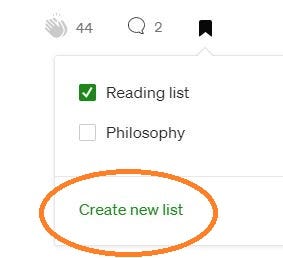
Select Create New List
to open the menu…
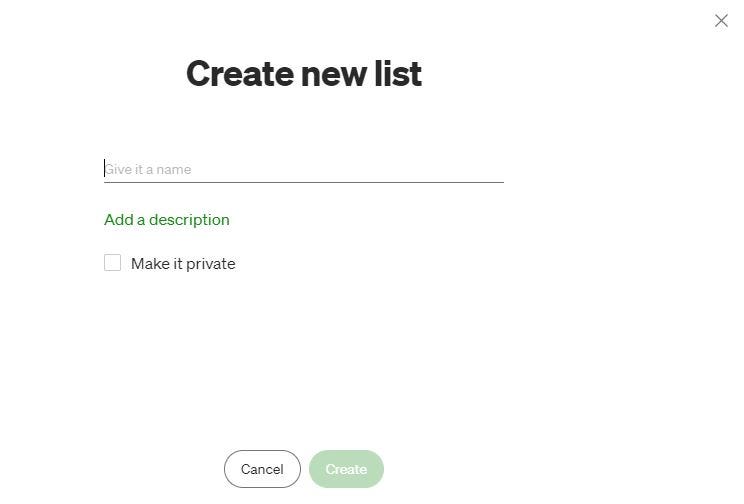
Here you can enter a name for your list and choose to make it private or leave that option unchecked and the list will be public. Anyone who clicks on Lists at the top of your profile page will be able to see your public lists.
Once you’ve created a List, go to your articles and select the bookmark icon and you can choose which list you want for the article:
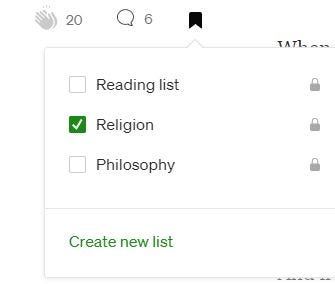
Select the list you want.
Once you’ve created your lists and saved the articles in each list, write another article with links to the web address of your List.
Now pin this article on your profile page so it’s easy to find.
You could also use this feature to create a list with your most popular articles, or this week’s article’s, or whatever list suits your categories or your readers.
When anyone visits your profile page they can either click on the links in the article, or they can click on the List option at the top of the page and all your public lists will be displayed.
This makes it easy for readers to find the topics they’re interested in.
If you’d like to become a member of Medium so you can read as many Medium articles as you like, you can sign up here. Signing up through this link gives me a portion of your membership fee every month.