avatarNeil Shah

Free AI web copilot to create summaries, insights and extended knowledge, download it at here

2752

Abstract

space-name-here>"</span> } } EOF</pre></div><p id="634c">In the above snippet, you can see the exact curl request for creating a namespace in your GKE cluster.</p><h2 id="2075">Few things to do before applying this;</h2><p id="524c">Token: For the token, you need to replace it with the value you’ll get after applying the below command</p><div id="286d"><pre>kubectl -n kube-<span class="hljs-params">system</span> describe secret (kubectl -n kube-<span class="hljs-params">system</span> get secret | grep <span class="hljs-literal">admin</span>-<span class="hljs-literal">user</span> | awk <span class="hljs-string">'{print <span class="hljs-variable">1</span>}'</span>)</pre></div><p id="b648">Before applying this command make sure you already have a service account created if not use the following command to create.</p><div id="e277"><pre><span class="hljs-attribute">kubectl create serviceaccount demo</span></pre></div><p id="7cbd">Later you need to also create a ClusterRole and need to bind it with the service account. Here is the YAML file for that</p><div id="9e71"><pre><span class="hljs-symbol">kind:</span> ClusterRole <span class="hljs-symbol">apiVersion:</span> rbac.authorization.k8s.io/v1 <span class="hljs-symbol">metadata:</span> <span class="hljs-symbol"> name:</span> demo <span class="hljs-symbol">rules:</span>

  • apiGroups: [<span class="hljs-string">""</span>] <span class="hljs-symbol"> resources:</span> [<span class="hljs-string">""</span>] <span class="hljs-symbol"> verbs:</span> [<span class="hljs-string">"*"</span>]</pre></div><p id="1662">Then bind the role with this command</p><div id="d290"><pre>$ kubectl create clusterrolebinding demo-binding <span class="hljs-attribute">--clusterrole</span>=demo <span class="hljs-attribute">--serviceaccount</span>=demo</pre></div><p id="2830">Cluster Endpoint: In your GKE cluster you can see your Endpoint by clicking on it in the details.</p><figure id="60ef"><img src="https://cdn-images-1.readmedium.com/v2/resize:fit:800/1*7eiq_pn2vuzMLC6VL93Hnw.png"><figcaption>Taken by Author</figcaption></figure><p id="2df6">Namespace: Write the desired name in the field which will the name of your namespace.</p><p id="2763">Now you have to just apply this above curl request on your local terminal. After applying you’ll see a success message like this.</p><div id="a120"><pre>{ <span class="hljs-string">"kind"</span>: <span class="hljs-string">"Namespace"</span>, <span class="hljs-string">"apiVersion"</span>: <span class="hljs-string">"v1"</span>, <span class="hljs-string">"metadata"</span>: { <span class="hljs-string">"name"</span>: <span class="hljs-string">"namedemo"</span>, <span class="hljs-string">"selfLink"</span>: <span class="hljs-stri

Options

ng">"/api/v1/namespaces/namedemo"</span>, <span class="hljs-string">"uid"</span>: <span class="hljs-string">"f97c50e0-4610-4d5a-bebc-de96583de255"</span>, <span class="hljs-string">"resourceVersion"</span>: <span class="hljs-string">"20080"</span>, <span class="hljs-string">"creationTimestamp"</span>: <span class="hljs-string">"2021-02-24T05:29:42Z"</span>, <span class="hljs-string">"managedFields"</span>: [ { <span class="hljs-string">"manager"</span>: <span class="hljs-string">"curl"</span>, <span class="hljs-string">"operation"</span>: <span class="hljs-string">"Update"</span>, <span class="hljs-string">"apiVersion"</span>: <span class="hljs-string">"v1"</span>, <span class="hljs-string">"time"</span>: <span class="hljs-string">"2021-02-24T05:29:42Z"</span>, <span class="hljs-string">"fieldsType"</span>: <span class="hljs-string">"FieldsV1"</span>, <span class="hljs-string">"fieldsV1"</span>: {<span class="hljs-string">"f:status"</span>:{<span class="hljs-string">"f:phase"</span>:{}}} } ] }, <span class="hljs-string">"spec"</span>: { <span class="hljs-string">"finalizers"</span>: [ <span class="hljs-string">"kubernetes"</span> ] }, <span class="hljs-string">"status"</span>: { <span class="hljs-string">"phase"</span>: <span class="hljs-string">"Active"</span> }</pre></div><h2 id="be22">Something More</h2><p id="5b83">Here are some bonus tips, now to modify this curl request in order to make pods, resource quota, etc you need to convert your YAML file into JSON and need to change the API link.</p><div id="2caa"><pre>curl -k <span class="hljs-string"></span> -X DELETE <span class="hljs-string"></span> -d @- <span class="hljs-string"></span> -H <span class="hljs-string">"Authorization: Bearer <token>"</span> <span class="hljs-string"></span> -H <span class="hljs-string">'Accept: application/json'</span> <span class="hljs-string"></span> -H <span class="hljs-string">'Content-Type: application/json'</span> <span class="hljs-string"></span> https:<span class="hljs-regexp">//Endpoint/api/v1/namespaces/namespacename <<'EOF' { ... } EOF</span></pre></div><p id="a81c">The above curl request will delete your Namespace which mentioned at the end of the URL.</p><p id="75ba"><i>What next?</i></p><p id="8815">The possibilities are infinite, you can look on the internet and find specific API for pod and other things and just modify the request accordingly.</p><p id="9a82">Thank you.</p><h2 id="87b9">Reference:</h2><p id="b39f"><a href="https://docs.openshift.com/container-platform/3.9/rest_api/api/v1.Namespace.html">Red Hat Open Shift Namespace</a></p></article></body>

How to Use Google Kubernetes API Efficiently

The exact way to make things simpler

Photo by Arnold Francisca on Unsplash

Recently, working on a project I was told to search and implement how to create namespaces and pods on GKE with an API call.

I knew right away that there should be a way in which we can use the API which we mentioned in our YAML file, like this
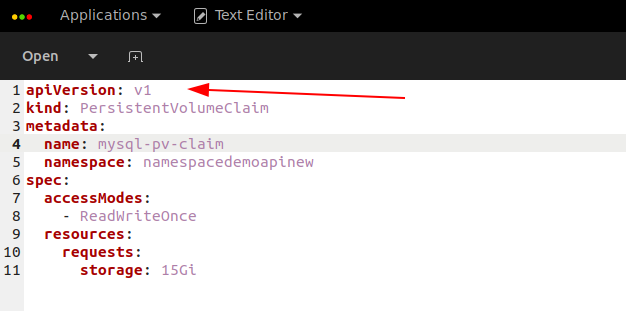
Taken by Author

I began my search on the web as usual and found some concrete stuff that somewhat worked after minor changes here and there.

Finally, I created a perfect API call with a curl request which I tested from a local Ubuntu terminal and with a tool called postman that worked perfectly.

After completing my given task, I stumbled upon an idea that led me to write this guide which can help a lot of people in the future like me, who also want to implement this kind of stuff.

That is why I want to create this guide which shows a straight-away exact solution of implement GKE API.

The main reason behind writing this short and to the point article is that during my search on the internet I was not able to find a correct and working solution easily.

I had to look here and there. I had to do trial and error many times just to perform this small stuff.

And finally, here we are with an exact guide that will let you fire an API call to perform various kinds of stuff in GKE.

curl -k \
    -X POST \
    -d @- \
    -H "Authorization: Bearer <token>" \
    -H 'Accept: application/json' \
    -H 'Content-Type: application/json' \
    https://ClusterEndpoint/api/v1/resourcequotas <<'EOF'
{
  "apiVersion": "v1",
  "kind": "Namespace",
  "metadata": {
    "name": "<insert-namespace-name-here>"
  }
}
EOF

In the above snippet, you can see the exact curl request for creating a namespace in your GKE cluster.

Few things to do before applying this;

Token: For the token, you need to replace it with the value you’ll get after applying the below command

kubectl -n kube-system describe secret $(kubectl -n kube-system get secret | grep admin-user | awk '{print $1}')

Before applying this command make sure you already have a service account created if not use the following command to create.

kubectl create serviceaccount demo

Later you need to also create a ClusterRole and need to bind it with the service account. Here is the YAML file for that

kind: ClusterRole
apiVersion: rbac.authorization.k8s.io/v1
metadata:
  name: demo
rules:
- apiGroups: ["*"]
  resources: ["*"]
  verbs: ["*"]

Then bind the role with this command

$ kubectl create clusterrolebinding demo-binding --clusterrole=demo --serviceaccount=demo

Cluster Endpoint: In your GKE cluster you can see your Endpoint by clicking on it in the details.
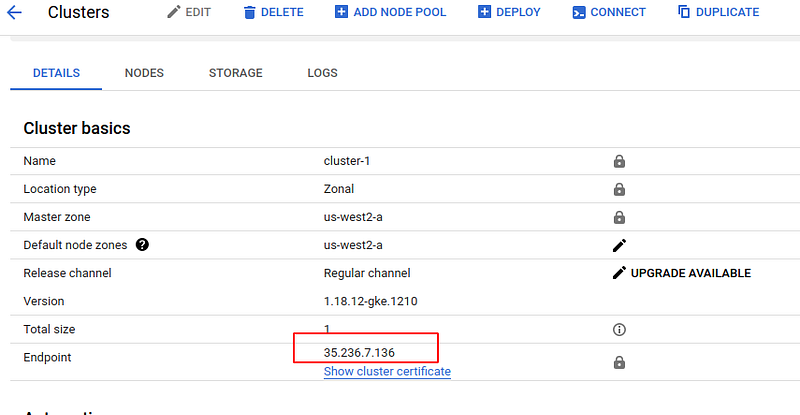
Taken by Author

Namespace: Write the desired name in the field which will the name of your namespace.

Now you have to just apply this above curl request on your local terminal. After applying you’ll see a success message like this.

{
  "kind": "Namespace",
  "apiVersion": "v1",
  "metadata": {
    "name": "namedemo",
    "selfLink": "/api/v1/namespaces/namedemo",
    "uid": "f97c50e0-4610-4d5a-bebc-de96583de255",
    "resourceVersion": "20080",
    "creationTimestamp": "2021-02-24T05:29:42Z",
    "managedFields": [
      {
        "manager": "curl",
        "operation": "Update",
        "apiVersion": "v1",
        "time": "2021-02-24T05:29:42Z",
        "fieldsType": "FieldsV1",
        "fieldsV1": {"f:status":{"f:phase":{}}}
      }
    ]
  },
  "spec": {
    "finalizers": [
      "kubernetes"
    ]
  },
  "status": {
    "phase": "Active"
  }

Something More

Here are some bonus tips, now to modify this curl request in order to make pods, resource quota, etc you need to convert your YAML file into JSON and need to change the API link.

curl -k \
    -X DELETE \
    -d @- \
    -H "Authorization: Bearer <token>" \
    -H 'Accept: application/json' \
    -H 'Content-Type: application/json' \
    https://Endpoint/api/v1/namespaces/namespacename <<'EOF'
{
  ...
}
EOF

The above curl request will delete your Namespace which mentioned at the end of the URL.

What next?

The possibilities are infinite, you can look on the internet and find specific API for pod and other things and just modify the request accordingly.

Thank you.

Reference:

Red Hat Open Shift Namespace

Programming
Coding
DevOps
Kubernetes
Google Cloud Platform
Recommended from ReadMedium