
How to Use Google Calendar to Capture Your Blog Post Ideas
A DIY method to create your own content calendar

I think just about every writer can tell you that at some point or another in their writing journey, they have scribbled notes on a napkin, a post-it note, a paper place mat at a restaurant, the back of a piece of mail, etc.
Heck, I remember trying to take notes on a diaper when my kids were little. I was at the park with them and an idea popped into my head —
ideas were hard to hold onto back then…
it was all I had with me…
at least I didn’t write ON the baby…
I was writing fiction then…
the diaper was clean!….
Hey, I’m a writer and a single mom of 4…don’t judge me 😃
Okay, so take a look around your house right now.
Do you have any writing ideas scribbled on something other than a notepad, journal, or piece of paper designated for writing ideas?
Go on, take a few minutes. Check the bedroom, the kitchen, living room.
Did you look in the bathroom too? You know that’s where you hide from the kids and spouse! 🙈
I bet you found writing ideas scribbled on something weird, right?
Or at least you’re laughing right now because you know you have in the past and likely will again.
If you’re anything like me, you need a better system for capturing writing ideas so you can use them and not lose them, right?
The solution is a blog content calendar.
Stop groaning. I know you’ve tried this before. So have I. Many times.
Too many to count. And I’ve spent money on blog calendars too. And then never used them.
But this process is working this time for me, it’s completely free, and here’s what I’m doing. All you need is an online calendar. It can be on your phone, your computer, tablet, any device connected to the Internet.
Something free, like Google calendar.
Every time you think of an idea for a blog post — -open your calendar and put in an event with a reminder. Just as if it was a doctor’s appointment, your child’s soccer game, or a hair appointment.
This works if it’s the middle of the night or early in the morning or even while you’re in the shower! I know your phone is within reach 24/7. Just step out of the shower, pick up your phone — -pull up Google calendar.
Just put the title of the blog post or the idea as the event name. Just a few words.
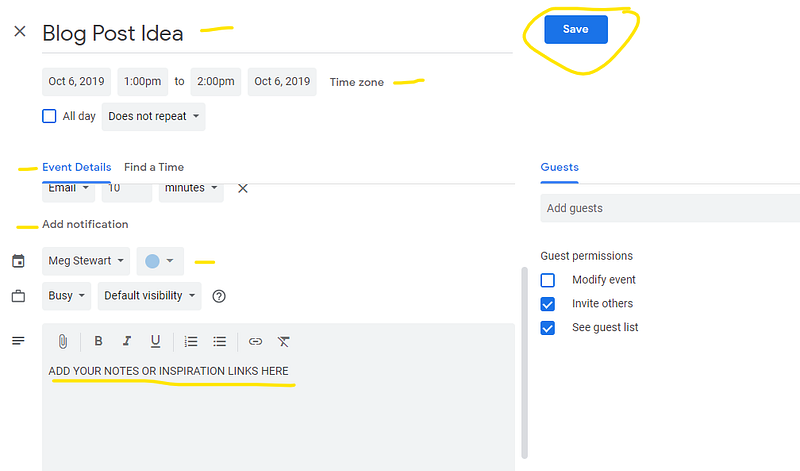
Then down further in the description area put some notes about what inspired the post idea.
What inspired your writing idea? Did you read a book, have a dream, or talk to that harmless spider who hangs out in the shower?
Maybe a reader of your last blog post or someone in a Facebook group asked a question, or you saw a meme, a news article, a movie, or just laughed for 20 minutes at something funny your child did, etc.
Since Google calendar is digital and online — you can even copy and paste a link to a writing prompt, a news article, FB meme or post, whatever — right there in the description box.
Add in any ideas or other notes you might have off the top of your head about the blog post you want write. But don’t spend a lot of time — just get it in there.
Don’t skip this step about putting notes or a link to your inspiration for the idea in the description. It will help you later when you go to write the post, trust me.
When you open that event in a couple days or even a few weeks from now, you’ll be able to quickly get re-inspired and jump right into writing that post!
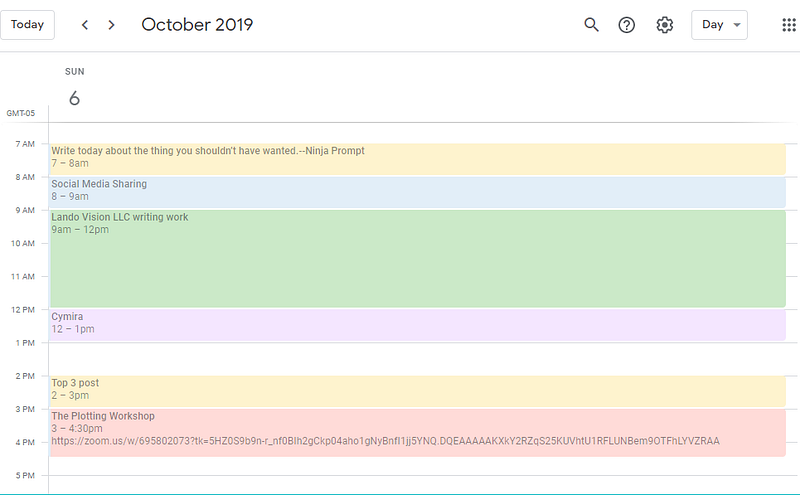
Okay here’s the steps in a nutshell so far.
- Get an idea for a blog post
- Open your Google calendar
- Put the idea as an event
- Fill in the description box with your source of inspiration and any ideas you have right then.
Final steps for right now is to pick a date and time in the future when you might be able to write that post. This will be different for everyone depending on your situation. But you should know when your “writing time” is roughly. Most people have a peak productivity time.
Unless you have kids under 3 years old, and then just check that box that says “all day event” and that way you can work on it throughout the whole day. Just open it whenever you have 5 minutes without someone hugging your legs and tugging your shirt.
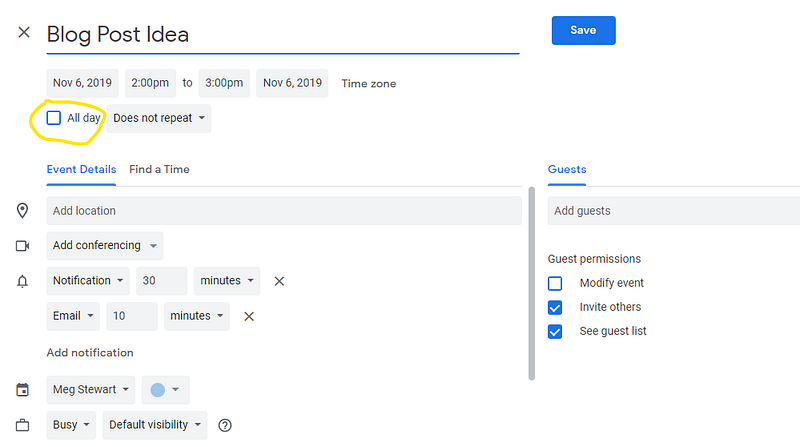
Finally, add a reminder with a bell or whatever will get your attention, and save it.
Ta Da! You have a free blog content calendar!
Now this next part is critical.
Check your calendar every day during your writing time or when you have that free 5 minutes without kids hanging on you
Work on the post that shows up on your calendar for that day.
If you’re really not feeling that idea or title on that day for whatever reason — no worries!
Just glance ahead at the next couple days and find a title or idea that fits with your mood and write that instead.
They’re all there, on your calendar, just waiting to be chosen.
Swap the post idea you didn’t want to write today with the one you did want to write — because in a couple days you may be in a different mood.
That’s what I do anyhow. I’m building content now for my old blog and my soon to be new one. I’ve got ideas for the next 2 to 3 weeks already planned out.
What to do if your ideas just aren’t coming to you.
Some times you have days where the ideas are few and far between. They may not come at all.
Trust me, it happens. No judgement here.
When that happens, you can google writing prompts, blog post ideas, blog content ideas, etc. You may find some good inspiration there.
Just an FYI — I am absolutely LOVING the Ninja writer prompts! If you haven’t seen them, go check them out.
I also found 255 Blog post ideas that will tantalize your readers in 2019, which was extremely helpful for me.
But there are tons of blog idea lists and prompts out there. Find the writing prompts that seem to call to you. Add those to your content calendar.
You’re going to miss a day or two, maybe three. But you can catch back up by moving the posts/ideas you skipped ahead and starting with the one that is there today.
Check your calendar every day for 21 days and write something, even if you don’t finish a post in one day. It takes at least that long to form a habit.
Let me know how it goes.
Just for fun, what’s the weirdest thing you’ve used to capture a writing idea?
Mine was the diaper. So far.
If anyone actually wrote ON the kid instead of just considering it like I did, I’d love to hear about it.
No judgement….I promise. 😁
Ready to find more freelance writing jobs? Get my free Market Mondays newsletter every week. It’s chock full of links to writing jobs and other markets that pay writers and my best tips and tricks for freelance writers.
Meg Stewart has been freelancing for nearly two decades. She’s a multi-passionate skill hoarder and the intersection of freelance writing, technology, and teaching is her sweet spot. Freelance Filter was founded to help writers get paid and help solopreneurs do business better. Meg and her family, (along with two dogs, two cats, and two leopard geckos), live in Northeast Ohio.