
How to Use Data Annotations to Exclude Sensitive Data in .NET Logs
While building .NET applications, I often struggled with sensitive data showing up in logs. Discovering data annotations transformed my approach — by simply adding attributes like [JsonIgnore], I could exclude confidential fields from logging effortlessly. This helped secure my applications, ensured compliance, and made my logging safer and more reliable without sacrificing functionality.
Using Data Annotations in ASP.NET Core is a straightforward way to control how data is handled, including logging. To exclude sensitive fields from logs, you can create a custom attribute and use it to decorate the fields you want to hide.
Here’s how you can implement this approach step-by-step:
Download Project —https://github.com/hasanmonsur/Use-Data-Annotations-to-Exclude-Sensitive-Data.git
Step 1: Create a New ASP.NET Core Web API Project
Open your terminal or command prompt and run the following command to create a new project named WebSeriLogApi:
dotnet new webapi -n WebSeriLogApi
cd WebSeriLogApi
Step 2: Install Required NuGet Packages
Add the necessary NuGet packages for Dapper, SQL Server , Serilog and Serilog.AspNetCore etc:
dotnet add package Dapper
dotnet add package Microsoft.Extensions.Configuration
dotnet add package Microsoft.Data.SqlClient
dotnet add package Serilog
dotnet add package Serilog.AspNetCore
dotnet add package Serilog.Sinks.Console  # For logging to console
dotnet add package Serilog.Sinks.File     # For logging to a file (optional)
Step 3: Configure Serilog in Program.cs
You can configure Serilog at the beginning of your application in the Program.cs file:
// Add services to the container.
builder.Services.AddControllers();

// add DI of service
builder.Services.AddSingleton<IMaskService, MaskService>();
// Configure Serilog
Log.Logger = new LoggerConfiguration()
    .MinimumLevel.Debug() // Set minimum log level
    .WriteTo.Console()    // Log to console
    .WriteTo.File("logs/log-.txt", rollingInterval: RollingInterval.Day) // Optional: Log to file
    .Enrich.FromLogContext() // Include contextual information
    .CreateLogger();

builder.Host.UseSerilog(); // Use Serilog as the logging provider


// Middleware and endpoint configuration
app.UseRouting();
app.UseAuthorization();
app.MapControllers();
Step 4: Create a Sample Data models/UserInputModel.cs
public class UserInputModel
{
    public string Email { get; set; }

    [LogExclude] // Exclude this field from logging
    public string Password { get; set; }

    public string Name { get; set; }
}
Step 5: Create a Sample Data Mask Service
Create a MaskService Interface Contacts/IMaskService.cs:
public interface IMaskService
{
    string MaskEmail(string email);
}
Create a Services Services/MaskService.cs:
public class MaskService : IMaskService
{
    public string MaskEmail(string email)
    {
        var parts = email.Split('@');
        return $"{parts[0][0]}****@{parts[1]}"; // Mask the email
    }
}
Step 6: Create a Custom Attribute
First, create a custom attribute that you can use to mark sensitive properties. Helpers/LogExcludeAttribute.cs
using System;

[AttributeUsage(AttributeTargets.Property, Inherited = false, AllowMultiple = false)]
public sealed class LogExcludeAttribute : Attribute
{
    // This attribute does not need any properties
}
Implement a Logging Filter
Next, implement a logging filter that checks for this attribute when logging objects. You can create an extension method for this purpose. Helpers/LoggerExtensions.cs
using Microsoft.Extensions.Logging;
using System.Linq;
using System.Reflection;

public static class LoggerExtensions
{
    public static void LogInformationWithoutSensitiveData<T>(this ILogger logger, string message, T obj)
    {
        var properties = typeof(T).GetProperties()
            .Where(p => !Attribute.IsDefined(p, typeof(LogExcludeAttribute)));

        var logData = properties.ToDictionary(p => p.Name, p => p.GetValue(obj));

        logger.LogInformation(message, logData);
    }
}
Step 7: Logging Data in a Structured Manner
You can log messages and structured data in your controllers or services using the injected ILogger<T> interface.
Example Controller Logging
Here’s how to log structured data from a controller while ensuring sensitive information is not logged:
[Route("api/[controller]/[action]")]
[ApiController]
public class SampleController : ControllerBase
{

    private readonly ILogger<SampleController> _logger;
    private readonly IMaskService _maskService;

    public SampleController(ILogger<SampleController> logger, IMaskService maskService)
    {
        _logger = logger;
        _maskService = maskService;
    }

    [HttpPost]
    public IActionResult SubmitForm(UserInputModel model)
    {

         // Log user input exclude sensitive data
        _logger.LogInformationWithoutSensitiveData("Received input from user: {@UserInput}", model);

        // Log user
        _logger.LogInformation("Received input from user: {@UserInput}", model);

        // Avoid logging sensitive data
        if (model.Password != null)
        {
            _logger.LogWarning("Password provided for user: {UserEmail}", model.Email);
            // Do not log the actual password
        }

        // Mask logging sensitive data
        if (model.Email != null)
        {
            var vemail = _maskService.MaskEmail(model.Email);
            _logger.LogWarning("Mask Email provided for user: {UserEmail}", vemail);
            // Do not log the actual Email
        }

        return Ok();
    }
}
Setp 8: Run and Test
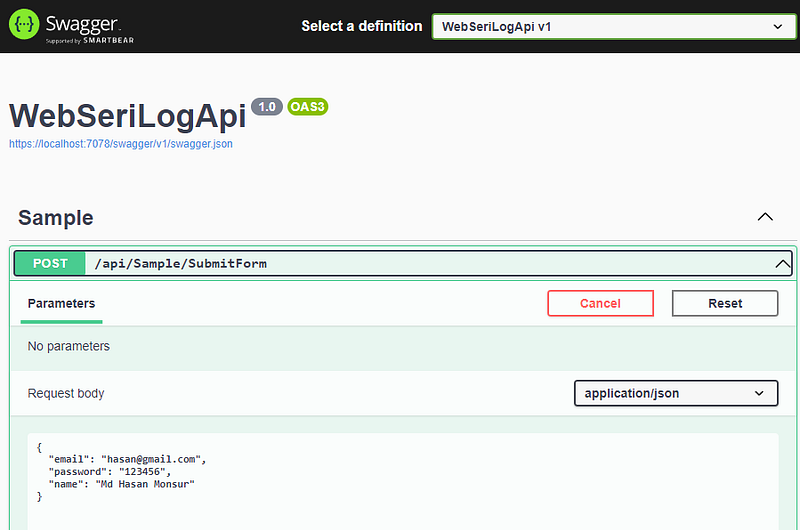
Result:

Conclusion
By creating a custom attribute and implementing a logging filter, you can effectively exclude sensitive fields from logs in your ASP.NET Core application. This approach helps maintain data privacy and security while still providing useful logging information. Always remember to review your logging practices to ensure sensitive data is not inadvertently exposed in logs.
If you enjoy my content or find my work helpful, consider supporting me — your contribution helps fuel more projects and knowledge sharing! https://buymeacoffee.com/hasanmcse
I offered you others article- https://medium.com/@hasanmcse
Connect with me https://www.linkedin.com/in/hasan-monsur/


