
How to Use ChatGPT to Query Your Databases for Insights
A guide to using natural language querying (NLQ) to query structured data for Insights

Comprehending natural language text, with its first-hand challenges of ambiguity and co-reference, has been a longstanding problem in Natural Language Processing, also known as NLP.
One manifestation of this problem is how one reliably enables question answering on a dataset by converting natural spoken language into SQL text structured query format.
Given the vast amount of today's information is stored in relational databases such as medical records, financial data, customer records, and big data insights, the ability to retrieve information from these databases and data warehouses is limited due, in part, to the need for users to understand powerful but complex structured query languages.
Since the introduction of ChatGPT and the rapid advancement of LLM models, resolving the challenge of text to SQL has gotten much easier. Non-technically literate users can use declarative language to describe the intended query. The details of how the query is constructed are delegated to the LLM.
What Does This Mean for You?
The ability to use natural language to ask questions about your database has many potential use cases, such as:
- Making data-driven insights accessible to users without coding skills
- Reducing time to insights in a domain
- Improving the value of accumulated data
- No knowledge of SQL is required
- No coding knowledge is required — just a basic understanding of prompt engineering
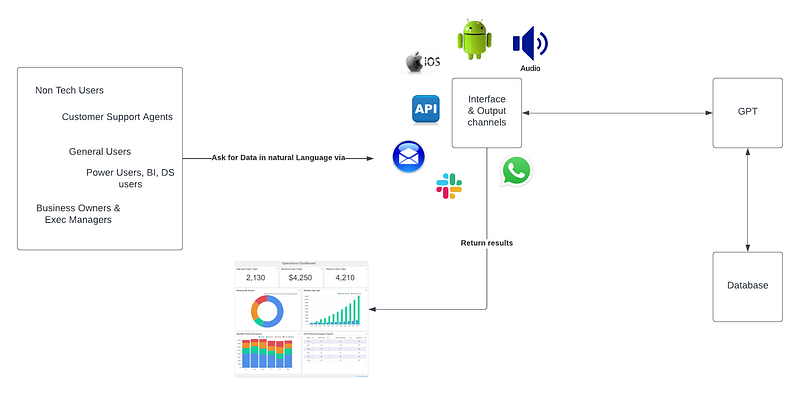
At its simplicity, we want to go from this prompt
Show all COVID-19 cases in New York from the last six months
Which would be translated by GPT to the following SQL, where the output SQL statement is tailored for the target database.
SELECT *
FROM covid_cases
WHERE [date] > dateadd(month, -6,  cast(getdate() as date))
AND city in ('New York');
While using LLM models make this process relatively easier, there will be a stronger emphasis on the following:
- Prompt engineering, as the quality of data extracted, will be largely driven by how good your query prompts are.
- How well your structured data is labeled.
- Your table structure and naming conventions that you use to name your tables and columns. Non-well-written data structures will be hard to comprehend, even for a human. Hence you will need to minimize the ambiguity and cryptic naming conversations.
If you have been using ChatGPT long enough, you would have realized how concise and descriptive data and input should be to fully derive the benefits of the model. Using NLP to SQL has many benefits; it does add an additional layer of abstraction which can slow down the retrieval process. Writing raw native queries that run against the database with well-optimized indexes will always be more efficient as queries get executed directly by the RDBMS.
In the example below, we will take a step-by-step approach to give your ChatGPT access to your database and write queries against your DB using natural language.
Getting Started
LlamaIndex will be our go-to library as it provides wrappers that make the process of hooking any database of your choice easier.
Create a new Python project in your IDE and install the required PyPi dependencies. We will use explicit package versions to ensure you don't run into any issues.
pip install langchain==0.0.219

pip install transformers==4.30.2

pip install llama-index==0.6.37
Download a copy Dbeaver so you can view your RDMS database data. The example we will use can easily be ported over to any RDMS database of your choice since we will use the SQLachemy library to connect to our database.
Let's fill our data into our DB; most likely, you already have an existing database that you would like to repurpose in your code base.
We will be using SQLAlchemy since it allows us to connect to many different types of databases.
import time

from langchain import SQLDatabaseChain, PromptTemplate
from langchain.llms import OpenAI
from llama_index import SQLDatabase, GPTSQLStructStoreIndex, LLMPredictor, ServiceContext
from llama_index.indices.struct_store.sql import SQLQueryMode
from llama_index.prompts.prompts import TextToSQLPrompt
from sqlalchemy import create_engine, MetaData, Table, Column, String, Integer, select
from sqlalchemy import insert


engine = create_engine("sqlite:///my_gpt.sqlite3")
metadata_obj = MetaData()

table_name = "city_stats"

city_stats_table = Table(
    table_name,
    metadata_obj,
    Column("city_name", String(16), primary_key=False),
    Column("population", Integer),
    Column("country", String(16), nullable=False),
)
metadata_obj.create_all(engine)


rows = [
    {"city_name": "Toronto", "population": 2930000, "country": "Canada"},
    {"city_name": "Tokyo", "population": 37194000, "country": "Japan"},
    {"city_name": "Chicago", "population": 2679000, "country": "United States"},
    {"city_name": "Seoul", "population": 9776000, "country": "South Korea"},
    {"city_name": "Kuala Lumpur", "population": 1808000, "country": "Malaysia"},
    {"city_name": "Singapore", "population": 5979599, "country": "Singapore"},
    {"city_name": "Jakarta", "population": 11249000, "country": "Indonesia"},
    {"city_name": "Rio de Janeiro", "population": 13728000, "country": "Brazil"},
    {"city_name": "Tianjin", "population": 14239000, "country": "China"},
    {"city_name": "Manila", "population": 11249000, "country": "Philippines"},
    {"city_name": "Kinshasa", "population": 16315534, "country": "Democratic Republic of Congo"},
    {"city_name": "Lagos", "population": 15946000, "country": "Nigeria"},
    {"city_name": "Kolkata", "population": 15333000, "country": "India"},
    {"city_name": "Buenos Aires", "population": 15490000, "country": "Argentia"},
    {"city_name": "Istanbul", "population": 15847768, "country": "Turkey"},
    {"city_name": "Chongqing", "population": 17341000, "country": "China"},
    {"city_name": "Karachi", "population": 17150000, "country": "Pakistan"},
    {"city_name": "Osaka", "population": 19013000, "country": "Japan"},
    {"city_name": "Mumbai", "population": 21297000, "country": "India"},
    {"city_name": "Beijing", "population": 21766214, "country": "China"},
    {"city_name": "Cairo", "population": 22183000, "country": "Egypt"},
    {"city_name": "Dhaka", "population": 23210000, "country": "Bangladesh"},
    {"city_name": "Mexico City", "population": 22281000, "country": "Mexico"},
    {"city_name": "Sao Paulo", "population": 22620000, "country": "Brazil"},
    {"city_name": "Shanghai", "population": 29210808, "country": "China"},
    {"city_name": "Delhi", "population": 32941000, "country": "India"},
]

with engine.begin() as connection:
    for row in rows:
        stmt = insert(city_stats_table).values(**row)
        connection.execute(stmt)
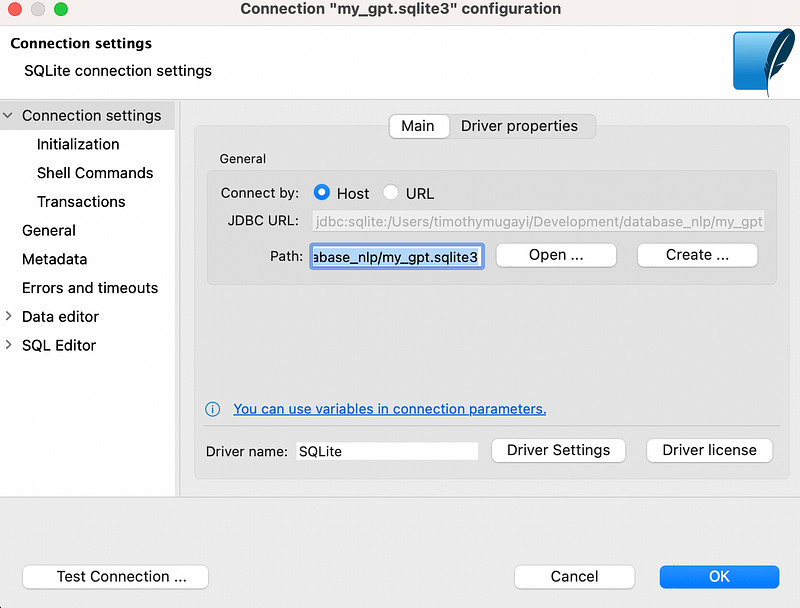
How to use Dbeaver with the following connection details:
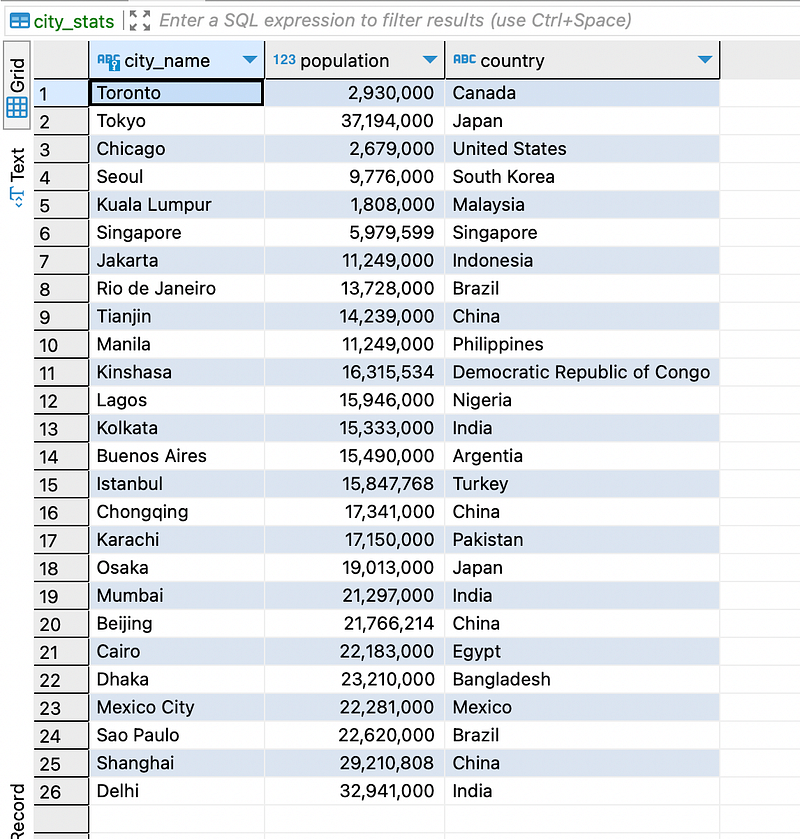
You can view the output of the table that has been auto-created.
Injecting Table Context
How to inject context for each table into the text-to-SQL prompt. The context can be manually added, or it can be derived from unstructured documents. By default, we directly insert the context into the prompt. Sometimes, this is not feasible if the context is large. Below is how we leverage the LlamaIndex data structure to contain the table context:
llm_predictor = LLMPredictor(llm=OpenAI(temperature=0, model_name="gpt-3.5-turbo"))
sql_database = SQLDatabase(engine, include_tables=["city_stats"])
service_context = ServiceContext.from_defaults(llm_predictor=llm_predictor)

# The table_name specified here is the table that you
# want to extract into from structured documents.
index = GPTSQLStructStoreIndex.from_documents(
    [],
    service_context=service_context,
    sql_database=sql_database,
    table_name="city_stats",
)

# view current table
with engine.begin() as connection:
    stmt = select(
        city_stats_table.c["city_name", "population", "country"]
    ).select_from(city_stats_table)
    results = connection.execute(stmt).fetchall()
    print(results)

query_engine = index.as_query_engine(query_mode=SQLQueryMode.NL)

response = query_engine.query("Which city has the highest population?")
print(response)

time.sleep(60*3)

response = query_engine.query("How did you derive this answer?")
print(response)
Under the hood GPTSQLStructStoreIndex is an index that uses a SQL database. During index construction, the data can be inferred
from unstructured documents given a schema extract prompt,
or it can be preloaded in the database.
During query time, the user can specify a raw SQL query or a natural language query to retrieve their data.
In our case, we will be explicitly specifying the natural language query_mode=SQLQueryMode.NL
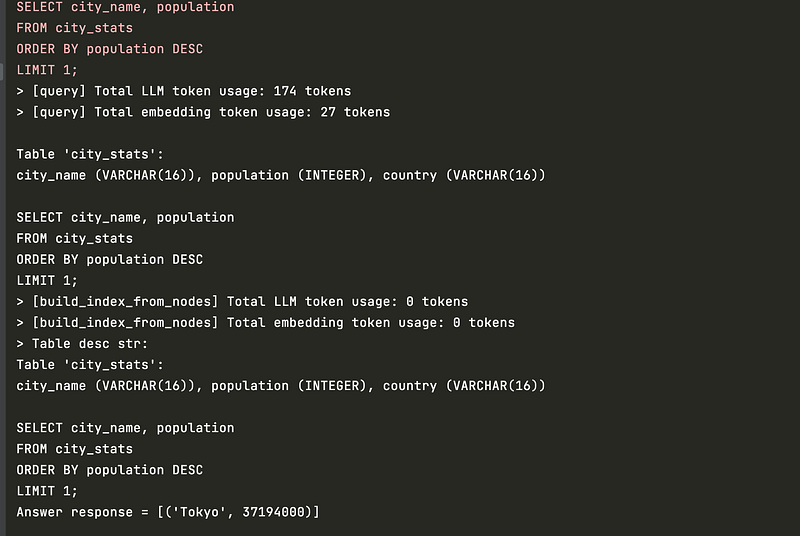
Before you run the code, define the OpenAI API key via your environment variables which you can find here. Once we execute our code, we will get the following output:

We can opt not to use any indexing and directly interact with the database using the SQLDatabaseChain wrapper class.
llm = OpenAI(temperature=0)

# Chain for interacting with SQL Database.
db_chain = SQLDatabaseChain(llm=llm, database=sql_database)

response = db_chain.run("Which city has the highest population?")
print(response)

response = db_chain.run("How did you derive this answer and what is your source")
print(response)

def ask_my_db():
    print("Type 'exit' to quit app")

    while True:
        question = input("Enter a NLQ prompt: ")

        if question.lower() == 'exit':
            print('Exiting...')
            break
        else:
            try:
                print(db_chain.run(question))
            except Exception as e:
                print(e)

ask_my_db()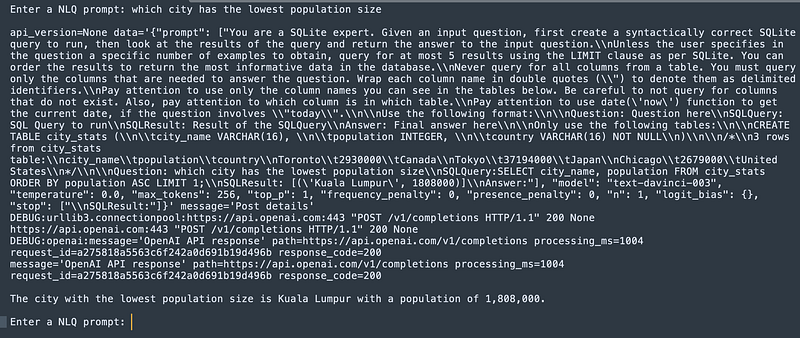
One thing you will want to take note of is there are no pre-validations nor safeguard in SQLDatabaseChain class to prevent a malicious user from sending a prompt such as “Drop table <tablename>”. You must build out a way to intercept and review SQL statements before sending them to the database to prevent unwarranted SQL injections from occurring that could potentially be harmful.
There's an open PR on Langchain GitHub you can look at for inspiration. Alternatively, you may restrict database access to read-only and define appropriate timeouts to long executing queries so as not to overload your database.
You can also bake in the ability to perform dry runs, for example, when building queries against other database types such as BigQuery, which have a cost associated with each query execution. When working with big datasets, you may want to show users that "This query will scan XXXGB and will cost approx $X.XX amount of dollars, would you like to continue? Y/N/Modify". You can also take this further and bake in ChatGPT cost simulations that display how much the prompt execution would cost before the actual execution chain.
How To Deal With Malformed SQL Queries
As you work more with NLQ, If may encounter some queries being generated incorrectly or needing to be corrected, each RDBMS may have slight variations in expected SQL syntax. A quick fix for this is:
- Modifying Langchain library default system prompt.
- Extending the Langchain code and parsing input and output responses to adhere to your requirements.
Here is an example of how we adjust the prompts to tell GPT how to generate the SQL statement before being sent to your RDBMS to prevent malformed SQL queries from being executed.
PROMPT_SUFFIX = """Only use the following tables:
{table_info}

Question: {input}"""

_DEFAULT_TEMPLATE = """Given an input question, first create a syntactically correct {dialect} query to run, then look at the results of the query and return the answer. Unless the user specifies in his question a specific number of examples he wishes to obtain, always limit your query to at most {top_k} results. You can order the results by a relevant column to return the most interesting examples in the database.

You are forbidden to use semicolons (;)

Never query for all the columns from a specific table, only ask for a the few relevant columns given the question.

Pay attention to use only the column names that you can see in the schema description. Be careful to not query for columns that do not exist. Also, pay attention to which column is in which table.

Use the following format:

Question: Question here
SQLQuery: SQL Query to run
SQLResult: Result of the SQLQuery
Answer: Final answer here

"""

PROMPT = PromptTemplate(
    input_variables=["input", "table_info", "dialect", "top_k"],
    template=_DEFAULT_TEMPLATE + PROMPT_SUFFIX,
)

llm = OpenAI(temperature=0)

# Chain for interacting with SQL Database.
db_chain = SQLDatabaseChain.from_llm(llm=llm, db=sql_database, prompt=PROMPT)

response = db_chain.run("Which city has the highest population?")
print(response)

response = db_chain.run("How did you derive this answer and what is your source")
print(response)
The above code adjusts the original Langchain default prompt. We instruct GPT not to use semicolons with the following instruction You are forbidden to use semicolons (;)
Final Thoughts
NLP to SQL is a really powerful idea that gives more flexibility to non-technical users while also minimizing the need to build extensive dashboards for ad-hoc data lookups.
By Leveraging LLMs, we are much closer to abstracting large data and allowing business owners and non-technical users to look up data quickly without investing significant time and resources to build fully-fledged insight dashboards.
I do not see this as a means to replace business intelligence teams but to augment how we work, where ad-hoc tasks and data requests can be eliminated, streamlining how we work.
I hope the article has sparked some new ideas for interesting things you can build around NLP to SQL.


