
How to use ChatGPT for UX Research: Can AI replace UX people?
Practical steps on how ChatGPT can help you in UX research, making the process quicker and more efficient

Artificial intelligence (AI) has made significant strides in recent years, giving rise to concerns among designers regarding the potential threat it poses to their roles. In this article, I’m not going to dismiss these concerns, but rather try to objectively explore if ChatGPT 4 can be used as a tool instead to enhance the UX research process, specifically in creating user personas, generating user interview questions, and conducting competitive analysis. I will also share some practices I use to facilitate my UX research work.
1. User Persona
User personas are fictional representations of target users that help guide the design process. The purpose of creating a user persona is to evoke empathy and provide perspective for the observer, typically a UX researcher, UX designer, or product professional. Let’s see how ChatGPT 4 can help create one.
Step 1: Define the user persona’s characteristics
Before interacting with ChatGPT, start by defining the key characteristics of your user persona. Consider factors such as demographics and goals. Having a clear understanding of who your potential user is will ensure more focused and relevant conversations.
Step 2: Engage in conversations with ChatGPT
Once you have defined the user persona’s characteristics, you can begin interacting with ChatGPT to gather insights. Here are some example prompts to get you started:
- Prompt 1: “I’m creating a user persona for a busy middle-aged professional who would like to stay fit at home. Can you provide me with some information about their preferences and frustrations?”
- Prompt 2: “I’m designing a mobile app for a tech-savvy millennial who loves outdoor activities. Can you give me some insights into their motivations and pain points?”
Here’s an example of a user persona generated by ChatGPT 4:
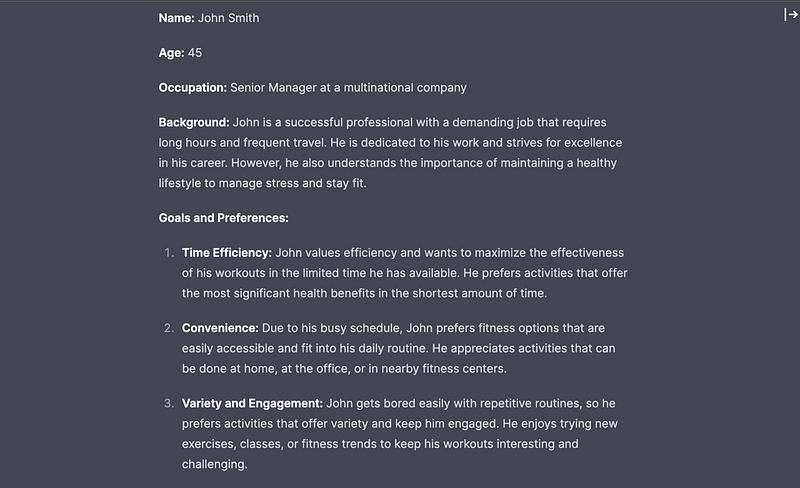
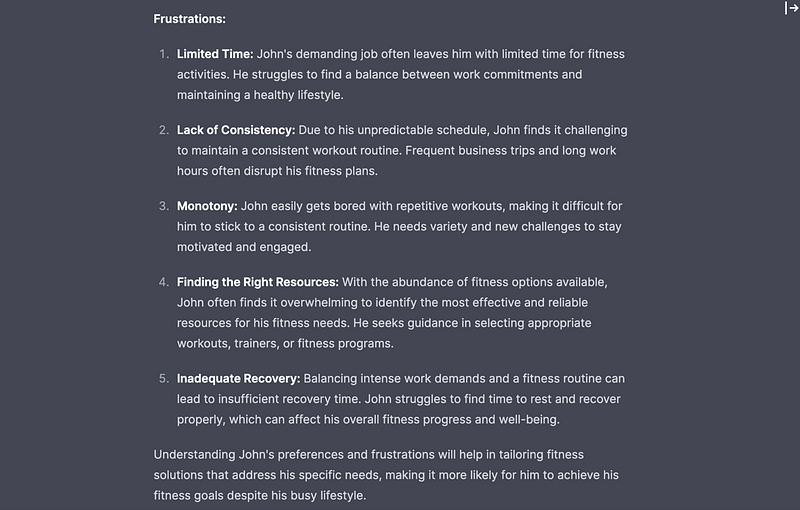
Step 3: Refine and analyse the conversations
As you engage in conversations with ChatGPT, it’s important to critically analyse the generated responses. While ChatGPT can provide valuable insights, it’s essential to evaluate the information and consider it as a starting point for further research. I then would try to improve the generated user persona by giving ChatGPT commands to provide more insights about the persona. Some optimal commands look like the following:
- What does John’s typical day look like?
- What are John’s main motivations?
- What motivates John to prioritise his fitness despite his demanding work schedule?
- What are the main challenges John faces in maintaining a consistent fitness routine?
- What skills or abilities does John possess?
- Which activities does John enjoy the most?
- How does John effectively manage his time on a daily basis?
- Does John have a support system or community that helps him stay motivated and accountable in his fitness journey?
It takes approximately 5–10 minutes to create a user persona using ChatGPT, whereas developing one from scratch by a UX person typically takes around 2 weeks. When the initial preparation is done correctly, the resulting persona template often aligns with around 75% of the initial findings from early stakeholder interviews. While this time-saving aspect is significant, it is important to approach AI-generated persona templates with caution due to the following reasons:
- ChatGPT is still in the process of improving its ability to accurately connect user needs with how they are addressed by the product. Therefore, the generated user personas may not fully capture the intricacies of user requirements.
- Due to the lack of client vision, ChatGPT may struggle to accurately prioritise user needs for a specific product strategy. This limitation stems from the AI model’s inability to fully understand the broader context and goals of the client.
- Sharing sensitive company information to enhance the accuracy of the generated user personas poses significant security concerns.
Overall, we can say that ChatGPT performs adequately in creating a baseline user persona. It efficiently generates concise bios that can enhance empathy towards users, thereby improving the accuracy of design work. However, it is important to note that the persona created by a UX person beyond this initial outline tends to be significantly more useful and comprehensive in terms of depth and insights. Therefore, while ChatGPT can be a valuable starting point, it should be supplemented with the expertise and in-depth research conducted by a UX/product person to ensure a more robust and reliable user persona.
User interview questions
User interview questions are used to gather information about the needs, pain points, and expectations of users of a product. By asking specific questions, designers can gather insights directly from users or potential users of the product or service. This information helps shape the design process and ensures that the final product meets user expectations.
To generate these specific questions with ChatGPT, you first need to define high-level prompts that would guide the AI towards your interview goals, i.e. specific areas of focus for the interview. By giving appropriate prompts, the interview questions can be tailored to explore relevant topics such as the user’s routine, preferences, motivations, challenges, technology usage, etc. To make things measurable, it is better to categorise the prompts based on the focus area you’d like to explore.
For our specific example of a home fitness solution, example prompts could look like this:
1. Fitness Routine and preferences: - Explore the user’s current fitness routine and activities they engage in. - Ask about their preferred fitness activities and why they enjoy them. - Understand how they discover and choose new fitness programs or activities.
2. Challenges and frustrations: - Identify the main challenges the user faces in maintaining a consistent fitness routine. - Uncover any frustrations or pain points they have experienced with existing fitness solutions. - Explore specific difficulties related to their busy work schedule and how it affects their fitness goals.
3. Motivations and goals: - Understand the user’s motivations for prioritising fitness despite their demanding work schedule. - Explore their main fitness goals and what they hope to achieve through their fitness routine. - Ask about the benefits they seek from staying fit and how it impacts their professional life.
4. Time management and priorities: - Discuss how the user currently manages their time between work and personal commitments, including fitness. - Explore their strategies for prioritising tasks and activities in their daily schedule. - Understand the role of fitness in their overall priorities and how they make time for it.
5. Technology and Support: - Ask about the user’s comfort level with technology and their experience using fitness apps, wearables, or online platforms. - Explore whether they have a support system or community that helps them stay motivated and accountable in their fitness journey. - Inquire about any specific features or functionalities they would like to see in a fitness solution tailored to their needs.
Now, let’t take these prompts and generate user interview questions with ChatGPT 4.
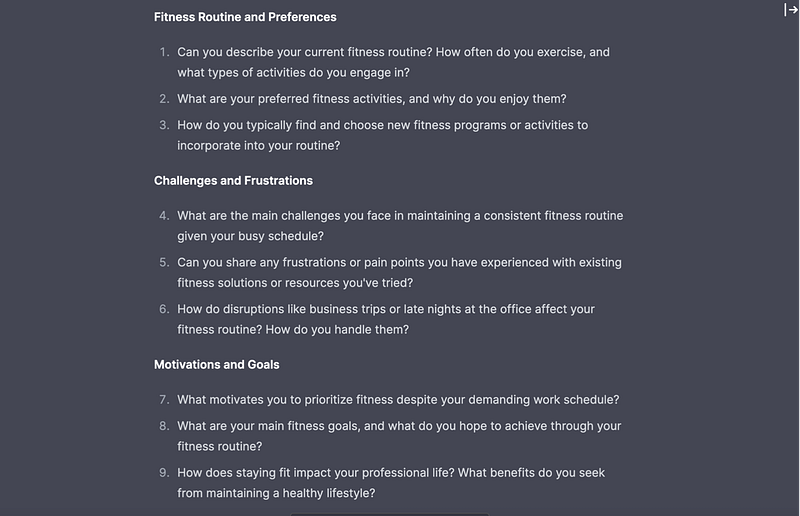
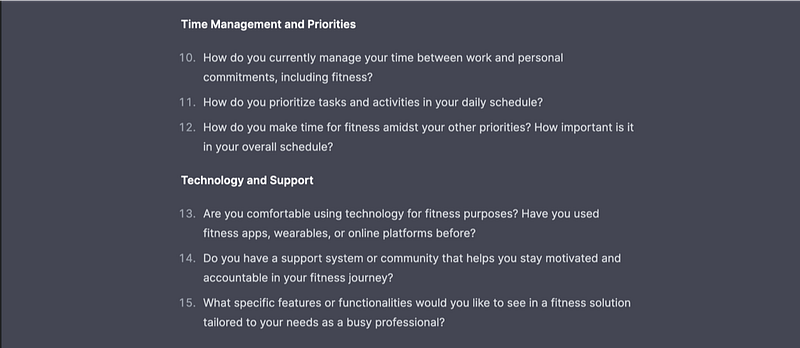
As you can see, ChatGPT 4 does a pretty good job generating questions within the specific domain and can improve further based on your additional prompts. However, there are limitations. AI, as of now, cannot accurately adjust the questions to the interviewee’s context, determine their priorities or sensitivities. It also cannot predict the dynamics of your conversation and adjust the questions based on your interview progression, nor can it replicate empathy and perspective thinking to strategically choose questions that would build trust with your interviewees due to its lack of emotional intelligence. Thus, the interview questions generated by ChatGPT should only be taken as a general outline and improved upon by human input.
Competitive analysis
Competitive analysis involves closely studying other companies that offer similar products. The goal is to gather and analyse information about these products to understand their features, functionality, UX strategies, user journeys, and also the overall industry trends. Additionally, a competitive analysis helps UX designers identify areas for improvement or gaps in the market, allowing to create a unique user experience that stands out from the competition.
Start by defining your industry/domain and type of product. Then make a list of its direct and indirect competitors. You may have this information from other sources or you could ask ChatGPT to help with it as well.
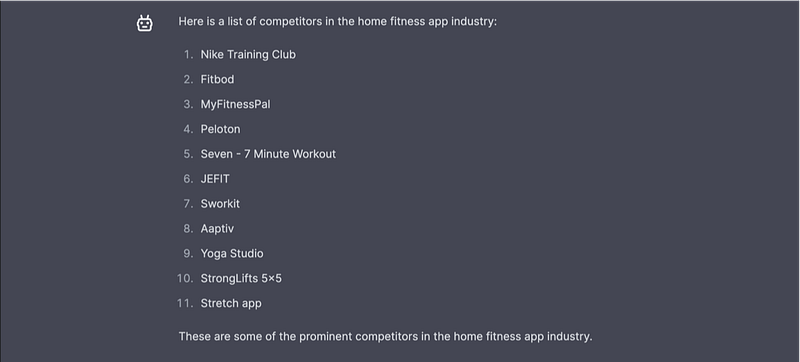
Next ask ChatGPT to create an outline of a specific competitor’s product’s features. For our example, let’s choose the Stretch app and give ChatGPT the following prompt:
“Create a list of features offered by the Stretch app from UX perspective.”
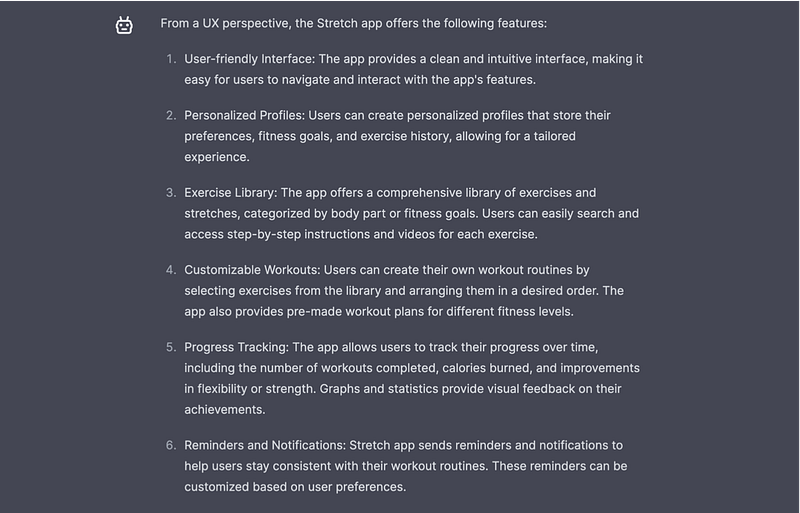
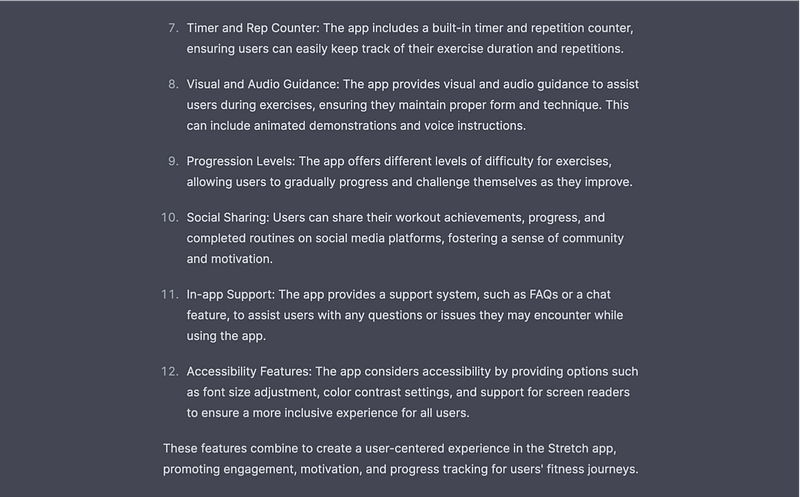
I got these results within less than a minute, and enhancing them with additional prompts to align with my particular objectives would usually require approximately 10 minutes of additional time. Doing such an analysis from scratch would take at least 3 working days. That makes AI 99.31% faster than a human at this particular task and the time saving is worth the limitations in my opinion. Even though the analysis lacks the visual side of things, with this outline in mind you can be quicker while exploring the actual product and have a more precise plan on what to look for.
If you need to compare the features of several products together, you can ask ChatGPT to generate a comparison table. This table will provide a quick and concise overview of the features offered by different competitors, assisting in identifying gaps, benchmarking, and making informed decisions.
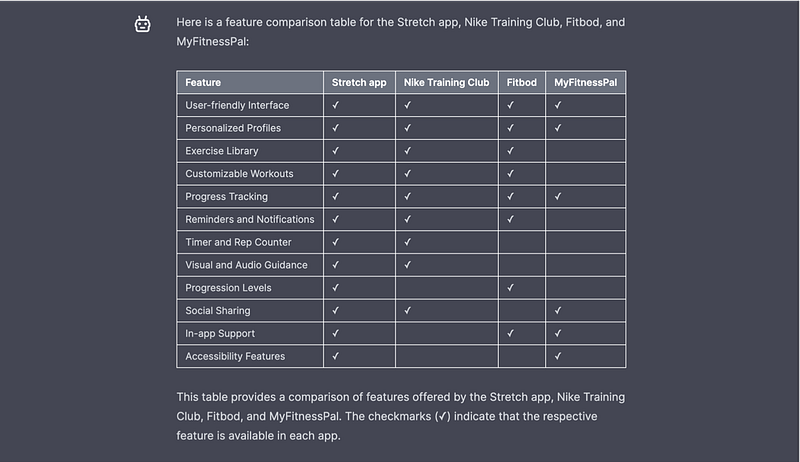
To summarise, here are the optimal commands, in the logical order, that you can give to generate a competitive analysis using ChatGPT:
1. Define the domain and type of product (in this case, the domain is fitness and wellness, and the type of product is a mobile-based home fitness app).
2. Create a list of competitors for this product: Compile a list of competitors operating in the fitness and wellness domain, specifically focusing on mobile-based home fitness apps.
3. Make a list of features of the given products from UX perspective
4. Generate a comparison table of features of the given products
In conclusion, as we can see, ChatGPT can be an efficient tool for UX research. It facilitates the UX research process, providing valuable insights and streamlining tasks for UX and product people. However, it is important to remember that ChatGPT is just that — a tool. It should be utilised as a supportive resource, complementing the expertise, creativity and emotional intelligence of UX professionals, rather than replacing them. The symbiotic relationship between AI and the human mind empowers us to deliver better product insights, combining the power of AI with human intuition and expertise.
Written by ChatGPT with love :)
Want to learn UX design?
Check Uxcel. Uxcel is a platform that will help you learn and improve your design skills with interactive UX courses and are tests designed both for new and professional designers. You will get 25% off discount for the Pro Yearly subscription if join through this link.
This post contains affiliate link(s)
Originally published at http://narpoghos.tilda.ws.


