How to use Airflow tags for DAG lineage?
As a Data Engineer, I always need help remembering the dependencies between programs of our data pipeline environment. It is not easy to remember things when you work for multiple teams across an organization with hundreds of jobs running.
I am writing this purely from the “Airflow” perspective. We use Apache Airflow for setting up and maintaining our data workflows. This article will not be useful if you are not using “Airflow” and are not interested in exploring “Airflow” for your data infrastructure needs. Please decide whether to read further or not.

Airflow:
If you are working in the latest data engineering environment, you must be aware of Airflow. If not, It is an orchestration platform for programmatically authoring, scheduling, and monitoring workflows.
You can read about Airflow and its capabilities over here: https://airflow.apache.org/docs/apache-airflow/stable/index.html.
This article discusses how to use “tags” for DAG lineage.
TAGs:
The Airflow UI shows a list of DAGs, which can be for the whole organization or from multiple different teams.
To filter a specific DAG, you can filter using the DAG name.
To filter the DAGs by specific functionality or by the team, you can use “tags”
The “tags” are only searchable keyword strings that are indexed. In simple words, it is like hashtags in social media to identify a relevant topic.
Airflow introduced “tags” in version 1.10.8.
Lineage:
In Airflow, Lineage is used at the task level. Airflow can visually represent the dependencies between tasks that are called lineage graphs. By tracking lineage graphs, we can understand the data pipeline flow and troubleshoot for any failures inside a DAG.
In summary, Lineage is the ability to trace and understand the flow of anything.
What about DAG Lineage?
Airflow is not providing any visual representation for DAG dependencies. The Airflow DAGs are independent objects. Obviously, we can set dependencies if required. If you have an Airflow instance running a reasonable amount of DAGs, tracking what depends on what can be challenging. Especially if you are in support and need to fix something middle of your night can be time-consuming and tedious to refer to the code base.
How to achieve DAG lineage using tags?
Let’s start with an example. The below Diagram shows four DAGs, and they depend on each other.
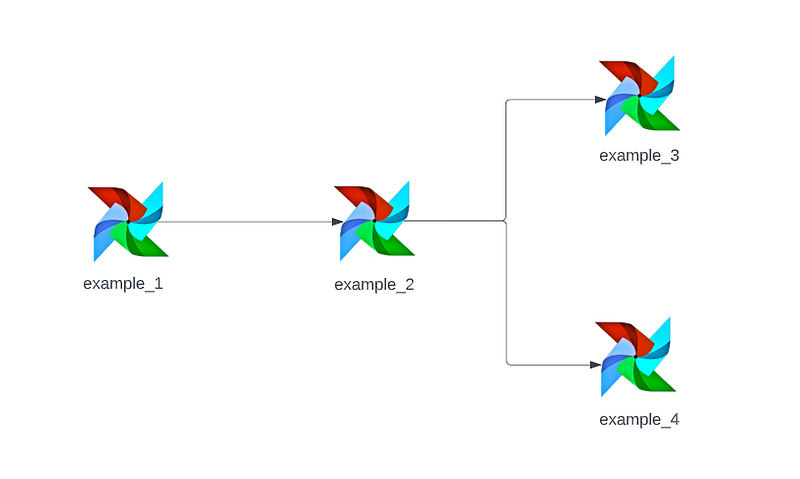
The “example_2” DAG depending on “example_1” DAG
The “example_3”, “example_4” DAGs are depending on “example_2” DAG
It is easy for us to understand from the diagrammatic representation.
Below screen-shot shows the list of DAGs in the Airflow UI.
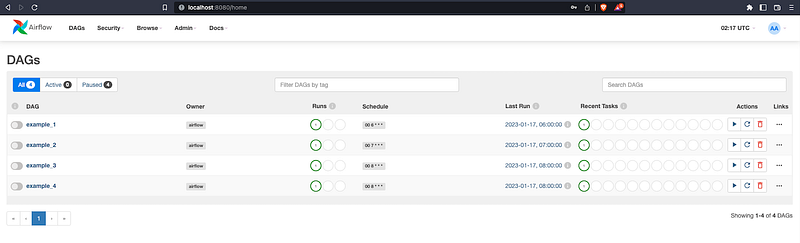
Let’s get to the real problem.
If “example_2” DAG fails, there might be two potential causes.
- A validation failure — it means “example_1” DAG has missing or partial data, so it is an upstream issue
- An error due to run time issues or bad data in the “example_2” DAG and will fail the other dependent DAGs
We may get a support alert or an email based on the importance. Usually, most failures are captured by triggering an email on failure.
Based on the above causes:
If it is a validation failure, we must fix the “example_1” DAG and rerun the dependent DAGs.
If it is a run-time error, we must fix the “example_2” DAG and rerun the dependent DAGs.
Being a support engineer, How do we know the dependent DAGs? By referring to the documents or code base? There is a better way. We can solve this by adding “tags” pointing to any downstream or upstream DAGs.
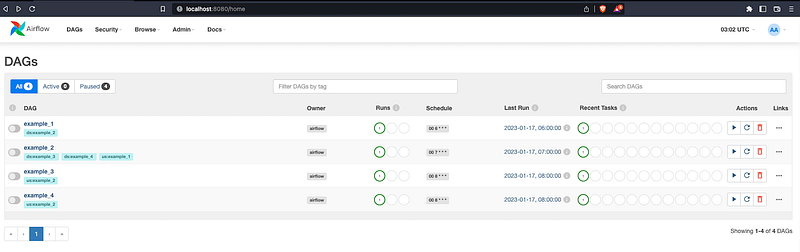
From the above Diagram, DAGs are tagged as per the dependencies. Now it is going to be easy to search through the tags.
As soon as we know the DAG “example_2” has some validation errors, we need to check the upstream DAGs for any failures. In this case, it is “example_1” DAG. To find this, we need to get the DAGs with “example_2” as downstream.
So search for tags with “ds:example_2” in the tag search bar as below.
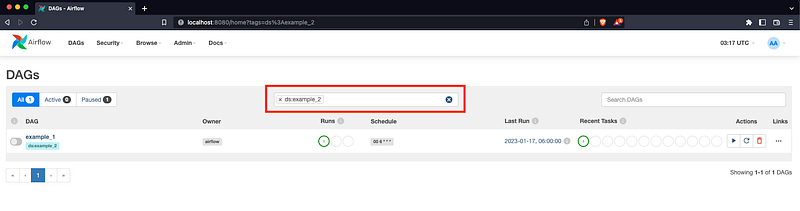
If you are fixing a run-time error in the DAG “example_2”, after the fix, we need to make sure related downstream DAGs are running. In this case, it is “example_3” and “example_4” DAGs. To find these, we need to get the DAGs “example_2” as upstream.
So search for tags with “us:example_2” in the tag search bar as below.
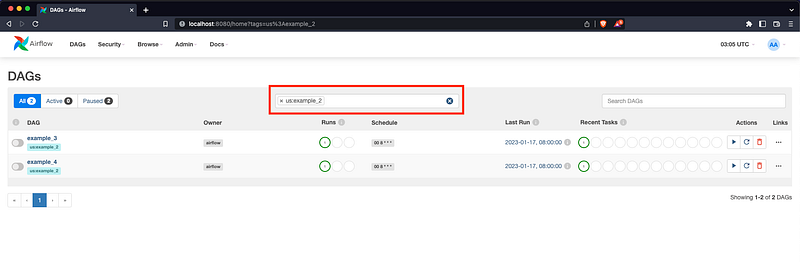
So using the above tagging approach, we can easily traverse through the DAG lineage without referring to the document or code base. It looks simple to remember, but it is challenging when you have hundreds of DAG running.
I hope I am making some sense here, but there is always another way to handle this. Please feel free to chip in your ideas if you have something.


