avatarSuragch

Free AI web copilot to create summaries, insights and extended knowledge, download it at here

859

Abstract

Script?selection.family=Dancing%20Script">dancing script</a> font. I renamed it to <code>dancing_script.ttf</code>.</li></ul><h2 id="c82d">2. Register the font</h2><ul><li>Open your <i>pubspec.yaml</i> file.</li><li>Add the fonts info under the <code>flutter</code> section. Indentation is mandatory.</li></ul><div id="e39b"><pre><span class="hljs-attribute">flutter</span><span class="hljs-punctuation">:</span> <span class="hljs-attribute">fonts</span><span class="hljs-punctuation">:</span> <span class="hljs-bullet">-</span> <span class="hljs-string">family: DancingScript </span> <span class="hljs-attribute">fonts</span><span class="hljs-punctuation">:</span> <span class="hljs-bullet">-</span> <span class="hljs-string">asset: assets/dancing_script.ttf</span></pre></div><h2 id="adbf">3. Use the font in your theme or widget</h2

Options

<ul><li>Now you can use your font by setting the <code>fontFamily</code> attribute in the <code>TextStyle</code> widget to whatever you called it in pubspec.yaml. For this example, I called it <code>DancingScript</code>.</li></ul><div id="13c2"><pre><span class="hljs-selector-tag">Text</span>(

<span class="hljs-string">'Hello world'</span>, <span class="hljs-attribute">style</span>: <span class="hljs-built_in">TextStyle</span>( <span class="hljs-attribute">fontFamily</span>: <span class="hljs-string">'DancingScript'</span>, ), )</pre></div><h2 id="07fd">4. Restart your app</h2><ul><li>Whenever I add assets I find I need to do a full stop and restart. Otherwise I get errors.</li></ul><h2 id="5a0f">Notes</h2><ul><li>Read the <a href="https://flutter.io/docs/cookbook/design/fonts">documentation</a> for more help.</li></ul></article></body>

How to use a custom font in a Flutter app

This is a repost of an answer I wrote on Stack Overflow.
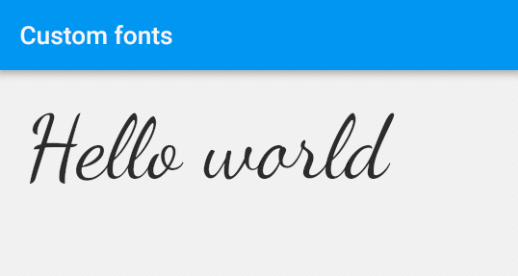
In this brief article I’ll give you the steps to include your own font in your Flutter project.

1. Add a font to your project

  • Right click on your project folder and go to New > Directory. Call it assets. It should be in your projects root directory.
  • Copy and paste your font into the new assets directory. I'm just using a single font in my example, the regular dancing script font. I renamed it to dancing_script.ttf.

2. Register the font

  • Open your pubspec.yaml file.
  • Add the fonts info under the flutter section. Indentation is mandatory.
flutter:
  fonts:
    - family: DancingScript     
      fonts:
        - asset: assets/dancing_script.ttf

3. Use the font in your theme or widget

  • Now you can use your font by setting the fontFamily attribute in the TextStyle widget to whatever you called it in pubspec.yaml. For this example, I called it DancingScript.
Text(
  'Hello world',
  style: TextStyle(
    fontFamily: 'DancingScript',
  ),
)

4. Restart your app

  • Whenever I add assets I find I need to do a full stop and restart. Otherwise I get errors.

Notes

Flutter
Fonts
Dart
Recommended from ReadMedium