
How to Upload Files to AWS S3 in React
In 2 different ways

Today, with some awesome serverless cloud solutions like AWS and Firebase, uploading a file has become a piece of cake.
Today we will see how we can quickly create an S3 bucket and upload files directly from our front-end React application.
Pre Requisites
- An AWS Account
- Basic Understanding of ReactJS
Let’s get started!
Step 1. Create S3 Bucket
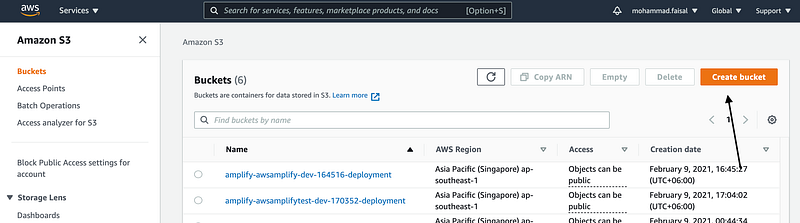
Log in to your aws console. Search for Amazon S3 and click on Create bucket.
Then give it a name and select the proper region. Then uncheck the Block all public access just for now (You have to keep it unchecked in production).
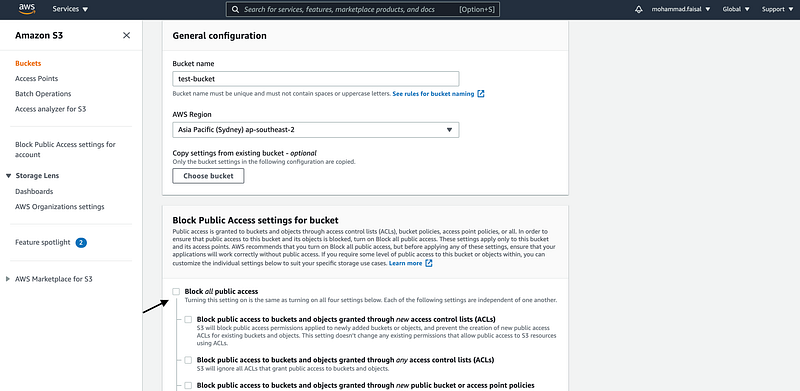
Hit Create Bucket and you will see your new bucket on the list.
Step 2. Edit Bucket Policy
Now we will set the bucket policy. Click on the bucket name and go to the properties tab.
Scroll down a bit, and you will see a section named Bucket Policy

Click on the Edit button. and add the following json.
This will allow public access to the folder's content for now.
Step 3. Edit CORS Policy
Scroll down a bit further, and you will get a section where you can edit the CORS policy. As we will be uploading files from another endpoint, we need to ensure that our bucket does not block that for cors

Then add the following .json file to the policy
Now we are ready to upload files to our AWS S3 bucket. Now moving on with the frontend part.
Step 4. Set Up React Project
To follow along, you will need a basic React project setup. You can do it easily by
npx create-react-app s3-uploadIt will scaffold a basic application for you.
Step 5. Upload File Via Native SDK
If we use other aws services in our project, then we have a special npm package for that named aws-sdk. We can get it by
yarn add aws-sdkThen create a new component named UploadImageToS3WithNativeSdk and add the following code there
Here is a simple component where there is a file input and upload the file using native aws-sdk .
Replace
BUCKET_NAME,REGION_NAME,SECRET_KEY,ACCESS_KEYwith your own value
Step 6. Upload File Via React S3
If you are not using other AWS services, then you don’t need the full aws-sdk which will unnecessarily increase your bundle size.
We will use another library named react-s3. First, install it
yarn add react-s3Then create a new component named UploadImageToS3WithReactS3 and add the following code
This component will do the same as the previous component. It will take a file as input and upload it to the S3 bucket.
And also, don’t forget to change the parameter values.
Conclusion
And there you go! Here is how you can upload any file to an s3 bucket. Explore the documentation for more customization according to your need.
UPDATE:
Read the below article to learn how to do it securely.
Have a great day! :D
Get in touch with me via LinkedIn or my Personal Website.


