How to upload a file to Google Drive and get the file ID using Node.js
Explaining it using an API example. The API will get the file from Postman and then upload it to Google Drive using the Multer npm package. Then using the googleapis npm package authenticate to drive and get the file ID.
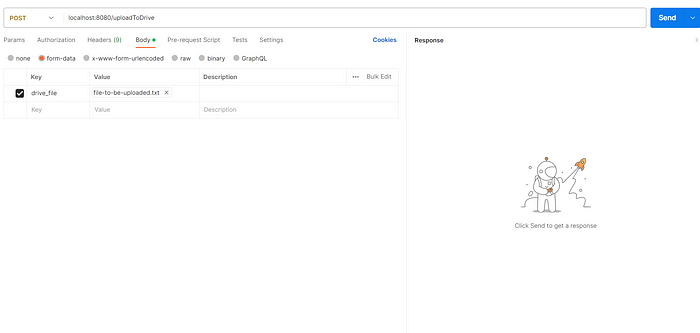
1. First, you have to use Postman or any other tool to send the request to the API. I had given my API name and key with my choice, you can give in your choice.
2. index.js file will look like this
const express = require("express");const uploadRouter = require("./routes/upload-router");const app = express();app.use("/", uploadRouter);app.listen(8080);3. upload-router.js file will look like this
const express = require("express");const multer = require("multer");const os = require("os");const router = express.Router();const { getFileDetails } = require("../controllers/upload-controller");const storage = multer.diskStorage({ destination: os.tmpdir(), filename: (req, file, callback) => callback(null, `${file.originalname}`) });const upload = multer({ storage: storage });router.post("/uploadToDrive", upload.single("drive_file"), getFileDetails);module.exports = router;Here I used a temporary directory for storing the file you can use any directory of your choice and the file name is set with the original name which you can modify in the storage object according to your requirement.
4. Create a folder where you want to store the files. Move inside the folder and from the URL get the folder id.

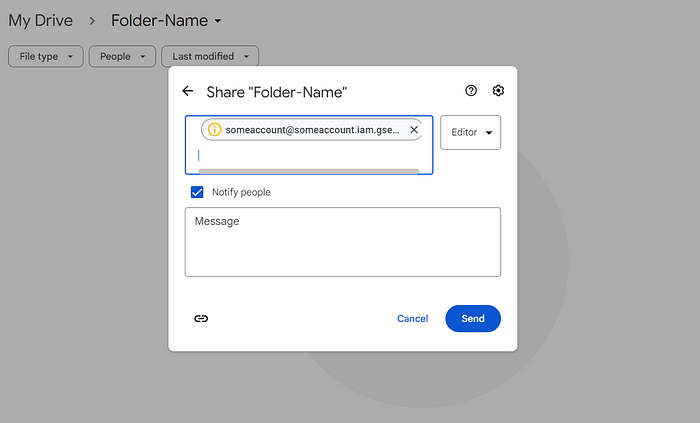
Also at the same time, move inside the folder -> tap on share -> In add people or groups add your service account id like “[email protected]” with the editor option -> click send to authenticate the service account to read and write in the specific folder.
5. Service account “some-service-account.json” must be present in the root directory. It something look like this
{
  "type": "service_account",
  "project_id": "projectname",
  "private_key_id": "randomalphanumericid",
  "private_key": "-----BEGIN PRIVATE KEY-----\nsomethingbigalphanumerickey\n-----END PRIVATE KEY-----\n",
  "client_email": "[email protected]",
  "client_id": "somerandomnumber",
  "auth_uri": "https://accounts.google.com/o/oauth2/auth",
  "token_uri": "https://oauth2.googleapis.com/token",
  "auth_provider_x509_cert_url": "https://www.googleapis.com/oauth2/v1/certs",
  "client_x509_cert_url": "https://www.googleapis.com/robot/v1/metadata/x509/[email protected]"
}
6. upload-controller.js will look like this
const { google } = require("googleapis");
const path = require("path");
const fs = require("fs");
const KEY_FILE_PATH = path.join("some-service-account.json");const SCOPES = ["https://www.googleapis.com/auth/drive"];const auth = new google.auth.GoogleAuth({
keyFile: KEY_FILE_PATH,
scopes: SCOPES,
})exports.getFileDetails = async (req, res) => { try { const { file } = req; const { data } = await google.drive({ version: "v3", auth: auth }).files
.create({
media: {
mimeType: file.mimeType,
body: fs.createReadStream(file.path)
},
requestBody: {
name: file.originalname,
parents: ["1kpWF08T-CrWnApQmEj22wRliOpjqV3CJ"] //folder id in which file should be uploaded
},
fields: "id,name"
}) console.log(`File uploaded successfully -> ${JSON.stringify(data)}`); res.json({ status: 1, message: "success", file_id: data.id, file_name: data.name }); } catch (error) { console.log(error);
res.json({ status: -1, message: "failure", err: error.message });} }
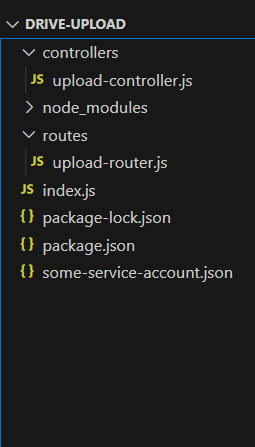
7. Directory structure is
8. package.json will look like
{
"name": "drive-upload",
"version": "1.0.0",
"description": "",
"main": "index.js",
"scripts": {
"test": "echo \"Error: no test specified\" && exit 1"
},
"keywords": [],
"author": "",
"license": "ISC",
"dependencies": {
"express": "^4.18.2",
"googleapis": "^118.0.0",
"multer": "^1.4.5-lts.1"
    }
}Hope it will work for you. If it worked then please clap for the article.
Thank You. Anshu


