
How to update an array of objects in Firestore?
Two simple solutions to update a single element in an array of custom objects in Cloud Firestore.
Even from the beginning, the array is a supported data type in Firestore. It’s very useful for storing data in String format or even custom objects, as long as the size of the document is less than 1 MiB (1,048,576 bytes). For larger amounts of data, a sub-collection is more likely to be used. However, if we only need a small amount of data, then storing it in an array is the best option that we have.
When it comes to the official documentation regarding how to update elements in an array in Firestore, it says that:
If your document contains an array field, you can use
arrayUnion()andarrayRemove()to add and remove elements.arrayUnion()adds elements to an array but only elements not already present.arrayRemove()removes all instances of each given element.
As you can see, there is no update option present. We can only add or remove array elements.
Why is no update option available when it comes to Firestore arrays?
This option is not available because in order to update an element in a Firestore array we need to know its index, and Firestore doesn’t have the ability to update an existing element by its index. So the only option that we have in order to perform an update is to add a new element to the array using arrayUnion() and remove an existing element using arrayRemove() as described in the documentation
Are there any other options available to update array elements?
Yes, there is an alternative, which is to read the entire document on the client, modify the items in the array and then write the document back to Firestore. So let’s try using the solution from the documentation, as well as the alternative. So I’ll try to explain to you in this article, both ways in which we can update a single element in a Firestore array.
Let’s assume we have a database schema that looks like this:
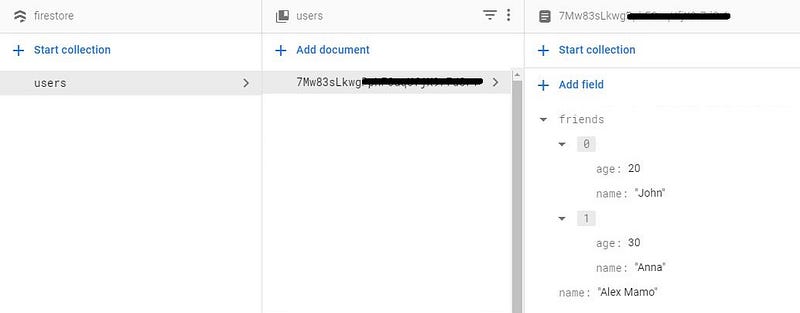
Where each User object contains a string property called “name” and an array of Friend objects called ”friends”. Here are the corresponding data classes:
Let’s try in the following examples to update John’s age from 20 to 21. This operation can be done either using a Map object:
val john = mutableMapOf(
    "name" to "John",
    "age" to 20
)
Or an object of Friend class:
val john = Friend("John", 20)So how to actually perform the update? First, we need to find John in the array, remove it, and then add it back with the new age. So, let’s define a CollectionReference object that points to the “users” collection:
val rootRef = FirebaseFirestore.getInstance()
val usersRef = rootRef.collection("users")
And find John in the array using the following query:
As you can see, we perform the “arrayRemove” and “arrayUnion” operations inside the callback. Please also note that in order to find John, we need to perform the query using all the data in the Friend object. We cannot get the desired result if we are using only partial data. So if we are using a Map object that looks like this:
val john = mutableMapOf(
    "name" to "John"
)
We’ll not get any results. So be aware of this constraint.
However, this operation might sound a little costly since it requires two update operations, one for removing John from the array and the second one for adding John with the changed age.
In the alternative solution we can remove and add the Friend object in the “friends” list in a one go, so in the end to perform a single set() operation. In code, it looks like this:
To make this solution work correctly, we need to override the equals() method in our Friend class:
Conclusion
These are two options that we have in order to update a single element in an array of objects in Firestore.
It’s also worth mentioning that not only the update operation based on the index is not available, but the insert and the delete operations as well.
If you are concerned about multiple clients trying to change a shared array in a document, you should then try doing the operations in a transaction. In that way, you’ll always have consistent data.
If you wanna support me, please join me!
You can see it on youtube:
#BetterTogether 🔥


