Who Needs the GIL If you Have AsyncIO, Multiprocessing and Threading in Python.

Concurrency indicates that two tasks progress simultaneously. For example, we need to order a pizza, and you have to write a story in Medium.
The synchronous way is you call the pizza shop and wait on hold until the pizza guy answers your call. Then once answered, you give him your order choice and your address and wait for confirmation. And after this task, you can write your medium’s post. This operation with the pizza shop stops you from doing your writing until the order is accepted, what a waste of time and resources. The asynchronous way is while waiting for the pizza shop, you could start writing your essay on Medium, when the pizza guy attends your order, you could stop writing your article, place your order, and after confirmation, you could start writing again.
Going back to our concurrency way, If we have a friend or a brother, we could ask for a favor to make an order at the pizza shop, and at the same time we could start writing our article, in this manner we’re writing a post and ordering a pizza at the same time, both of these processes would run concurrently. Last but not least parallelism way is a sort of concurrency. But parallelism is hardware-dependent. For example, if the CPU has only one core, two operations cannot be done at the same time. They just exchange temporal slices from the same core. This is concurrent, but not parallel. However, with many cores, we can perform two or more operations (depending on the number of processors) in parallel.
In Python programming, we typically have three library options for concurrency: threading, multiprocessing, and asyncIO. I was aware that Python’s concurrent nature varies significantly from that of traditional compiled languages such as Java, C++, and Rust. The guys of Real Python have already given an informative overview with code samples on Python concurrency. In this story, I would like to explore more about threading, multiprocessing, and asyncIO in Python, with additional factors that the Real Python tutorial does not cover. This post will be divided into more sections, The GIL (Global Interpreter Lock), IO-Bound, CPU-Bound, The difference between the main three concepts, Which approach suits you? and the Conclusion.
IO-Bound
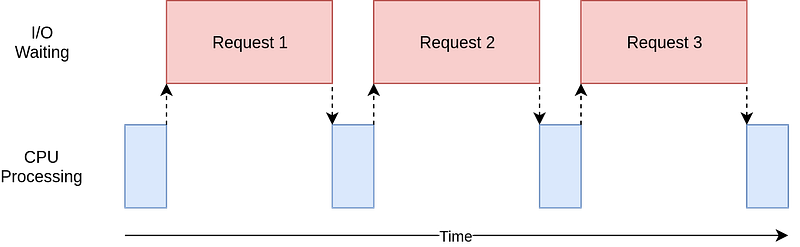
When a task is IO-bound, it means that its progress is mainly determined by how long it takes to read from or write to devices like memory, hard drives, or networks. Imagine you’re waiting for a webpage to load. If your internet connection is slow, the webpage takes longer to load because it’s waiting for data to come in. This is an example of an IO-bound task. When a task is IO-bound, making the input/output operations faster (like improving internet speed, using faster storage devices, or using faster memory) can significantly make the IO task faster.
CPU-Bound
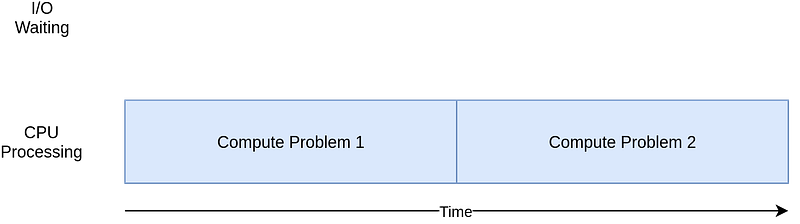
The CPU-bound task spends most of its time waiting for the CPU to finish its work. Adding a faster CPU can have a big improvement in the execution time of the task. An example of CPU-Bond is running a complex calculation that requires a lot of processing power, like rendering a high-definition video, then the speed depends more on the CPU’s capabilities.
The Global Interpreter Lock
Python uses reference counting for memory management. It means that objects in Python have a count variable that counts the number of references that reference the object. Let’s take a code example to understand this concept.
>>> import sys
>>> a = []
>>> sys.getrefcount(a)
2
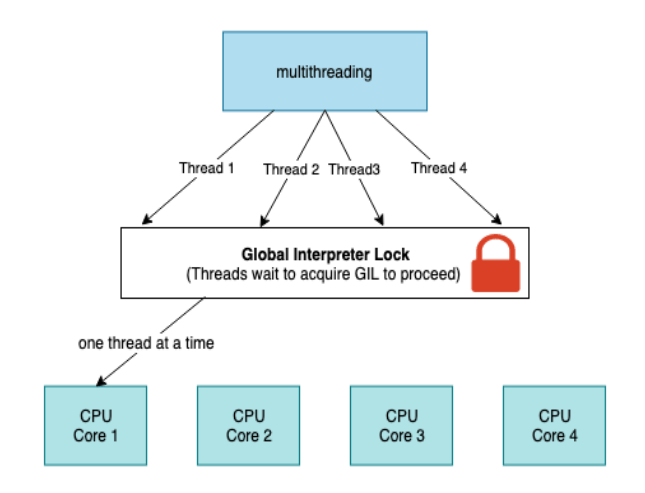
In the above example, the reference count for the empty list object [] was 2. The list object was referenced by a, b and the argument passed to sys.getrefcount(). The issue with this count variable must have protection from race conditions for example a couple of threads increase or decrease their value at the same time. This can trigger leaked memory that is never liberated or even worse cases. This behavior can create crashes in our Python programs. This variable can be preserved using two mechanisms one of them is implementing locks to all the data structures and the other solution is implementing one single lock to control to the beast.
The first solution could cause another obstacle which is deadlocks. Deadlocks are triggered when there is more than one lock implemented, and this creates another collateral that reduces performance. The second solution is to implement The GIL. The Global Interpreter Lock is a single lock placed on the Python interpreter, enforcing a rule that executing any Python bytecode requires acquiring this lock. This mechanism serves to prevent deadlocks, as there is only one lock, and it doesn’t impose significant performance overhead. However, it also means that any Python program primarily reliant on CPU processing becomes effectively single-threaded. Some languages like Java avoid the requirement of a GIL for thread-safe memory management by using approaches such as garbage collection. And for solving the lack of single-threaded performance by implementing other features for example Just in Time(JIT) compilers.
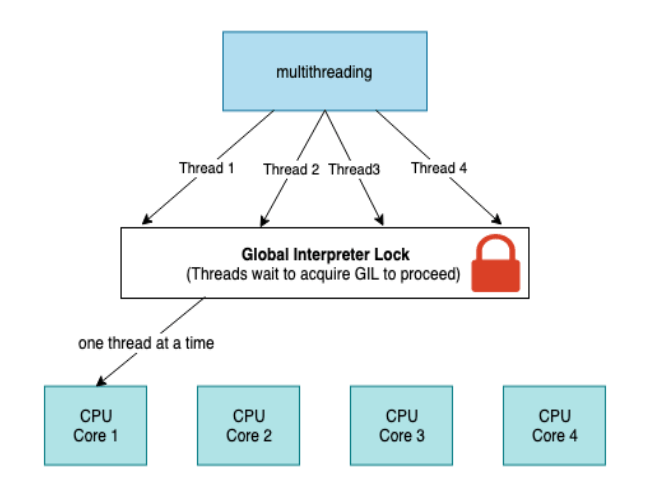
AsyncIO, Multiprocessing and Threading in Python.
Threading
Using threading, we can make better use of the CPU sitting idle when waiting for the I/O. By overlapping the waiting time for requests, we can improve the performance. In addition, because all the threads share the same memory, to do cooperative tasks in Python using threading, we would have to be careful and use locks when necessary. Lock and unlock make sure that only one thread could write to memory at one time, but this will also introduce some overhead. Note that the threads we discussed here are the thread concepts in programming languages.
The native thread is the number of threads in the physical CPU core, instead of the thread concept in the programming languages.
The number of native threads in CPU core is usually 2 nowadays, but the number of threads in a single-process Python program could be much larger than 2.
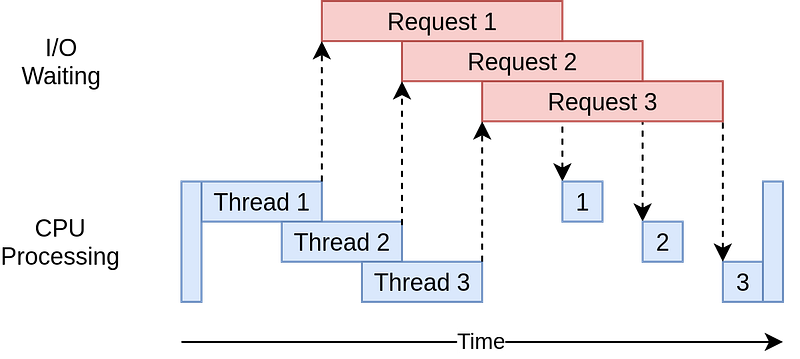
Hence, for an IO-bound task in Python, threading could be a good library to use to maximize performance. It should also be noted that all the threads are in a pool and there is an executor from the operating system managing the threads deciding who to run and when to run. This can be a shortcoming of threading because the operating system knows about each thread and can interrupt it at any time to start running a different thread. This is called pre-emptive multitasking since the operating system can pre-empt your thread to make the switch.
All these threads are managed by a pool within the operating system. And there is an executor that acts like a thread manager, deciding which thread gets to run and when. This control by the operating system can be a drawback because the operating system can interrupt any thread at any moment and switch to running a different one. This is called pre-emptive multitasking. While it allows the system to be more responsive overall, it means there is no guarantee that your thread run in one go until it’s finished.
import threading
import time
import random

def worker(number):
    sleep = random.randrange(1, 10)
    time.sleep(sleep)
    print("I am Worker {}, I slept for {} seconds".format(number, sleep))

for i in range(5):
    t = threading.Thread(target=worker, args=(i,))
    t.start()
print("All Threads are queued, let's see when they finish!")
AsyncIO
Why do we need to use AsyncIO, if we have threading library and multiprocessing library? Let’s find out in the next section.
The idea behind using multiple threads (with libraries like threading) is to improve performance, especially for tasks involving waiting for IO tasks. Therefore multi-threading might not always be necessary. The point is that if you can manage the switching between tasks effectively, a single thread can potentially be enough. This is because, in Python’s threading model, threads often become idle while waiting for the response of the requests they’ve sent. If a single thread has some kind of intelligence can switch to another task when it’s waiting for an IO response. By avoiding this idle time and the overhead of managing multiple tasks, the overall execution of IO-bound tasks could be faster. threading library couldn’t do it, this is why we need AsyncIO.
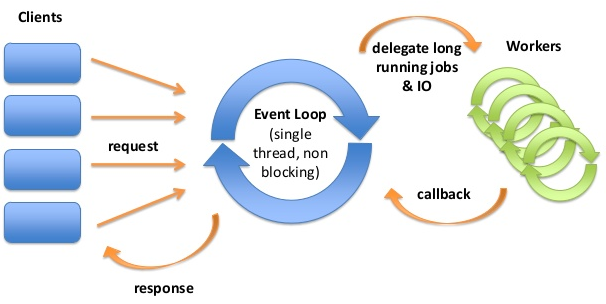
AsyncIO gives you an event loop. The event loop records different IO events switches to ready tasks, and pauses the others waiting for the IO event. Hence we wouldn’t waste time on tasks not ready. You give the functions to the event loop and order it to run those functions for you, these functions run asynchronous IO operations. The event loop returns a Future object. It’s like a promise, that we will get something in the future.AsyncIO uses generators and coroutines to pause and resume tasks.
A Future is a special low-level awaitable object that represents an eventual result of an asynchronous operation
import asyncio
import datetime
import random


async def my_sleep_func():
    await asyncio.sleep(random.randint(0, 5))


async def display_date(num, loop):
    end_time = loop.time() + 50.0
    while True:
        print("Loop: {} Time: {}".format(num, datetime.datetime.now()))
        if (loop.time() + 1.0) >= end_time:
            break
        await my_sleep_func()


loop = asyncio.get_event_loop()

asyncio.ensure_future(display_date(1, loop))
asyncio.ensure_future(display_date(2, loop))

loop.run_forever()
Multiprocessing
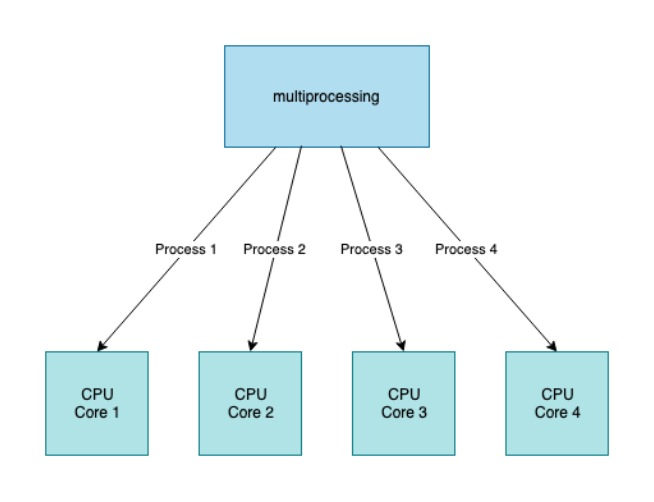
Using the Python multiprocessing library, we can run Python programs across multiple processes. By launching many Python interpreters on numerous native threads, a multi-process Python application may theoretically make full use of all available CPU cores and native threads. because there is no memory shared by any of the processes and they are all independent of one another. If we want to run cooperative tasks in Python using multiprocessing, it requires us to use the API provided by the operating system.

Thus, for a CPU-bound task in Python, multiprocessing would be a perfect library to use to maximize the performance.
import multiprocessing
import time
import random


def worker(number):
    sleep = random.randrange(1, 10)
    time.sleep(sleep)
    print("I am Worker {}, I slept for {} seconds".format(number, sleep))


for i in range(5):
    t = multiprocessing.Process(target=worker, args=(i,))
    t.start()

print("All Processes are queued, let's see when they finish!")
Conclusion
We have now covered the most common types of concurrency. But the question yet exists: which one should I choose and when? Indeed, it is dependent upon the use cases. based on my own experiences and experimentations.
- If it’s fast IO-Bound, single process, or many threads, the operating system decides tasks switching with a limited number of connections and chooses multi-threading.
- If it’s slow IO-Bound, single process, single thread, tasks cooperatively decide to switch with many connections choose Asyncio.
- If it’s CPU-Bound with multiple processes, and high CPU use, choose multi-processing.