
How To Turn Your Voice Into Any Instrument
If you’re impatient and just looking for my code and audio, here you go!
The complexity we see with any text-to-speech (or “audio deepfake”) project comes from nuances in spoken language. Not only do we all have individual voices, we also have unique ways of saying our names, our friend’s names, and basically any word. Microsoft’s claim that they can simulate your voice with only 3 seconds of audio is true, but its accuracy comes from averaging out the way most people say most words, while factoring in some elements of your vocal timbre and pronunciation.
As someone with only a basic understanding of linguistics, projects like Microsoft’s VALL-E fascinate me. Audio processing sounds like fun until you need to actually train and deploy a machine learning model, and any attempt I’ve made thus far to build my own language model has fallen a little short. So I decided to forget about language for now and focus on instrument sounds instead!
I’ve been a pianist for most of my life and have taught myself guitar and percussion along the way. The complexity of an instrument voice is a little easier to understand — making it a lot easier to explain to a computer.
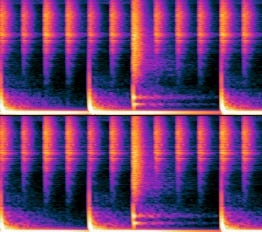
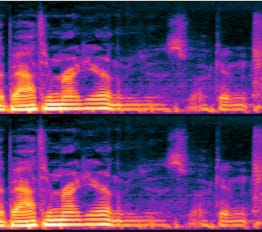
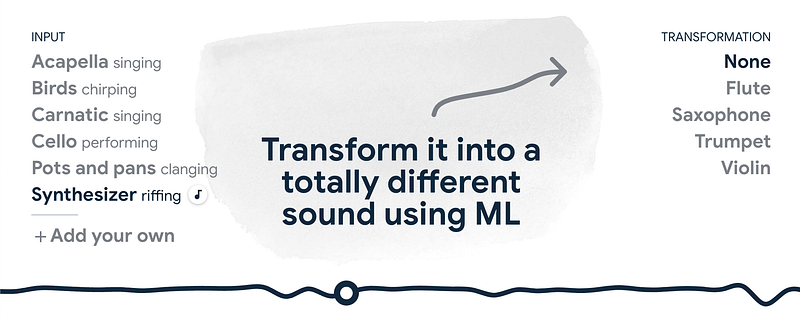
My goal for this project was to replicate Google Magenta’s Tone Transfer to allow for more flexible outputs. That is, instead of being able to turn a voice into 4 instruments, I wanted to turn my voice into any instrument for which I had the WAV files.
Method & Quick Results
I completed this project in Python, starting with the librosa module to analyze the timbre of WAV files. By timbre, I mean the textural qualities that make instrument (or human) voices unique.
Mathematically, I needed to replicate the amplitude for each frequency in a stack of frequency bins, across multiple clarinet samples for better accuracy. So I built a scikit-learn RandomForestRegressor model to read in frequency bins and return the amplitudes to replicate a clarinet voice. Training the model took around one minute per second of audio, and around twice that time when testing in Google Cloud.
Once the model was trained on a couple clarinet samples and deployed on a fresh audio sample of me speaking, I needed to modulate the deepfaked clarinet audio to match my pitch. Again, I used librosa to find the fundamental frequency f0 of my voice and then the pitch_shift method to, of course, shift the pitch to match mine.
Please refer to this Colab notebook to hear me saying a word and then a clarinet “playing” it the same way. You may notice that my voice dips while the clarinet pitch remains consistent — this is intentional! As shown in the spectrograms above, our voices have a lot more flexibility than physical instruments, and modern producers will tell you they prefer to quantize their music so that everything “locks” or “snaps” onto the grid evenly.
Since the folks at Google Magenta seem more anti-quantization, and instead allow for sounds to slide more flexibly, I’m currently taking it a step further to match their efforts. Even though the possibilities for a clarinet are rather discrete (step-by-step), I’d like to explore the possibilities of fun continuous slides.
Stay tuned for Part 2, and thanks for following!


