
How to Troubleshoot an Azure Storage Account with a Private Endpoint and a Container with Terraform
Today, we will discuss a common error when deploying an Azure Azure Storage Account with a Private Endpoint with Terraform.
After we try to add a Storage Account Container, we receive the following error:
Error: containers.Client#GetProperties: Failure responding to request: StatusCode=403 — Original Error: autorest/azure: Service returned an error. Status=403 Code=”AuthorizationFailure” Message=”This request is not authorized to perform this operation.\nRequestId:1b7570b6–101e-005f-296f-f7f2e3000000\nTime:2023–10–05T09:37:49.1892533Z”
1. Our Scenario
- We have a virtual machine running Terraform.
- Resource group “kopicloud-core-dev-we-rg”
- Virtual Network “kopicloud-core-dev-we-vnet”
- Subnet “kopicloud-core-dev-we-subnet”
2. We have an existing “privatelink.blob.core.windows.net” Private DNS Zone.
- Resource group “kopicloud-core-dev-we-dns-rg”
3. We will deploy a new Azure Storage Account with a private endpoint.
- Resource group “kopicloud-storage-dev-we-rg”
- Virtual Network “kopicloud-storage-dev-we-vnet”
- Subnet “kopicloud-storage-dev-we-endpoint-subnet”
2. Terraform Code to Deploy the Azure Storage Account with Private Endpoint
I’m not going to explain the code in this story. Check my story Using Private Endpoint in Azure Storage Account with Terraform for more details.
The “network-variables.tf” file:
variable "network-vnet-cidr" {
  type        = string
  description = "The CIDR of the network VNET"
}

variable "network-endpoint-subnet-cidr" {
  type        = string
  description = "The CIDR for the network subnet"
}
The “network.tf” file:
# Create a resource group for network
resource "azurerm_resource_group" "network-rg" {
  name     = "kopicloud-storage-dev-we-rg"
  location = var.location
}

# Create the network VNET
resource "azurerm_virtual_network" "network-vnet" {
  name                = "kopicloud-storage-dev-we-vnet"
  address_space       = [var.network-vnet-cidr]
  resource_group_name = azurerm_resource_group.network-rg.name
  location            = azurerm_resource_group.network-rg.location
}

# Create a Endpoint Subnet
resource "azurerm_subnet" "endpoint-subnet" {
  name                 = "kopicloud-storage-dev-we-endpoint-subnet"
  address_prefixes     = [var.network-endpoint-subnet-cidr]
  virtual_network_name = azurerm_virtual_network.network-vnet.name
  resource_group_name  = azurerm_resource_group.network-rg.name

  private_endpoint_network_policies_enabled = true

  service_endpoints = ["Microsoft.Storage"]
}
The “storage-account.tf” file:
# Reference to Existing Private DNS Zone
data "azurerm_private_dns_zone" "dns-zone" {
  name                = "privatelink.blob.core.windows.net"
  resource_group_name = "kopicloud-core-dev-we-dns-rg"
}

# Create Private DNS Zone Network Link
resource "azurerm_private_dns_zone_virtual_network_link" "network_link" {
  name                  = "kopicloud-storage-dev-we-vnet-link"
  resource_group_name = data.azurerm_private_dns_zone.dns-zone.resource_group_name
  private_dns_zone_name = data.azurerm_private_dns_zone.dns-zone.name
  virtual_network_id    = azurerm_virtual_network.network-vnet.id
}

# Create Storage Account
resource "azurerm_storage_account" "storage" {
  name                = "kopicloudstoragedevwesta"
  resource_group_name = azurerm_resource_group.network-rg.name
  location            = azurerm_resource_group.network-rg.location

  account_kind             = "StorageV2"
  account_tier             = "Standard"
  account_replication_type = "LRS"
}

# Create Private Endpint
resource "azurerm_private_endpoint" "endpoint" {
  name                = "kopicloudstoragedevwesta-pe"
  resource_group_name = azurerm_resource_group.network-rg.name
  location            = azurerm_resource_group.network-rg.location
  subnet_id           = azurerm_subnet.endpoint-subnet.id

  private_service_connection {
    name                           = "kopicloudstoragedevwesta-psc"
    private_connection_resource_id = azurerm_storage_account.storage.id
    is_manual_connection           = false
    subresource_names              = ["blob"]
  }
}

# Create DNS A Record
resource "azurerm_private_dns_a_record" "dns_a" {
  name                = "kopicloudstoragedevwesta"
  resource_group_name = data.azurerm_private_dns_zone.dns-zone.resource_group_name
  zone_name = data.azurerm_private_dns_zone.dns-zone.name
  ttl                 = 300
  records             = [azurerm_private_endpoint.endpoint.private_service_connection.0.private_ip_address]
}
3. Closing the Public Access
By default, this code will create a storage account with public access.
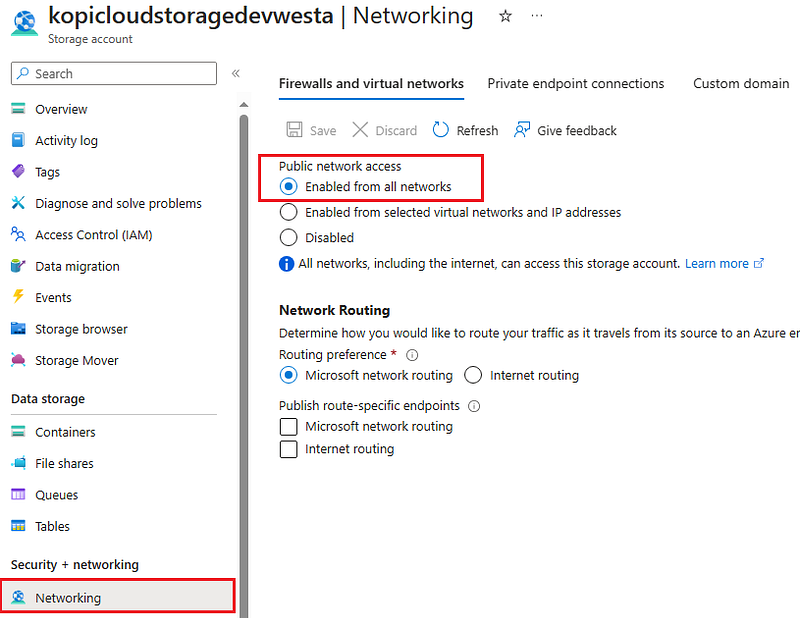
We need to close the public access, or there is no point in implementing the Private Endpoint.
So we will modify the “azurerm_storage_account” resource and add the line public_network_access_enabled = false.
// Create the Storage Account
resource "azurerm_storage_account" "storage" {
  name                = "${lower(replace(var.company," ","-"))}${var.app_name}${var.environment}${var.shortlocation}sta"
  resource_group_name = azurerm_resource_group.network-rg.name
  location            = azurerm_resource_group.network-rg.location

  account_kind             = "StorageV2"
  account_tier             = "Standard"
  account_replication_type = "LRS"

  public_network_access_enabled = false
}
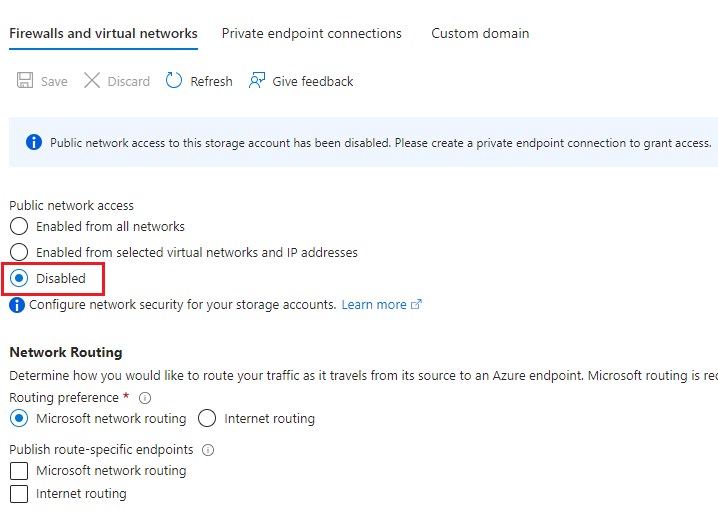
We ran “Terraform Apply” command and verified that the public access was disabled.
4. Creating a Storage Account Container
Now, it is time to create a Storage Account Container with the following code:
// Create Azure Storage Container for External Storage Account
resource "azurerm_storage_container" "external" {
  name                  = "container"
  storage_account_name  = azurerm_storage_account.storage.name
  container_access_type = "private"
}
We ran “Terraform Apply” command, and we got an error:
Error: containers.Client#GetProperties: Failure responding to request: StatusCode=403 — Original Error: autorest/azure: Service returned an error. Status=403 Code=”AuthorizationFailure” Message=”This request is not authorized to perform this operation.\nRequestId:b19da349-c01e-0046–7877-f7a9b1000000\nTime:2023–10–05T10:34:54.9962737Z”
4. Enabling Access from Specific Networks
So, to fix this problem, we will enable the public access from specific networks.
So we will modify the “azurerm_storage_account” resource and add the line public_network_access_enabled = true.
// Create the Storage Account
resource "azurerm_storage_account" "storage" {
  name                = "${lower(replace(var.company," ","-"))}${var.app_name}${var.environment}${var.shortlocation}sta"
  resource_group_name = azurerm_resource_group.network-rg.name
  location            = azurerm_resource_group.network-rg.location
  account_kind             = "StorageV2"
  account_tier             = "Standard"
  account_replication_type = "LRS"

  public_network_access_enabled = true
}
Also, we need to create an “Azure Storage Account Network Rules” resource to allow access from specific networks; in this case, we will allow the Storage Account Subnet.
# Create Azure Storage Account Network Rules
resource "azurerm_storage_account_network_rules" "rules" {
  storage_account_id = azurerm_storage_account.storage.id

  default_action = "Deny"
  virtual_network_subnet_ids = [ azurerm_subnet.endpoint-subnet.id ]
  bypass         = ["Metrics", "Logging", "AzureServices"]
}
We ran the “Terraform Apply” command and got the 403 error again.
5. Updating Azure Storage Account Network Rules
Let's change the rules and allow traffic from the subnet when our VM is running Terraform. We will use data to get the subnet ID.
# Reference to the Core Subnet
data "azurerm_subnet" "core" {
  name                 = "kopicloud-core-dev-we-subnet"
  virtual_network_name = "kopicloud-core-dev-we-vnet"
  resource_group_name  = "kopicloud-core-dev-we-rg"
}

# Create Azure Storage Account Network Rules
resource "azurerm_storage_account_network_rules" "rules" {
  storage_account_id = azurerm_storage_account.storage.id

  default_action = "Deny"
  virtual_network_subnet_ids = [ azurerm_subnet.endpoint-subnet.id, data.azurerm_subnet.core.id ]
  bypass         = ["Metrics", "Logging", "AzureServices"]
}
We ran the “Terraform Apply” command and got the 403 error again.
We looked at the portal and saw that rules were not implemented, as the container failed before.
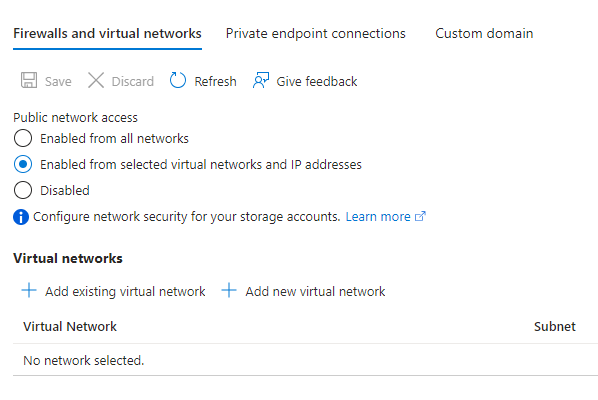
Note: we maybe need to comment the Terraform container code, or configure the virtual network settings or public network access manually if the Terraform gets stuck on the container code and the update code is not executed.
6. Creating a Peering between Core and Storage Virtual Network
After that, we wondered if maybe we need a peering between both Virtual Networks.
So we create the “peering.tf” file and add this code:
locals {
  core_rg_name = "kopicloud-core-dev-we-rg"
  core_vnet_name = "kopicloud-core-dev-we-vnet"
}

// Reference to Core VNET
data "azurerm_virtual_network" "core" {
  name                = local.core_vnet_name
  resource_group_name = local.core_rg_name
}

// Create Peering Core to Storage
resource "azurerm_virtual_network_peering" "core-to-storage" {
  name                      = "Core-to-Storage"
  resource_group_name       = local.core_rg_name
  virtual_network_name      = local.core_vnet_name
  remote_virtual_network_id = azurerm_virtual_network.network-vnet.id
}

// Create Peering Storage to Core
resource "azurerm_virtual_network_peering" "storage-to-core" {
  name                      = "Storage-to-Core"
  resource_group_name       = azurerm_resource_group.network-rg.name
  virtual_network_name      = azurerm_virtual_network.network-vnet.name
  remote_virtual_network_id = data.azurerm_virtual_network.core.id
}
Note: we maybe need to comment the Terraform container code, or configure the virtual network settings or public network access manually if the Terraform gets stuck on the container code and the peering code is not executed.
We ran the “Terraform Apply” command, and finally, our code is running fine!
The final network configuration should look like this:
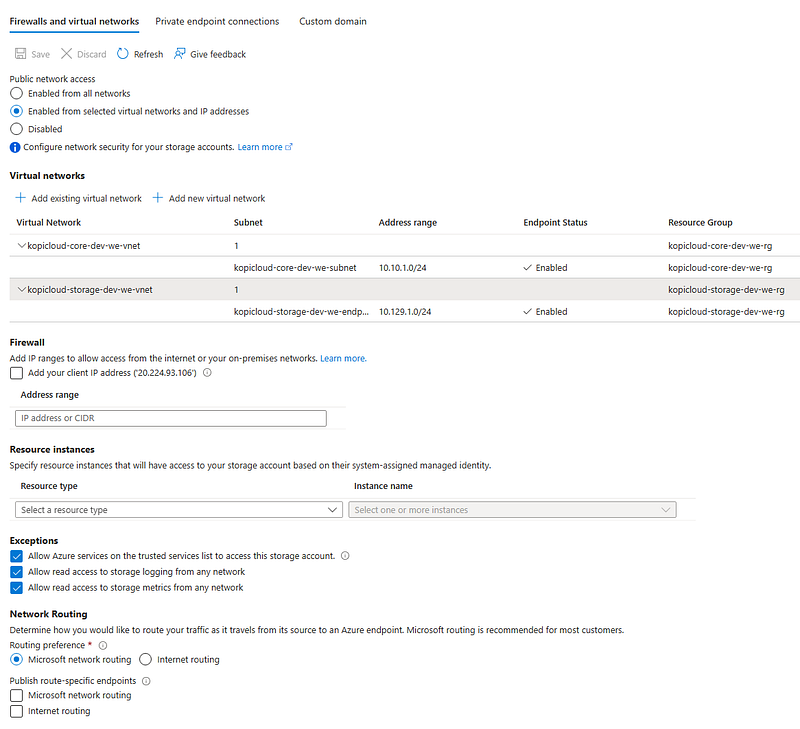
And that’s all, folks. If you liked this story, please show your support by 👏 this story. Thank you for reading!


