
How To Trade Crypto Futures With A Grid Bot — You Can Make +10% Monthly Profit With This Strategy
When I first ventured into crypto trading, it wasn’t long before I discovered there were a ton of things I needed to learn about the market.
I think this is something you can easily relate to if you’re curious about crypto.
And if you have previous trading experience, it won’t be long before you discover that crypto trading is much faster than other markets.
Aside from the fact that it runs 24 hours a day, the amount of money you can gain or lose in a short period of time is shocking compared to slower markets.
But the coolest thing about crypto trading these days is that there are insanely effective automated strategies that you can use to become profitable without investing a lot of time.
One strategy that has gained a lot of traction is grid trading.
As an automated strategy, it is controlled by autonomous programs or bots that are designed with advanced functionalities and features that enable them to analyze and interpret market data and to execute and exit trades.
The strategy itself is so simple to implement such that even a complete noob can deploy and start making profits instantly.
There are two types of grid strategies that you can implement depending on the market you would like to carry out day trading.
These include:
- Spot market grid for spot trading.
- Futures market grid for crypto derivatives trading.
A spot market grid is the simplest to implement of the two strategies. The spot grid bot is programmed to place buy and sell orders depending on market fluctuations.
But if you’re a risk taker who likes to exploit more profit making opportunities, it would be ideal to launch a futures grid bot which allows you to go long or short using leverage.
Beyond that, grid trading is free to use on some crypto exchanges.
Those exchanges include Binance which is my favorite crypto exchange and this is where I’ve been testing the bot to see its effectiveness.
In this article, I have covered the features of grid bots that you may want to know.
I have also discussed ways to get started with grid trading for free on Binance.
What is grid trading?
Grid trading essentially means instructing a bot to enter or exit a trade within a range you set yourself.
Its history can be traced back to the Forex markets where currencies can remain range bound for extended periods.
Grid trades are set up between two price points and spread your investment over a fixed number of buy and sell points called grid steps.
As the price drops, it will automatically make small buys at each grid step.
Then, when the trend reverses and the price starts rising it will sell each of those small buys for a profit, according to the parameters you set up when you initially created the grid startegy.
As each buy or sell point is hit, the grid bot will automatically set up the next appropriate buy or sell point, so you don’t need to interact with it beyond the initial setup until you are ready to cancel it.
Simply put, grid trades are fun to watch as they run though.
Grid trading is very effective during volatile and sideways markets and fortunately this is exactly what crypto has to offer.
A perfect grid trade would involve prices going up and down over and over again in between the two price points you set up, never breaking above or below the top or bottom points you picked.
Unlike day trading, grid trading doesn’t require timing the market correctly or staying up all night scouring trading opportunities.
Instead it is solely based on the current price ratio of two cryptocurrencies and a series of (more or less) evenly spaced buy and sell points that make up your grid.
It is often conducted with a crypto/crypto or crypto/stablecoin pair like ETH/BTC or ADA/USDT.
To set up a grid trade you start by picking a token that is likely to oscillate within a particular corridor for some time as this is what the bot needs in order to put up very good numbers.
The next step is to set the buy and sell price points that will form the grid steps for your bot.
Grid bots can generate massive profits if they work as intended long enough.
One thing that tells you the bots are working perfectly is when they make a lot of trades. More trades equals more profit.
From a personal experiment, grid trading profits quickly outperformed the crypto that was left sitting in my account untouched for the same period of time the bots were running.
And before you get me wrong here, I’m in no way saying that you start risking the crypto that you might be holding in cold storage.
Quite the opposite.
In fact, automated trading solutions of this nature are mostly suitable for HODLers who just want to grow their crypto portfolio with no hassle.
In other words, grid trading offers a nice way to grow your crypto portfolio balance, that’s if you can diversify some of your funds and have a portion in for the bots.
That way, the profits coming out of grid trading can be used to buy more crypto which can then be added to cold storage.
It’s not always possible to stack up crypto out of your own pocket and during such times, the amount of the coins in your cold wallets won’t change. What might change is the dollar value of the assets when prices go up.
A lot of people usually trade manually so as to grow their crypto portfolio balance.
But if you’re the type of lad who doesn’t have enough experience or time to trade themselves, this is the time to start testing your grid bot.
How does grid trading work?
To set up a grid trade you start by picking a trading pair.
Binance’s spot market grid has huge diversity of trading pairs in that it allows you to use either stablecoins like USDT and BNB or actual cryptocurrencies such as ETH, BTC, BNB, TRX as the right hand pairs (i.e. AAVE/USDT or AAVE/BNB).
But in the futures grid, you’ll mostly use USDT stablecoin as the right hand asset in your trading pairs.
The right hand asset simply means the base currency that measures the value of other crypto assets.
An example of such a trading pair is ADA/USDT or BTC/USDT. As you can see in that example, the right hand asset is USDT regardless of the chosen crypto asset.
So, how do you determine the best trading pair for your grid strategy?
In order to get the best results in your grid trading setup, you should go for altcoin trading pairs that have high liquidity and high volatility, i.e. big price swings in both directions.
For simplicity I will use USDT as the right hand currency in all of my examples as the point of this article is to show you how to implement a grid trading strategy in Binance futures.
The next important thing after choosing the trading pair is configuring the grid settings.
Binance futures grid trading bot has a few parameters that you can set up manually.
Alternatively, you can select the auto mode. In the auto mode, parameters are automatically generated based on technical analysis of the selected trading pair.
But you have to keep in mind that the computed values typically only represent what has already happened and not what is likely to happen based on news or upcoming market momentum in either direction.
It’s not a bad idea to get started using automated parameters if you are uncomfortable picking them yourself.
The required parameters are:
Upper price — this is the top price limit of the grid trade. When the current price goes above this number, the bot will exit the trade which is another way of saying you will have all of your assets in the right hand coin of your trading pair. More details on this below.
Lower price — this is the bottom price limit of the grid trade. When the current price drops below this number, the bot will take a new long position.
Grid number — this is the number of buy and sell points that will be in your grid trade.
You should always figure out your top price and bottom price before you set the number of steps because the steps need to be close enough that they will get hit often, but also far enough to ensure you still make profit after paying two exchange trading fees (one for the buy and one for the sell).
On Binance Futures, fees are roughly 0.018% for each transaction, meaning that you’ll pay around 0.036% ‘roundtrip’ for one complete grid step transaction.
What might cause the fees to skyrocket is setting the grid steps close together.
That’s because the bot will create so many transactions and you’d be paying half of your profit to Binance.
That’s obviously not what you want to do.
I typically aim for 1.5% gap on average between steps but you should evaluate the fees you pay and set this according to your personal preference. I will give an example of how I might set this up below.
Total investment — This is the amount of funds you want to use for the grid trade and it is measured in USDT.
Total investment = Initial margin * leverage.
Now that we understand the parameters, the next step is to choose the trade direction.
The direction can either be neutral, long or short.
Neutral: This grid strategy is ideal for creating sell and buy orders during range-bound markets.
Long: This lets you open long positions with the grid and its ideal for trending and volatile bull markets.
Short: Ideal for trending and volatile bear markets and lets you open short positions with the grid.
After picking the trade direction, the next step is to run the bot.
Assuming that you have instructed the bot to take long positions, this is what will happen:
When the price drops and hits the buy order, the bot will place a sell order at the upper price limit of the grid trade.
When the price rises and hits the sell order, the bot will place a buy order at the lower price limit of the grid trade.
If you change your mind about the chosen strategy, closing the bot is easy.
If you have enabled [Cancel all orders on stop] , all open orders will be canceled when you end the strategy.
If not, all open orders will be kept in your Futures account.
If you have enabled [Close all positions on stop], after you end the strategy, all positions will be closed at market price. If not, all positions will be kept in your Futures account.
Benefits of trading futures with grid bots
- Grid bots can trade and monitor the market 24/7. Crypto markets never sleep but we humans have to. That means you can leave the bot overnight still scouring those opportunities without worrying about missing a potential entry or exit point.
- Another benefit of setting up grid bots ahead of time is that it takes the emotions out of trading. Various studies show that your human emotions often trade against you. Emotions impact on your decision making ability and lead to sub-optimal trades. For example, buying near the top because you have immense fomo or panic selling because you’re worried about losing funds.If you outsource that decision to an unemotional computer program that’s operating purely based on code, logical decisions will be made at the most optimal times.
- Additionally, you won’t need some mega trading setup either. That’s because a grid bot can execute multiple trades at once using only the rule criteria you have set.
Benefits of grid trading on Binance Futures
Right now Binance is the most suitable exchange for the most accurate testing of trading bots for several reasons.
- It allows you to create several sub accounts.
- It has more than 500 trading pairs.
- High volume.
- Grid bots have been integrated in the futures market.
- You can access leverage.
- You can deploy a grid strategy for free.
- Grid trading has an auto mode to reduce the learning curve.
Beyond that, Binance allows users to customize and set grid parameters, to determine the upper and lower limits of the grid and the number of grids.
On the grid trading panel, you could set parameters of the strategy, including:
- The upper and lower boundaries of the price range.
- The number of orders to be placed within the configured price range.
- The width between each buy- and sell-limit order.
Once the grid is created, the system will automatically buy or sell the orders at preset prices.
Why crypto beginners need to try grid trading
If you have time, passion and discipline, then probably trading without any bots is the right choice.
But this is not always the case for most people for various reasons.
For example, as someone who has a full-time job, you might not have the luxury of time to learn to be a skilled trader, which then means you’ve to start analyzing charts round the clock and executing trades manually.
And in the fast-paced crypto market, not knowing how to trade means that you miss out on many opportunities to increase the size of your crypto wallet.
The way I see it, grid trading is a new avenue for anyone who’d like to go into crypto trading, but lacks time to learn all of the finer details about the market.
If this description fits you, there’s every reason why you should jump the gun and try the tool that is being offered right in front of you.
With grid trading, you can easily maximize your efficiency in the crypto market and start adding more coins in your wallets.
As earlier mentioned, grid bots are designed to place orders in the market at preset intervals within a configured price range.
Another advantage of grid trading is that you don’t even have to waste time configuring the parameters manually.
You can simply select the recommended settings and the bot will launch using the automatically configured parameters.
How to use auto parameters in grid trading
Binance provides auto grid trading parameters to help improve user experience and reduce the learning curve.
The available auto parameters include lower price limit, upper price limit, and grid count or steps.
With these auto parameters, you can create a grid trading strategy with just one click.
But you may not see any of these features on your Binance dashboard if you have never traded futures before.
If that’s the case, you’ll need to open a free futures account on Binance.
And if you’re new to Binance, you can register a free account by going to this page.
Also remember to verify your account. Learn more about Binance account verification here.
After you’ve completed those tasks, go to the navigation menu and click Derivatives — USDⓈ-M Futures.

That will open the new Binance futures trading interface and you’ll see a trading terminal as shown in the image below.
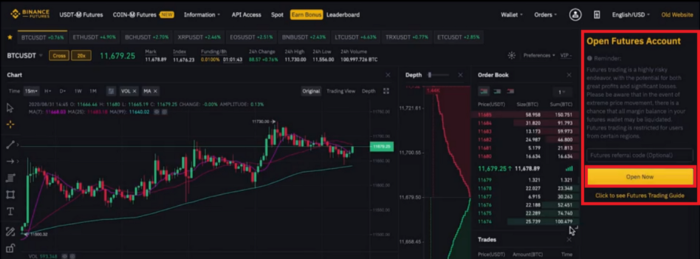
On the right sidebar, click the Open Now button to activate your futures trading account.
With that out of the way, we’re one step away from launching the futures grid bot.
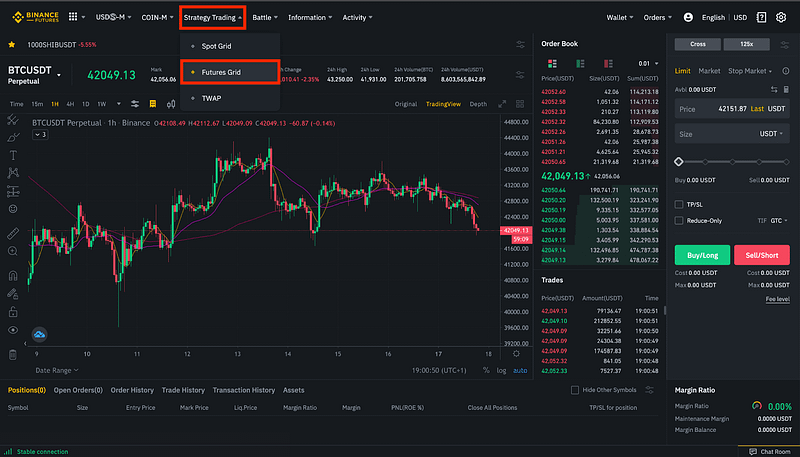
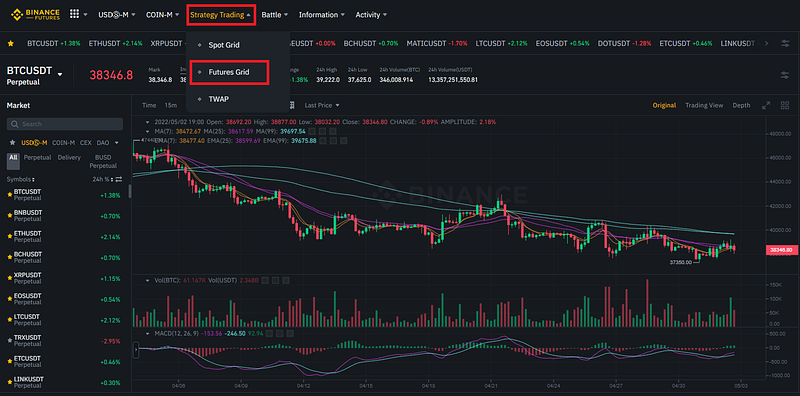
To start, click [Strategy Trading] located at the top-left corner of the Binance Futures trading interface and then choose [Futures Grid].
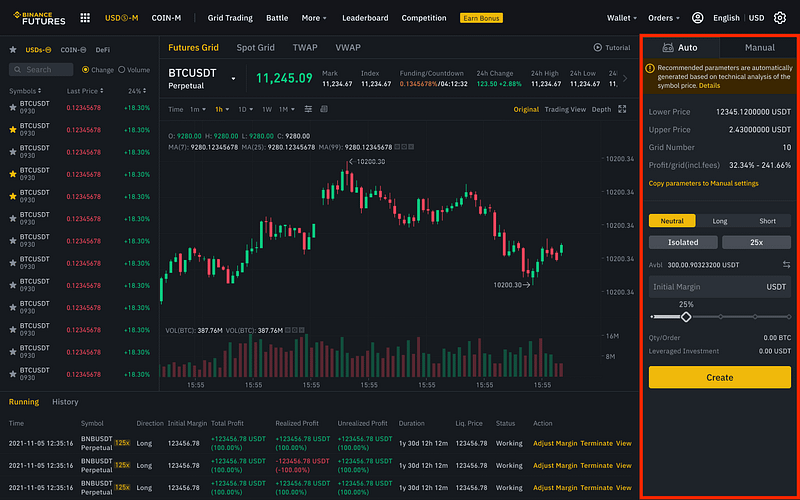
Then head over to the right sidebar of the Futures Grid trading interface as show above. On the [Auto] tab, verify the recommended parameters and set up your [Initial Margin].
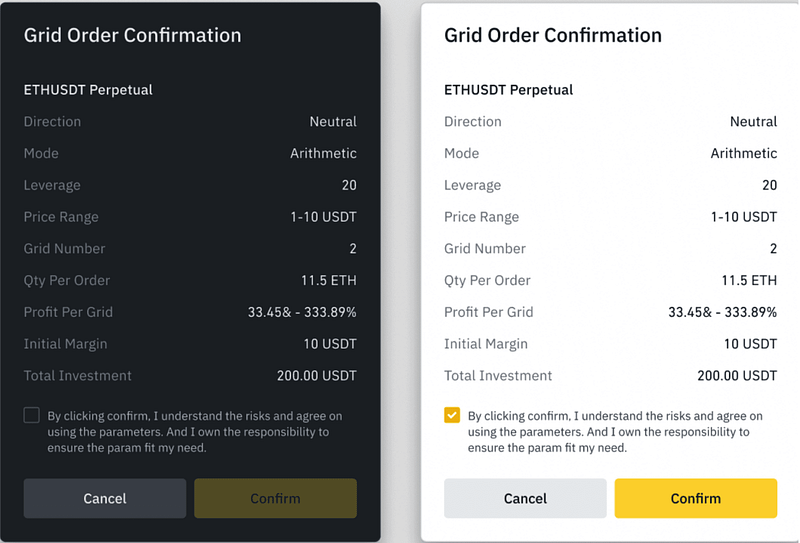
Once you have allocated funds to the grid bot, click [Create], and confirm your grid order so the system automatically places buy or sell orders at the preset prices.
It is worth noting that the recommended parameters are set in a Neutral direction and in Arithmetic Mode by default.
Also be aware that the auto parameters function will not work when there is not enough trading history on a given asset. In such circumstances, it’s best to pick a different asset.
Why experienced crypto traders need to use grid trading
Crypto trading can be difficult during neutral markets. And that’s not news.
What’s unsettling is when prices move sideways for far too long as has been the case in the past few months.
Since January, the crypto market has stayed flat and it may be a month or two before we see the next uptrend.
But if you still want to speculate without taking a lot of risk, it would be a nice idea to try grid trading.
Automating your trading strategy has several advantages.
First, grid trading can help overcome emotions if you’re the type of person who experiences panic attacks at seeing red candles.
Another thing to like about grid trading is that it’s not as involving as manual trading, especially in choppy markets.
So, when should you deploy a grid bot?
As a day trader, the best time to use a grid bot is when you find a coin that is bouncing up and down hard between two points but never dropping outside of that range.
This can be in a totally neutral market or it can just be a trading pair that has a lot of micro volatility but not a lot of macro volatility.
Here is a good example of a coin that was a good grid candidate at one point.
The coin in the example is BTS/USDT.
As you can see, this particular token bounced around between $0.02042 and $0.02252 for quite a while (this is a one hour chart if that’s not clear.)
The start and end points are almost identical. If you had run a neutral grid trade in arithmetic mode with a range of $0.02042 to $0.02252 you would have made about 6% net profit from your investment.
Earnings on this type of trade are called grid yield or signal trading profits.
They are paid in the righthand currency of your trading pair.
How to set up a custom grid trading strategy from scratch
As I have previously mentioned, the best platform to launch your grid trading strategy is Binance.
So, if you’re new to Binance, start by creating a free account on this page.
If you already have a Binance account, go to USDⓈ-M Futures on the trading interface and then click [Grid Trading].
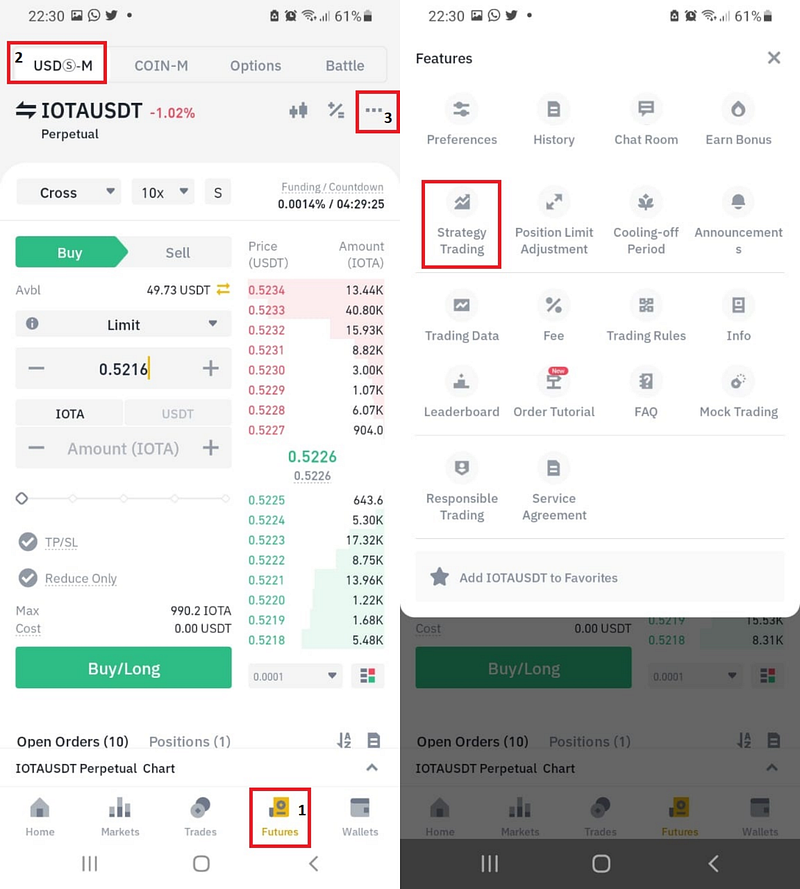
If you’re using the Binance App, start by tapping [Futures] then [USDⓈ-M] and finally the three dots as shown in 3 below. On the pop-up menu, tap [Strategy Trading].
On the futures grid interface, select a trading pair and then set the grid parameters. Don’t forget to select your desired leverage amount.
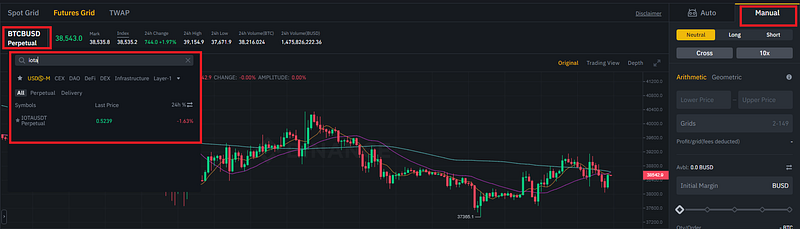
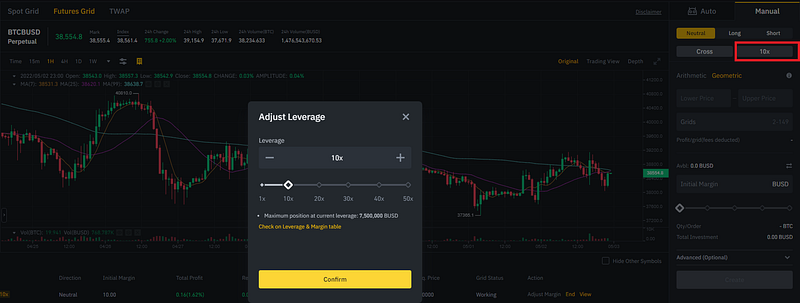
Aside from adjusting leverage, Binance has more unique options like the ability to choose either an arithmetic or geometric grid setup.
- Arithmetic — each grid has equal price difference.
- Geometric — each grid has equal price ratio difference.
I like geometric because you get normalized returns across the entire trade.
Beyond that, there’s an option to choose the trade direction. The direction can be either neutral, long or short.
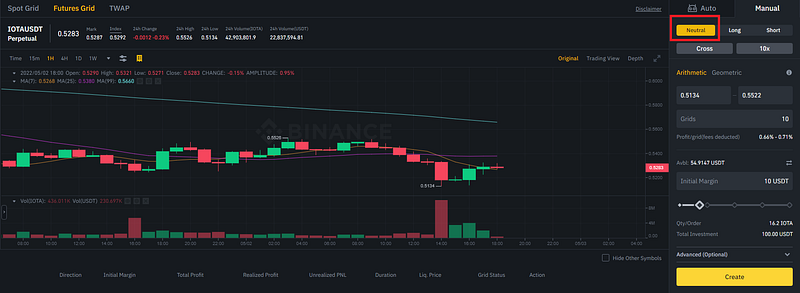
As you can see, the neutral mode is preselected by default and this is simply because grid trades work best in neutral markets with lots of micro volatility but no real major price swings.
Here’s a visual representation of the grid itself.
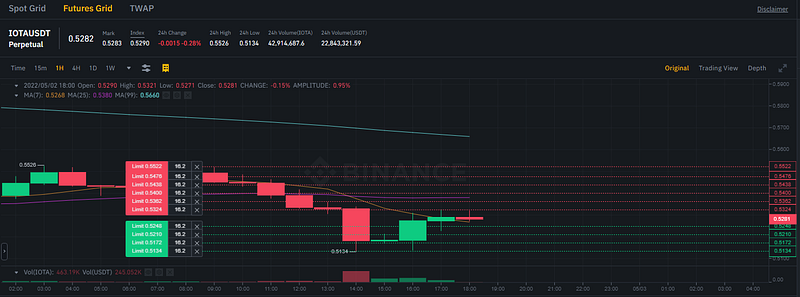
It shows you each of the buy and sell points. As each buy point is reached by the price dropping, a new sell order will automatically be placed at the next grid step above it.
Similarly, as the price rises and each sell point is reached a new buy order will be placed at the next grid step below it.
At the time I took this image IOTAUSDT was at $0.5281.
Each of the green and red lines represents a buy and sell point, respectively.
For example if the price dropped all the way to $0.5117, the grid bot would purchase at $0.5210, $0.5172, $0.5134 and then finally at $0.5117.
You would then see all of the grid steps represented as sell points.
It would sell the $0.5210 buy order at $0.5248, the $0.5172 buy at $0.5210 and so on.
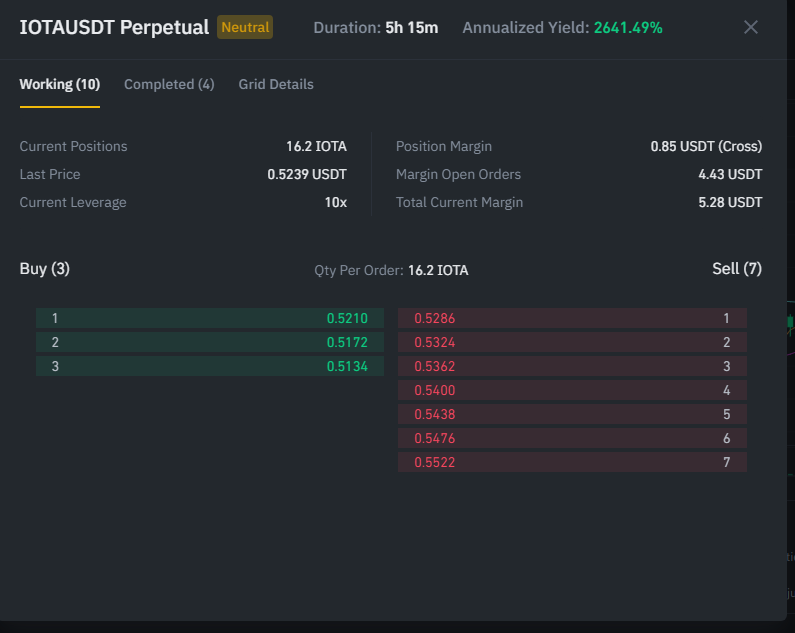
In the next example, I’ll use a trading pair with round figures to try to bring more clarity to this trading concept.
Let’s assume you decide to put $1000 into an EOS/USD grid trade. You look at the chart and see that it’s been bouncing around quite a bit within $1 and $3 range.
After confirming your technical analysis, you set your lower grid price to $1 and your upper grid price to $3
You set 11 grid steps and you put your $1000 initial margin to start the grid bot right when the price is $2.
As I mentioned earlier, a grid trade is basically a ratio of the two coins in your seleted pair.
In this case, you are entering at the midpoint between $1 and $3, which means at the moment you start the grid trade, the bot will buy $500 worth of EOS at $2 per EOS and keep the other $500 as USD.
At this point your ratio is 50/50 of EOS/USD.
To see this in action, go ahead and select your preferred trading pair. Since we’re doing this in manual mode, there are just a few parameters to set up.
The important ones are:
- Trade Direction (Neutral)
- Leverage
- Lower price.
- Upper price.
- Number of grids.
- Initial margin.
You can set these parameters on the right side of of the trading interface.
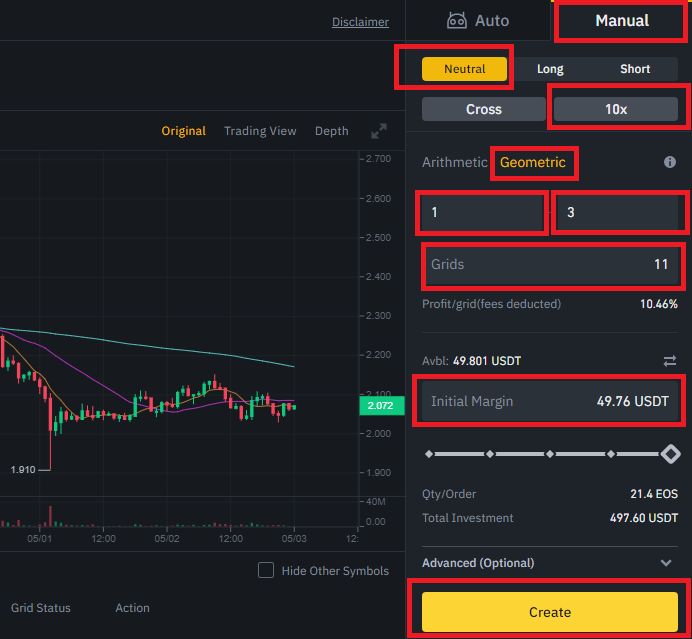
Thereafter, click [Create] to confirm and execute the strategy.
Conclusion
Just like anything else in crypto, grid trading can be a wild ride. You can have crazy successes with grids and sometimes failures.
The cool thing, though, is that it offers a new avenue for anyone who would like to go into day trading.
And as I have mentioned, the transaction costs of running these Bots on Binance are very low.
What might actually worry some people is the tax implication for creating a lot of trades. But that depends on where you live.
That said, grid trading is a solid alternative trading method and it could turn out to be the perfect fit for your personality.
You just have to try it.
I hope you enjoyed reading this. Please follow me to get more articles like this in your inbox. Also, If you’d like to support me as a writer, consider signing up to become a Medium member. It’s just $5 a month and you get unlimited access to Medium.
Disclaimer: This article is meant for educational purposes only and should not be construed as investment advice.
Disclosure: I only recommend products I use myself and all opinions expressed here are my own. This post contains affiliate links. If you use these links to buy crypto assets, you will get a discount and we may earn a commission.
Resources
- https://www.binance.com/en-NG/support/faq/f4c453bab89648beb722aa26634120c3
- https://www.binance.com/en/blog/futures/benefits-of-grid-trading-on-binance-futures-421499824684903550
Contents distributed by Learn.Block6.tech
👉 Telegram — Fresh ideas
👉 Twitter — Latest articles
👉 LinkTr.ee