
How to Test Python Code
A quick introduction to one of the most important skills for a programmer

“Code without tests is broken by design.” Jacob Kaplan-Moss
Testing software is a huge topic. In fact, there is a whole academic profession (test engineering) dedicated to it. But fortunately, the basics are very simple. So, minimize your risk and write some tests.
Choose a test framework
In the Python world, there are three great testing frameworks, which are widely used: unittest, nose, and pytest. To get started, I recommend using unittest. It is part of the Python standard library, so no additional installs are necessary. pytest requires less code, but it does a lot of implicit (or should I say “magic”) stuff. unittest, on the other hand, is more explicit, so you clearly see what’s going on.
Writing tests
Suppose you have a function count_leap_years(start, end) that counts the number of leap years in the range of years from start to (excluding) end. This function shall reside in a module leap.py. Let's write tests to make sure that it is working properly.
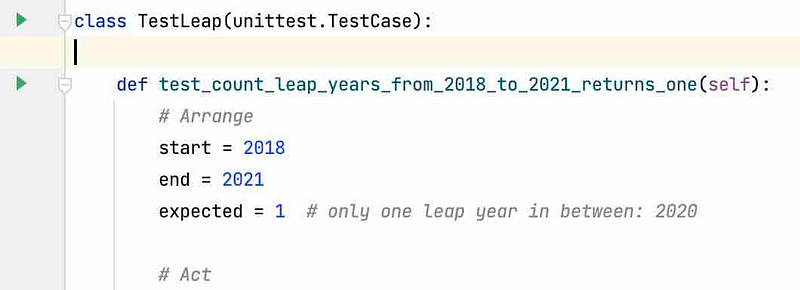
Create a file test_leap.py and write your first test:
In the unittest framework, you always create test cases by inheriting from the class unittest.TestCase. Each function in the class that starts with test_* is considered as a test and will be found by the test runner automatically.
Usually, tests have three parts: — an Arrange part, which sets up everything that you need for the test — an Act part, which executes the code you want to test — and an Assert part, which checks if the result of the code is what you expect.
Oh, and please give your tests descriptive names! If you have a test suite of hundreds of tests, and some tests fail, a descriptive name gives you a good idea, of what may have gone wrong.
In this particular example, we make sure that the actually computed number of leap years is equal to the expected number of leap years. unittest has many more assertion functions, like assertTrue, assertAlmostEqual (which is good for comparing floating-point numbers), assertIn, assertRaises, etc.
Testing for Exceptions
Often, you want to make sure that under certain conditions, your code raises an exception. This is usually for testing the error handling of your code. You can do that by using a with block in your code. If the code inside raises the specified exception (ValueError in this case), then the test passes, otherwise, it fails.
Running Tests
When you have tests, you want to make sure to run all the tests often.
IDEs like PyCharm allow for easy execution of tests, just click the Play button in the editor window:
But you can also run the tests from the terminal:
$ python -m unittest test_leap.py
..
----------------------------------------------------------------------
Ran 2 tests in 0.000s

OK
If tests fail, you get a description of what failed, so you can track down the problem.
If you have many tests distributed over many files in a folder, say, tests, you can let the test runner find and run all the tests automatically:
$ python -m unittest discover tests
..
----------------------------------------------------------------------
Ran 2 tests in 0.000s

OK
Finding out the test coverage
Tests are your most important safety net in software development. So it is important to find out, which parts of your code are covered by tests, and which ones are not. In Python, there is a practical tool to find out about that: coverage. Install coverage using pip:
$ pip install coverageRun your tests with coverage:
$ coverage run -m unittest discoverShow the coverage report:
$ coverage report -mName Stmts Miss Cover Missing
--------------------------------------------
leap.py 15 2 87% 5, 8
--------------------------------------------
TOTAL 31 3 90%Don’t forget the -m option, as it shows you the missing lines, i.e. lines of code that are not covered by tests.
Beware: the test coverage is only a hint at what still needs to be tested. But you can easily get 100% test coverage with absolutely meaningless tests! The coverage tool can only check if your tests run through certain parts of your code, but not if the test is meaningful.
Conclusion
This article gave a quick introduction to testing Python code, one of the most important skills for a Python developer. Thanks for reading! If you have questions or comments, feel free to leave a message.
More content at PlainEnglish.io. Sign up for our free weekly newsletter. Follow us on Twitter and LinkedIn. Check out our Community Discord and join our Talent Collective.